הקדמה
Thank you for choosing the KLIM K7 Cassette Tape Player and MP3 Converter. This device allows you to enjoy your classic cassette tapes and convert them into digital MP3 files for modern playback. It features a built-in microphone for recording, an integrated speaker, and a rechargeable battery for portability. This manual provides detailed instructions for setup, operation, and maintenance of your KLIM K7.
פּראָדוקט איבערview
שליסל פֿעיִקייטן
- Cassette to MP3 Converter: Effortlessly convert cassette tapes to digital MP3 files directly onto an SD card.
- פּאָרטאַטיוו פּלאַן: Lightweight and compact for on-the-go listening.
- געבויט-אין מיקראָפאָן: Record audio directly to the SD card.
- געבויט-אין רעדנער: Share your audio without external devices.
- קריקאָנלאָדלעך באַטערי: Integrated 1000mAh battery provides extended playback.
- SD Card Player: שפּיל mp3 fileס סטאָרד אויף די סד קאָרט.
- 3.5 מם ירפאָון דזשאַק: For private listening with included earphones.
מיטל קאַמפּאָונאַנץ און קאָנטראָלס
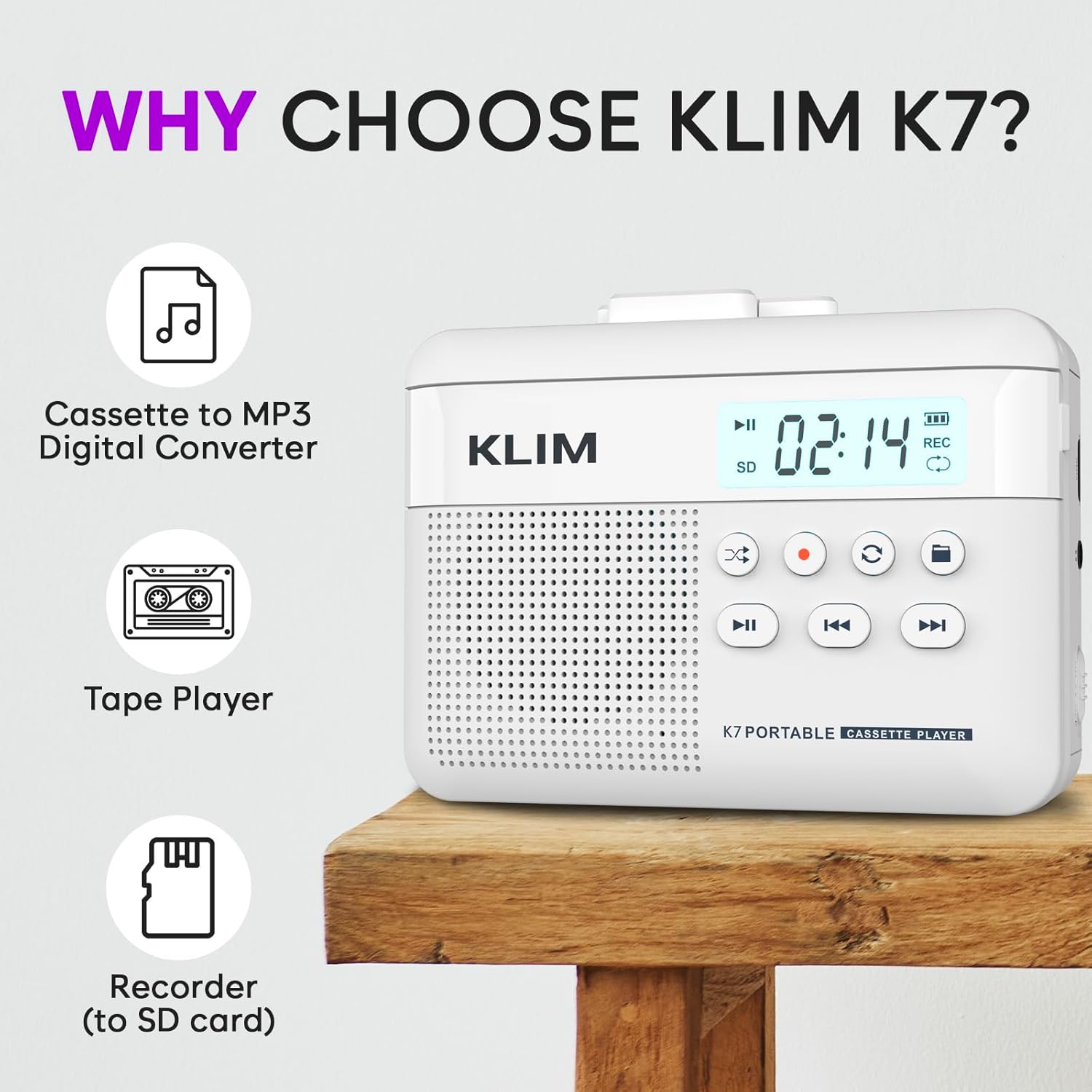
פיגורע 1: פראָנט view of the KLIM K7 Cassette Player, showing the speaker grille, LCD display, and control buttons (Play/Pause, Rewind, Fast Forward, Stop, Record, Mode, Folder, Loop).
- LCD ווייַז: Shows track number, recording status, and battery level.
- רעדנער: ינטעגראַטעד רעדנער פֿאַר אַודיאָ פּלייבאַק.
- שפּילן/פּויזע קנעפּל (►▮): סטאַרץ אָדער פּאָזאַז פּלייבאַק.
- Rewind Button (◀◀): Rewinds the cassette tape or navigates backward through MP3 tracks.
- Fast Forward Button (►►): Fast forwards the cassette tape or navigates forward through MP3 tracks.
- שטאָפּ קנעפּל (■): סטאַפּס פּלייבאַק אָדער רעקאָרדינג.
- Record Button (●): Initiates or stops recording.
- Mode Button (↻): Switches between cassette playback and SD card MP3 playback.
- Folder Button (🖿): Navigates through folders on the SD card.
- Loop Button (⟳): איבערחזרט דעם איצטיקן טרעק אדער אלע טרעקס.

פיגורע 2: זייַט view of the KLIM K7 Cassette Player, highlighting the SD card slot, 3.5mm headphone jack, and On/Off switch.
- SD Card Slot: Insert your Micro SD card here for recording and MP3 playback.
- 3.5 מם כעדפאָון דזשאַק: Connect the included earphones or other standard headphones.
- אָנ / אַוועק באַשטימען: מאַכט אָן אָדער אויס דעם אַפּאַראַט.
- באַנד קאָנטראָל: אַדזשאַסץ די אַודיאָ רעזולטאַט מדרגה.

פיגורע 3: Top view of the KLIM K7 Cassette Player with the cassette compartment open, showing the tape mechanism.
- קאַסעטע אָפּטייל: Insert your cassette tapes here.
- Cassette Door Release: עפֿנט דעם קאַסעטע אָפּטייל.
סעטאַפּ
1. טשאַרדזשינג די באַטערי
Before first use, fully charge the KLIM K7. The device comes with a 1000mAh rechargeable battery.
- Locate the Type-C USB charging port on the side of the device.
- Connect the included Type-C USB cable to the charging port and the other end to a USB power adapter (not included) or a computer's USB port.
- The charging indicator on the LCD display will show charging status. A full charge typically takes approximately 2 hours.

פיגורע 4: The KLIM K7 connected to a Type-C USB cable for charging.
2. אריינשטעלן אן SD קארטל
An SD card (16GB included) is required for converting tapes to MP3 and for recording with the built-in microphone.
- געפינט דעם SD קאַרטל שפּאַלט אויף דער זייט פון דעם מיטל (זעט בילד 2).
- Gently insert the Micro SD card into the slot with the gold contacts facing down until it clicks into place.
- To remove, push the SD card inward until it clicks, then release, and it will eject.

פיגורע 5: Inserting the Micro SD card into the KLIM K7.
3. אריינלייגן א קאסעטע טייפ
- Press the Cassette Door Release button to open the cassette compartment.
- Insert your cassette tape with the open side facing upwards and the tape reels aligned with the player's mechanism.
- מאַכט פעסט צו די קאַסעטע אָפּטייל טיר ביז עס קליקט.
אַפּערייטינג ינסטראַקשאַנז
1. Playing Cassette Tapes
- Ensure the device is powered on using the On/Off switch.
- Insert a cassette tape as described in the Setup section.
- דרוק די Play/Pause (►▮) קנעפּל צו אָנהייבן פּלייבאַק.
- סטרויערן די באַנד מיט די באַנד קאָנטראָל.
- ניצן די Rewind (◀◀) און שנעל פאָרויס (►►) קנעפּלעך צו נאַוויגירן די טייפּ.
- דרוק די שטאָפּ (■) קנעפּל צו ענדיקן ווידערשפּיל.
2. Converting Cassette Tapes to MP3
The KLIM K7 allows direct conversion of cassette audio to MP3 files on the inserted SD card, without needing a computer or additional software.
- Ensure an SD card is inserted and the device is powered on.
- אַרײַנשטעלן די קאַסעטע טייפּ וואָס איר ווילט קאָנווערטירן.
- דרוק די Play/Pause (►▮) button to start playing the tape.
- לאנג דריקן די רעקאָרד (●) button. The 'REC' indicator on the LCD display will illuminate, indicating that recording has started.
- צו האַלטן רעקאָרדינג, דריקן די רעקאָרד (●) button again. The 'REC' indicator will turn off. The recorded audio will be saved as an MP3 file אויף די סד קאָרט.
- You can then remove the SD card and use the included SD card reader to transfer the MP3 files to a computer or other device.

פיגורע 6: Visual guide for converting cassette audio to MP3 files.
3. Using the Built-in Microphone for Recording
The KLIM K7 can also record audio directly from its built-in microphone to the SD card.
- Ensure an SD card is inserted and the device is powered on.
- דרוק די Mode (↻) button until the device is in SD card mode (no cassette playing).
- לאנג דריקן די רעקאָרד (●) button. The 'REC' indicator will light up, and the device will start recording audio from its microphone.
- צו האַלטן רעקאָרדינג, דריקן די רעקאָרד (●) button again. The 'REC' indicator will turn off, and the recording will be saved as an MP3 file.

פיגורע 7: Using the KLIM K7's built-in microphone for recording.
4. Playing MP3 Files from SD Card
- Ensure an SD card with MP3 files is inserted and the device is powered on.
- דרוק די Mode (↻) button to switch to SD card playback mode. The LCD display will show track information.
- דרוק די Play/Pause (►▮) קנעפּל צו אָנהייבן פּלייבאַק.
- ניצן די Rewind (◀◀) און שנעל פאָרויס (►►) קנעפּלעך צו האָפּקען טראַקס.
- די Folder (🖿) button allows navigation through different folders on the SD card.
- די Loop (⟳) button can be used to repeat the current track or all tracks.
- סטרויערן די באַנד מיט די באַנד קאָנטראָל.
- דרוק די שטאָפּ (■) קנעפּל צו ענדיקן ווידערשפּיל.

פיגורע 8: Enjoying audio with the KLIM K7 and included earphones.
וישאַלט
Proper maintenance ensures the longevity and optimal performance of your KLIM K7.
- רייניקונג: ניצט אַ ווייכע, טרוקענע שטאָף צו רייניקן די אויסערלעכע זייט פון דעם אַפּאַראַט. ניצט נישט קיין פליסיקע רייניגער אָדער סאָלווענטן.
- קאַסעטע אָפּטייל: רייניקן די טייפּ קעפּ און די ראָולערס פון צייט צו צייט מיט אַ וואַטע שטעכל.ampened with isopropyl alcohol to prevent audio quality degradation. Ensure the device is off and dry before use.
- סטאָרידזש: האַלט דעם אַפּאַראַט אין אַ קיל, טרוקן אָרט אַוועק פון דירעקט זונשייַן און עקסטרעמע טעמפּעראַטורן.
- באַטערי זאָרגן: פֿאַר לאַנג-טערמין סטאָרידזש, לאָדט די באַטאַרייע צו אַרום 50% יעדע עטלעכע חדשים צו האַלטן די באַטאַרייע געזונט.
טראָובלעשאָאָטינג
If you encounter any issues with your KLIM K7, please refer to the following common solutions:
| פּראָבלעם | מעגלעך סיבה | לייזונג |
|---|---|---|
| די מיטל טוט נישט מאַכט אויף. | באַטערי איז דיפּליטיד. | Charge the device using the provided Type-C USB cable. |
| No sound during cassette playback. | די קול איז צו נידעריג אדער די כעדפאָונז זענען נישט ריכטיק פארבונדן. | Increase the volume. Ensure headphones are fully plugged into the 3.5mm jack. |
| Recording to MP3 fails or produces no file. | SD card is full, not inserted correctly, or corrupted. | Check SD card insertion. Ensure sufficient space on the SD card. Try reformatting the SD card (this will erase all data). |
| Poor audio quality from cassette. | Dirty tape heads or worn-out cassette tape. | Clean the tape heads and pinch rollers. Try a different cassette tape to determine if the issue is with the tape itself. |
| די דעווייס פרירט זיך אדער ווערט נישט-רעאגירנדיק. | צייטווייליגע ווייכווארג פראבלעם. | Turn the device off and then on again. If the issue persists, allow the battery to fully discharge and then recharge. |
ספּעסאַפאַקיישאַנז
- פּראָדוקט דימענשאַנז: 4.76 X 3.61 X 1.56 אינטשעס
- נומער וואָג: 9.9 אונסעס
- באַטערי: 1 ליטהיום יאָן באַטאַרייע (אַרייַנגערעכנט), 1000mAh
- טשאַרדזשינג צייט: בעערעך 2 שעה
- סטאָרידזש: שטיצט מיקראָ SD קאַרטל (16GB אַרייַנגערעכנט)
- אַודיאָ רעזולטאַט: Built-in speaker, 3.5mm headphone jack
- רעקאָרדינג פֿאָרמאַט: mp3

פיגורע 9: Dimensions of the KLIM K7 Cassette Player.
וואָראַנטי און שטיצן
KLIM is committed to producing quality electronics. The KLIM K7 Cassette Tape Player comes with a 5-year assurance. If you encounter any problems with your device, please contact KLIM customer support for assistance.
נאָך שוץ פּלענער קען מען קויפן:
- 2-יאָר שוץ פּלאַן: $3.99 (one-time)
- 3-יאָר שוץ פּלאַן: $5.99 (one-time)
- NEW Complete Protect: $16.99 (monthly)
פֿאַר ווייטערדיקע שטיצע, באַזוכט די KLIM Store on Amazon.


