1. הקדמה
Thank you for choosing the RUJIXU Large Digital Kitchen Scale. This precision instrument is designed for accurate weighing in various settings, from home kitchens to commercial environments. With a maximum capacity of 30kg (66lb) and multiple functions including tare, unit conversion, price computing, and counting, this scale offers versatility and reliability. Please read this manual thoroughly before use to ensure proper operation and longevity of your device.
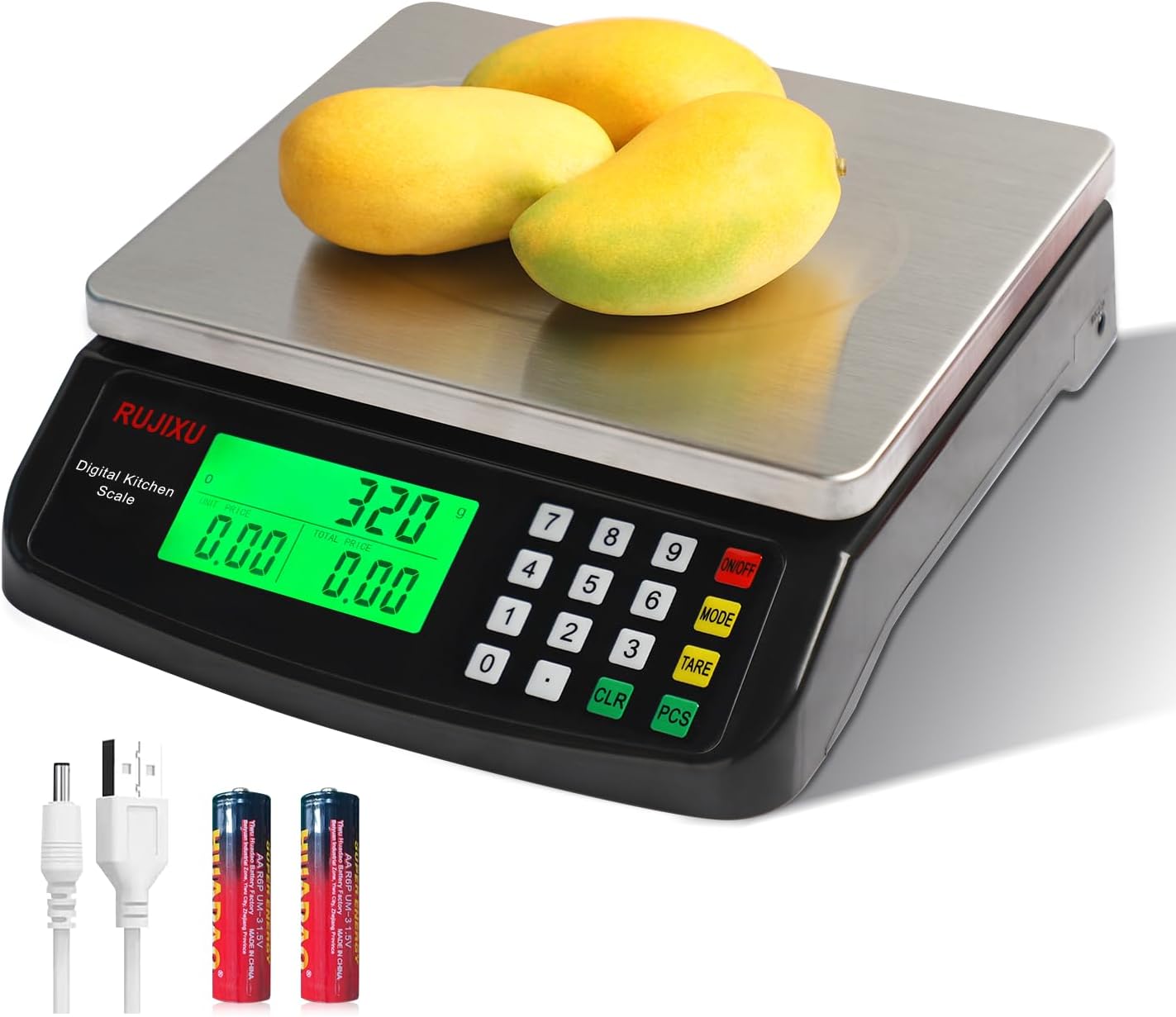
Image 1.1: RUJIXU Large Digital Kitchen Scale (Model DT-580)
2. פּראָדוקט קאָמפּאָנענטן און פֿעיִקייטן
2.1 שליסל פֿעיִקייטן
- הויך קאַפּאַציטעט: Weighs items from 3g up to 30kg (66lb).
- קייפל וניץ: Supports grams (G), kilograms (KG), pounds (LB), and ounces (OZ).
- טאַרע פֿונקציע: Allows subtraction of container weight for net measurements.
- Counting Function (PCS): Enables counting of small, identical items.
- Price Computing: Calculates price based on weight and unit price input.
- LCD באַקלייט ווייַז: Provides clear and easy-to-read measurements, even in varying light conditions.
- דוראַבאַל קאַנסטראַקשאַן: Features a stainless steel platform and ABS plastic frame.
- צווייענדיק מאַכט צושטעלן: Operates with an AC power adapter or 2x 1.5V AA batteries (not included).
- אָטאַמאַטיק אַוועק: Automatically shuts off after 120 seconds of inactivity to conserve power.
2.2 דימענשאַנז

Image 2.1: Scale Dimensions
The scale features a stainless steel weighing surface measuring approximately 7 inches by 8.7 inches (18cm by 22cm). The overall product dimensions are 9.8 x 9 x 2.5 inches (24.9 x 22.9 x 6.4 cm).
3. סעטאַפּ
3.1 אַנפּאַקינג
Carefully remove all components from the packaging. Ensure that the scale, AC power adapter, and user manual are present.
3.2 מאַכט צושטעלן
The scale can be powered by either the included AC power adapter or two 1.5V AA batteries (not included).
- AC מאַכט: Connect the AC power adapter to the scale's power input port and then plug it into a standard electrical outlet.
- באַטאַרייע מאַכט: Open the battery compartment on the underside of the scale and insert two 1.5V AA batteries, observing the correct polarity.
באַמערקונג: The two power sources cannot be used simultaneously. If both are connected, the scale will prioritize AC power.

Image 3.1: Power Supply Modes
3.3 פּלייסמאַנט
Place the scale on a firm, flat, and stable surface to ensure accurate readings. Avoid placing it near strong electromagnetic fields, vibrations, or extreme temperature changes.
4. אָפּעראַציע
4.1 טורנינג אויף / אַוועק
- צו אנצינדן די וואָג, דריק די ON/OFF קנעפל. דער דיספלעי וועט זיך אויפלעכטן און ווייזן "0.000".
- צו אויסלעשן די וואָג, דריק און האַלט די קנעפּל ON/OFF קנעפּל פֿאַר אַ פּאָר סעקונדעס ביז דער עקראַן וועט זיך אויסלעשן.
4.2 איינהייט סוויטשינג
The scale supports four units of measurement: grams (G), kilograms (KG), pounds (LB), and ounces (OZ).
- מיט דער וואָג אויף, דריק די מאָדע button to cycle through the available units. The selected unit will be displayed on the LCD screen.

Image 4.1: Unit Switching
4.3 טאַרע פֿונקציע
The tare function allows you to subtract the weight of a container, so you only measure the net weight of its contents.
- Place the empty container on the weighing platform. The display will show the container's weight.
- דרוק די TARE קנעפל. דער עקראַן וועט זיך צוריקשטעלן צו "0.000".
- Add the items you wish to weigh into the container. The display will now show only the weight of the items.

Image 4.2: Tare Function Steps
4.4 צייל פונקציע (PCS)
The PCS function is useful for counting small, identical items such as screws, coins, or beads.
- Turn on the scale and ensure it reads "0.000".
- דריקן און האַלטן די פּקס button for approximately 5 seconds. The display will show a sample size (e.g., "25").
- Use the number pad to enter the quantity of items you will use as a sample (e.g., "10", "20", "50", "100").
- שטעלן די sample quantity of items on the platform.
- דרוק די פּקס קנעפּל ווידער צו באַשטעטיקן די sample. The scale is now calibrated for counting.
- אַראָפּנעמען די sample and place the bulk quantity of items you wish to count on the platform. The display will show the total count.
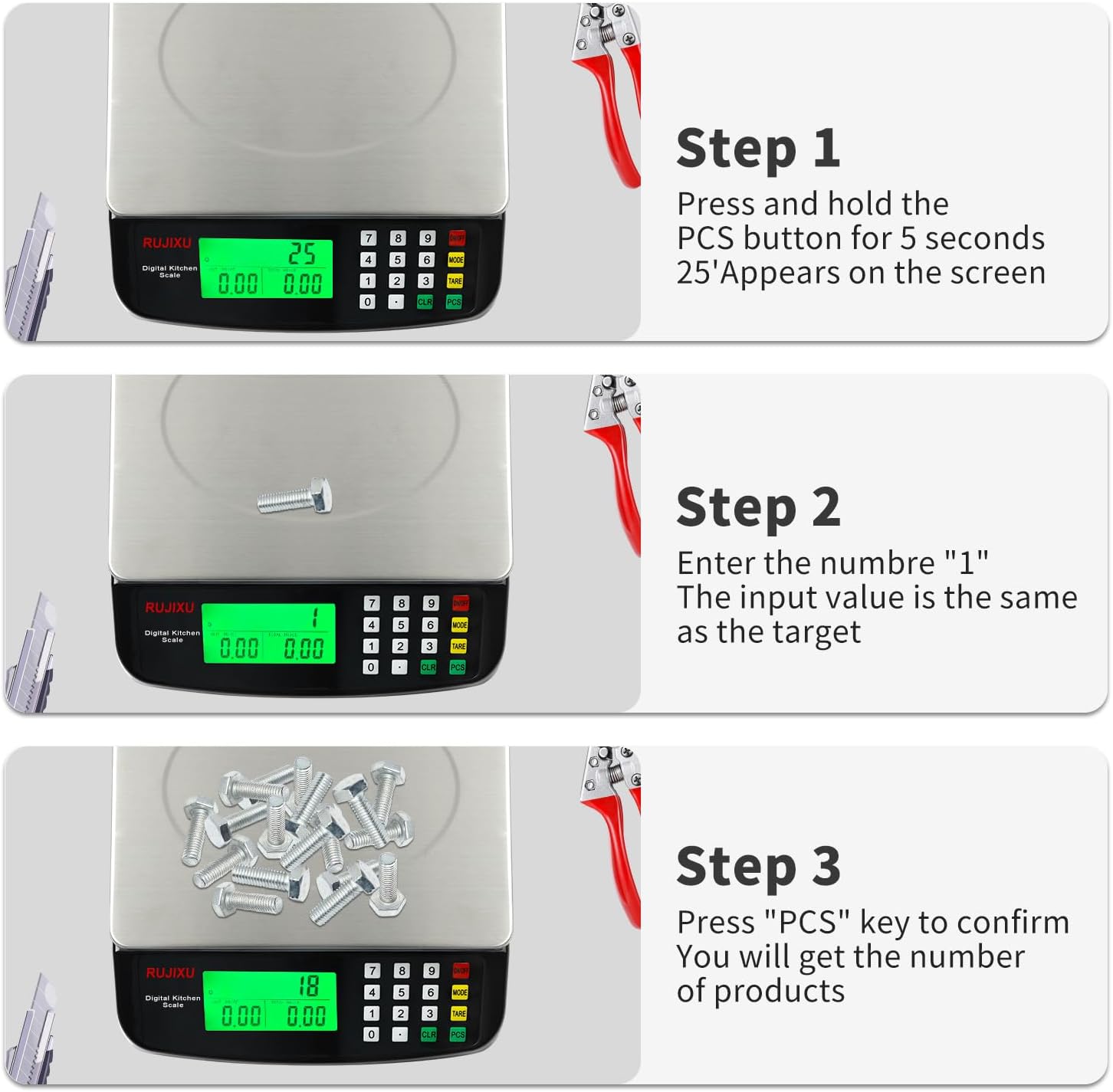
Image 4.3: Counting Function Steps
4.5 פרייז קאמפיוטינג פונקציע
This function allows you to calculate the total price of items based on their weight and a set unit price.
- Turn on the scale and ensure it reads "0.000".
- Place the item(s) to be weighed on the platform. The scale will display the weight.
- Using the number pad, enter the unit price (e.g., price per KG or LB).
- די וואָג וועט אויטאָמאַטיש רעכענען און ווייַזן די גאַנצע פּרייַז.

Image 4.4: Price Computing in Use
4.6 אויטאָ-אויס פֿונקציע
To conserve battery life, the scale is equipped with an automatic shut-off feature. If no operation is performed for approximately 120 seconds, the scale will power down.
5. וישאַלט
5.1 רייניקונג
The stainless steel platform and ABS plastic body are designed for easy cleaning.
- ווישט די וואָג ייבערפלאַך מיט אַ ווייכן, דamp שטאָף.
- For stubborn stains, a mild detergent can be used.
- Do not immerse the scale in water or use abrasive cleaners, as this can damage the electronic components.
- זיכער מאַכן אַז די וואָג איז גאָר טרוקן איידער סטאָרידזש אָדער ווייַטער נוצן.

Image 5.1: Food-Grade Stainless Steel Platform
5.2 סטאָרידזש
Store the scale in a cool, dry place away from direct sunlight and extreme temperatures. If storing for an extended period, remove the batteries to prevent leakage.
6. טראָובלעשאָאָטינג
- וואָג איז נישט קער אויף:
- Check if the AC adapter is securely plugged in.
- If using batteries, ensure they are inserted correctly with the right polarity and are not depleted. Replace if necessary.
- נישט פּינקטלעכע לייענונגען:
- Ensure the scale is placed on a flat, stable, and level surface.
- Avoid placing the scale near sources of vibration or drafts.
- Make sure no objects are touching the scale or platform during weighing.
- Recalibrate the scale if possible (refer to specific instructions if available, otherwise, turn off and on).
- Ensure the weight limit (30kg/66lb) is not exceeded.
- דיספּליי איז טונקל אָדער נישט ליינעוודיק:
- Check battery level if operating on batteries.
- Ensure the scale is not in direct sunlight or extremely bright conditions that might wash out the display. The LCD is designed for full view, but extreme glare can still affect visibility.
- "EEEE" or "O-Ld" error message:
- This indicates an overload. Remove items from the platform immediately to prevent damage.

Image 6.1: Improved LCD Display Visibility
7. ספּעסאַפאַקיישאַנז
| שטריך | דעטאַל |
|---|---|
| פּראָדוקט מאָדעל | דט-קסנומקס |
| אַפּאַראַט | G, KG, LB, OZ |
| מאַקס וואָג קאַפּאַסיטי | 30 קג / 66 לב |
| מינימום וואָג | 2ג-3ג |
| פּרעסיסיאָן מעזשערמאַנט | 1g |
| פֿעיִקייטן | Tare function, Price Calculator, Accurate Counting |
| ווייַז סקרין | פול view LCD display (7.5x3.8cm) |
| אַוטאָ-אויסגעלאשן | 120 seconds automatic shut-off when no operation |
| רעקאָממענדעד ניצט | Food baking, market business, cooking meal |
| Food Scale Size | 24 × 21.6 × 6.5 cm (9.8 x 9 x 2.5 inches) |
| Stainless Weighing Surface | 21.6 × 17.5 cm (8.5 x 6.9 inches) |
| פּונקט וואָג | 1.16 קג (2.55 לב) |
| Food Scale Material | אַבס פּלאַסטיק און ומבאַפלעקט שטאָל |
| מאַכט צושטעלן | AC6V Power Adapter, 2x 1.5V AA battery (Batteries not included) |
| פּעקל כולל | 1x Kitchen Scale, 1x Power Adapter, 1x User Manual |

Image 7.1: Product Specifications Table


