1. הקדמה
This manual provides detailed instructions for the setup, operation, maintenance, and troubleshooting of your Rapoo E9050L Multi-Device Wireless Keyboard. The E9050L is an ultra-thin, 78-key compact keyboard designed for seamless switching between up to four devices across multiple operating systems, including Windows, macOS, Linux, and Chrome OS. It features a low-profile design for comfortable typing and a long-lasting rechargeable battery.

Figure 1:Rapoo E9050L Multi-Device Wireless Keyboard (White)
2. וואָס איז אין דער קעסטל
באַשטעטיקן אַז אַלע זאכן זענען פאַראַן אין פּעקל:
- 1 x Rapoo E9050L Wireless Keyboard
- 1 x טשאַרדזשינג קאַבלע (וסב-C)
- 1 x באַניצער גייד
- 1 x 2.4G USB Receiver (typically stored in the keyboard's battery compartment or a small slot)
3. פּראָדוקט פֿעיִקייטן
3.1 Multi-Device and Multi-OS Wireless Connectivity
The E9050L keyboard supports seamless switching between up to four devices. It offers connectivity via 2.4GHz wireless (using the included USB receiver) and Bluetooth 5.0/4.0. This allows you to connect to laptops, desktop computers, tablets, or smartphones without the need to constantly re-pair or swap keyboards. It is compatible with Windows, macOS, Linux, and Chrome OS.
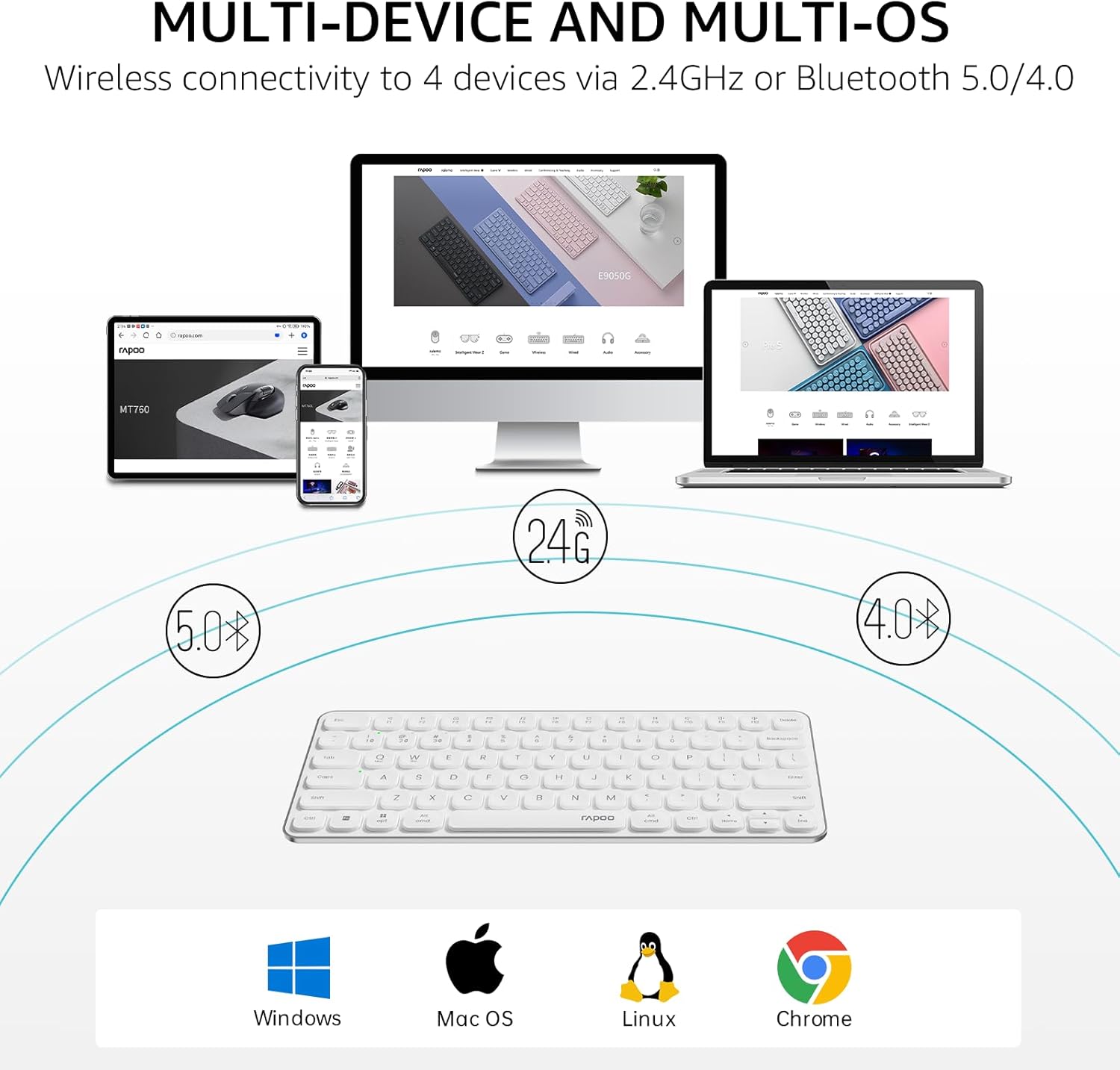
Figure 2:Multi-Device and Multi-OS Connectivity Diagram
3.2 Quiet and Comfortable Low-Profile טשיקלעט קיקאַפּס
Designed with Rapoo's classic blade-series ultra-thin profile, the E9050L provides a fluid, precise, and quiet typing experience. Its 0.2-inch thickness contributes to reduced wrist strain, often eliminating the need for an additional palm rest.

Figure 3:Close-up of Low-Profile טשיקלעט קיקאַפּס
3.3 78-Key Compact TKL Layout
The keyboard features a space-saving Tenkeyless (TKL) design with 78 keys, making it portable and easy to carry. This compact layout provides more room for mouse movement and optimizes desktop space. It includes 12 multimedia hotkeys for quick access to common functions like play/pause, volume control, and email.

Figure 4:Overhead view of 78-Key TKL Keyboard on a Desk
3.4 Rechargeable Battery with 90-Day Life
Equipped with low-power technology, the E9050L wireless keyboard can operate for up to 90 days on a single full charge. The USB-C port supports fast charging, providing a full day of use with just a 10-minute charge.

Figure 5:Keyboard with Battery Life Indicators
3.5 Dual System Multimedia Keys
The keyboard provides instant access to 12 commonly used function keys, including volume control, play/pause, and mute. These functions are accessible via the Fn key combination and are supported on both Windows and Mac OS.

Figure 6:Keyboard Layout Highlighting Multimedia Keys
3.6 Device and Capitalization Indicator Lights
The latest version of the E9050L includes dedicated indicator lights for the active device connection and capitalization (Caps Lock). These lights provide clear visual feedback, making it easier to identify which device you are typing on and the status of your Caps Lock.

Figure 7:Close-up of Indicator Lights
3.7 ברייטע קאָמפּאַטאַביליטי
The Rapoo E9050L keyboard is compatible with a broad range of operating systems, including Windows, Mac OS, Linux, iOS, Android, and Chrome OS, ensuring versatile use across various devices.

Figure 8:Compatibility Icons
3.8 פּראָדוקט דימענשאַנז און וואָג
The keyboard measures approximately 11.18 inches (28.4 cm) in length, 4.69 inches (11.9 cm) in width, and 0.51 inches (1.3 cm) in height, with a thickness of 0.20 inches (0.53 cm). It weighs approximately 10.3 ounces (292 grams).

Figure 9:Keyboard Dimensions Diagram
4. סעטאַפּ גייד
4.1 ערשט טשאַרדזשינג
Before first use, fully charge the keyboard using the provided USB-C charging cable. Connect the USB-C end to the keyboard's charging port and the USB-A end to a power source (e.g., computer USB port, USB wall adapter). The battery indicator light will show charging status and turn off when fully charged.
4.2 קאַנעקטינג צו דעוויסעס
The E9050L keyboard supports both Bluetooth and 2.4G wireless connections.
4.2.1 בלועטאָאָטה קאַנעקשאַן
- צינדט אן די קלאַוויאַטור מיטן מאַכט קנעפּל, וואָס געפינט זיך געוויינטלעך אויף דער זייט אָדער הינטן.
- דריקן און האַלטן די Fn key and one of the device keys (1, 2, 3, אָדער 4) for approximately 3 seconds until the corresponding indicator light flashes rapidly. This indicates the keyboard is in pairing mode.
- On your device (computer, tablet, smartphone), open Bluetooth settings.
- זוכן פֿאַר "Rapoo E9050L" or a similar name in the list of available devices and select it to pair.
- אַמאָל פארבונדן, וועט די אינדיקאַטאָר ליכט אויפהערן צו בלינקען און בלייבן פעסט פֿאַר אַ פּאָר סעקונדעס איידער עס וועט זיך אויסלעשן.
4.2.2 2.4G Wireless Connection (via USB Receiver)
- Locate the 2.4G USB receiver, typically found in a storage slot on the keyboard itself.
- אַרייַנלייגן די וסב ופנעמער אין אַ בנימצא וסב פּאָרט אויף דיין קאָמפּיוטער.
- Turn on the keyboard. The keyboard should automatically connect to the receiver. No manual pairing is usually required for the 2.4G connection.
- If the connection is not established, ensure the keyboard is not actively paired via Bluetooth to another device on the same channel.
4.3 וועקסלען צווישן פארבונדענע דעווייסעס
צו בייטן צווישן פארבונדענע דעווייסעס, דריק פשוט די Fn key along with the corresponding device key (1, 2, 3, אָדער 4) that the device is paired to. The indicator light above the selected device key will briefly illuminate to confirm the switch.
4.4 Switching Operating System Modes
The keyboard supports specific key layouts for Windows and macOS to optimize functionality.
- For Windows OS:Press פן + וו
- For macOS:Press Fn + Q
5. אַפּערייטינג ינסטרוקטיאָנס
5.1 גרונטלעכע טייפּינג
The keyboard functions as a standard QWERTY keyboard. Ensure the correct OS mode is selected for optimal key mapping.
5.2 Using Multimedia Hotkeys
To activate the multimedia functions (F1-F12), press and hold the Fn key, then press the desired F-key. For exampלא, Fn + F1 might decrease volume, Fn + F2 increase volume, etc. Refer to the keycap legends for specific functions.
5.3 פֿאַרשטיין אינדיקאַטאָר ליכט
- Device Indicator Lights (above 1, 2, 3, 4 keys):Indicate the currently active paired device. Flashes rapidly during pairing mode.
- קאַפּס לאַק ינדיקאַטאָר ליכט:לייכט זיך ווען קאַפּס לאַק איז אַקטיוו.
- באַטערי ינדיקאַטאָר ליכט:Typically illuminates when the battery is low or during charging. Refer to the product's specific light behavior for detailed battery status.
6. וישאַלט
6.1 רייניקן די קלאַוויאַטור
To clean your keyboard, power it off. Use a soft, lint-free cloth slightly dampened with water or a mild cleaning solution. Avoid excessive moisture. Do not spray cleaners directly onto the keyboard. For debris between keys, use compressed air.
6.2 באַטערי קער
To maximize battery lifespan, avoid fully discharging the keyboard frequently. Charge the keyboard when the low battery indicator appears. Store the keyboard in a cool, dry place when not in use for extended periods.
7. טראָובלעשאָאָטינג
- Keyboard not connecting/responding:
- פאַרזיכערן די קלאַוויאַטור איז פּאַוערד אויף.
- קאָנטראָלירט די באַטאַרייע מדרגה און לאָדנט אויף אויב נייטיק.
- For Bluetooth:Ensure Bluetooth is enabled on your device. Try re-pairing the keyboard. Remove previous pairings from your device's Bluetooth list and try again.
- For 2.4G:Ensure the USB receiver is securely plugged into a working USB port. Try a different USB port.
- Ensure the correct device channel (Fn+1/2/3/4) is selected on the keyboard.
- ריסטאַרט דיין מיטל און די קלאַוויאַטור.
- Keys are repeating or not registering:
- This can sometimes indicate low battery. Charge the keyboard fully.
- Ensure there is no physical obstruction under the keycap.
- Try re-pairing the keyboard to your device.
- Ensure the keyboard is within the effective range of your device (for Bluetooth/2.4G).
- מולטימעדיאַ שליסלען נישט ארבעטן:
- זייט זיכער אז איר דריקט די Fn קנעפּל גלײַכצײַטיק מיטן געוואונטשענעם F-קנעפל.
- Verify that the correct operating system mode (Windows/macOS) is selected using פן + וו or Fn + Q.
8. ספּעסאַפאַקיישאַנז
| שטריך | דעטאַל |
|---|---|
| מאָדעל נומער | E9050L |
| פּראָדוקט דימענשאַנז | 11.18 X 4.69 X 0.51 אינטשעס (28.4 X 11.9 X 1.3 סענטימעטער) |
| פּונקט וואָג | 10.3 אונסעס (292 גראַמז) |
| קאַנעקטיוויטי טעכנאָלאָגיע | Bluetooth (5.0/4.0), RF (2.4GHz) |
| באַטערי טיפּ | 1 ליטהיום יאָן באַטאַרייע (אַרייַנגערעכנט, ריטשאַרדזשאַבאַל) |
| באַטערי לעבן | אַרויף צו 90 טעג אויף אַ פול אָפּצאָל |
| שליסל גראף | 78 keys (TKL layout) |
| מאַטעריאַל | אַלומינום (ראַם) |
| קאַמפּאַטאַבאַל דעוויסעס | Laptop, PC, Projector, Smartphone, Tablet |
| קאַמפּאַטאַבאַל אַס | Windows, Mac OS, Linux, iOS, Android, Chrome OS |
| פאַבריקאַנט | שענזשען ראַפּאָו טעכנאָלאָגיע קאָו, לטד. |
9. וואָראַנטי און שטיצן
For product support, please contact the seller, RAPOO Official, through the platform where the product was purchased. The product typically comes with a 30-day return window from the date of purchase, as per standard policy. For further information or to explore other Rapoo products, you may visit the official Rapoo store:


