1. הקדמה
א דאנק פארן קויפןasing the LIECTROUX M7S Pro Robot Vacuum Cleaner. This manual provides essential information for the safe operation, maintenance, and troubleshooting of your device. Please read this manual thoroughly before using the product and retain it for future reference.
זיכערקייַט אינסטרוקציעס
- פאַרזיכערן אַז די ראָבאָט איז גאָר באפוילן איידער ערשטער נוצן.
- ניצט נישט דעם ראָבאָט אין נאַסע סביבות אדער לעבן פליסיקייטן.
- Keep loose cables, curtains, and small objects out of the robot's path to prevent entanglement.
- היט אויף קינדער און חיות ווען דער ראָבאָט אַרבעט.
- Do not use the robot to pick up large debris, sharp objects, or burning materials.
- Only use the original charging dock and power adapter provided with the robot.
- Turn off the robot and unplug it from the charging dock before performing any maintenance.
2. פּעקל אינהאַלט
באַשטעטיקן אַז אַלע זאכן זענען פאַראַן אין פּעקל:
- LIECTROUX M7S Pro Robot Vacuum Cleaner
- טשאַרדזשינג דאָק
- מאַכט אַדאַפּטער
- Side Brushes (set)
- HEPA פילטער (פאר-אינסטאלירט אדער רעזערוו)
- רייניקונג טול
- ווייַט קאָנטראָל
- באַניצער מאַנואַל
3. פּראָדוקט איבערview
Familiarize yourself with the components of your LIECTROUX M7S Pro robot vacuum cleaner.

פיגורע 3.1: The LIECTROUX M7S Pro robot vacuum cleaner, showcasing its sleek black design, along with its remote control and a smartphone displaying the cleaning map via the app.
הויפּט קאַמפּאָונאַנץ:
- Top פּאַנעל: Power button, Wi-Fi indicator, charging indicator.
- פראָנט באַמפּער: Obstacle detection sensors.
- זייט ברושעס: זאַמלען שטויב און דעבריס פון די עדזשאַז און ווינקלען.
- דרייווינג רעדער: Allow movement across various floor types.
- מיסט Collects dry debris.
- Water Tank (for mopping): Holds water for wet cleaning.
- טשאַרדזשינג קאָנטאַקטן: Connects with the charging dock.
- קליף סענסארן: Detects drops and prevents falls.
4. סעטאַפּ
4.1 טשאַרדזשינג דאָק פּלאַצירונג
Place the charging dock against a wall in an open area, ensuring there are no obstacles within 1 meter (3 feet) to the sides and 2 meters (6 feet) in front of the dock. Connect the power adapter to the charging dock and plug it into a power outlet.
4.2 ערשט טשאַרדזשינג
Place the robot onto the charging dock, ensuring the charging contacts align. The robot will begin charging automatically. For first use, allow the robot to charge completely (approximately 4-5 hours) before operation.

פיגורע 4.1: The robot vacuum cleaner automatically returning to its charging dock when its battery is low, ensuring it is always ready for the next cleaning cycle.
4.3 App Connection (TUYA App)
- Download the "TUYA Smart" app from your smartphone's app store (iOS or Android).
- רעגיסטרירט זיך אדער לאגט זיך איין אין אייער TUYA אקאונט.
- Ensure your robot is charged and powered on.
- Follow the in-app instructions to add your LIECTROUX M7S Pro robot vacuum cleaner. This typically involves pressing and holding a button on the robot to enter pairing mode and connecting to your home Wi-Fi network.
- אַמאָל פארבונדן, קענט איר קאָנטראָלירן דעם ראָבאָט, view cleaning maps, and set schedules via the app.
4.4 שטימע אַסיסטאַנט אינטעגראַציע
The LIECTROUX M7S Pro supports voice control via Amazon Alexa and Google Home. Refer to the respective app (Alexa app or Google Home app) for instructions on how to link your TUYA Smart account and control your robot with voice commands.
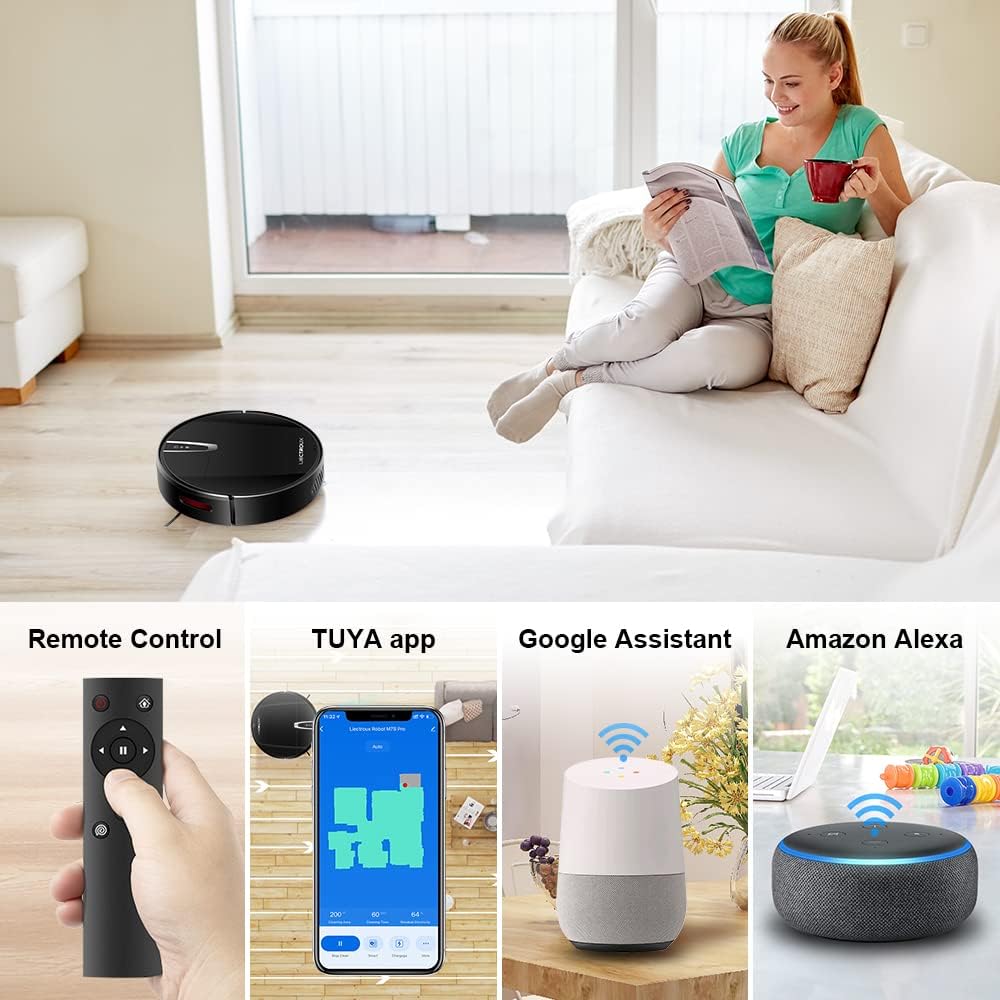
פיגורע 4.2: Various control methods for the robot vacuum, including a physical remote control, the TUYA smartphone application displaying a cleaning map, and integration with voice assistants like Google Assistant and Amazon Alexa.
5. אַפּערייטינג ינסטרוקטיאָנס
5.1 רייניקונג מאָדעס
The robot offers multiple cleaning modes to suit different needs, accessible via the app, remote control, or voice commands:
- אָטאַמאַטיק רייניקונג: דער ראָבאָט נאַוויגירט און רייניקט קלוג דעם גאַנצן שטאָק־שטח.
- אָרט רייניקונג: פאָקוסירט אויף אַ ספּעציפֿיש שמוציקע געגנט, רייניקט אין אַ שפּיראַלישן מוסטער.
- ברעג רייניקונג: רייניקט לעבן ווענט און מעבל עדזשאַז.
- Mopping Mode: For wet cleaning, attach the water tank and mopping cloth.

פיגורע 5.1: The robot vacuum cleaner operating on a floor with scattered debris, illustrating its powerful suction and various cleaning modes: Scheduled Cleaning, Auto Cleaning, Edge Cleaning, and Spot Cleaning.
5.2 נאַוויגאַציע און מאַפּינג
The M7S Pro utilizes smart gyroscope navigation to create a 2D map of your environment, allowing for precise positioning and efficient route planning. This ensures comprehensive coverage and minimizes missed spots.

פיגורע 5.2: The robot vacuum cleaner navigating a room, with a grid overlay illustrating its smart gyroscope navigation system for precise positioning and thorough cleaning.

פיגורע 5.3: A visual comparison showing the efficient, systematic cleaning path generated by the LIECTROUX M7S Pro's gyroscope navigation versus a less organized common route planning method, highlighting intelligent route planning.
5.3 אויטאָמאַטישע ריטשאַרדזשינג
When the battery level is low or a cleaning task is complete, the robot will automatically return to its charging dock to recharge. Ensure the charging dock is always powered on and accessible.
5.4 Anti-Drop System
The robot is equipped with cliff sensors to detect stairs and elevated surfaces, preventing it from falling. It also intelligently detects different floor types and adjusts its direction within 10 milliseconds.
6. וישאַלט
רעגולערע אויפהאלטונג גאראנטירט אפטימאלע פאָרשטעלונג און פארלענגערט די לעבנסדויער פון אייער ראָבאָט וואַקוום קלינער.
6.1 אויסליידיקן דעם מיסטקאסטן
Empty the dustbin after each cleaning cycle or when the 'full' indicator appears. Open the top cover, remove the dustbin, and dispose of the collected debris.
6.2 רייניקונג די פילטער
The HEPA filter should be cleaned regularly (e.g., weekly) using the provided cleaning tool or a soft brush. Replace the HEPA filter every 3-6 months, depending on usage, to maintain suction efficiency.
6.3 רייניקונג פון זייט-באַרשטן
Inspect and clean the side brushes regularly. Remove any tangled hair or debris. If brushes are worn or damaged, replace them with new ones.
6.4 רייניקונג פון סענסאָרן און טשאַרדזשינג קאָנטאַקטן
Wipe the cliff sensors and charging contacts on both the robot and the charging dock with a clean, dry cloth to ensure proper function and charging.
6.5 Brush-less Suction Nozzle
The M7S Pro features an advanced brush-less suction nozzle designed to minimize hair entanglement, reducing the frequency of cleaning the main suction path.

פיגורע 6.1: An illustration of the robot vacuum's underside, highlighting the advanced brush-less suction nozzle designed to prevent hair entanglement and ensure consistent cleaning performance.
7. טראָובלעשאָאָטינג
אויב איר טרעפט פּראָבלעמען מיט אייער ראָבאָט וואַקוום, זעט די פאלגענדע געוויינטלעכע פּראָבלעמען און לייזונגען:
| פּראָבלעם | מעגלעך סיבה | לייזונג |
|---|---|---|
| ראָבאָט טוט נישט קער אויף. | נידעריגע באַטעריע; מאַכט אויסשאַלטן. | Charge the robot; ensure the main power switch is on. |
| ראָבאָט לאָדט נישט אויף. | Charging contacts dirty; charging dock not powered. | Clean charging contacts; ensure charging dock is plugged in. |
| ראָבאָט בלייבט אָפט שטעקן. | Obstacles (cables, rugs); narrow spaces. | Clear the cleaning area; use virtual walls if available. |
| שלעכטע רייניקונג פאָרשטעלונג. | Dustbin full; filter clogged; brushes tangled. | Empty dustbin; clean/replace filter; clean brushes. |
| אַפּ קאַנעקשאַן פּראָבלעמען. | Incorrect Wi-Fi password; robot not in pairing mode; 5GHz Wi-Fi network. | Verify Wi-Fi details; re-enter pairing mode; ensure 2.4GHz Wi-Fi is used. |
8. ספּעסאַפאַקיישאַנז
| שטריך | דעטאַל |
|---|---|
| סאָרט | LIECTROUX |
| מאָדעל נאָמען | M7S PRO |
| קאָליר | שוואַרץ |
| פּראָדוקט דימענשאַנז | 32 ל רענטגענ 32 וו רענטגענ 7.8 ה סענטימעטער |
| פּונקט וואָג | 4 קילאָגראַמס |
| מאַקס סאַקשאַן מאַכט | 4000 פּאַ |
| באַטאַרייע קאַפּאַציטעט | 2500 מאַה ליטהיום-יאָן |
| רונטימע | אַרויף צו 120 מינוט |
| פילטער טיפּ | העפּאַ |
| קאָנטראָללער טיפּ | App Control, Touchpad Control, Voice Control |
| קול אַססיסטאַנט קאַמפּאַטאַבילאַטי | Google היים, Amazon Alexa |
| נאַוויגאַציע טיפּ | Gyroscope Navigation (2D Map) |
| ספּעציעלע שטריך | Anti-drop system, Brush-less suction nozzle |
| ייבערפלאַך רעקאָמענדאַציע | Low-pile carpet, hard floors, ceramic tiles |
9. וואָראַנטי און שטיצן
The LIECTROUX M7S Pro Robot Vacuum Cleaner comes with a standard manufacturer's warranty. Please refer to the warranty card included in your package for specific terms and conditions, including the warranty period and coverage details.
For technical support, troubleshooting assistance, or warranty claims, please contact the seller or LIECTROUX customer service. Contact information can typically be found on the product packaging, the seller's website, or within the TUYA Smart app.
When contacting support, please have your product model number (M7S Pro) and purchase details readily available.


