1. הקדמה
Thank you for choosing the LONPOO LP42M Active Bookshelf Speakers. These speakers are designed to deliver high-quality audio with versatile connectivity options, suitable for various home audio setups. This manual provides essential information for safe and efficient use of your new speakers.
2. זיכערקייַט אינפֿאָרמאַציע
ביטע ליינט אלע זיכערהייט אינסטרוקציעס קערפול איידער איר ניצט דעם פראדוקט. האלט דעם מאנואל פאר שפעטערדיגע רעפערענץ.
- מאַכט מקור: ניצט נאָר דעם צוגעשטעלטן מאַכט אַדאַפּטער. זיכערט זיך אַז דער וואָלומען איזtage שוועבעלעך דיין היגע מאַכט צושטעלן.
- ווענטילאַטיאָן: Do not block any ventilation openings. Maintain adequate space around the speakers for proper airflow.
- וואַסער און נעץ: Do not expose the speakers to water, rain, or moisture. Avoid placing liquid-filled objects on or near the speakers.
- היץ: Keep the speakers away from heat sources such as radiators, heat registers, stoves, or other heat-producing appliances.
- רייניקונג: Unplug the speakers from the power outlet before cleaning. Use a soft, dry cloth. Do not use liquid cleaners or aerosol cleaners.
- סערוויס: דו זאלסט נישט פּרווון צו דינען דעם פּראָדוקט זיך. קאָנטאַקט אַלע קוואַלאַפייד סערוויס פּערסאַנעל.
3. פּעקל אינהאַלט
באַשטעטיקן אַז אַלע זאכן זענען פאַראַן אין פּעקל:
- LONPOO LP42M Active Bookshelf Speaker Pair (1 powered speaker, 1 passive speaker)
- ווייַט קאָנטראָל רענטגענ 1
- Speaker Wire (6.56ft / 2m) x 1
- Optical Cable (4.92ft / 1.5m) x 1
- AC Power Cord (3.94ft / 1.2m) x 1

4. פּראָדוקט איבערview
The LONPOO LP42M speakers feature a classic wooden design with advanced audio components and multiple connectivity options.
4.1 Front Panel (Powered Speaker)
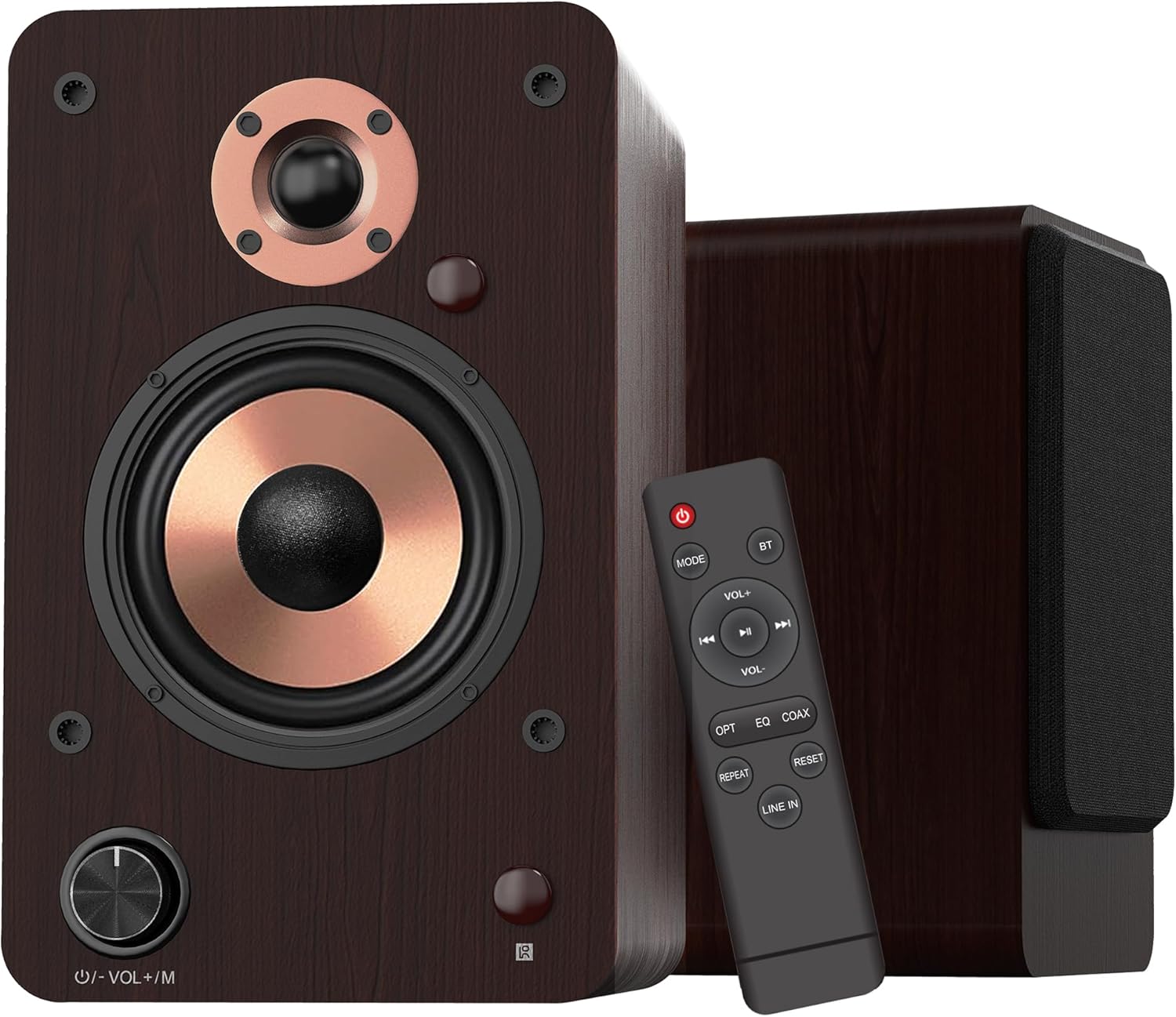
- באַנד/מאָדוס קנעפּל: Rotate to adjust volume. Press to cycle through input modes.
- LED ינדיקאַטאָר: Displays the current input mode (Red: Standby, Blue: Bluetooth, Green: Optical, Purple: Coaxial/USB, Yellow: AUX, Light Blue: Line-in).
4.2 רעדנער קאָמפּאָנענטן

- 1-inch Silk Dome Tweeter: Delivers crisp and clear high frequencies.
- 4-inch Aluminum Cone Woofer: Provides rich and powerful bass.
- 12mm MDF Wood Cabinet: Ensures solid construction and minimizes resonance for improved audio clarity.
4.3 Rear Panel (Powered Speaker)

- TREBLE Button: אַדזשאַסטירט הויך-פרעקווענץ אַוטפּוט.
- BASS קנעפּל: אַדזשאַסטירט נידעריק-פרעקווענץ אַוטפּוט.
- מאַכט באַשטימען: טוט אן אדער אויסלעשן דעם רעדנער סיסטעם.
- AC PORT: Connects to the AC power cord.
- רעדנער אויס: Connects to the passive speaker using the provided speaker wire.
- LINE IN (RCA L/R): For connecting devices with RCA audio output (e.g., turntables, CD players).
- AUX IN: For connecting devices with a 3.5mm audio output.
- אָפּטיש: For connecting devices with optical audio output (e.g., TVs, game consoles).
- קאָאַקסיאַל: For connecting devices with coaxial audio output.
- וסב ינפּוט: For connecting USB flash drives for audio playback or connecting to a PC.
5. סעטאַפּ
5.1 אַנפּאַקינג
נעמט פֿאָרזיכטיק אַרויס אַלע קאָמפּאָנענטן פֿון דער פּאַקאַדזשינג. האַלט די פּאַקאַדזשינג פֿאַר צוקונפֿטיקן טראַנספּאָרט אָדער סטאָרידזש.
5.2 רעדנער פּלייסמאַנט
For optimal sound quality, place the speakers on a stable surface, such as a bookshelf or speaker stands. Position them along a wall or near a corner of the room to enhance bass response. Ensure the speakers are equidistant from your listening position for a balanced stereo image.
5.3 פֿאַרבינדן די רעדנערס
Connect the powered speaker to the passive speaker using the provided speaker wire. Ensure the red wire connects to the red terminal and the white/black wire connects to the black terminal on both speakers.

5.4 קאַנעקטינג צו אַודיאָ קוואלן
The LP42M speakers offer multiple input options:
- בלועטאָאָטה: For wireless connection to smartphones, tablets, or other Bluetooth-enabled devices.
- וסב: Connect a USB flash drive for direct audio playback or connect to a PC using a USB cable.
- אָפּטיש: Use the optical cable to connect to TVs, game consoles, or other digital audio sources.
- קאָואַקסיאַל: Use a coaxial cable to connect to compatible digital audio sources.
- RCA (Line In): Use RCA cables to connect to devices like turntables, CD players, or DVD players.
- AUX אין: Use a 3.5mm audio cable to connect to devices with a headphone jack.


5.5 מאַכט קאַנעקשאַן
Connect the AC power cord to the AC port on the rear of the powered speaker, then plug the other end into a wall outlet.
6. אַפּערייטינג ינסטרוקטיאָנס
6.1 מאַכט אויף / אַוועק
פליפּ די מאַכט switch on the rear panel of the powered speaker to the 'ON' position to turn on the speakers. Flip it to 'OFF' to power down.
6.2 אַרייַנשרייַב סעלעקציע
דרוק די Volume/Mode Knob on the front of the powered speaker or the 'MODE' button on the remote control to cycle through the available input modes: Bluetooth, Optical, Coaxial, RCA (Line In), USB, and AUX-in. The LED indicator will change color to reflect the selected mode.

6.3 באַנד קאָנטראָל
דרייען די Volume/Mode Knob on the front of the powered speaker clockwise to increase volume and counter-clockwise to decrease volume. Alternatively, use the 'VOL+' and 'VOL-' buttons on the remote control.
6.4 טאָן קאָנטראָל
ניצן די טרעבל און באַס knobs on the rear panel of the powered speaker to adjust the high and low frequencies to your preference.

6.5 בלועטאָאָטה פּערינג
- Switch the speaker to Bluetooth mode (blue LED indicator).
- On your device (smartphone, tablet), enable Bluetooth and search for 'LP42M'.
- Select 'LP42M' to pair. Once connected, the blue LED will remain solid.
6.6 יו-עס-בי פּלייבּעק
אַרײַנשטעלן אַ USB פֿלעש דרייוו מיט MP3/WMA אַודיאָ files into the USB port. The speaker will automatically switch to USB mode and begin playback. Use the remote control for playback functions (play/pause, next/previous track).
6.7 רימאָוט קאָנטראָל פאַנגקשאַנז

- מאַכט קנעפּל: Turns the speakers on/off (standby).
- DIRECTIONS: גייט דורך די אינפוט מאָדעס.
- בט: Directly switches to Bluetooth mode.
- VOL+/VOL-: אַדדזשוסץ באַנד.
- שפּילן/פּויזע, ווייטער/פֿריִער: Controls audio playback (USB/Bluetooth).
- OPT: Directly switches to Optical mode.
- EQ: Cycles through sound equalization presets.
- קאָאַקס: Directly switches to Coaxial mode.
- איבערחזרן: Repeats current track or playlist (USB).
- באַשטעטיק: רעסעץ סעטטינגס.
- שורה אין: Directly switches to Line In (RCA) mode.
7. וישאַלט
געהעריגע אויפהאלטונג גאראנטירט די לאנגעוויטי און פאָרשטעלונג פון אייערע רעדנערס.
- רייניקונג: Use a soft, dry, lint-free cloth to clean the speaker cabinets. Do not use abrasive cleaners, waxes, or solvents.
- שטויב: Regularly dust the speaker grilles and surfaces to prevent dust buildup.
- סוויווע: Avoid placing speakers in direct sunlight, near heat sources, or in areas with high humidity.
8. טראָובלעשאָאָטינג
אויב איר טרעפט פּראָבלעמען, זעט די פאלגענדע געוויינטלעכע פּראָבלעמען און לייזונגען:
| פּראָבלעם | מעגלעך סיבה | לייזונג |
|---|---|---|
| קיין געזונט | Power not connected; incorrect input mode; volume too low; cables loose. | Ensure power is on; select correct input mode; increase volume; check all cable connections. |
| בלועטאָאָטה איז נישט קאַנעקטינג | Speaker not in Bluetooth mode; device too far; already paired with another device. | Switch speaker to Bluetooth mode; ensure device is within 10m range; disconnect from other devices and try pairing again. |
| פאַרקרימט אַודיאָ | Volume too high; poor source quality; loose cable connection. | Reduce volume on speaker and source; try a different audio source; check cable connections. |
| ווייַט קאָנטראָל נישט ארבעטן | Batteries dead; obstruction between remote and speaker; remote not pointed at sensor. | Replace batteries; remove obstructions; ensure remote is pointed at the speaker's sensor. |
9. ספּעסאַפאַקיישאַנז
| שטריך | באַשרייַבונג |
|---|---|
| רעדנער טיפּ | אַקטיוו בוקשעלף ספּיקערז |
| רעזולטאַט מאַכט | 100 וו (50 וו רענטגענ 2) |
| וואָאָפער דיאַמעטער | 4 inches (Aluminum Cone) |
| טוועעטער דיאַמעטער | 1 inch (Silk Dome) |
| אָפטקייַט ענטפער | 40Hz-20KHz |
| ימפּידאַנס | 4 אָהמס |
| סיגנאַל-צו-ראַש פאַרהעלטעניש (S/N) | 80dB |
| קאַנעקטיוויטי | Bluetooth 5.3, Optical, Coaxial, RCA (Line In), USB, AUX-in (3.5mm) |
| בלועטאָאָטה קייט | אַרויף צו 10 מעטער (33 פֿיס) |
| קאָנטראָל מעטאָד | Remote Control, On-speaker Knobs |
| קאַבינעט מאַטעריאַל | 12mm MDF Wood |
| דימענסיאָנס (יעדער רעדנער) | 9.84" (H) x 7.07" (W) x 6.1" (L) / 25cm (H) x 18cm (W) x 15.5cm (L) |
| וואָג (פּאָר) | 5.05 קג (11.13 לבס) |
| קאָליר | ברוין |
10. אפיציעלע פּראָדוקט ווידעאָס
Watch these official videos for additional setup and feature demonstrations:
LONPOO Premium Bookshelf Speakers LP-42M
ווידעא: אן אפיציעלע איבערview of the LONPOO LP-42M Premium Bookshelf Speakers, showcasing their design and key features.
Active Bookshelf Speaker 100W
Video: A short demonstration highlighting the active features and 100W power output of the bookshelf speakers.
11. וואָראַנטי און שטיצן
The LONPOO LP42M speakers come with a Limited Warranty. Please refer to the warranty card included in your package for detailed terms and conditions.
For technical support, troubleshooting assistance, or warranty claims, please contact LONPOO customer service through the official webפּלאַץ אָדער דיין זיצער.


