1. פּראָדוקט איבערview
The MageGee LIGHT87 is a versatile 87-key wireless mechanical keyboard designed for gaming and productivity. It features a gasket-mounted structure for a creamy typing sound, hot-swappable switches, vibrant RGB backlighting, and multiple connectivity options including 2.4GHz wireless, Bluetooth 5.0, and USB-C wired mode. It is equipped with an 8000mAh battery and durable side-printed PBT keycaps.

פיגור 1: פון אויבן אַראָפּ view of the MageGee LIGHT87 Wireless Mechanical Keyboard, showcasing its 87-key layout and RGB backlighting.

פיגורע 2: איבערview of the MageGee LIGHT87's key features, including 8000mAh battery, PBT keycaps, Win/Mac dual system support, gasket mount, 5 layers of silencing foams, 16.8 million RGB backlight, triple mode connection, custom hot-swappable switches, and 87-key anti-ghosting.
2. פּעקל אינהאַלט
איידער איר הייבט אן, ביטע זיכער מאכן אז אלע זאכן זענען פאראן אין פעקל:
- MageGee LIGHT87 Wireless Mechanical Keyboard
- וסב-C צו וסב-א קאַבלע
- 2.4 גהז וסב ופנעמער
- קייקאַפּ פּולער
- באַשטימען פּולער
- באַניצער מאַנואַל (דעם דאָקומענט)

Figure 3: Contents of the MageGee LIGHT87 keyboard package, including the keyboard, USB cable, keycap puller, switch puller, and user manual.
3. סעטאַפּ און קאַנעקטיוויטי
The MageGee LIGHT87 keyboard offers three connection modes: USB-C wired, 2.4GHz wireless, and Bluetooth 5.0.
3.1 אויפלאָדן די קלאַוויאַטור
Before first use, it is recommended to fully charge the keyboard. Connect the provided USB-C cable to the keyboard's USB-C port and the other end to a USB power source (e.g., computer USB port, wall adapter). The keyboard features an 8000mAh large-capacity battery.

Figure 4: Illustration of the 8000mAh battery capacity, providing approximately 53 hours with RGB backlight on and 400 hours with RGB backlight off.

Figure 5: Detailed battery life estimates: 53 hours with backlight on, 400 hours with backlight off, and 450 hours of sleep standby time.
3.2 קאַנעקשאַן מאָדעס
The keyboard supports seamless switching between wired, 2.4GHz, and Bluetooth modes.
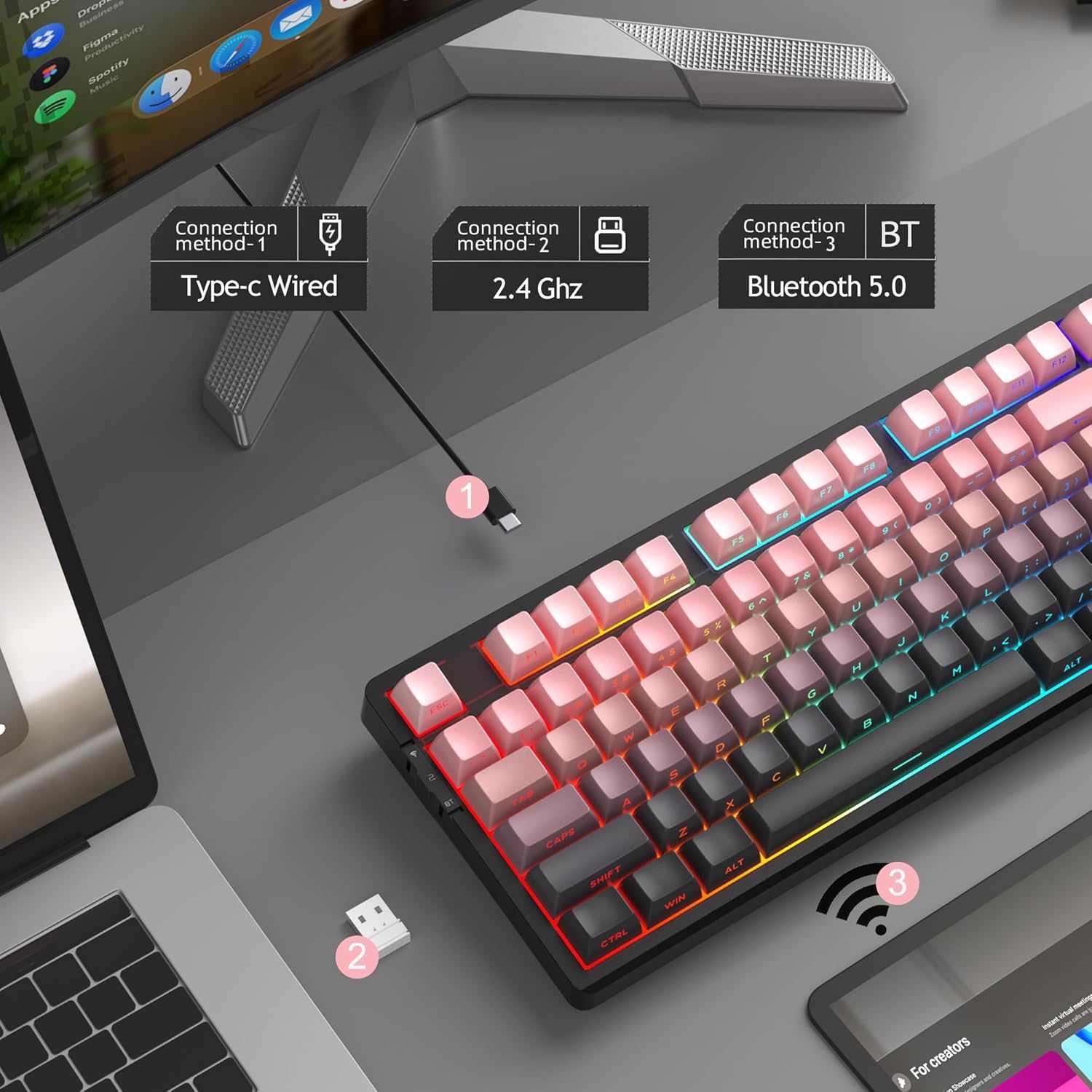
Figure 6: Visual representation of the three connection methods: Type-C Wired, 2.4 GHz Wireless, and Bluetooth 5.0.

Figure 7: Detailed instructions for switching between 2.4GHz, Bluetooth 5.0, and Type-C wired modes using the toggle switch and Fn key combinations.
3.2.1 יו-עס-בי-סי ווייערד מאָדע
- Connect the USB-C cable to the keyboard and your computer's USB port.
- Toggle the switch on the keyboard to the "2" position (wired mode).
- די קלאַוויאַטור וועט ווערן אויטאָמאַטיש דערקענט דורך דיין סיסטעם.
3.2.2 2.4GHz ווירעלעס מאָדע
- געפינט דעם 2.4GHz USB ריסיווער (געווענליך געהאלטן אין א קאמפארטמענט אויף דער קלאַוויאַטור).
- צאַפּן די וסב ופנעמער אין אַ בנימצא וסב פּאָרט אויף דיין קאָמפּיוטער.
- Toggle the switch on the keyboard to the "wifi" icon position (2.4G wireless mode).
- דרוק fn+4 to activate 2.4GHz mode. The keyboard should connect automatically.
3.2.3 בלועטוט 5.0 מאָדע
The keyboard can connect to up to three Bluetooth devices.
- Toggle the switch on the keyboard to the "BT" position (Bluetooth mode).
- דריקן און האַלטן fn+1, fn+2, אָדער fn+3 for 3-5 seconds to enter pairing mode for the desired channel. The indicator light will flash rapidly.
- On your device (PC, laptop, tablet, smartphone), enable Bluetooth and search for "MageGee LIGHT87".
- Select the keyboard to pair. Once connected, the indicator light will stop flashing.
- צו בייטן צווישן פארבינדענע בלוטוט דעווייסעס, דריק פשוט fn+1, fn+2, אָדער fn+3.
4. אַפּערייטינג ינסטרוקטיאָנס
4.1 RGB באַקלייט קאָנטראָל
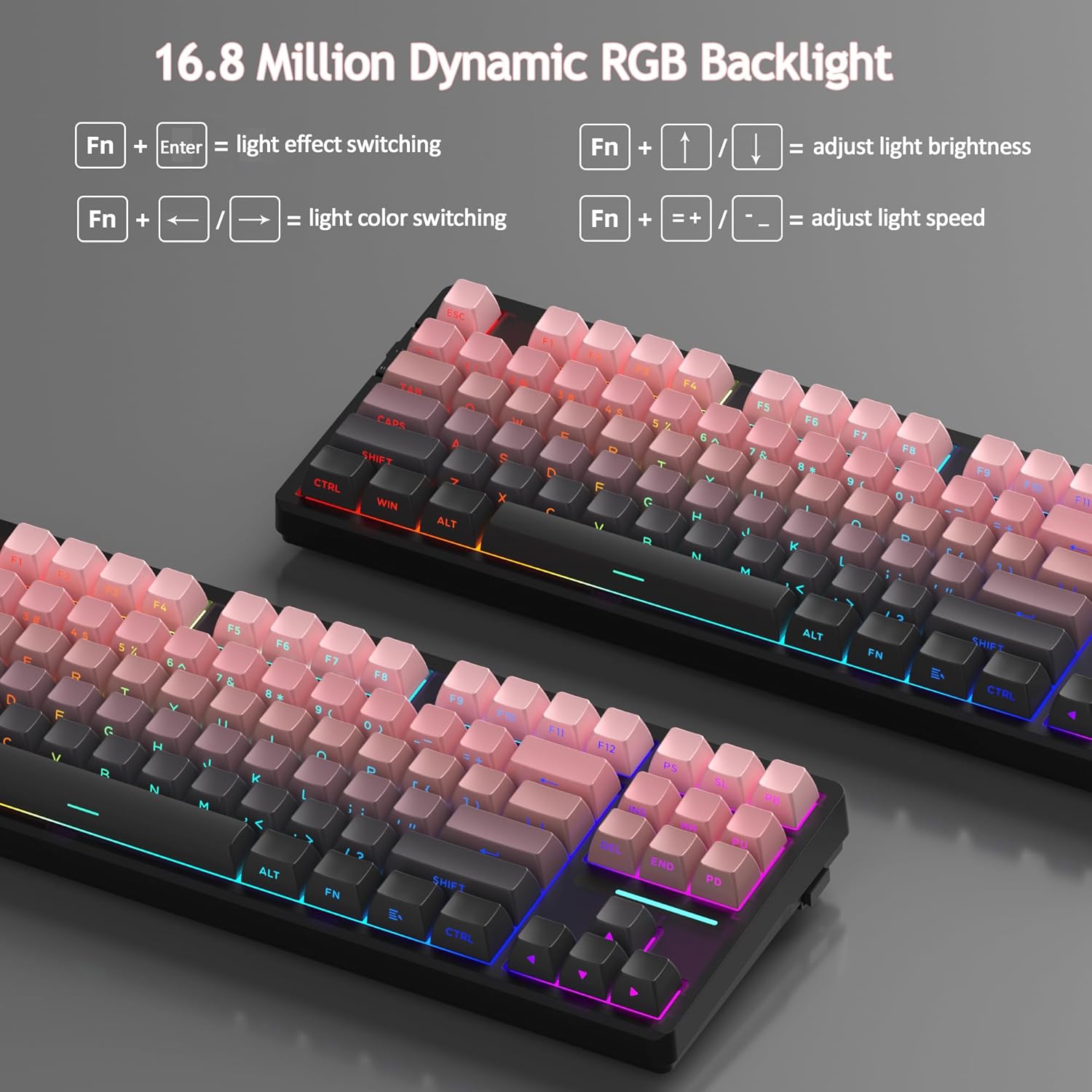
The MageGee LIGHT87 features 16.8 million cool RGB backlight options with various effects.
- Fn + אַרייַן: Toggle between approximately 20 different backlight modes/effects.
- Fn + ←: Adjust light direction (for certain effects).
- Fn + →: Adjust light color (for static modes or color cycling).
- Fn + ↑: פֿאַרגרעסערן די ברייטקייט פֿון דער הינטערליכטונג.
- Fn + ↓: פֿאַרקלענערן די ברייטקייט פֿון דער הינטערליכט.
- פֿן + =+: Increase backlight speed (for dynamic effects).
- Fn + -_: Decrease backlight speed (for dynamic effects).
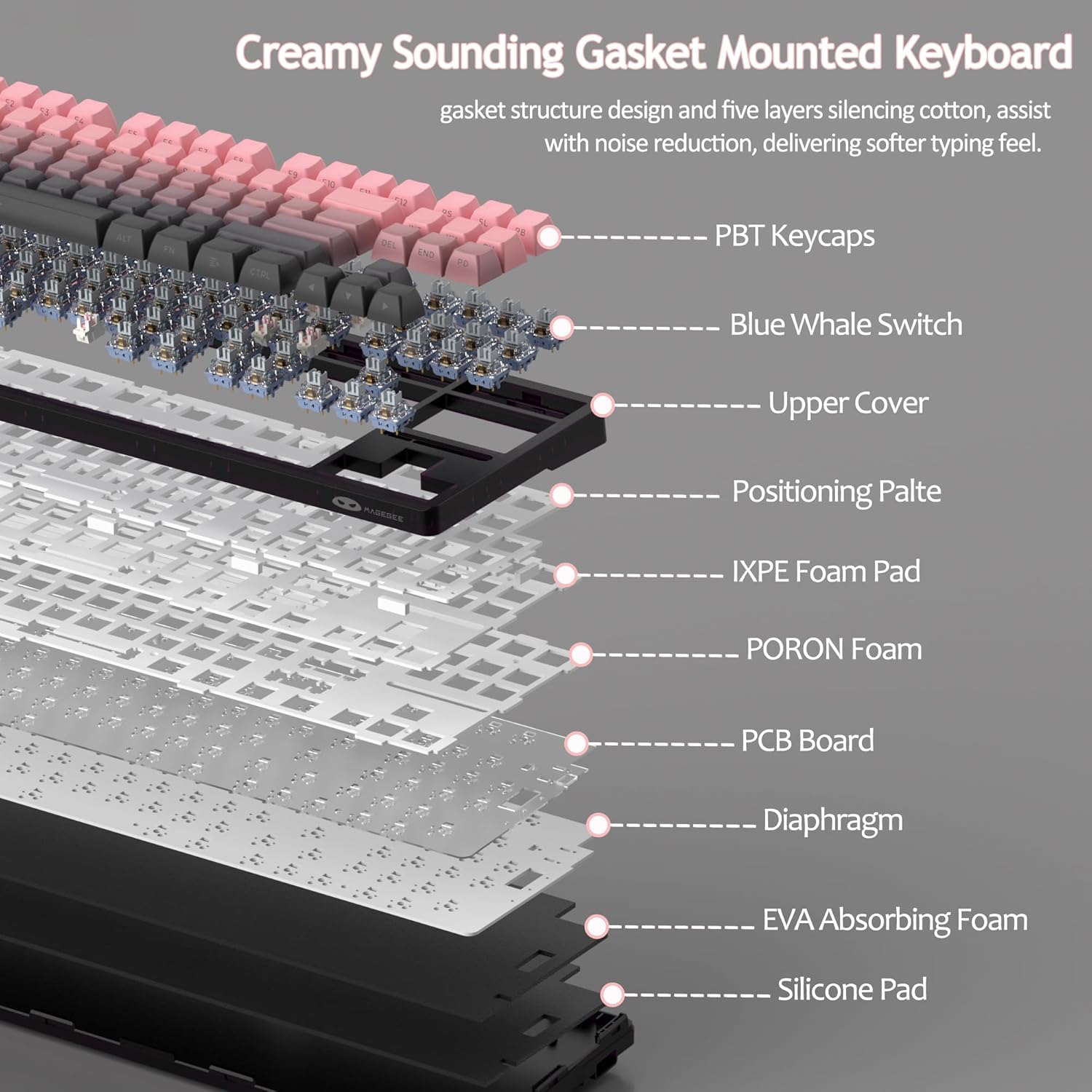
Figure 8: Visual guide to RGB backlight control key combinations.

Figure 9: Table summarizing RGB backlight functions and their corresponding Fn key combinations.
4.2 הייס-סוואַפּאַבל סוויטשיז
The LIGHT87 keyboard features hot-swappable sockets, allowing you to change switches without soldering. It supports both 3-pin and 5-pin mechanical switches. The keyboard comes pre-installed with quiet linear Blue Whale switches.

Figure 10: Diagram illustrating the hot-swappable switch mechanism, showing compatibility with 3-pin and 5-pin switches and the pre-lubed Blue Whale switch.

Figure 11: Specifications of the Blue Whale Switch, including linear type, conduction stroke, total travel, operating force, material, and lifespan.
To Replace Switches:
- פֿאָרזיכטיק אַראָפּנעמען דעם קלאַוויאַטור מיטן צוגעשטעלטן קלאַוויאַטור-אויסציער.
- Use the switch puller to gently grip the top and bottom clips of the switch.
- ציעט דעם סוויטש גלייך ארויף צו עס ארויסנעמען פון די PCB.
- גלייכט אויס די פּינס פון דעם נייעם סוויטש מיט די לעכער אויף דער פּקב.
- Press the new switch firmly into place until it clicks. Ensure it is seated properly and not bent.
- פֿאַרבײַטן די קלאַוויאַטור.
4.3 Gasket Structure and Sound Dampענינג
The LIGHT87 utilizes a gasket-mounted design, which provides a softer, more flexible typing feel and contributes to a "creamy thock" sound profile. Additionally, it incorporates five layers of sound-absorbing foams to effectively reduce noise and improve typing comfort.

פיגורע 12: עקספּלאָדעד view of the keyboard's internal components, highlighting the gasket structure and various foam layers (IXPE Foam Pad, PORON Foam, EVA Absorbing Foam, Silicone Pad) for sound dampענינג.
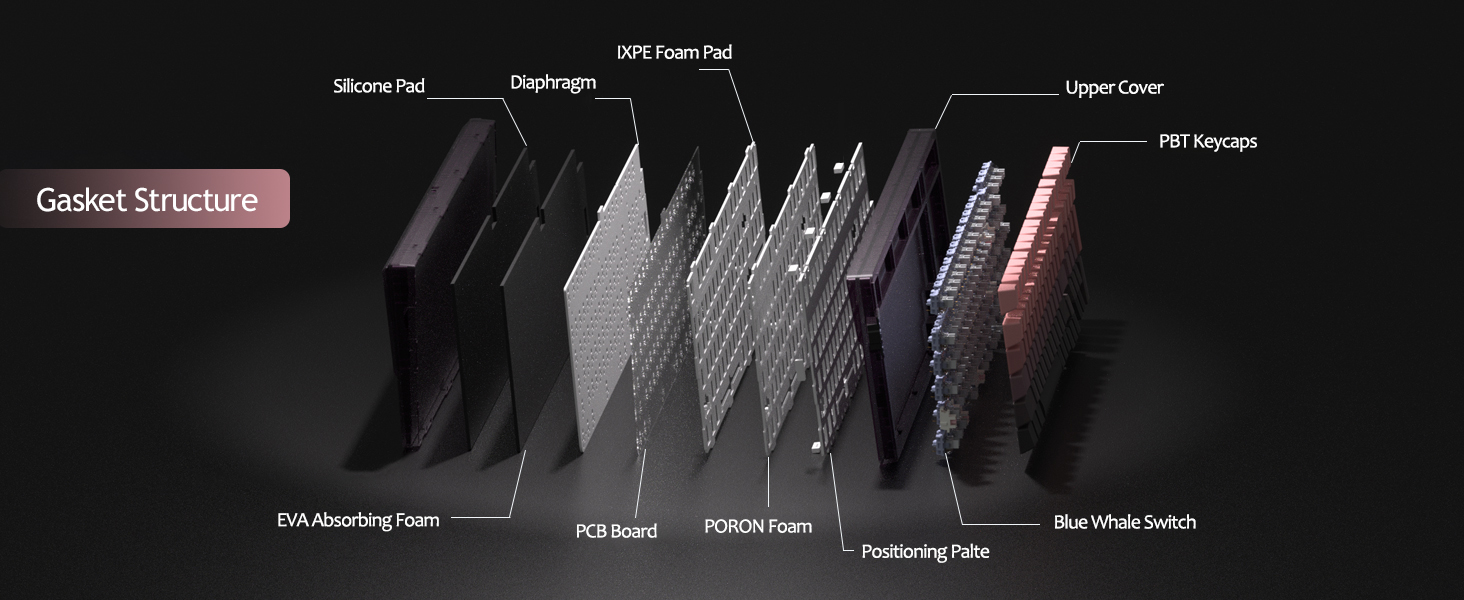
Figure 13: Detailed diagram of the gasket structure, showing how the plate is isolated from the case by gaskets, along with the various foam layers.
4.4 PBT שליסל קאַפּס
The keyboard is equipped with durable PBT keycaps, known for their resistance to shine and wear over time. The legends are side-printed for a clean top surface aesthetic.
פיגורע 14: נאָענט-אַרויף view of the keyboard's side-printed PBT keycaps.
4.5 Layout and Compatibility
The LIGHT87 features a compact 80% (TKL) layout with 87 keys, saving desktop space while retaining essential function and arrow keys. It supports both Windows and Mac operating systems, and all 87 keys feature 100% anti-ghosting for accurate input during intense gaming or typing sessions.
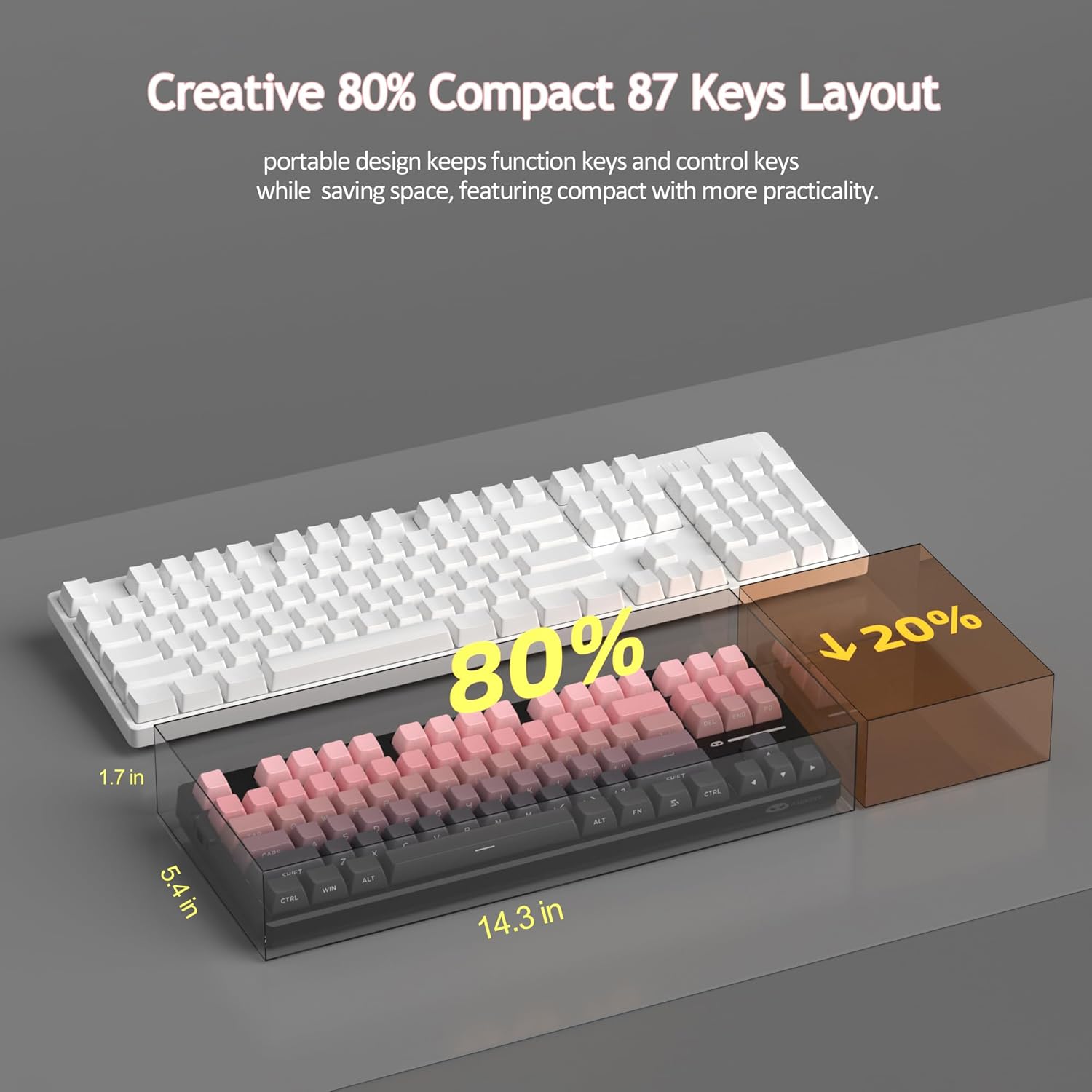
Figure 15: Comparison illustrating the compact 80% layout of the LIGHT87 keyboard compared to a full-size keyboard, highlighting space savings.

Figure 16: The MageGee LIGHT87 keyboard integrated into a desktop setup, demonstrating its use with a computer and monitor.
5. וישאַלט
5.1 רייניקן די קלאַוויאַטור
To maintain the performance and appearance of your keyboard, regular cleaning is recommended.
- אָפּשטעקן די קלאַוויאַטור פֿון אייער קאָמפּיוטער איידער איר רייניקט.
- ניצט אַ ווייכע באַרשט אָדער קאָמפּרעסירטע לופט צו באַזייַטיקן שטויב און דעבריס פון צווישן די קלאַוויאַטורן.
- For stubborn dirt, you can carefully remove keycaps using the provided keycap puller and clean the surface underneath with a slightly damp, lint-free cloth. Ensure the cloth is not dripping wet.
- Wipe the keycaps and keyboard surface with a dry, soft cloth.
- ניצט נישט קיין שטרענגע כעמיקאלן, שרײַבנדיקע רייניגער, און טונקט נישט אײַן די קלאַוויאַטור אין פליסיקייט.

Figure 17: Image showing keycaps being removed from the keyboard, useful for cleaning or switch replacement.
5.2 אַדזשאַסטירן קלאַוויאַטור ווינקל
The keyboard features adjustable feet to customize your typing angle for ergonomic comfort.

Figure 18: Image demonstrating the adjustable feet on the underside of the keyboard for tilt customization.

פיגור 19: זייט פּראָfile of the keyboard illustrating its ergonomic keycap profile פֿאַר באַקוועמען טייפּן.
6. טראָובלעשאָאָטינג
| פּראָבלעם | מעגלעך סיבה | לייזונג |
|---|---|---|
| Keyboard not responding in wired mode. | Loose cable connection, incorrect mode selected, faulty USB port. | Ensure USB-C cable is securely connected. Check if the keyboard switch is set to "2" (wired mode). Try a different USB port on your computer. |
| 2.4GHz wireless not connecting. | USB ריסיווער נישט אריינגעשטעקט, אומרעכטער מאָד, נידעריגע באַטעריע. | Ensure the 2.4GHz USB receiver is plugged in. Set the keyboard switch to "wifi" icon and press fn+4לאָדנט אויף די קלאַוויאַטור. |
| Bluetooth pairing failed or connection unstable. | Incorrect pairing procedure, interference, device Bluetooth issues, low battery. | Ensure keyboard switch is set to "BT". Press and hold Fn + 1/2/3 to re-enter pairing mode. Forget the device on your computer/device and re-pair. Move closer to the device. Charge the keyboard. Restart your device's Bluetooth. |
| באַקלייט אַרבעט נישט אָדער איז שטעקן געבליבן. | Backlight turned off, low battery, software glitch. | דרוק Fn + ↑ to increase brightness. Charge the keyboard. Try cycling through backlight modes with Fn + אַרייַן. |
| Certain keys not responding. | לויזער אדער דעפעקטיווער סוויטש, שמוץ אונטערן קאפ. | Remove the keycap and check for debris. If hot-swappable, try reseating the switch or replacing it with a known working switch. |
7. ספּעסאַפאַקיישאַנז
| שטריך | דעטאַל |
|---|---|
| מאָדעל | ליכט 87 |
| סאָרט | MageGee |
| קאַנעקטיוויטי | 2.4GHz ווירעלעס, בלועטוט 5.0, USB-C מיט ווייערס |
| אויסלייג | 87-key (80% TKL) |
| סוויטשיז | Hot-swappable (3-pin/5-pin compatible), Blue Whale Linear Switches |
| קייקאַפּס | Side-printed PBT |
| באַקלייט | 16.8 מיליאָן RGB |
| באַטאַרייע קאַפּאַציטעט | 8000 מאַה |
| Battery Life (RGB ON) | בעערעך. 53 שעה |
| Battery Life (RGB OFF) | בעערעך. 400 שעה |
| קאַמפּאַטאַבאַל דעוויסעס | פּיסי, לאַפּטאָפּ, טאַבלעט, סמאַרטפאָון, גיימינג קאַנסאָול |
| אַפּערייטינג סיסטעם שטיצן | Windows, macOS |
| אַנטי-גהאָסטינג | All 87 keys |
| דימענשאַנז (פּאַקאַץ) | 15.91 X 7.17 X 2.6 אינטשעס |
| פּונקט וואָג | 2.72 פונט |
8. וואָראַנטי און שטיצן
MageGee products are designed for reliability and performance. For warranty information and customer support, please refer to the official MageGee webזייטל אדער קאנטאקט דעם פארקויפער גלייך דורך אייער קויפן פלאטפארמע.
You can visit the official MageGee store on Amazon for more information and product updates: MageGee Amazon Store


