הקדמה
This manual provides essential information for the safe and efficient use of your Shark EVOPOWER SYSTEM NEOII+ LC551JBK Cordless Stick Vacuum Cleaner. Please read these instructions carefully before operating the appliance and retain them for future reference.
The Shark EVOPOWER SYSTEM NEOII+ LC551JBK is designed for powerful and effortless cleaning, featuring advanced sensor technology and an automatic dust collection system.

Image: The Shark EVOPOWER SYSTEM NEOII+ vacuum cleaner in use on both carpet and hard flooring, demonstrating its versatility.
סעטאַפּ
אַנפּאַקינג און אַסעמבאַל
- קערפאַלי באַזייַטיקן אַלע קאַמפּאָונאַנץ פון די פּאַקקאַגינג.
- Connect the main vacuum body to the extension wand until it clicks into place.
- Attach the Hybrid Power Clean head to the bottom of the extension wand.
- Place the assembled vacuum onto the automatic dust collection dock. Ensure it is securely seated.
טשאַרדזשינג די באַטאַרייע
- The vacuum comes with two lithium-ion batteries. Insert one battery into the vacuum body and the other into the charging slot on the automatic dust collection dock.
- Connect the power cord of the dock to a wall outlet. The battery indicator lights will illuminate during charging.
- Allow the battery to fully charge before first use. A full charge typically takes approximately 3.5 hours.

Image: The Shark EVOPOWER SYSTEM NEOII+ vacuum cleaner docked with its automatic dust collection station, ready for use or charging.
אַפּערייטינג ינסטראַקשאַנז
מאַכט אויף / אַוועק
- דריק דעם מאַכט קנעפּל וואָס געפינט זיך אויפן הענטל צו דרייען דעם וואַקוום אָן אָדער אויס.
Smart iQ Technology
The vacuum features Smart iQ Technology with three sensors to optimize cleaning:
- iQ Sensor: Automatically adjusts suction power based on the amount of debris detected. The iQ ring on the handheld unit changes color (green for low debris, yellow for medium, red for high) to indicate the cleaning intensity.
- שטאָק סענסאָר: Automatically adjusts brush roll speed according to the floor type (hardwood, carpet, tatami). On carpets, the brush speed increases to dislodge embedded dirt.
- Edge Sensor: Detects walls and edges, automatically boosting suction power up to 2.5 times to ensure thorough cleaning along borders.

Image: Visual representation of the iQ, Floor, and Edge sensors detecting debris, floor type, and wall proximity to optimize cleaning.
רייניקונג מאָדעס
- Smart iQ Mode: The default mode where the vacuum automatically adjusts suction and brush speed based on sensor input.
- בוסט מאָדע: Provides maximum suction for stubborn dirt. Activate by pressing the Boost button.
- עקאָ מאָדע: Offers extended runtime with reduced suction for lighter cleaning tasks. Activate by pressing the Eco button.

Image: A visual comparison demonstrating the vacuum's performance in Boost Mode for heavy debris and Eco Mode for general cleaning.
Using Attachments and Handheld Mode
- To convert to handheld mode, press the release button on the main body and detach it from the extension wand.
- Attach desired accessories (e.g., crevice tool, multi-tool, mini motorhead) directly to the handheld unit or the extension wand for specialized cleaning.
- The FLEX function allows the wand to bend, making it easy to clean under furniture without bending down.

Image: The vacuum cleaner's flexible wand allows easy access to clean under low-lying furniture.
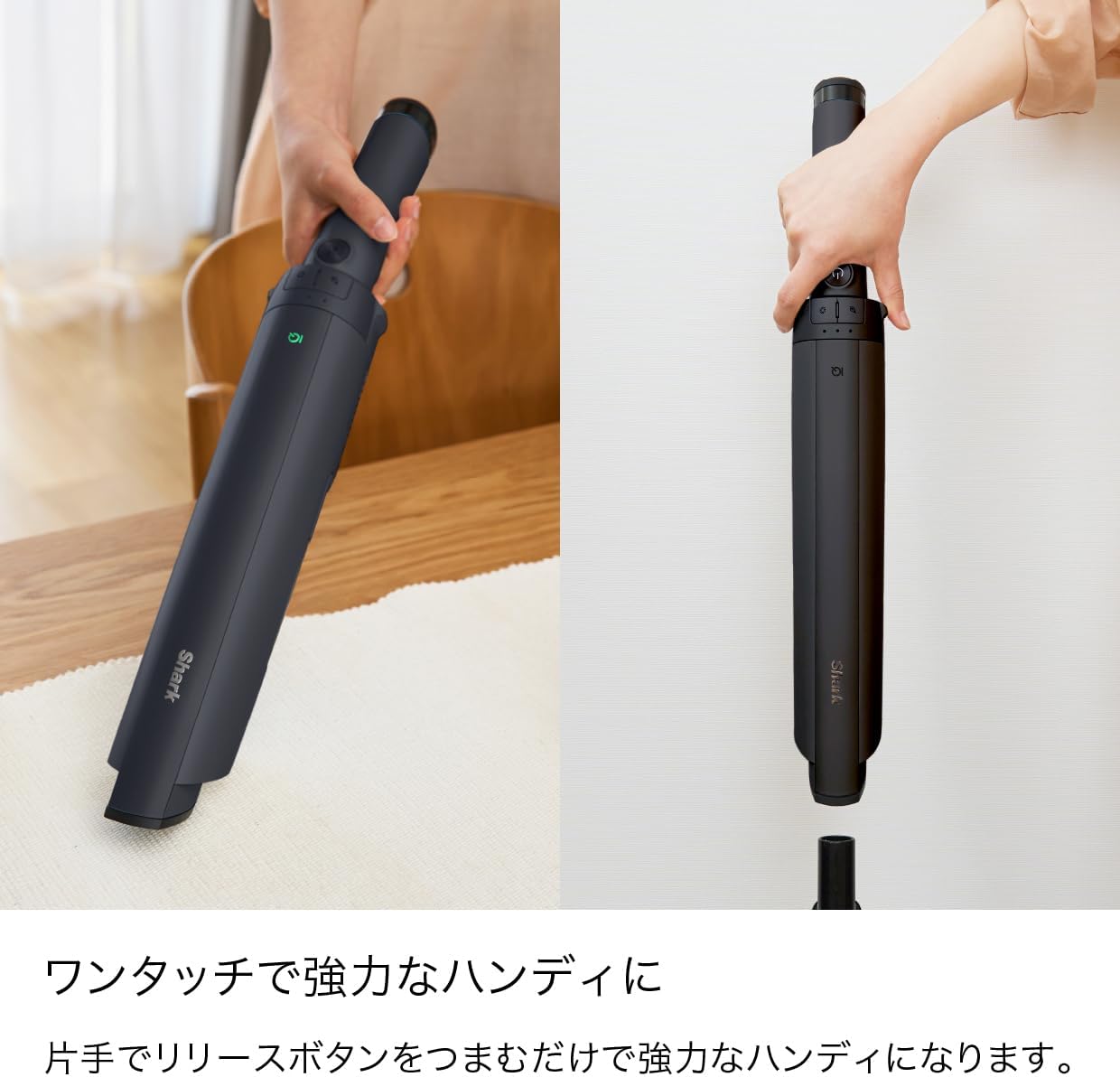
Image: A user demonstrating the one-touch conversion of the stick vacuum into a powerful handheld unit.

Image: The Shark vacuum being used in various settings, including floor cleaning, handheld spot cleaning, and reaching high areas with attachments.
וישאַלט
Automatic Dust Collection
- When the vacuum is returned to the automatic dust collection dock, debris is automatically transferred from the vacuum's dust cup to the dock's larger dust bin. This process also charges the vacuum.
- The dock's dust bin typically holds up to 30 days of debris, depending on usage and room size.
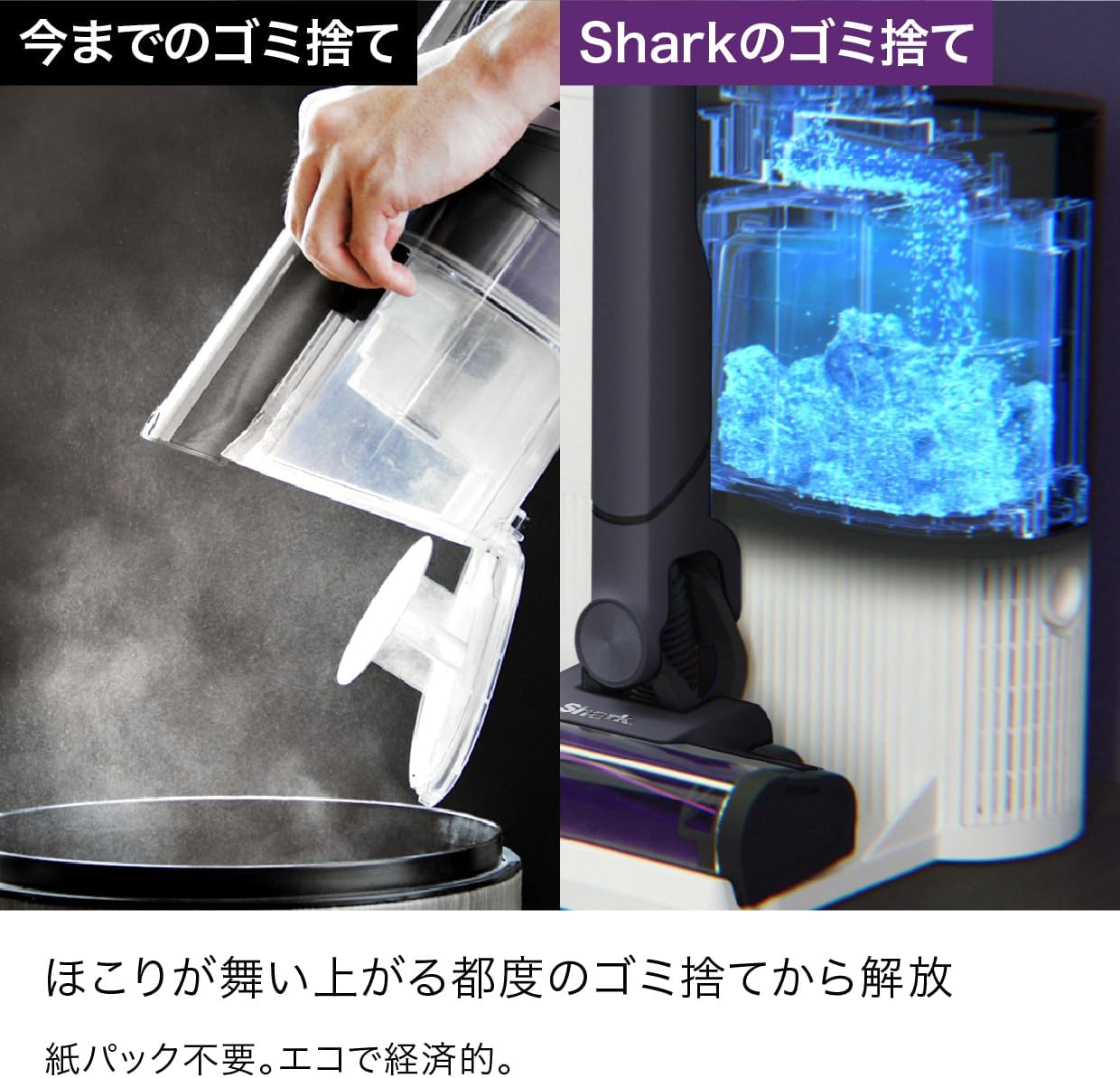
Image: A comparison showing the traditional method of manually emptying a dust cup versus the automatic, hands-free dust collection system of the Shark dock.
Emptying the Dust Cup (Manual)
- If not using the auto-empty dock, or for quick emptying, press the dust cup release button to detach it from the handheld unit.
- Hold the dust cup over a trash bin and press the release lever to open the bottom flap and empty debris.

Image: A hand demonstrating how to manually empty the vacuum's dust cup into a trash bin with a single touch.
רייניקונג די פילטער
- The filter is located inside the dust cup. Twist to remove it.
- Rinse the filter with cold water. Tap loose dirt off between washes.
- לאָזט דעם פילטער גאָר טרוקן ווערן אין דער לופט פֿאַר לפּחות 24 שעה איידער איר עס צוריק אַרײַנשטעלט. ניצט נישט קיין האָר־טריקענער אָדער אַנדערע הייצונג־מעטאָדן.

Image: Hands cleaning the vacuum's filter under running water, illustrating the simple maintenance process.
באַרשט ראָלל וישאַלט
- Regularly check the brush roll for hair wraps or debris.
- To access the brush roll, open the brush roll garage on the power head.
- Use scissors to carefully cut away any hair or string wrapped around the brush roll.
טראָובלעשאָאָטינג גייד
| פּראָבלעם | מעגלעך סיבה | לייזונג |
|---|---|---|
| וואַקוום נישט אויסגעדרייט אויף | באַטעריע נישט אויפגעלאָדן אָדער נישט ריכטיק אַרײַנגעשטעלט. | זיכער מאַכן אַז די באַטאַרייע איז גאָר אויפגעלאָדן און ריכטיק אַרײַנגעשטעלט. |
| נידעריק סאַקשאַן מאַכט | Dust cup full, filter clogged, or blockage in nozzle/hose. | Empty dust cup, clean filter, check for and remove blockages. |
| באַרשט זעמל נישט ספּיננינג | Obstruction in brush roll, or power head not properly connected. | Remove any obstructions from the brush roll. Ensure power head is securely attached. |
| Automatic dust collection not working | Vacuum not properly seated on dock, or dock's dust bin is full. | Ensure vacuum is correctly aligned on the dock. Empty the dock's dust bin. |
ספּעסאַפאַקיישאַנז
- סאָרט: הייַפיש
- מאָדעל נאָמען: LC551J
- מאָדעל נומער: LC551JBK
- פאַבריקאַנט: שאַרקנינדזשאַ
- קאָליר: Grape Black
- פאָרם פאַקטאָר: שטעקן
- קאָרדלעסס: יא
- באַטערי טיפּ: ליטהיום יאָן
- ליטהיום באַטערי פּאַק: Battery built-in
- באַטעריז פארלאנגט: יא
- באַטעריז אַרייַנגערעכנט: יא
- פּעקל דימענשאַנז: 55.6 X 42 X 28.9 סענטימעטער
- פּעקל וואָג: 8.93 קילאָגראַמס
וואָראַנטי אינפֿאָרמאַציע
ביטע זעט די וואָראַנטי קאַרטל וואָס איז אַרייַנגערעכנט מיט אייער פּראָדוקט פֿאַר דעטאַלירטע וואָראַנטי טערמינען און באַדינגונגען. האַלט אייער קויף קוויטל ווי אַ באַווייַז פון קויפן פֿאַר קיין וואָראַנטי קליימז.
קונה שטיצן
For further assistance, troubleshooting, or to order replacement parts, please visit the official SharkNinja webזייטל אדער קאנטאקטירן זייער קאסטומער סערוויס דעפארטמענט. קאנטאקט אינפארמאציע קען געווענליך געפונען ווערן אויף דער פראדוקט פאקאדזש אדער דעם פאבריקאנט'ס webפּלאַץ.


