1. הקדמה
The Gustard H26 is a high-performance, fully balanced discrete Class A headphone amplifier designed to deliver exceptional audio fidelity. It incorporates advanced features and robust construction to provide a superior listening experience for audiophiles.
שליסל פֿעיִקייטן:
- Fully balanced discrete Class A amplifier with 8 pairs of power tubes for powerful and controlled sound.
- Seamless switching of preamplifier output, allowing the device to function as a pure pre-stage רעזולטאַט.
- פאַר-סtage utilizes two direct-insert LME49720 dual op-amps.
- Matrix relay volume control for consistent and unbiased 4-way volume accuracy.
- Equipped with two custom 50W audio-specific toroidal transformers, one for each channel, ensuring minimal interference.
- Fully balanced input stage, enhancing clarity and richness for both balanced and single-ended RCA inputs.
2. זיכערקייַט אינפֿאָרמאַציע
Please read and follow these safety guidelines to ensure safe operation and to prevent damage to the device or injury to yourself.
- שטעלט נישט אויס דעם אַפּאַראַט צו רעגן, פייכטקייט, אדער עקסטרעמע טעמפּעראַטורן.
- ענשור געהעריק ווענטאַליישאַן אַרום די ampליפיער צו פאַרמייַדן אָוווערכיטינג.
- נישט עפענען דעם סיasinג; רעפֿערירט אַלע סערוויסינג צו קוואַליפֿיצירטע פּערסאָנעל.
- Use only the specified power adapter and cables.
- Disconnect power before cleaning or moving the unit.
3. פּעקל אינהאַלט
באַשטעטיקן אַז אַלע זאכן זענען פאַראַן אין פּעקל:
- Gustard H26 Headphone Ampליפער
- מאַכט שנור
- ווייַט קאָנטראָל
- באַניצער מאַנואַל (דעם דאָקומענט)
4. פּראָדוקט איבערview
4.1 פראָנט פּאַנעל
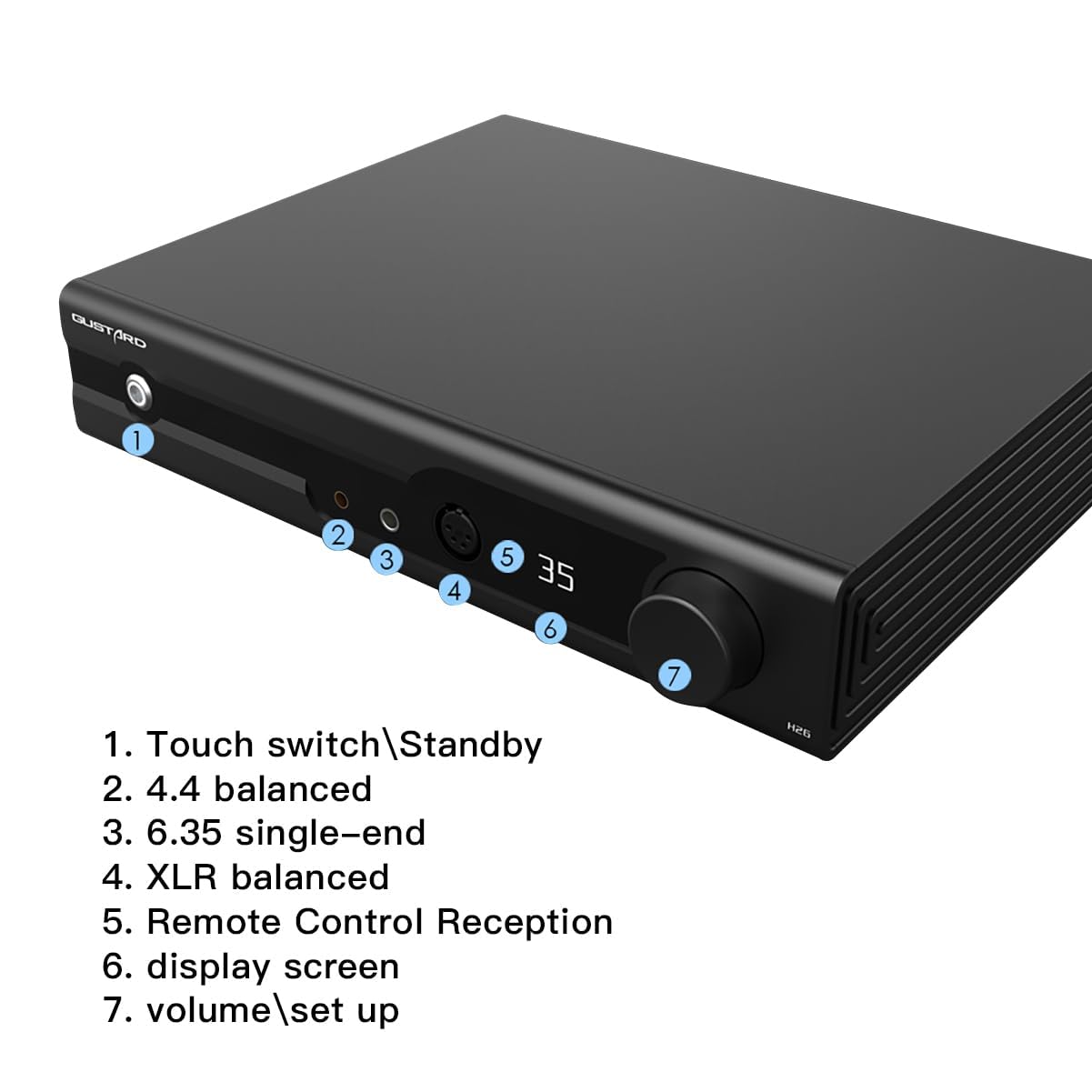
The front panel provides access to essential controls and headphone outputs.
- Touch Switch/Standby: Power on/off or place the unit in standby mode.
- 4.4 Balanced Output: Headphone output for 4.4mm balanced connectors.
- 6.35 Single-End Output: Headphone output for 6.35mm single-ended connectors.
- XLR באַלאַנסירטע אַרויסגאַנג: Headphone output for 4-Pin XLR balanced connectors.
- Remote Control Reception: ינפרערעד ופנעמער פֿאַר די ווייַט קאָנטראָל.
- ווייַז פאַרשטעלן: Shows current settings such as volume, input, and gain.
- Volume/Setup Knob: Adjusts volume and navigates setup menus.
4.2 דערציען פּאַנעל

The rear panel houses all input and output connections, along with power controls.
- Balanced Input XLR 1 & 2 (Left/Right): For balanced audio sources.
- Single Input RCA (Left/Right): For single-ended audio sources.
- Preamp Output XLR (Left/Right): באַלאַנסט פאַרampליבער רעזולטאַט.
- Preamp Output RCA (Left/Right): איין-געענדיקט פאַרampליבער רעזולטאַט.
- Voltage סעלעקציע: Switch to select appropriate input voltage (e.g., 115V/230V).
- אַק מאַכט אַרייַנשרייַב: פֿאַרבינדט דאָ דעם עלעקטרישן שנור.
- מאַכט סוויטש: Main power toggle for the unit.
- קאָריק Replaceable fuse for electrical protection.
4.3 אינערלעכע קאָמפּאָנענטן
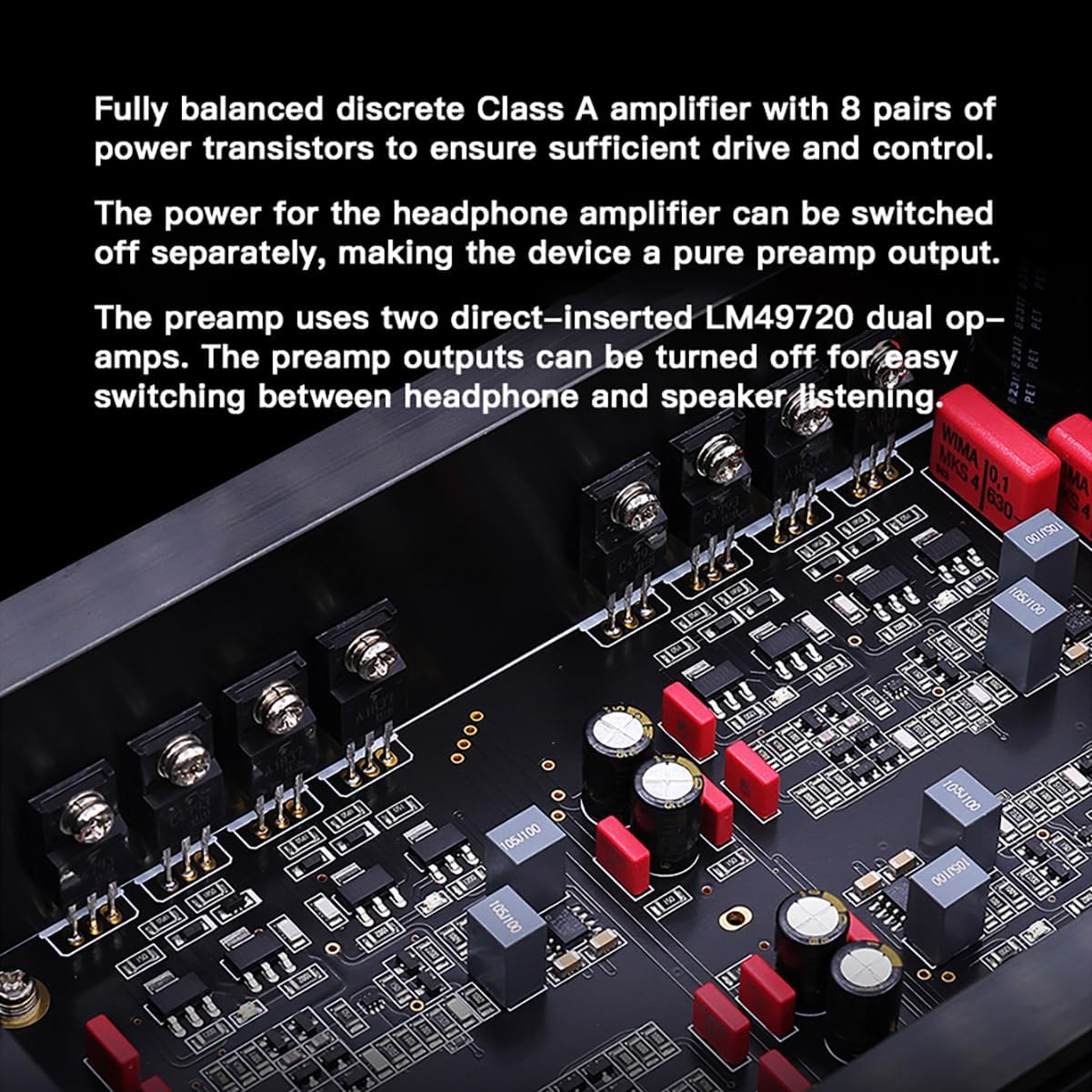
The Gustard H26 features a fully balanced discrete Class A amplifier design, utilizing 8 pairs of power transistors to ensure robust driving capability and precise control. The use of discrete components allows for fine-tuning of each stage, optimizing performance. The pre-stage incorporates two LME49720 dual op-amps.
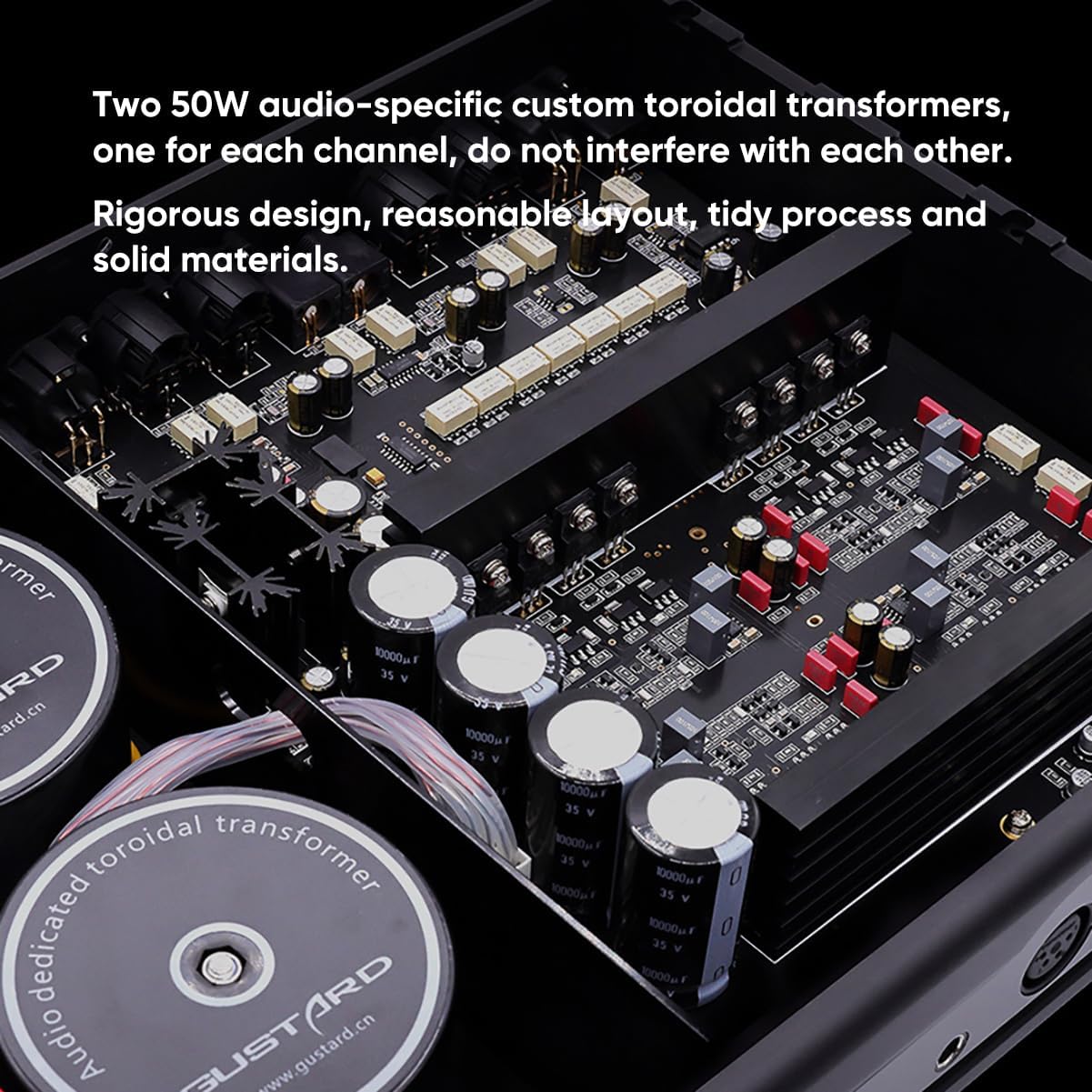
The power supply section is equipped with two custom 50W audio-specific toroidal transformers, one dedicated to each channel. This design minimizes cross-channel interference and ensures stable power delivery. Multiple low-noise regulators and Nichicon capacitors contribute to the unit's clean power and overall audio quality.
4.4 דימענשאַנז
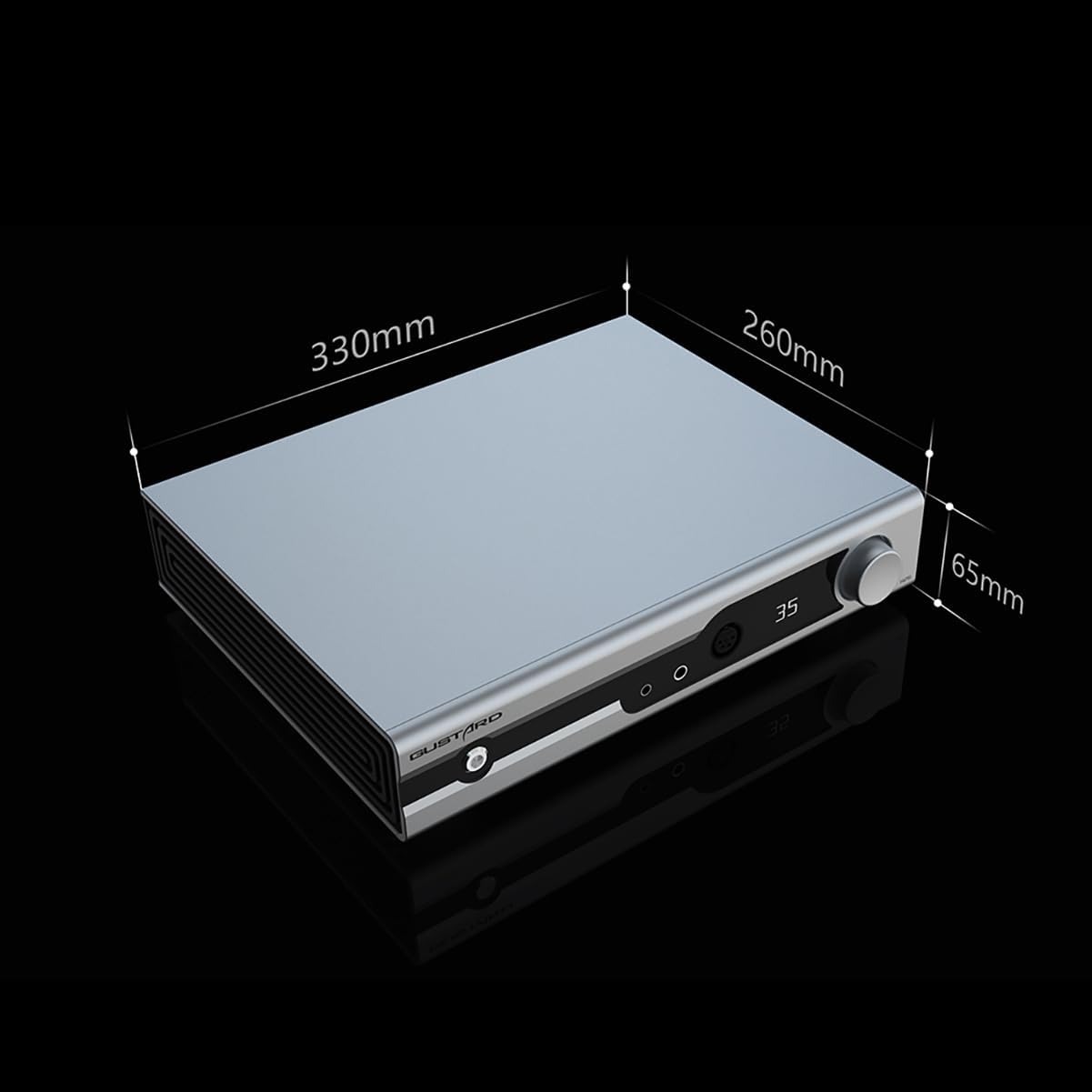
The physical dimensions of the Gustard H26 are approximately 330mm (width) x 260mm (depth) x 65mm (height).
5. סעטאַפּ
5.1 קאַנעקטינג מאַכט
- זיכער מאַכן אַז דער הויפּט מאַכט קנעפל אויף דער הינטערשטער פּאַנעל איז אין דער אויסגעלאָשן פּאָזיציע.
- באַשטעטיקן די וואַלtage selection switch on the rear panel matches your local power supply (e.g., 115V or 230V).
- Connect the provided power cord to the AC Power Input on the rear panel and then to a suitable wall outlet.
5.2 פֿאַרבינדן אַודיאָ קוועלער
The H26 supports both balanced (XLR) and single-ended (RCA) audio inputs.
- For Balanced Sources: Connect your audio source's balanced outputs to the XLR 1 or XLR 2 inputs on the rear panel.
- For Single-Ended Sources: Connect your audio source's RCA outputs to the RCA inputs on the rear panel.
5.3 קאַנעקטינג כעדפאָונז
The H26 offers multiple headphone output options on the front panel.
- 4.4mm Balanced: For headphones with a 4.4mm balanced connector.
- 6.35mm Single-Ended: For headphones with a standard 6.35mm (1/4 inch) single-ended connector.
- 4-Pin XLR Balanced: For headphones with a 4-pin XLR balanced connector.
5.4 פאַרampהעכער רעזולטאַט
The H26 can also function as a preamplifier. Connect the XLR or RCA Preamp Outputs on the rear panel to your power amplifier or active speakers. The headphone amplifier section can be turned off separately when using the preampליבער רעזולטאַט.
6. אָפּעראַציע
6.1 מאַכט אויף / אַוועק
- Flip the main power switch on the rear panel to the ON position.
- Press the front panel Touch Switch (1) to power on the unit from standby, or to put it back into standby.
6.2 באַנד קאָנטראָל
Rotate the Volume/Setup Knob (7) on the front panel clockwise to increase volume and counter-clockwise to decrease volume. The matrix relay volume control ensures precise and balanced adjustments across all channels.
6.3 אַרייַנשרייַב סעלעקציע
Single press the Volume/Setup Knob (7) to cycle through available input sources (XLR 1, XLR 2, RCA). The selected input will be shown on the Display Screen (6).
6.4 Gain Level Adjustment
Long press the Volume/Setup Knob (7) to switch between low and high gain levels. This allows for optimal matching with various headphones and In-Ear Monitors (IEMs).
6.5 Quiescent Current Adjustment
Double press the Volume/Setup Knob (7) to toggle between 50mA and 100mA quiescent current settings. This feature allows for fine-tuning the Class A operation.
6.6 ניצן די רימאָוט קאָנטראָל

The included remote control provides convenient access to all primary functions from a distance.
6.7 אפעראציאנעלע דעמאנסטראציע ווידעא
This video demonstrates the operational controls, including volume adjustment, input selection, gain level, and quiescent current settings. While the video features a similar product (Aune S17 Pro), the control principles and functions are analogous to the Gustard H26.
7. וישאַלט
7.1 רייניקונג
To clean the unit, disconnect it from the power source. Use a soft, dry cloth to wipe the exterior surfaces. Avoid using abrasive cleaners, solvents, or chemical sprays, as these can damage the finish.
7.2 סטאָרידזש
ווען נישט אין באַנוץ פֿאַר לענגערע צייטן, זאָל מען עס אַוועקלייגן amplifier in a cool, dry place, away from direct sunlight and excessive dust. It is recommended to keep the original packaging for protection during storage or transport.
8. טראָובלעשאָאָטינג
If you encounter issues with your Gustard H26, refer to the following common problems and solutions:
- קיין מאַכט: Ensure the power cord is securely connected to both the unit and the wall outlet. Check the rear panel power switch and the front panel touch switch. Verify the voltagדער אויסוואל-קנעפל איז ריכטיק איינגעשטעלט.
- קיין קול: Confirm that the correct input source is selected. Check all audio cable connections (source to ampליפער, amplifier to headphones/speakers). Ensure headphone cables are fully inserted. Adjust the volume level.
- פאַרקרימט סאָונד: Check audio cable integrity. Ensure the input source is not overdriving the amplifier. Try adjusting the gain level to match your headphones.
- רימאָוט קאָנטראָל נישט ארבעטן: Check the batteries in the remote control. Ensure there are no obstructions between the remote and the unit's remote reception window.
אויב די פראבלעם בלייבט נאך פרובירן די לייזונגען, ביטע קאנטאקטירט קאסטומער סופארט.
9. ספּעסאַפאַקיישאַנז
- מאָדעל נומער:
- H26
- סאָרט:
- גאסטארד
- קאַנעקטער טיפּ:
- RCA, XLR
- רעזולטאַט וואָסtage:
- 50 וואטס
- מאַכט מקור:
- קאָרדעד עלעקטריק
- קאָליר:
- שוואַרץ
- נומער פון בענדס:
- 4
10. וואָראַנטי און שטיצן
10.1 וואָראַנטי אינפֿאָרמאַציע
All Gustard products purchased from authorized retailers are covered by a warranty. The standard warranty period is 1 year or more from the date of purchase, depending on the specific product and regional regulations. Please retain your proof of purchase for warranty claims.
10.2 קונה שטיצן
For technical assistance, troubleshooting, or warranty inquiries, please contact your retailer or the manufacturer's customer service. Support is typically available online, and inquiries are addressed promptly.


