הקדמה
This manual provides detailed instructions for the QCOQ T60 Smart Watch. It covers setup, operation, maintenance, and troubleshooting to ensure optimal use of your device. The QCOQ T60 Smart Watch features a 1.91-inch display, Bluetooth call functionality, heart rate monitoring, and IP68 water resistance.
פּעקל אינהאַלט
ביטע טשעק די פּאַקעט פֿאַר די פאלגענדע זאכן:
- QCOQ T60 Smart Watch (1 unit)
- טשאַרדזשינג קאַבלע
- באַניצער מאַנואַל
סעטאַפּ
1. טשאַרדזשינג די מיטל
Before first use, fully charge the smart watch. Connect the magnetic charging cable to the charging contacts on the back of the watch and plug the USB end into a standard USB power adapter (not included).

Image: The QCOQ T60 Smart Watch connected to its magnetic charging cable, illustrating the charging process. The watch display shows an 80% battery level, indicating partial charge.
- טשאַרדזשינג צייט: בערך 2 שעה פֿאַר אַ פולע טשאַרדזשינג.
- Battery Life: Up to 7 days of typical usage on a full charge.
2. אַפּ אינסטאַלאַציע און פּערינג
To utilize all features of your QCOQ T60 Smart Watch, download and install the companion application on your smartphone.
- Scan the QR code provided in the quick start guide or search for the app name (usually indicated in the watch's initial setup screen or manual) in your smartphone's app store (App Store for iOS, Google Play Store for Android).
- מאַכן זיכער אַז בלועטאָאָטה איז ענייבאַלד אויף דיין סמאַרטפאָנע.
- Open the installed app and follow the on-screen instructions to create an account or log in.
- Within the app, navigate to the device pairing section and select your QCOQ T60 Smart Watch from the list of available devices.
- באַשטעטיקט די פּאָרינג בקשה אויף ביידע אייער סמאַרטפאָון און די סמאַרטוואַטש.
אַפּערייטינג ינסטראַקשאַנז
1. יקערדיק נאַוויגאַציע
The QCOQ T60 Smart Watch features a touchscreen display and a side button for navigation.
- שלעפּן אַרויף / אַראָפּ: סקראל דורך מעניוז און נאָוטאַפאַקיישאַנז.
- שלעפּן לינקס / רעכט: צוטריט צו שנעלע פונקציעס אדער פארשידענע ווידזשעטס.
- צאַפּן: אויסקלייבן אַן אייטעם אָדער באַשטעטיקן אַן אַקציע.
- זייַט קנעפּל: דריקן צו צוריקקומען צום היים־עקראַן אדער אויפוועקן דעם דעווייס. לאנג דריקן פאר מאַכט־אָפּציעס.
2. בלועטוט רוף פונקציאָנאַליטעט
Once paired with your smartphone, the QCOQ T60 Smart Watch allows you to make and answer calls directly from your wrist.
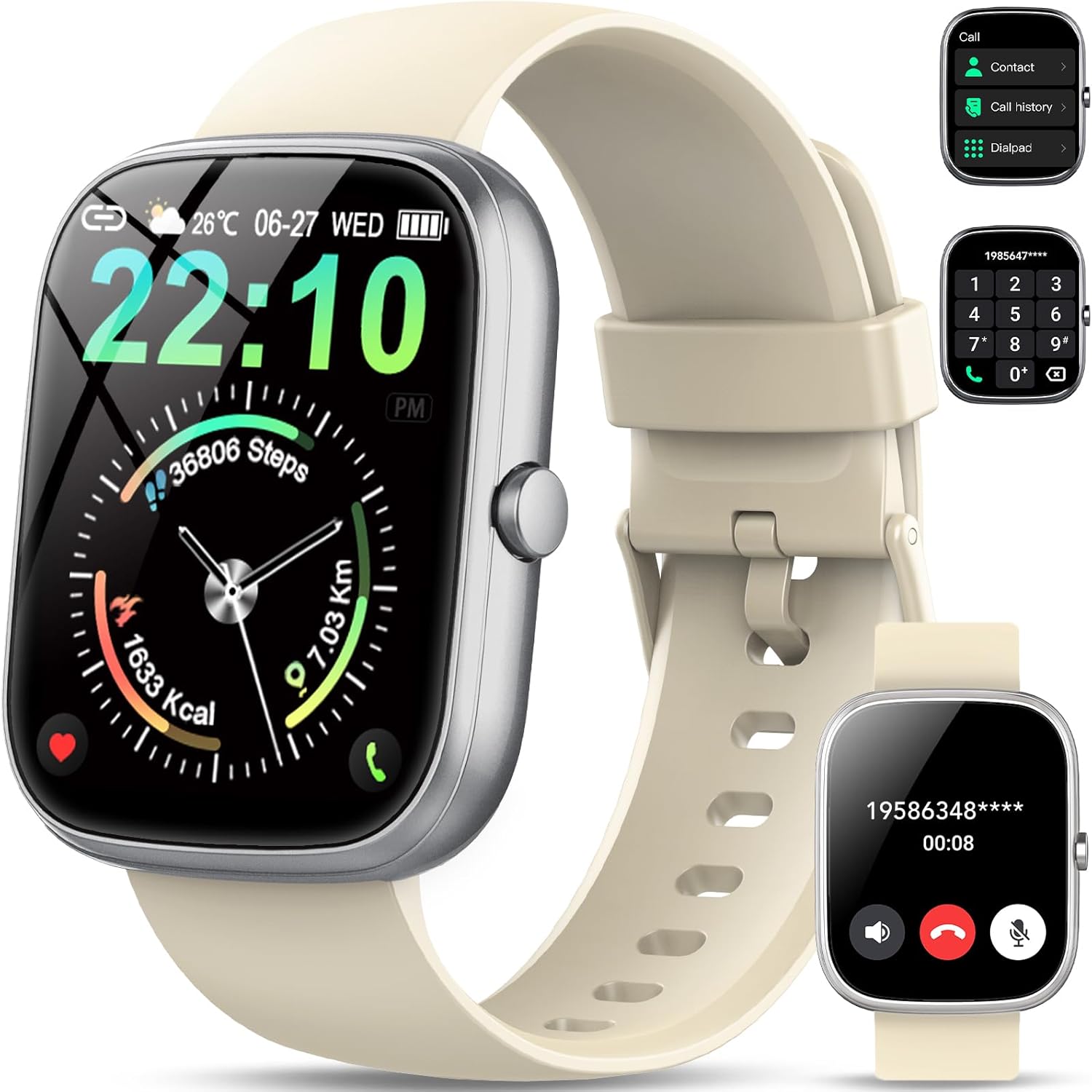
Image: The QCOQ T60 Smart Watch screen showing the call interface, including options to access contacts, view call history, and use a dialpad. A separate inset shows an incoming call notification.
- ענטפֿערן קאַללס: When an incoming call is received, tap the green answer icon on the watch screen.
- מאַכן קאַללס: Access the 'Call' menu on the watch, then select from contacts, call history, or use the dialpad to enter a number.
3. נאָוטאַפאַקיישאַנז
באַקומען נאָוטאַפאַקיישאַנז פון דיין סמאַרטפאָון גלייך אויף דיין זייגער.

Image: The QCOQ T60 Smart Watch screen showing notifications from various social media and messaging applications. Adjacent to it, a smartphone displays an incoming call, demonstrating the watch's Bluetooth call feature.
- זיכער מאַכן אַז אָנזאָג פּערמישאַנז זענען ענייבאַלד פֿאַר דער באַגלייטער אַפּ אויף דיין סמאַרטפאָון.
- סווייפּ אַראָפּ פֿון דער שפּיץ פֿון דער זייגער־פּנים צו view לעצטע מעלדונגען.
4. פיטנעס טראַקינג
The QCOQ T60 Smart Watch monitors various fitness metrics.

Image: A visual representation of the QCOQ T60 Smart Watch's fitness capabilities, highlighting over 110 sport modes, step counting, calorie expenditure tracking, IP68 water resistance, and comprehensive daily activity data.
- האַרץ קורס מאָניטאָרינג: The watch provides real-time heart rate data. Access the heart rate function on the watch or through the app.
- Step Count & Calories: Tracks your daily steps, distance, and estimated calories burned.
- ספּאָרט מאָדעס: Select from over 110 sport modes to track specific activities.
5. שלאָפן מאָניטאָרינג
The watch automatically monitors your sleep patterns.

Image: The QCOQ T60 Smart Watch screen showing detailed sleep monitoring data, including deep, light, and awake sleep stages. Another section displays a 7-day weather forecast.
- Wear the watch while sleeping for accurate data.
- View detailed sleep analysis in the companion app, including deep sleep, light sleep, and awake times.
6. אנדערע פֿעיִקייטן
- וועטער פאָרעקאַסט: View current weather and a 7-day forecast.
- מוזיק קאָנטראָל: קאָנטראָלירט מוזיק ווידערשפּיל אויף אייער סמאַרטפאָון (שפּילן, פּויזירן, איבערשפּרינגען טראַקס).
- קאַמעראַ רימאָוט: ניצט די זייגער ווי אַ ווייַט לאָדן פֿאַר דיין סמאַרטפאָון קאַמעראַ.
- שטימע אַססיסטאַנט: Access your smartphone's voice assistant.
- זיציק דערמאָנונג: באַקומען וואָרענונגען צו רירן זיך נאָך פּעריאָדן פון אינאַקטיוויטעט.
- שרעק: שטעלט אַלאַרמס גלייך פֿון דער זייגער.
- מאָניטאָרינג פון בלוט זויערשטאָף: מעסט אייערע בלוט זויערשטאָף לעוועלס.
- פרויען געזונט: Track menstrual cycles and related data.
- קאַלקולאַטאָר: גרונטלעכע קאַלקולאַטאָר פונקציע.
7. קאַסטאַמייזן זייגער פּנים
פערזענליכשטעלן אייער זייגער מיט פארשידענע זייגער פנימער.

Image: A collage of various watch faces available for the QCOQ T60 Smart Watch, demonstrating the range of styles and information displays, including options for personalized backgrounds.
- Long press on the current watch face to enter the watch face selection menu.
- Swipe left or right to browse available watch faces. Tap to select.
- More watch faces and customization options (including custom backgrounds) are available through the companion app.
וישאַלט
1. רייניקונג
- ווישט ווי דעם זייגער-עקראַן און קערפּער מיט אַ ווייכן, לינט-פֿרייע שטאָף.
- For the strap, use a mild soap and water solution if necessary, then rinse thoroughly and dry completely before wearing.
- ויסמיידן ניצן האַרב קעמיקאַלז אָדער אַברייסיוו מאַטעריאַלס.
2. וואַסער קעגנשטעל (IP68)
The QCOQ T60 Smart Watch is IP68 rated, meaning it is resistant to dust and can withstand immersion in water up to 1.5 meters for up to 30 minutes. It is suitable for daily use, such as hand washing or light rain.
- Do not use the watch for diving, hot showers, saunas, or in environments with high-pressure water.
- וואַסער קעגנשטעל איז נישט אַ שטענדיקע צושטאַנד און קען פאַרמינערן זיך מיט דער צייט מיט נאָרמאַלער טראָגן און טרער.
3. באַטערי קער
- פֿאַרמײַדן עקסטרעמע טעמפּעראַטורן, וואָס קענען פֿאַרערגערן די באַטאַריע־פּערפאָרמאַנס.
- Charge the watch regularly; avoid letting the battery completely drain for extended periods.
טראָובלעשאָאָטינג
- זייגער טוט זיך נישט אן: זיכער מאַכן אַז די זייגער איז גאָר אויפגעלאָדן. פֿאַרבינדט עס צום טשאַרדזשער פֿאַר לפּחות 10 מינוט.
- קען נישט צוזאמענשטעלן מיט סמאַרטפאָון:
- זיכער מאַכן אַז בלועטוט איז ענייבאַלד אויף דיין טעלעפאָן און די זייגער.
- זייט זיכער אז די זייגער איז אין דער דערגרייכונג פון אייער טעלעפאָן.
- ריסטאַרט ביידע די זייגער און דיין טעלעפאָן.
- Check if the companion app has necessary permissions.
- מעלדונגען נישט באקומען:
- Verify that notifications are enabled in the watch's settings and the companion app.
- זיכער מאַכן אַז די זייגער איז ריכטיק פארבונדן דורך בלועטוט.
- Check your phone's notification settings for the app.
- Inaccurate heart rate/activity data: זייט זיכער אז די זייגער טראָגט זיך גוט אויף אייער האַנטגעלענק, נישט צו ענג אדער צו לויז. רייניקט דעם סענסאָר רעגולער.
ספּעסאַפאַקיישאַנז
| שטריך | באַשרייַבונג |
|---|---|
| סאָרט | קיוקאָק |
| מאָדעל | T60 |
| ווייַז גרייס | 1.91 אינטשעס |
| ווייַז טעכנאָלאָגיע | לקד |
| האַכלאָטע | 240 X 240 |
| קאַנעקטיוויטי | בלועטאָאָטה |
| קאַמפּאַטאַבאַל דעוויסעס | סמאַרטפאָנע |
| וואַסער קעגנשטעל | IP68 |
| ספּעציעלע פֿעיִקייטן | Heart Rate Monitor, Notifications, Camera Remote, Voice Assistant |
| מענטש צובינד אַרייַנשרייַב | טאָוטשסקרעען |
| גפּס | קיין גפּס |
| באַטערי טיפּ | ליטיום יאָן (1 פארלאנגט) |
| דימענסיעס (פּאַקעט) | 17.4 X 9.4 X 1.8 סענטימעטער |
| וואָג (פּאַקעט) | 38.19 ג |
| קאָליר | קרימי ווייסע |
זיכערקייַט אינפֿאָרמאַציע
- Consult your doctor before starting any new exercise regimen or if you have pre-existing health conditions.
- דו זאלסט נישט פּרווון צו דיסאַסעמבאַל אָדער מאָדיפיצירן די וואַך.
- האַלט דעם אַפּאַראַט אַוועק פון עקסטרעמע היץ אָדער קעלט.
- אַוועקוואַרפן דעם אַפּאַראַט און זײַן באַטאַרייע לויט די לאָקאַלע רעגולאַציעס.
וואָראַנטי און שטיצן
For warranty information and customer support, please refer to the documentation included with your purchase or visit the official QCOQ website. Ensure you have your purchase receipt and product model number (T60) available when contacting support.


