1. הקדמה
The DEWENWILS Remote Control Outlet with Magnetic Base provides a convenient solution for wirelessly controlling various household appliances. This system includes a plug-in outlet receiver and a remote control transmitter, designed for ease of use and flexible placement.
2. זיכערקייַט אינפֿאָרמאַציע
- נאָר פֿאַר אינעווייניקסטן באַנוץ. נישט אויסשטעלן צו רעגן אָדער פֿײַכטקייט.
- Do not exceed the maximum load ratings: 125V, 60Hz, 15A, 1875W. Overloading may cause overheating and fire.
- Ensure the appliance connected to the outlet is in good working condition.
- נעמט נישט אויס אדער מאדיפיצירט נישט דאס אפאראט. לאָזט איבער אלע סערוויסעס צו קוואַליפֿיצירטע פּערסאָנעל.
- האַלטן אויס פון דערגרייכן פון קינדער.
3. פּעקל אינהאַלט
- 1 x Remote Control Outlet Receiver
- 1 x Remote Control Transmitter with Magnetic Base
- מאָנטירונג האַרדווער (שרויף און אַנקערס)
- CR2032 Battery (pre-installed in remote)
4. פּראָדוקט פֿעיִקייטן
- ברייט קאַמפּאַטאַבילאַטי: Suitable for controlling indoor lights, fans, chargers, and other hard-to-reach appliances.
- פּלאַג און שפּיל אָפּעראַציע: No programming or tools required for initial use.
- סאָליד פּלאַן: The wireless outlet occupies only one wall socket, leaving adjacent outlets free.
- Strong RF Signal: Operates through walls and doors with a range of up to 100 feet.
- מאַגנעטיק באַזע: The remote control features a magnetic base for easy attachment to metallic surfaces or the included mounting bracket.
- קיין ינטערפיראַנס: Advanced technology prevents interference with other RF remote systems.
- יקספּאַנדאַבאַל סיסטעם: Allows for the addition of more DEWENWILS outlet switches to customize your control system.
- Reliable Power Capacity: Rated for 125V, 60Hz, 15A, 1875W, compatible with most household appliances.

Figure 1: Remote control in fixed mode (mounted) and portable mode (handheld).

Figure 2: Illustration of the 100-foot RF signal range through walls and doors.

Figure 3: Maximum wattage and current capacity with examples of compatible appliances.
5. סעטאַפּ
- Install the Outlet Receiver: Plug the DEWENWILS remote control outlet into any standard 125V wall receptacle.
- קאָננעקט אַפּפּליאַנסע: שטעק אריין אייער געוואונטשענע אפאראט (למשל, לamp, fan) into the side outlet of the DEWENWILS receiver.
- צוגרייטן ווײַטקאָנטראָל: The CR2032 battery is pre-installed in the remote. Remove any plastic insulation tab if present to activate the battery.
- Mounting the Remote (Optional):
- The remote can be attached to any metallic surface using its magnetic back.
- Alternatively, use the included mounting bracket and hardware to secure the remote to a wall. First, screw the bracket to the desired location, then magnetically attach the remote to the bracket.
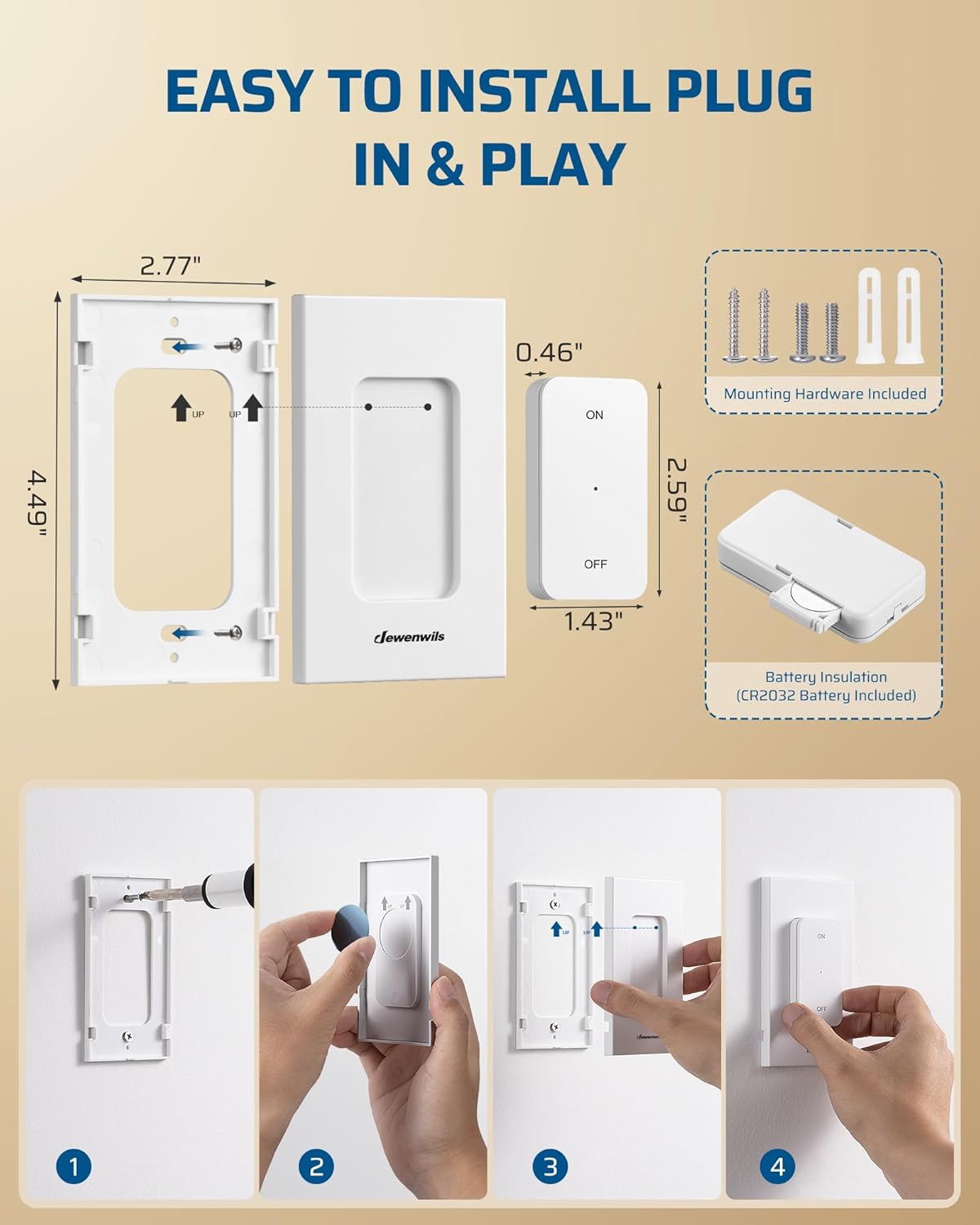
Figure 4: Installation steps for the remote control's magnetic base.
6. אַפּערייטינג ינסטרוקטיאָנס
The DEWENWILS Remote Control Outlet is pre-programmed for immediate use. No pairing is required for initial operation.
- ניצן די רימאָוט קאָנטראָל:
- דריק דעם "ON" קנעפּל אויף דער ווײַטקאָנטראָל צו צינדן אָן דעם פֿאַרבונדענעם אַפּאַראַט.
- דריק דעם "OFF" קנעפּל אויף דער ווײַטקאָנטראָל צו אויסלעשן דעם פֿאַרבונדענעם אַפּאַראַט.
- Using the Manual Switch on the Outlet:
- The outlet receiver has a manual ON/OFF button. Press this button to toggle the power to the connected appliance directly at the outlet.
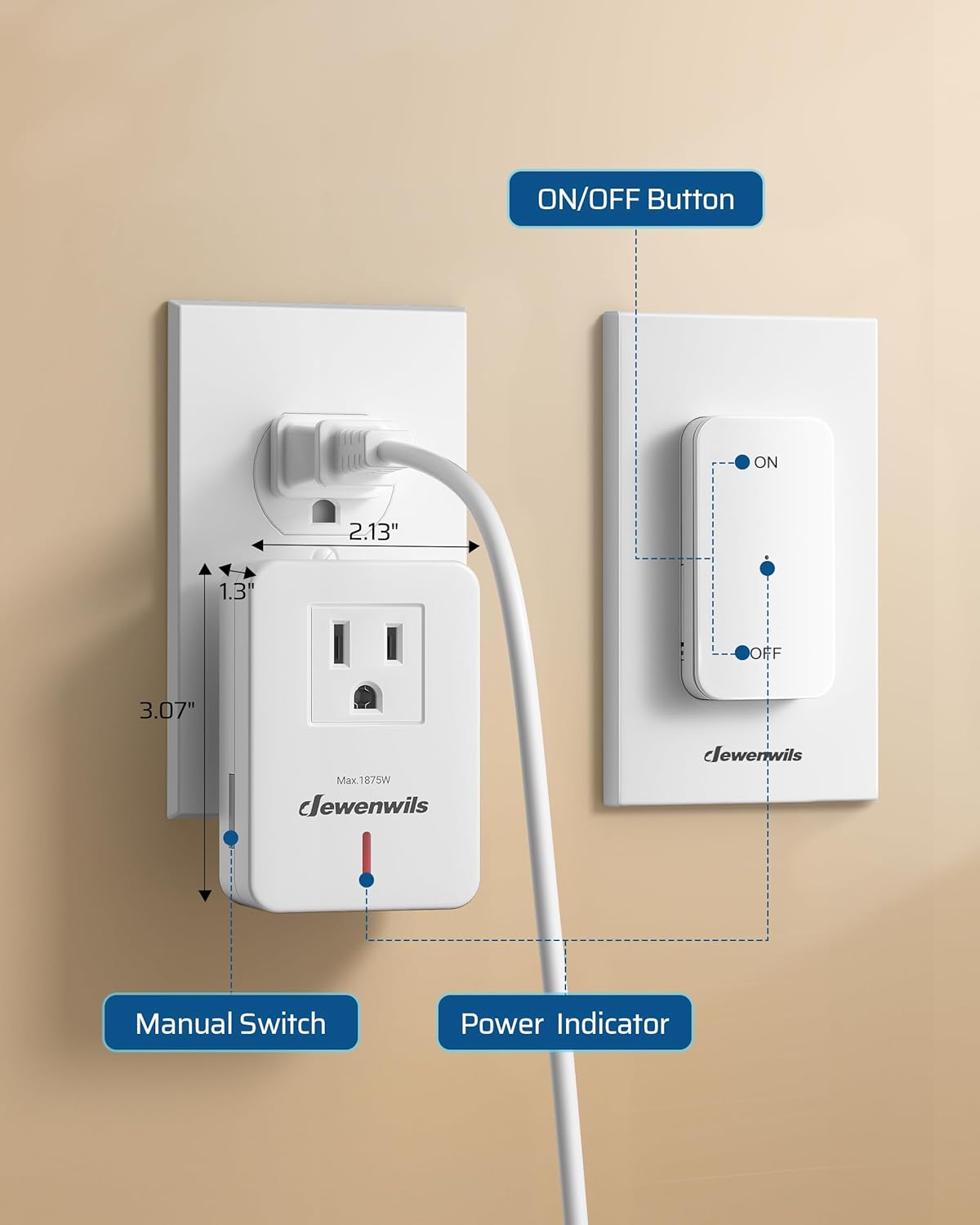
Figure 5: Remote control and outlet receiver components.
7. וישאַלט
- רייניקט דעם אַפּאַראַט מיט אַ טרוקענעם, ווייכן שטאָף. ניצט נישט קיין שרײַבנדיקע רייניגערס אדער סאָלווענטן.
- If the remote control's range decreases or it stops responding, replace the CR2032 battery.
- האַלט דעם אַפּאַראַט אין אַ קיל, טרוקן אָרט ווען נישט אין באַנוץ פֿאַר לענגערע פּעריאָדן.
8. טראָובלעשאָאָטינג
- אַפּאַראַט טוט זיך נישט אָנצינדן/אויסלעשן:
- Ensure the outlet receiver is securely plugged into a live wall socket.
- Verify the appliance is properly plugged into the receiver and is switched ON if it has its own power switch.
- קאָנטראָלירט די באַטאַרייע אין דער ווײַטקאָנטראָל און פֿאַרבײַט זי אויב נייטיק.
- Ensure the remote control is within the 100-foot operating range and there are no excessive obstructions.
- Confirm the appliance's power consumption does not exceed the 1875W/15A limit.
- ווײַטקאָנטראָל רעאַגירט נישט:
- פאַרבייַטן די CR2032 באַטאַרייע אין די ווייַט.
- If the remote was dropped or damaged, it might require replacement.
9. ספּעסאַפאַקיישאַנז

Figure 6: Key product specifications.
| באַשרייַבונג | ווערט |
|---|---|
| מאָדעל נומער | BH9912U-15A+BH-23A |
| אָפּעראַציע מאָדע | אויף-אַוועק-אויף |
| קראַנט רייטינג | 15 Amps |
| אַפּערייטינג וואָלtage | 125 וואלטס |
| קאַנעקטער טיפּ | צאַפּן אין |
| נומער דימענשאַנז (L X W X H) | 2.77 X 2.77 X 4.51 אינטשעס |
| מאַונטינג טיפּ | Wall Mount (for remote) |
| קאָנטראָל מעטאָד | ווייַט |
| קאַנעקטיוויטי פּראָטאָקאָל | RF |
| וואָסtage | 1875 וואטס |
| באַטאַרייע (ווייַטקייט) | 1 ליטיום מעטאַל (CR2032) |
10. וואָראַנטי און שטיצן
For warranty information or technical support, please refer to the product packaging or contact DEWENWILS customer service directly. Contact details can typically be found on the manufacturer's official webזייטל אדער דורך אייער קויפן פּלאַטפאָרמע.