הקדמה
א דאנק פארן קויפןasing the WIITHINK WTB-777 Portable Cassette Player and Recorder. This versatile device combines the classic charm of a cassette player and recorder with modern features such as Bluetooth connectivity, USB playback, and AM/FM radio. Designed for ease of use and portability, it allows you to enjoy your favorite audio content wherever you go. Please read this manual thoroughly before operating the device to ensure proper use and to maximize its lifespan.

Figure 1: WIITHINK WTB-777 Portable Cassette Player and Recorder
פּראָדוקט איבערview
The WIITHINK WTB-777 is an all-in-one audio solution, offering multiple playback and recording options. Its compact design and dual power capabilities make it ideal for both home and portable use.
- Classical Tape Radio Player: Enjoy music, radio, and cassette tapes with this all-in-one portable player featuring AM/FM radio, Bluetooth connectivity, USB port, and recording from radio to cassette.
- Retro Nostalgia: Relive the nostalgia of cassette tapes while enjoying modern features like Bluetooth. Built-in cassette player and recorder to record radio to blank tapes.
- AM/FM Radio Stereo: Equipped with a long antenna and upgraded chip for great reception of AM/FM stations. Features a big speaker for clear stereo sound. Frequency range: FM 87 - 108 MHz, AM 520 - 1710 kHz.
- בלועטאָאָטה סטרימינג: Stream your favorite music wirelessly from your smartphone, tablet, or other Bluetooth-enabled devices.
- פּאָרטאַטיוו פּלאַן: Compact and lightweight for easy portability, perfect for on-the-go listening or use at home. Includes an earphone jack and DC/AC power options.

Figure 2: Key Features of the WTB-777
וואָס איז אין די קעסטל
ביים אויספּאַקן, ביטע זיכער מאַכן אַז אַלע זאכן וואָס זענען ליסטעד אונטן זענען פאַראַן און אין גוטן צושטאַנד:
- WTB-777 Cassette Player Boombox
- מאַכט שנור
- באַניצער מאַנואַל (דעם דאָקומענט)
סעטאַפּ
מאַכט די מיטל
The WIITHINK WTB-777 can be powered by either AC power or batteries.
- AC מאַכט: Connect the included power cord to the AC input jack on the back of the unit and plug the other end into a standard wall outlet (AC 120V/60Hz).
- באַטאַרייע מאַכט: For portable use, open the battery compartment on the bottom of the unit and insert 4 x 'C' size batteries (not included), ensuring correct polarity (+/-). Close the battery compartment securely.
באַמערקונג: When using AC power, batteries are automatically disconnected. Remove batteries if the unit will not be used for an extended period to prevent leakage.
אַפּערייטינג ינסטראַקשאַנז
Familiarize yourself with the control panel before operation. Refer to Figure 3 for a detailed diagram of the controls.
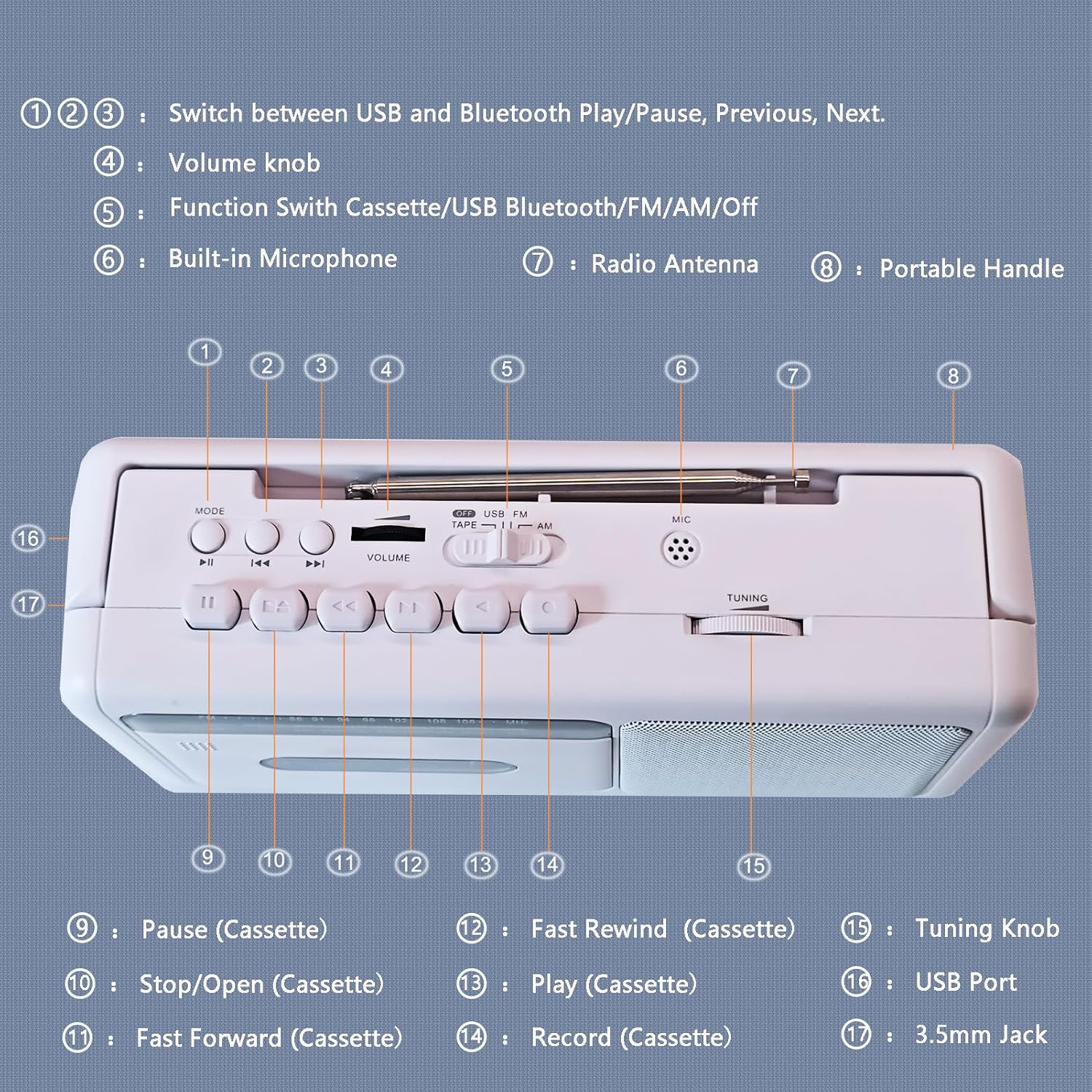
Figure 3: Control Panel Diagram
- 1 , 2 , 3 : Mode/Playback Control Buttons (USB/Bluetooth Play/Pause, Previous, Next)
- 4: באַנד קנעפּל
- 5: Function Switch (Cassette/USB/Bluetooth/FM/AM/Off)
- 6: געבויט-אין מיקראָפאָן
- 7: ראַדיאָ אַנטענע
- 8: פּאָרטאַטיוו שעפּן
- 9: Pause (Cassette)
- 10: Stop/Open (Cassette)
- 11: Fast Forward (Cassette)
- 12: Fast Rewind (Cassette)
- 13: Play (Cassette)
- 14: Record (Cassette)
- 15: טונינג קנופּ
- 16: וסב פּאָרט
- 17: 3.5mm Jack (Earphone/Aux-in)
קאַסעט שפּילער אָפּעראַציע
- Set the Function Switch (5) to "TAPE".
- Press the Stop/Open button (10) to open the cassette compartment door.
- Insert a cassette tape with the open edge facing upwards. Close the compartment door firmly.
- Press the Play button (13) to begin playback.
- Adjust the Volume Knob (4) to your desired listening level.
- To pause playback, press the Pause button (9). Press again to resume.
- To fast forward, press the Fast Forward button (11). To fast rewind, press the Fast Rewind button (12). Press Play (13) or Stop/Open (10) to stop winding.
- To stop playback and eject the tape, press the Stop/Open button (10).

Figure 4: Inserting a Cassette Tape
AM / FM ראַדיאָ אָפּעראַציע
- Set the Function Switch (5) to "FM" or "AM".
- Extend the telescopic antenna (7) for optimal FM reception. For AM reception, rotate the unit for best signal.
- Rotate the Tuning Knob (15) to select your desired radio station.
- Adjust the Volume Knob (4) to your desired listening level.

Figure 5: Enjoying AM/FM Radio
בלועטאָאָטה סטרימינג
- Set the Function Switch (5) to "BT" (Bluetooth). The unit will enter pairing mode, indicated by an audible prompt.
- אויף אייער בלוטוט-פארשטארקטע דעווייס (למשל, סמאַרטפאָון, טאַבלעט), אַקטיווירט בלוטוט און זוכט פֿאַר פאַראַן דעווייסעס.
- Select "WTB-777" from the list of devices to pair. Once paired, you will hear a confirmation sound.
- Begin playing audio on your connected device. The sound will be streamed wirelessly to the WTB-777.
- Use the Volume Knob (4) on the unit or the volume controls on your connected device to adjust the volume.
- Use buttons (1, 2, 3) to control playback (Play/Pause, Previous/Next track) directly from the unit.

פיגור 6: בלועטוט קאנעקטיוויטי
וסב פּלייַבאַקק
- Set the Function Switch (5) to "USB".
- אַרײַנשטעלן אַ USB פֿלעש דרייוו מיט MP3 אַודיאָ files into the USB Port (16).
- The unit will automatically begin playing the audio fileס פון די USB דרייוו.
- Use buttons (1, 2, 3) to control playback (Play/Pause, Previous/Next track).
- Adjust the Volume Knob (4) to your desired listening level.
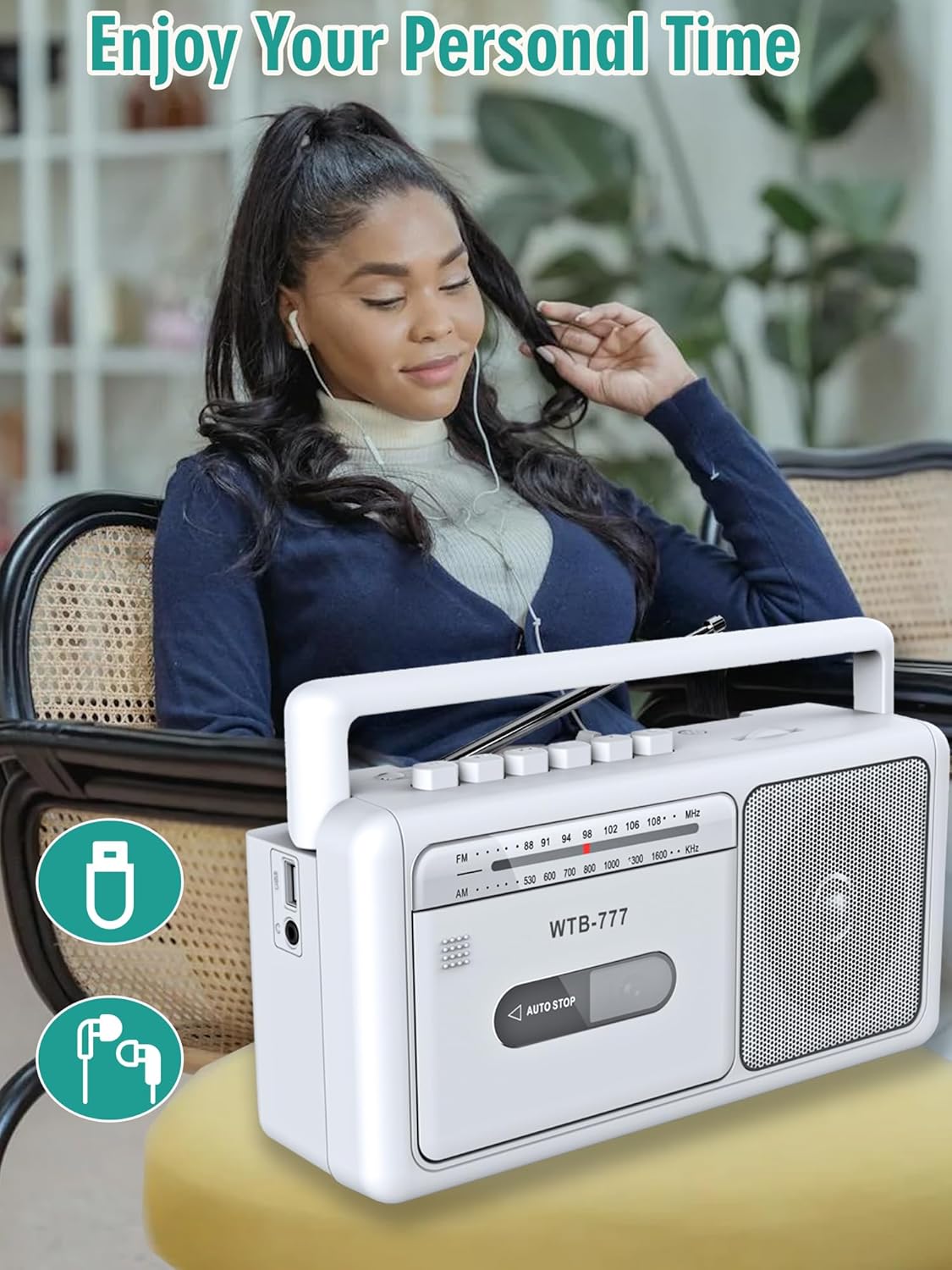
Figure 7: USB Playback and Earphone Jack
אויפנעמען צו קאסעטע
The WTB-777 allows you to record audio from the radio onto a blank cassette tape.
- Insert a blank cassette tape into the cassette compartment (refer to Cassette Player Operation).
- Set the Function Switch (5) to "FM" or "AM" and tune to your desired radio station.
- Press the Record button (14) and the Play button (13) simultaneously to begin recording. The unit will automatically start recording the radio broadcast onto the tape.
- To stop recording, press the Stop/Open button (10).
באַמערקונג: The built-in microphone (6) can also be used for voice recording directly to tape when the function switch is set to "TAPE" and the Record button (14) is pressed.
וישאַלט
- רייניקונג: Use a soft, dry cloth to clean the exterior of the unit. Do not use abrasive cleaners or solvents. For the cassette head and pinch roller, use a specialized cassette head cleaner periodically to ensure optimal sound quality and prevent tape damage.
- סטאָרידזש: When not in use for extended periods, store the unit in a cool, dry place away from direct sunlight and extreme temperatures. Remove batteries if storing for a long time.
- טייפּ זאָרג: האַלט קאַסעטע טייפּס אין זייערע קעסטלעך צו באַשיצן זיי פון שטויב און שאָדן. פֿאַרמייַדט אויסשטעלן טייפּס צו שטאַרקע מאַגנעטישע פֿעלדער.
טראָובלעשאָאָטינג
If you experience issues with your WIITHINK WTB-777, please consult the following table before seeking professional service.
| פּראָבלעם | מעגלעך סיבה | לייזונג |
|---|---|---|
| דער אַפּאַראַט טוט נישט מאַכט אויף. |
|
|
| קיין קלאַנג פֿון רעדנער. |
|
|
| קאַסעטע טייפּ שפּילט נישט אָדער קלינגט פֿאַרדרייט. |
|
|
| נעבעך ראַדיאָ אָפּטראָג. |
|
|
| די בלוטוט דעווייס וועט זיך נישט פארבינדן. |
|
|
ספּעסאַפאַקיישאַנז
Detailed technical specifications for the WIITHINK WTB-777.
| סאָרט | WIITHINK |
| מאָדעל | ווטב-777 |
| פּראָדוקט דימענשאַנז (L x W x H) | 9.8 X 3 X 5.1 אינטשעס (24.9 X 7.6 X 13 סענטימעטער) |
| פּונקט וואָג | 2.75 פונט (1.25 קג) |
| קאָליר | ווייַס |
| קאַנעקטיוויטי טעכנאָלאָגיע | Bluetooth, Built-in Microphone, Earphone Jack, USB |
| רעדנער טיפּ | פּאָרטאַטיוו |
| AM פרעקווענסי ראַנגע | 520 - 1710 kHz |
| עפעם פרעקווענסי קייט | 87 - 108 מעגהערץ |
| מאַכט מקור | AC (Power Cord included), 4 x 'C' Batteries (not included) |
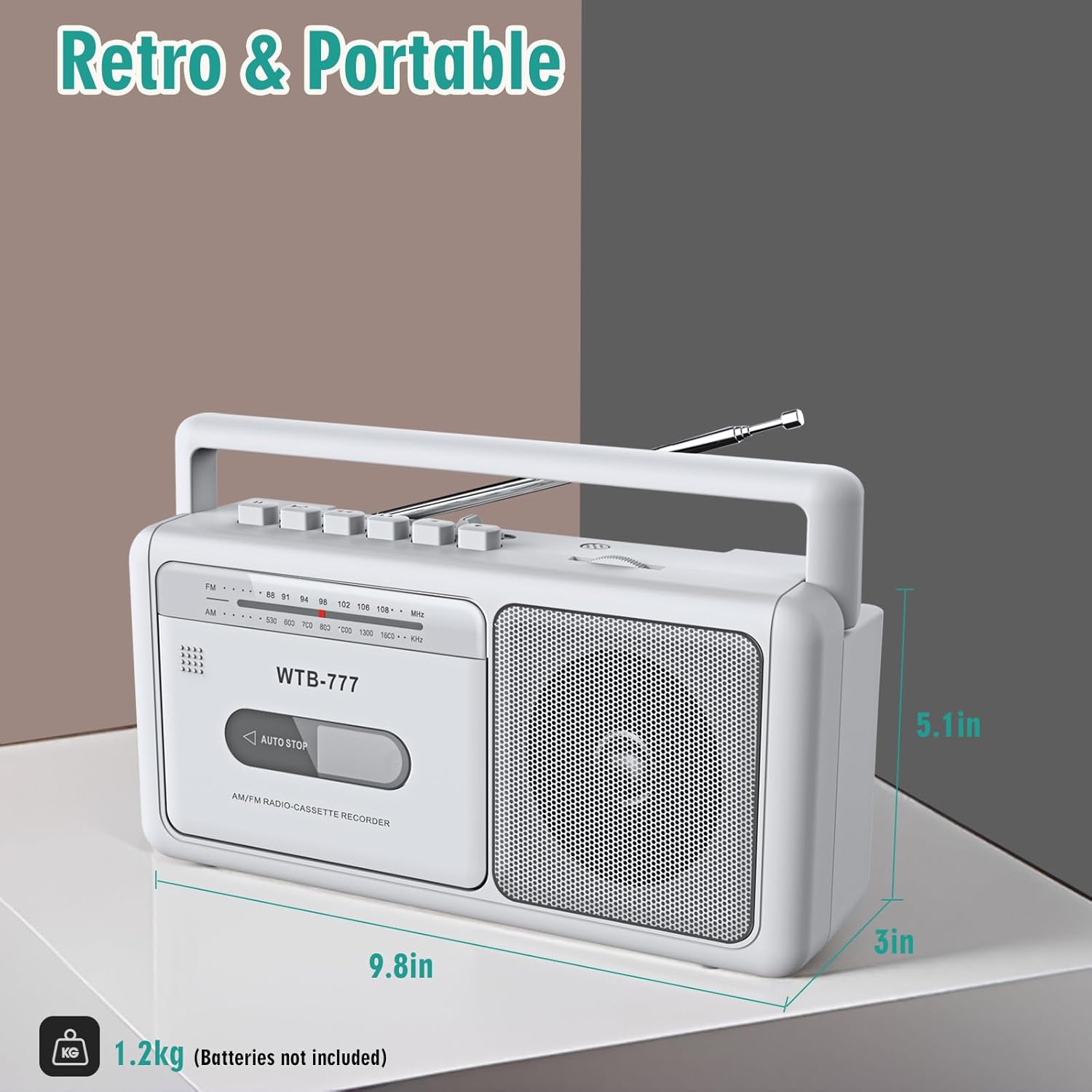
פיגור 8: פּראָדוקט דימענסיעס
וואָראַנטי און שטיצן
Specific warranty information for the WIITHINK WTB-777 is typically provided with the product packaging or on the manufacturer's official website. Please refer to the documentation included with your purchase for detailed warranty terms and conditions.
For technical support, troubleshooting assistance beyond this manual, or inquiries regarding parts and service, please contact WIITHINK customer support through their official channels. Contact information can usually be found on the product packaging, the manufacturer's website, or the retailer's product page.


