1. הקדמה
This manual provides detailed instructions for the safe installation, operation, and maintenance of your PHORUS 48-inch Modern White Ceiling Fan with Lights and Remote/APP Control. Please read all instructions carefully before beginning installation and retain this manual for future reference.
2. זיכערקייַט אינפֿאָרמאַציע
- זיכער מאַכן אַז די מאַכט איז אָפּגעטיילט בײַם קרייַז ברעאַקער איידער די אינסטאַלאַציע אָדער סערוויסינג.
- אַלע וויירינג מוזן זיין אין לויט מיט נאַציאָנאַלע און לאָקאַלע עלעקטרישע קאָודז. אויב איר זענט נישט באַקאַנט מיט וויירינג, קאָנסולטירט אַ קוואַליפֿיצירטן עלעקטריקער.
- דער ווענטילאַטאָר מוז זיין מאָנטירט מיט אַ מינימום פון 7 פֿיס (2.1 מעטער) ווייטקייט פון דער ערד ביזן הינטערשטן ראַנד פון דער בלייד.
- די מאָנטירונג סטרוקטור מוז זיין טויגיק צו שטיצן די וואָג פון די פאָכער (אומגעפער 13.4 פונט).
- בייגט נישט די בלייד האָלדערס בעת אינסטאַלאַציע אָדער רייניקונג.
- דער פאָכער איז דיזיינד פֿאַר דרינענדיק נוצן.
3. פּעקל אינהאַלט
באַשטעטיקן אַז אַלע קאָמפּאָנענטן זענען פאַראַן איידער איר הייבט אָן די אינסטאַלאַציע:
- פאָכער מאָטאָר אַסעמבלי
- האַנגינג באָרד
- 5 פאַן בלאַדעס
- געפירט לampשאָטן
- ווײַטקאָנטראָל (מיט 2 AAA באַטעריעס)
- שרויפן און מאָנטירונג האַרדווער
- ינסטראַקשאַנז מאַנואַל

4. ספּעסאַפאַקיישאַנז
| שטריך | באַשרייַבונג |
|---|---|
| סאָרט | פאָרוס |
| מאָדעל נאָמען | #8907 |
| גרייס | 48 אינטשעס |
| קאָליר | ווייַס |
| מאַטעריאַל | אַקריליק, פּלאַסטיק |
| מאָטאָר טיפּ | DC Motor (30W) |
| ליכט מקור | געפירט (28 וו) |
| ליכט קאָלאָרס | 3 (White, Warm, Neutral) |
| דימינג ראַנגע | אָן טריט (10%-100%) |
| ווינט ספּידז | 6 |
| קאָנטראָל מעטאָד | ווײַט קאָנטראָל, אַפּ קאָנטראָל |
| ספּעציעלע פֿעיִקייטן | Reversible Function, 2-Hour Timer, Memory Function |
| געזונט מדרגה | אונטער 35 דב |
| פּראָדוקט דימענשאַנז | 48"ל x 48"בר x 10.83"ה |
| פּונקט וואָג | 13.4 פונט |
5. סעטאַפּ און ייַנמאָנטירונג
5.1 פאַר-ינסטאַללאַטיאָן טשעקליסט
- Ensure the power supply is turned off at the main circuit breaker.
- Confirm you have all necessary tools (screwdriver, drill, wire strippers, etc.).
- Verify that the ceiling junction box is securely mounted and capable of supporting the fan.
5.2 שריט-ביי-שריט אינסטאַלאַציע
- Attach Blades to Motor Assembly: Secure each of the five fan blades to the motor assembly using the provided screws. Ensure the 'THIS SIDE UP' marking on the blade attachment is facing upwards.
- Install LED Light Board: Carefully place the LED light board into the designated area on the motor assembly and secure it with screws. Connect the LED wires.
- Attach LED Lampשאָטן: שטעלן די געפירט לampshade over the light board and twist it clockwise until it is securely fastened.
- Mount Hanging Board: Secure the hanging board to your ceiling junction box using appropriate screws. Ensure it is firmly attached.
- פאַרבינדן וויירינג: Connect the fan's electrical wires to your household wiring. The typical connections are: Black (Live) to Black (Live), White (Neutral) to White (Neutral), and Yellow/Green (Ground) to Green (Ground). Use the provided wire connectors.
- Secure Fan to Hanging Board: Lift the fan assembly and attach it to the hanging board, ensuring all wires are tucked safely inside the canopy. Secure the fan with the provided screws.
6. אַפּערייטינג ינסטרוקטיאָנס
6.1 רימאָוט קאָנטראָל פאַנגקשאַנז
The included remote control allows for convenient operation of your ceiling fan:
- מאַכט אויף / אַוועק: דריק דעם מאַכט קנעפּל צו דרייען דעם ווענטילאַטאָר און ליכט אָן אָדער אויס.
- פאַן גיכקייַט: Select from 6 wind speeds (1-6) to adjust airflow.
- ליכט אויף/אַוועק: Control the light independently from the fan.
- קאָליר טעמפּעראַטור: Cycle through 3 light colors: White (6000K), Neutral (4500K), and Warm (3000K).
- דימינג: Adjust light brightness from 10% to 100%.
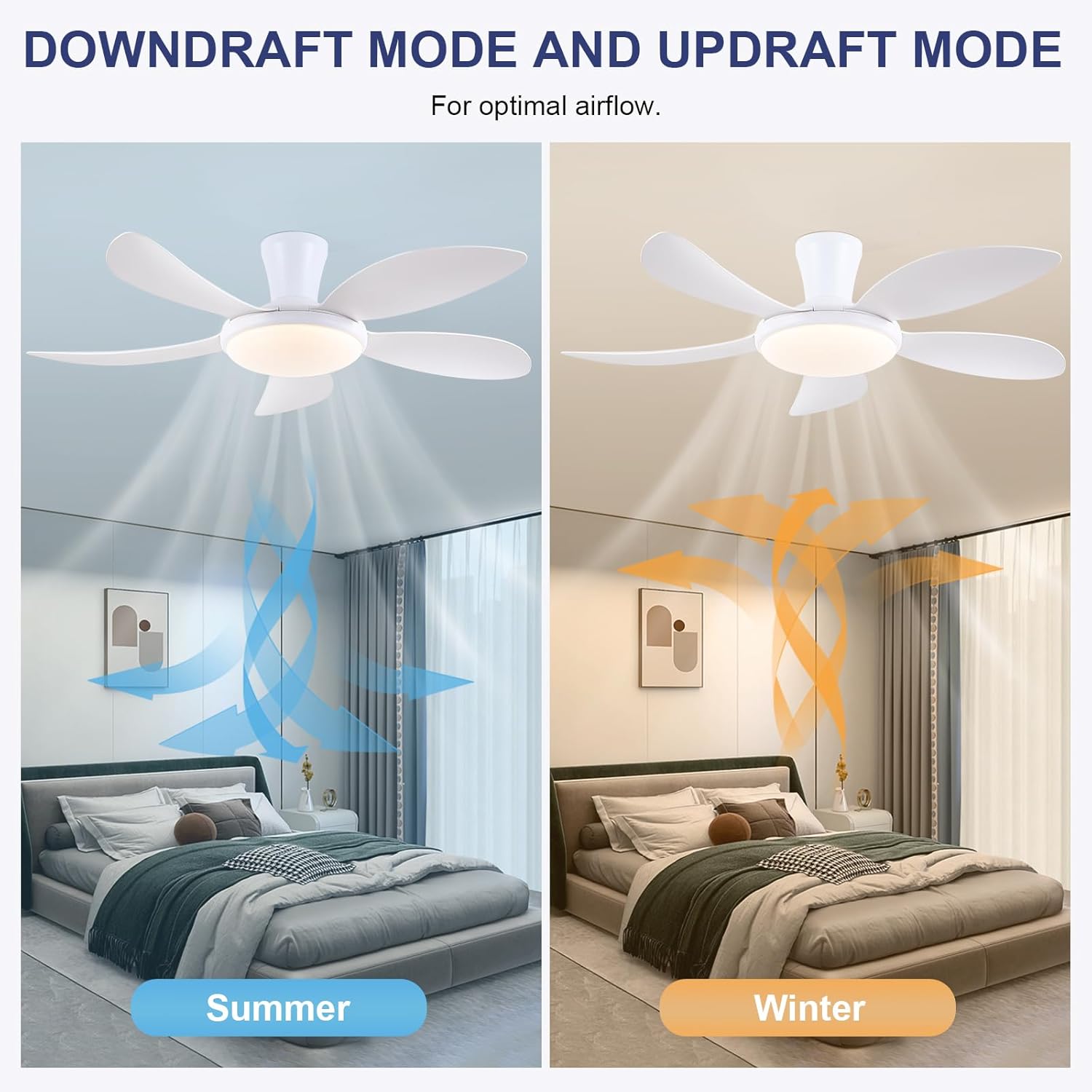
- ריווערסאַבאַל פֿונקציע: Press the F/R key to change the blade rotation direction for summer (downdraft) or winter (updraft) modes. The fan will stop briefly before reversing.
- טיימער: Set a 2-hour timer for automatic shutdown.
- נאַכט מאָדע: Activates a low-speed fan and dim light setting.

6.2 Remote Code Pairing
If the remote control is not responding, it may need to be paired:
- Turn off the main power supply to the fan for one minute.
- Turn on the main power supply and simultaneously long-press the 'Code Key' button on the remote control for 3-5 seconds.
- The fan light will blink 2-3 times, indicating successful code matching. The remote can now be operated normally.
6.3 אַפּ קאָנטראָל
Control your fan using the 'Fan Lamp Pro' mobile application:
- אראפקאפיע אַפּ: Scan the QR code provided in the product images or search for "Fan Lamp Pro" in your app store.
- פאַרבינדן דורך בלועטאָאָטה: זיכער מאַכן אַז אייער טעלעפאָן'ס בלועטוט איז ענייבאַלד.
- פּאָר דיווייס: Open the app, add a new device, and follow the on-screen instructions to connect to your fan. The fan light will blink twice upon successful connection.
- פאַנגקשאַנז: The app allows control over fan speeds, light colors, dimming, reverse function, and timer settings, similar to the remote control.
6.4 Fan Speed and Airflow
- לעוועלס 1-2: Low Comfortable Wind, suitable for sleep.
- לעוועלס 3-4: Medium Natural Wind, suitable for daily life.
- לעוועלס 5-6: High Cooling Wind, suitable for hot weather.

6.5 ליכט סעטטינגס
- The LED light source supports stepless dimming and memory function, retaining your last brightness and color temperature setting.
- Choose from 3 color temperatures: 3000K (Warm Light), 4500K (Natural Light), and 6000K (White Light).

6.6 אומקערלעכע פונקציע
The reversible DC motor allows you to change the direction of the fan seasonally:
- זומער מאָדע (דאַונדראַפט): Blades rotate counter-clockwise, pushing cool air downwards.
- ווינטער מאָדע (אויפֿדראַפֿט): Blades rotate clockwise, drawing cool air up and circulating warm air downwards.
7. וישאַלט
- רייניקונג: צו רייניקן דעם ווענטילאַטאָר, ווישט עס אָפּ מיט אַ ווייכן, טרוקענעם שטאָף.amp שטאָף. דו זאלסט נישט נוצן אַברייסיוו קלינערז אָדער סאָלוואַנץ.
- בלייד קער: The ABS blades are designed to be easy to clean and resistant to deformation.
- רעגולער טשעקס: קאָנטראָלירט פּעריִאָדיש אַלע פֿאַרבינדונגען און שרויפֿן צו זיכער מאַכן אַז זיי זענען זיכער.
8. טראָובלעשאָאָטינג
אויב איר טרעפט פּראָבלעמען מיט אייער ווענטילאַטאָר, זעט די פאלגענדע געוויינטלעכע פּראָבלעמען און לייזונגען:
- פאָכער טוט נישט אַרבעטן: Check power supply, ensure all wiring connections are secure, and verify remote control pairing.
- ליכט טוט נישט אַרבעטן: Check power supply, ensure light wires are connected, and verify remote control pairing.
- פאן איז טומלדיק: Ensure all screws are tightened, especially on the blades and mounting bracket. Check for any obstructions.
- רימאָוט קאָנטראָל נישט ארבעטן: Replace batteries, ensure line of sight to the fan, and re-pair the remote control as per section 6.2.
- APP connection issues: Ensure Bluetooth is on, the app is updated, and try re-pairing the device.
9. וואָראַנטי און שטיצן
PHORUS provides a one-year quality warranty for this product. For any damage or quality problems, free replacement service is offered. If you have any questions or require assistance, please contact PHORUS customer service. You will receive a satisfactory answer within 24 hours.
For additional support and resources, please visit the official PHORUS webזייטל אדער זעט די קאנטאקט אינפארמאציע וואס איז צוגעשטעלט געווארן מיט אייער קויפן.


