הקדמה
This manual provides detailed instructions for the setup, operation, and maintenance of your SABLUTE Wireless Keyboard and Mouse Combo, Model KC213D. This 2.4G wireless combo is designed for comfortable and efficient use with computers, laptops, and PCs running Windows, macOS, or Chrome OS. It features an ergonomic design with a wrist rest, a built-in phone/tablet holder, silent keys, and a responsive mouse.
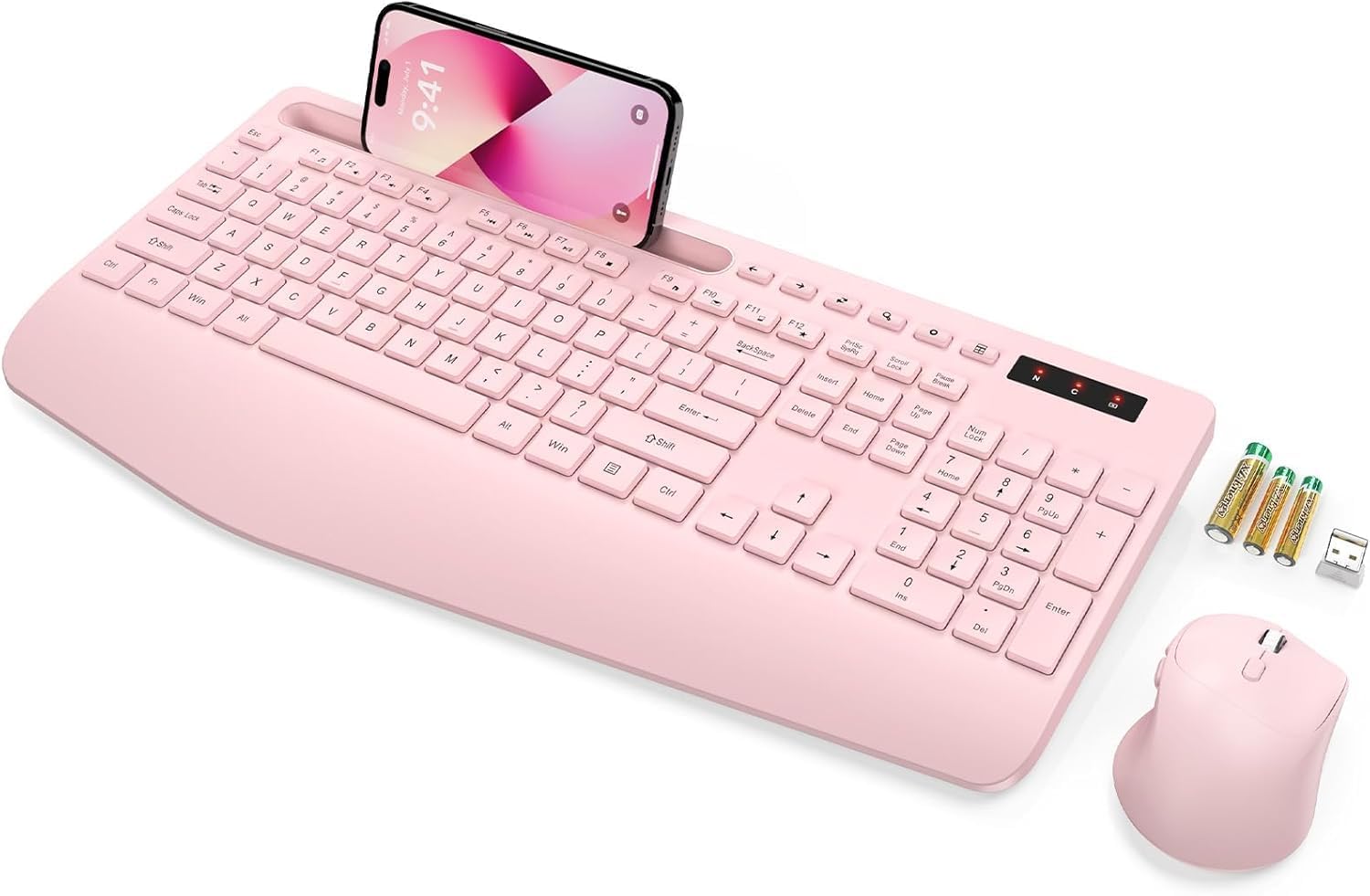
Image: The SABLUTE wireless keyboard and mouse combo in rose pink, with a phone in the integrated holder and batteries next to it.
פּעקל אינהאַלט
ביטע באַשטעטיקן אַז אַלע זאכן זענען פאַראַן אין דיין פּעקל:
- Wireless Keyboard (Model KC213D)
- ווירעלעסס מאַוס
- יו-עס-בי 2.4 דזשי ריסיווער
- 2 x AAA באַטעריעס (פֿאַר קלאַוויאַטור)
- 1 x AA באַטעריע (פֿאַר מויז)
- באַניצער מאַנואַל (דעם דאָקומענט)
סעטאַפּ אינסטרוקציעס
1. באַטאַרייע ייַנמאָנטירונג
Install the included batteries into the keyboard and mouse:
- Locate the battery compartments on the underside of the keyboard and mouse.
- עפֿנט די דעקל פֿון די באַטעריע־אָפּטיילן.
- Insert 2 AAA batteries into the keyboard, ensuring correct polarity (+/-).
- Insert 1 AA battery into the mouse, ensuring correct polarity (+/-).
- פאַרמאַכן די באַטאַרייע אָפּטייל קאָווערס סיקיורלי.

Image: Illustration showing the battery compartments on the underside of the keyboard and mouse, with AAA and AA batteries ready for insertion.
2. פֿאַרבינדן דעם USB ריסיווער
The keyboard and mouse connect wirelessly via a single 2.4G USB receiver:
- Locate the USB 2.4G receiver. It is typically found in a sealed bag within the packaging or stored in the mouse's battery compartment.
- Plug the USB receiver into an available USB port on your computer, laptop, or PC.
- The system should automatically detect and install the necessary drivers. This is a plug-and-play device.
- The wireless connection range is up to 33 feet (10 meters).
Note: This keyboard and mouse combo uses a 2.4G USB receiver and cannot connect directly to tablets or phones via USB-C or Bluetooth.

Image: A diagram illustrating the 2.4G USB receiver plugged into a laptop, showing the wireless signal connecting to the keyboard and mouse.
אַפּערייטינג ינסטראַקשאַנז
קלאַוויאַטור פֿעיִקייטן
- ערגאָנאָמיש האַנטגעלענק רו: The keyboard features a 2.8-inch wide wrist rest and a 10° tilt angle to promote a comfortable typing posture and reduce wrist strain.
- Integrated Phone & Tablet Holder: A built-in slot at the top of the keyboard can securely hold phones and tablets up to 11.9 inches, allowing for convenient multitasking.
- מולטימעדיאַ האָטקייס: The keyboard includes 6 dedicated multimedia hotkeys for quick access to functions such as previous page, next page, refresh, search, stop loading, and calculator.
- שטיל טייפן: The soft membrane keys are designed to reduce typing noise by up to 95%, providing a quiet working environment.

בילד: אן איבערקאפ view of the ergonomic wireless keyboard, highlighting the large phone holder, wrist rest, and the location of the 6 one-click shortcut keys.

בילד: א נאָענטע בילד view of the keyboard's multimedia shortcut keys, with labels explaining their functions: Previous Page, Next Page, Refresh, Search, Stop Loading, and Calculator.
מויז פֿעיִקייטן
- 6-קנעפל דיזיין: The mouse features a standard left/right click, scroll wheel, DPI adjustment button, and dedicated forward/backward buttons for enhanced navigation.
- Adjustable Tracking Speed (DPI): Cycle through 3 levels of tracking speed to adjust cursor sensitivity to your preference.
- שטילע קליקן: Equipped with Silent Micro Motion technology, the mouse buttons produce minimal noise during clicks.

בילד: א דעטאַלירטע view of the wireless mouse, highlighting its 6-button layout including forward and backward buttons, and illustrating the silent click feature.

Image: A graphic detailing the mouse's ergonomic design, 2.4G wireless connectivity, and three adjustable tracking speed levels.
מאַכט שפּאָרן מאָדע
To conserve battery life, the keyboard and mouse feature an automatic sleep mode:
- The devices will enter sleep mode after 10 minutes of inactivity.
- To wake the keyboard, press any key.
- To wake the mouse, click any button.
- The keyboard offers up to 365 days of standby time, and the mouse provides up to 400 hours of working time.

Image: A visual representation of the power-saving features, showing quick wake-up (1s), auto sleep mode (10 min), and extended standby time (365 days).
וישאַלט
Proper maintenance ensures the longevity and optimal performance of your SABLUTE Wireless Keyboard and Mouse:
- רייניקונג: Use a soft, dry cloth to clean the surfaces of the keyboard and mouse. For deeper cleaning, a slightly damp מען קען ניצן אַ שטאָף מיט מילדער זייף, און זיכער מאַכן אַז קיין פליסיקייט גייט נישט אַרײַן אין די אינעווייניקסטע קאָמפּאָנענטן. פֿאַרמײַדט שטרענגע כעמיקאַלן אָדער אַברייסיוו מאַטעריאַלן.
- באַטערי פאַרבייַט: When the devices become unresponsive or exhibit delayed input, it is likely time to replace the batteries. Follow the battery installation steps outlined in the Setup section. Dispose of old batteries responsibly according to local regulations.
- סטאָרידזש: When not in use for extended periods, remove the batteries to prevent potential leakage. Store the devices in a cool, dry place away from direct sunlight and extreme temperatures.
טראָובלעשאָאָטינג
If you encounter issues with your SABLUTE Wireless Keyboard and Mouse, please refer to the following common solutions:
- קיין ענטפער פון קלאַוויאַטור/מויז:
- זיכער מאַכן אַז די באַטעריעס זענען ריכטיק אינסטאַלירט און נישט אויסגעשעפּט. טוישן אויב נייטיק.
- איבערצייגט אז דער USB ריסיווער איז זיכער אריינגעשטעקט אין א ארבעטנדיקן USB פארט אויף אייער קאמפיוטער. פרובירט אן אנדערן USB פארט.
- Move the keyboard and mouse closer to the USB receiver to rule out range issues.
- ריסטאַרט דיין קאָמפּיוטער.
- פארשפּעטיקונג אדער איבערצייטיגע פארבינדונג:
- Ensure there are no large metal objects or other wireless devices (like Wi-Fi routers, cordless phones) operating too close to the receiver, which could cause interference.
- קאָנטראָלירט די באַטאַרייע לעוועלס און פאַרבייטן אויב זיי זענען נידעריק.
- מויז קורסאָר שפּרינגט אָדער איז נישט פּינקטלעך:
- Clean the mouse sensor on the underside.
- ניצט די מויז אויף אַ ריינער, נישט-רעפלעקטיווער ייבערפלאַך. אַ מויז פּאַד איז רעקאָמענדירט.
- Adjust the DPI setting using the button on the mouse to find a suitable tracking speed.
- Missing USB Dongle:
- The USB dongle is typically stored in a sealed bag within the product packaging or in the battery compartment of the mouse. Please inspect all packaging materials carefully.
If these steps do not resolve the issue, please contact SABLUTE customer support.
ספּעסאַפאַקיישאַנז
| פּראָדוקט דימענשאַנז | 16.54 X 8.27 X 1.38 אינטשעס |
| פּונקט וואָג | 2 פונט |
| נומער מאָדעל נומער | KC213D |
| באַטעריז פארלאנגט | 2 AAA (keyboard), 1 AA (mouse) - included |
| קאַנעקטיוויטי טעכנאָלאָגיע | 2.4G וסב ווירעלעסס |
| ספּעציעלע פֿעיִקייטן | Ergonomic Wrist Rest, Phone Holder, Full Size, Shortcut Keys, Low-profile keycap, Water Repellent |
| קאַמפּאַטאַבאַל דעוויסעס | Chromebook, Dell Inspiron, HP ENVY, HUAWEI MateBook, Laptop, Notebook, Macbook Air, iMac, Personal Computer, Television (Windows, macOS, Chrome OS) |

Image: A diagram illustrating the precise dimensions of the SABLUTE wireless keyboard and mouse.
וואָראַנטי און שטיצן
SABLUTE is committed to providing quality products and customer satisfaction. Your product is covered by the following:
- 90-טאָגיקע פאַרבייַט: Eligible for replacement within 90 days of purchase.
- 360-Day Manufacturer Warranty: Covers manufacturing defects for 360 days from the date of purchase.
- Brand Care: Dedicated customer support for product assistance.
For any inquiries, technical support, or warranty claims, please contact us:
- בליצפּאָסט: sabluteservices@outlook.com
- אָנליין: Refer to your platform order or store link for direct support options.

Image: A customer service representative wearing a headset, smiling, representing SABLUTE support.


