1. הקדמה און איבערview
The Infinity Smart Watch for Women is designed to seamlessly integrate into your daily life, offering a blend of elegance and advanced functionality. Featuring a vibrant AMOLED 1.1" screen, this smartwatch provides comprehensive health and fitness tracking, communication features, and smart notifications. It is compatible with both iOS and Android phones.

פיגורע 1: פראָנט view of the Infinity Smart Watch for Women, showcasing its elegant design and vibrant AMOLED display.
2. וואָס איז אין דער קעסטל
- Infinity Smart Watch (Model WS_BLK)
- טשאַרדזשינג קאַבלע
- באַניצער מאַנואַל
3. סעטאַפּ
3.1 ערשט טשאַרדזשינג
Before first use, fully charge your smartwatch. Connect the magnetic charging cable to the charging points on the back of the watch and plug the USB end into a compatible power adapter (not included) or computer USB port. The watch display will indicate charging status.

Figure 2: The smartwatch connected to its magnetic charging cable, showing the battery charging indicator.
3.2 אַפּ אינסטאַלאַציע און פּערינג
- Scan the QR code provided in the manual or on the watch screen (if available) to download the companion app. Alternatively, search for the app name (e.g., 'VeryFit' or 'FitCloudPro' as seen in related videos) in your smartphone's app store (iOS App Store or Google Play Store).
- ינסטאַלירן די אַפּ אויף דיין סמאַרטפאָנע.
- עפֿנט די אַפּ און פֿאָלגט די אינסטרוקציעס אויף דעם עקראַן צו שאַפֿן אַ חשבון און אויפֿשטעלן אייער פּראָ.file.
- מאַכן זיכער אַז בלועטאָאָטה איז ענייבאַלד אויף דיין סמאַרטפאָנע.
- In the app, navigate to the device pairing section and select your Infinity Smart Watch from the list of available devices.
- באַשטעטיקן די פּאָרינג בעטן אויף ביידע דיין סמאַרטפאָון און די סמאַרטוואַטש
Video 1: Official product video demonstrating the Infinity Smart Watch for Women, including its features and design. This video provides a visual guide to the watch's capabilities.
4. אַפּערייטינג ינסטרוקטיאָנס
4.1 יקערדיק נאַוויגאַציע
- סוויפּ אַרויף: View recent notifications/messages.
- שלעפּ אַראָפּ: Access quick settings (brightness, Do Not Disturb, flashlight, phone finder, settings).
- שלעפּן לינקס / רעכט: Scroll through main features like activity data, heart rate, sleep tracking, and weather.
- דריקן די זייט קנעפל: Return to the watch face or access the main menu.
4.2 רופן און ענטפֿערן רופט
אַמאָל געפּאָרט מיט דיין סמאַרטפאָון, קענט איר מאַכן און ענטפֿערן רופן גלייך פֿון דיין סמאַרטוואַטש.
- צו מאַכן אַ רוף: Access the phone function from the main menu, use the dial pad or select a contact from your synced phonebook.
- צו ענטפֿערן אַ רוף: ווען אַ רוף קומט אַרײַן, וועט די זייגער ווײַזן דעם רופער־אידענטיפֿיקאַציע־אַפּאַראַט. דריקט אויף דעם גרינעם בילדל צו ענטפֿערן אָדער אויף דעם רויטן בילדל צו אָפּוואַרפֿן.
4.3 קלוגע נאָטיפיקאַציעס
Receive alerts for incoming calls, text messages, and app notifications directly on your wrist. Configure notification preferences within the companion app.

Figure 3: The smartwatch interface showing options for Bluetooth calls, smart notifications, and voice assistant.
4.4 קאַסטאַמייזן זייגער פנימער
The smartwatch offers a variety of customizable watch faces to suit your style. You can change them directly on the watch or through the companion app, which provides over 200 options.
5. געזונט מאָניטאָרינג פֿעיִקייטן
The Infinity Smart Watch is equipped with a comprehensive suite of health and fitness tracking features:
- האַרץ קורס מאָניטאָרינג: כסדר טראַקס דיין האַרץ טעמפּאָ איבערן טאָג.
- מאָניטאָרינג פון בלוט דרוק: צושטעלט בלוטדרוק מעסטונגען אויף פארלאנג.
- שלאָף מאָניטאָרינג: אנאליזירט אייערע שלאף-מוסטערן, אריינגערעכנט טיפע שלאף, לייכטע שלאף, און וואך-צייטן.
- פּעדאָמעטער: Counts your steps, distance traveled, and calories burned.
- עטלעכע ספּאָרט מאָדעס: Supports over 100 sports modes, allowing you to track specific workouts like walking, running, cycling, and swimming.
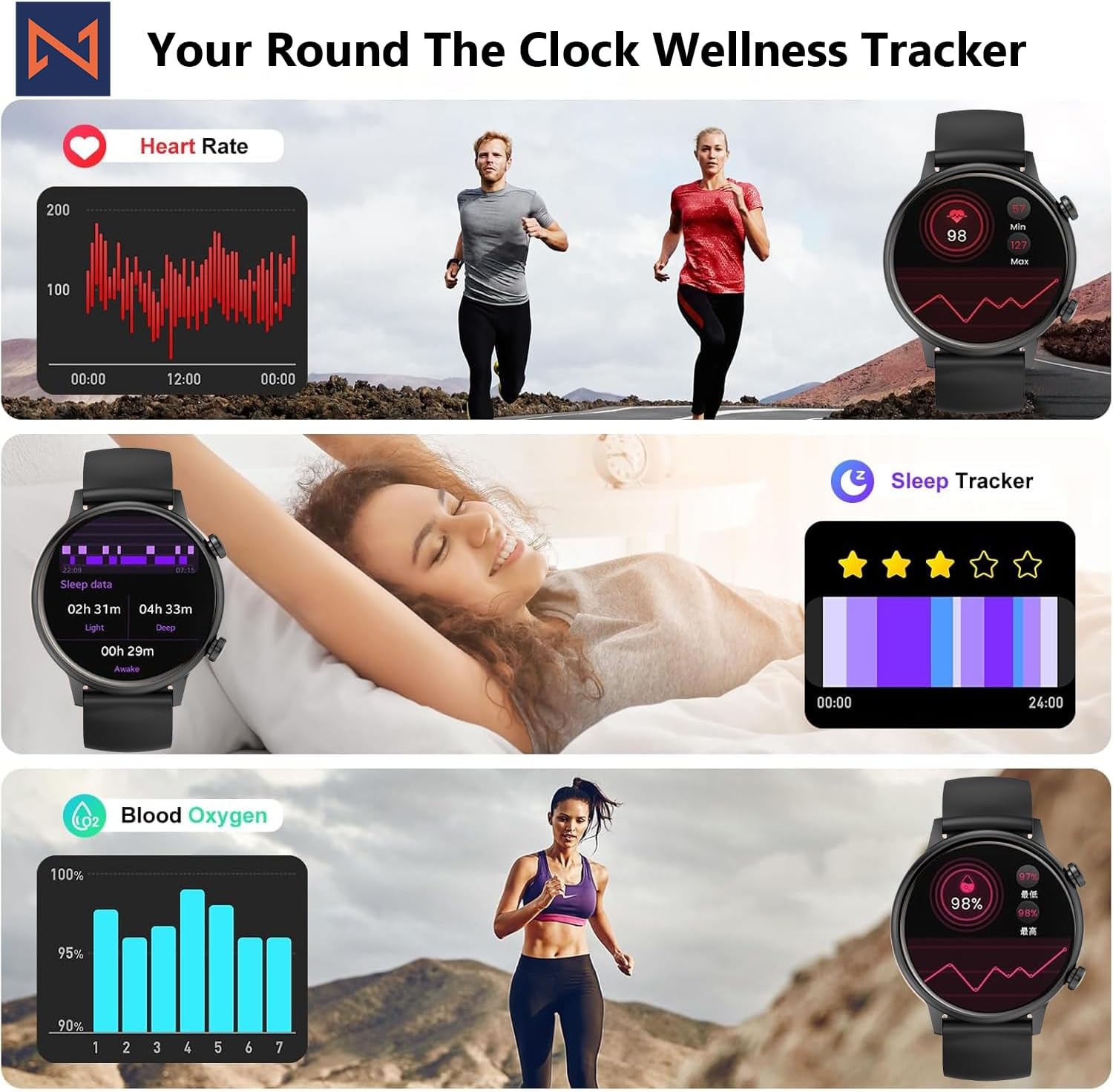
Figure 4: The smartwatch interface showing real-time heart rate, sleep tracking, and blood oxygen levels.

Figure 5: The smartwatch showing a selection of its multiple sports tracking modes.
6. וואַסער קעגנשטעל
The Infinity Smart Watch has an IP68 waterproof rating, making it resistant to dust, sweat, and water. It is suitable for daily wear, including hand washing, face washing, and swimming. באַמערקונג: Avoid using the watch in hot water (e.g., hot showers, saunas) or for deep-sea diving, as extreme temperatures or high-pressure water may compromise its water resistance.

Figure 6: The smartwatch demonstrating its IP68 waterproof capability during water exposure.
7. באַטאַרייע און טשאַרדזשינג
The smartwatch features a 200 mAh Lithium Polymer battery. A full charge typically takes approximately 2 hours, providing 3-5 days of working time and up to 30 days of standby time, depending on usage.
8. ספּעסאַפאַקיישאַנז
| שטריך | דעטאַל |
|---|---|
| מאָדעל נומער | WS_BLK |
| פאַרשטעלן גרייס | 1.1 אינטשעס אַמאָלעד |
| וואָטערפּרוף רייטינג | IP68 |
| באַטאַרייע קאַפּאַציטעט | 200 מיליamp שעה (ליטיום פּאָלימער) |
| קאַנעקטיוויטי | בלועטאָאָטה |
| אָפּערייטינג סיסטעם | אַנדרויד (קאָמפּאַטיבל מיט iOS) |
| זכּרון סטאָרידזש קאַפּאַסיטי | 128 מב |
| פּונקט וואָג | 5 אונסעס |
| פאַבריקאַנט | Kizzy Enterprises Inc |
9. טראָובלעשאָאָטינג
- זייגער טוט זיך נישט אן: Ensure the watch is fully charged. Long-press the side button to power on.
- נישט געקענט צופּאַסן מיטן טעלעפאָן: Ensure Bluetooth is enabled on your phone and the watch is within range. Restart both devices and try pairing again through the app.
- מעלדונגען נישט באקומען: Check app settings on your phone to ensure notification permissions are granted for the smartwatch app. Also, verify that 'Do Not Disturb' mode is not active on the watch.
- נישט פּינקטלעכע געזונטהייט מעסטונגען: Ensure the watch is worn snugly on your wrist, not too tight or too loose. Clean the sensors regularly. Note that the blood pressure monitor may not be medically accurate and is for reference only.
- סקרין פריזינג: Restart the smartwatch by long-pressing the side button until it powers off, then power it back on. If the issue persists, check for app updates.
10. וואָראַנטי און שטיצן
For warranty information, technical support, or service inquiries, please refer to the contact details provided on the product packaging or the manufacturer's official webזייטל. האַלט אייער קויף קוויטל ווי אַ באַווייַז פון קויפן פֿאַר וואָראַנטי קליימז.


