1. הקדמה
The BUSICOM PC-SeaV15c is a 15-inch Windows IoT touch panel PC designed for commercial and industrial applications. This manual provides essential information for the safe and efficient setup, operation, and maintenance of your device. Please read this manual thoroughly before using the product and retain it for future reference.
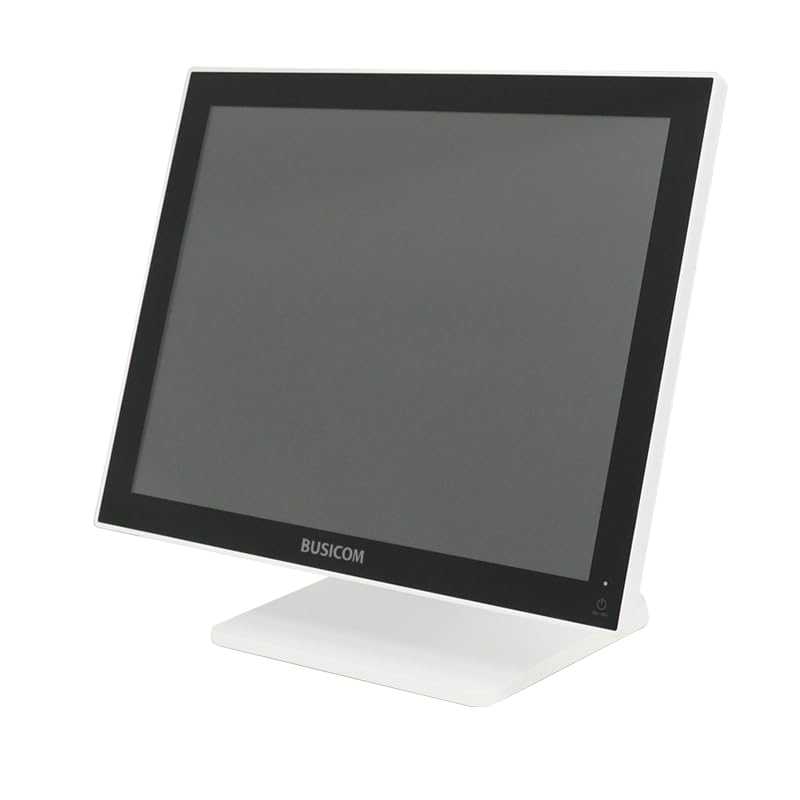
פיגורע 1: פראָנט view of the BUSICOM PC-SeaV15c Touch Panel PC.
2. פּראָדוקט איבערview
2.1 שליסל פֿעיִקייטן
- אַוואַנסירטע פּלאַן: Features an ultra-thin bezel and a highly durable 7H reinforced display for enhanced aesthetics and protection.
- העכער פאָרשטעלונג: Equipped with Microsoft Windows 10 IoT Enterprise, ensuring long-term support and reliable operation.
- Intuitive Touch Panel: Utilizes a capacitive touch method, offering a familiar and responsive touch experience similar to smartphones and tablets.
- גרינג וישאַלט: Designed for simple RAM and SSD replacement, facilitating upgrades and servicing.
- ווערסאַטאַל ינטערפייסיז: Provides a wide range of connectivity options to integrate with various peripherals.
- עפעקטיוו סטאָרידזש: SSD storage ensures fast processing speeds, quiet operation, and excellent shock resistance.
2.2 קאַמפּאָונאַנץ
The package typically includes the BUSICOM PC-SeaV15c unit and a power adapter. Additional accessories may vary.

Figure 2: Front and side profile of the PC-SeaV15c unit.

פיגורע 3: דערציען view showing access panels for RAM and SSD components.
3. סעטאַפּ אינסטרוקציעס
3.1 אַנפּאַקינג
- Carefully remove the PC-SeaV15c from its packaging.
- Check for any visible damage. If damaged, contact your vendor immediately.
- זיכער מאַכן אַז אַלע ליסטעד קאָמפּאָנענטן זענען פאַראַן.
3.2 קאַנעקטינג פּעריפעראַלס
Refer to the interface diagram below for port locations and types.

Figure 4: Detailed diagram of the PC-SeaV15c's rear and bottom interfaces.
- מאַכט קשר: Connect the provided power adapter to the DC In port and then to a power outlet.
- USB דעוויסעס: Use the USB 2.0 (4 ports) and USB 3.0 (2 ports) for connecting keyboards, mice, printers, and other USB peripherals.
- נעץ קאַנעקשאַן: פֿאַרבינדט אַן עטערנעט קאַבל צום לאַן פּאָרט פֿאַר דראָטיקן נעץ אַקסעס.
- אַודיאָ רעזולטאַט: Connect external speakers or headphones to the Audio Out port.
- Serial Ports (RJ45): Utilize COM1, COM2, COM3, and COM6 for connecting specialized POS peripherals such as barcode scanners or receipt printers.
- Cash Drawer (RJ11): Connect a compatible cash drawer to the RJ11 port.
- פונדרויסנדיק ווייַז: If an external monitor is required, connect it to the Mini DisplayPort.
- וסב טיפּ-C: פֿאַר קאָמפּאַטיבלע דעוויסעס.
3.3 פּאַוערינג אויף / אַוועק
- מאַכט אויף: Press the power button located on the upper right side of the display bezel or the power mark on the rear panel.
- מאַכט אַוועק: To safely shut down the system, use the standard Windows shutdown procedure. Avoid direct power disconnection during operation to prevent data loss.
4. אַפּערייטינג ינסטרוקטיאָנס
4.1 Windows 10 IoT Enterprise
The PC-SeaV15c operates on Windows 10 IoT Enterprise 2021. Familiarize yourself with the Windows operating system for basic navigation, application management, and system settings.
4.2 Touch Panel Usage
The capacitive touch screen supports multi-touch gestures.
- צאַפּן: עקוויוואַלענט צו אַ מויז קליק.
- טאָפּל טאַפּ: עקוויוואַלענט צו אַ טאָפּל-קליק.
- דריקן און האַלטן: עקוויוואַלענט צו אַ רעכט-קליק.
- לאַקכענען: פֿאַר סקראָלן אָדער נאַוויגירן.
- קניפּ-צו-זומען: ניצט צוויי פינגער צו פארגרעסערן אדער פארקלענערן.
5. וישאַלט
5.1 רייניקונג די מיטל
- שטענדיק אויסלעשן און ארויסציען דעם אפאראט פון עלעקטרישן פלאץ איידער איר רייניגט.
- ניצן אַ ווייך, לינט-פֿרייַ שטאָף אַ ביסל דampגעוואשן מיט וואַסער אָדער אַ ניט-אַברייסיוו פאַרשטעלן רייניגער.
- Do not spray liquids directly onto the screen or device.
- ויסמיידן ניצן שטרענגע כעמיקאַלן, סאָלוואַנץ, אָדער אַברייסיוו מאַטעריאַלס.
5.2 RAM and SSD Replacement
The PC-SeaV15c is designed for easy replacement of RAM and SSD components. Refer to Figure 3 for the access panel location. For detailed instructions on component replacement, consult a qualified technician or the BUSICOM support webפּלאַץ.
6. טראָובלעשאָאָטינג
די סעקציע גיט לייזונגען צו געוויינטלעכע פראבלעמען וואָס איר קענט באַגעגענען.
- אַפּאַראַט אַרבעט נישט אָן:
- זיכער מאַכן אַז דער מאַכט אַדאַפּטער איז זיכער פארבונדן צו ביידע דעם מיטל און אַ אַרבעטנדיקן מאַכט ווענטיל.
- באַשטעטיקן אַז די עלעקטרישע ווענטיל אַרבעט דורך אַרײַנשטעקן אַן אַנדער דעוויס.
- טאָוטש סקרין רעאַגירט נישט:
- ריסטאַרט די מיטל.
- זיכער מאַכן אַז דער עקראַן איז ריין און פריי פון שטערונגען.
- קיין ווייַז:
- קאָנטראָלירן צי די מיטל איז ענייבאַלד.
- If an external display is connected, ensure the correct input source is selected on the external display.
- Peripheral not detected:
- Ensure the peripheral is correctly connected to the appropriate port (USB, LAN, COM).
- פרובירט צו קאנעקטן דעם פעריפעראלן מיטל צו אן אנדערן פארט.
- Check the peripheral's own power supply, if applicable.
For further assistance, please contact BUSICOM customer support.
7. ספּעסאַפאַקיישאַנז
| שטריך | דעטאַל |
|---|---|
| סאָרט | BUSICOM |
| מאָדעל נאָמען | PC-SeaV15c |
| קאָליר | ווייַס |
| פאַרשטעלן גרייס | 15 אינטשעס |
| האַכלאָטע | 1024x768 |
| אָפּערייטינג סיסטעם | Windows 10 IoT Enterprise 2021 |
| קפּו סאָרט | ינטעל |
| פּראָסעססאָר סאָקקעט | אינטעל® N97 |
| קפּו ספּיד | 3.6 גהז |
| זכּרון טיפּ | דדר4 |
| אינסטאַלירן באַראַן | 4 גיגאבייט |
| האַרט דיסק טיפּ | ססד |
| SSD קאַפּאַציטעט | 128 גיגאבייט (לויטן פּראָדוקט טיטל) |
| גראַפיקס קאַרטל טיפּ | ינטעגראַטעד |
| VRAM Type | DDR4 SDRAM |
| VRAM Capacity | 4 גיגאבייט |
| וסב 2.0 פּאָרץ | 4 |
| וסב 3.0 פּאָרץ | 2 |
| אָפּטיש דרייוו | קיינער |
| פּראָדוקט וואָג | 6 קילאָגראַמס |
| הייך (בעערעך) | 307.5 mm (as per dimension diagram) |

פיגורע 5: דערציען view of the PC-SeaV15c with approximate height dimension.
8. וואָראַנטי און שטיצן
For warranty information and technical support, please refer to the warranty card included with your product or visit the official BUSICOM webזייטל. האַלט אייער קויף קוויטל ווי אַ באַווייַז פון קויפן פֿאַר וואָראַנטי קליימז.
BUSICOM Official Webפּלאַץ: BUSICOM Store on Amazon.co.jp