1. איבערview
This manual provides detailed instructions for the Jazmm CD Cassette Player Combo with Bluetooth, Model CD-W16. This versatile audio system offers multiple playback options including CD, cassette tape, FM radio, Bluetooth, USB, TF card, and AUX-IN. It features 10W HiFi speakers, a built-in rechargeable battery, and remote control for convenient use in various settings.

Image 1.1: The Jazmm CD Cassette Player Combo (Model CD-W16) highlighting its seven playback modes: CD Player, FM Radio, TF Card Playback, USB Playback, Tape Player, AUX-IN Playback, and Bluetooth 5.1.
2. וויכטיק סאַפעטי אינפֿאָרמאַציע
- לייענען אַלע ינסטראַקשאַנז איידער אַפּערייטינג די מיטל.
- האַלטן דעם מאַנואַל פֿאַר צוקונפֿט רעפֿערענץ.
- שטעלט נישט אויס דעם אפאראט צו רעגן אדער פייכטקייט כדי צו פארמיידן פייער אדער עלעקטרישע שאק.
- בלאָקירט נישט קיין ווענטילאַציע עפענונגען. אינסטאַלירט לויט די אינסטרוקציעס פונעם פאַבריקאַנט.
- דו זאלסט נישט ינסטאַלירן לעבן קיין היץ קוואלן אַזאַ ווי ראַדיאַטאָרס, היץ רעדזשיסטערז, סטאָוווז אָדער אנדערע אַפּאַראַט (אַרייַנגערעכנט ampליפיערס) וואָס פּראָדוצירן היץ.
- באַשיצן די מאַכט שנור פון גיין אויף אָדער פּינטשט, ספּעציעל אין די פּלאַגז, קאַנוויניאַנס רעסאַפּיז און די פונט ווו זיי אַרויסגיין פון די אַפּאַראַט.
- נאָר נוצן אַטאַטשמאַנץ / אַקסעסעריז ספּעסיפיעד דורך דער פאַבריקאַנט.
- אָפּשטויסן דעם אַפּאַראַט בעשאַס בליץ סטאָרמז אָדער ווען אַניוזד פֿאַר לאַנג פּיריאַדז.
- קאָנטאַקט אַלע קוואַלאַפייד סערוויס פּערסאַנעל. סערוויסינג איז פארלאנגט אויב די אַפּאַראַט איז דאַמידזשד אין קיין וועג.
3. פּראָדוקט פֿעיִקייטן
The Jazmm CD Cassette Player Combo (Model CD-W16) is designed for versatile audio playback and recording. Key features include:
- 7-in-1 Playback Modes: Supports CD, Cassette Tape, FM Radio, Bluetooth 5.1, USB, TF Card, and AUX-IN.
- קאָמפּאַקטדיסק שפּילער: Compatible with CD, CD-R, CD-RW, MP3, and WMA formats. Features song programming.
- Cassette Player & Recorder: Play existing tapes or record audio onto blank tapes using the built-in microphone.
- עפעם ראַדיאָ: Extended antenna for improved reception, automatic scanning, and storage for up to 30 preset stations (FM 87.5-108MHz).
- בלועטאָאָטה 5.1: Supports both Bluetooth transmission (to external Bluetooth speakers/headphones) and reception (from mobile devices).
- High-Fidelity Speakers: Dual 10W HiFi speakers deliver clear sound with strong bass and pure treble.
- 5 EQ Sound Modes: Customize your audio experience with NORMAL, ROCK, POP, JAZZ, and CLASS settings.
- קייפל אַרייַנשרייַב: USB port, TF (Micro SD) card slot, and 3.5mm AUX-IN jack for various media sources.
- קריקאָנלאָדלעך באַטערי: איינגעבויטע 5000mAh ריטשאַרדזשאַבאַל באַטאַרייע פֿאַר פּאָרטאַטיוו נוצן.
- ווייַט קאָנטראָל: Conveniently operate the device from a distance of up to 7 meters.
- כעדפאָון דזשאַק: 3.5mm headphone output for private listening.
4. פּעקל אינהאַלט
ביטע טשעק די פּאַקעט פֿאַר די פאלגענדע זאכן:
- Jazmm CD Cassette Player Combo (Model CD-W16)
- ווייַט קאָנטראָל
- מאַכט אַדאַפּטער/קאַבל
- באַניצער מאַנואַל
5. קאָנטראָלן און פּאָרטן
Familiarize yourself with the controls and connection ports on your device.
פראָנט פּאַנעל קאָנטראָלס:
- FUNC/REP/PROG: Function/Repeat/Program button.
- באַנד- / באַנד+: Volume down / Volume up.
- יבערקוקן: Scan for radio stations.
- EQ: עקוואַלייזער סעטטינגס.
- פֿריִערדיקע / ווייַטער: פֿריִערדיקע שפּור / ווייַטער שפּור.
- שפּיל / פּויזע: שפּיל / פּויזע קנעפּל.
- האַלטן / אַרויסוואַרפן: Stop playback / Eject CD or cassette.
- FFWD / REW: Fast forward / Rewind (for cassette).
- רעק: Record button (for cassette).
- מאַכט קנעפּל: טורנס די מיטל אויף / אַוועק.
- LCD ווייַז: Shows current mode, track number, time, etc.
Side/Rear Panel Ports:
- כעדפאָון דזשאַק (3.5 מם): פֿאַר קאַנעקטינג כעדפאָונז.
- אוקס-אין (3.5 מ"מ): פֿאַר קאַנעקטינג פונדרויסנדיק אַודיאָ דעוויסעס.
- וסב פּאָרט: פֿאַר USB פלאַש דרייווס.
- טף קאַרד שפּעלטל: For Micro SD cards.
- DC אין פּאָרט: פֿאַר מאַכט אַדאַפּטער קאַנעקשאַן.
- FM אַנטענע: Extendable antenna for radio reception.
6. סעטאַפּ
- מאַכט קשר:
Connect the provided power adapter to the DC IN port on the device and plug it into a standard wall outlet. The internal battery will begin charging automatically.
- ערשט אָפּצאָל:
For optimal battery life, fully charge the device before first use. The charging indicator light will show charging status.
- Antenna (for FM Radio):
Extend the telescopic FM antenna for better radio reception.
- מאַכט אויף:
דרוק די מאַכט button to turn on the device. The LCD display will illuminate.
7. אַפּערייטינג ינסטרוקטיאָנס
7.1 סי פּלייבאַק
- עפֿנט דעם דעקל פֿונעם סי-די אָפּטייל.
- Place a CD (label side up) onto the spindle.
- פֿאַרמאַכט דעם דעקל פֿון דעם סי-די אָפּטייל זיכער.
- דרוק די FUNC קנעפּל עטלעכע מאָל ביז "CD" מאָדע איז אויסגעקליבן.
- דרוק די שפּיל / פּויזע קנעפּל צו אָנהייבן פּלייבאַק.
- ניצן PREV און NEXT קנעפּלעך צו האָפּקען טראַקס.
- דרוק האַלטן / אַרויסוואַרפן צו האַלטן פּלייבאַק.
7.2 Cassette Tape Playback & Recording

Image 7.1: The Jazmm CD Cassette Player Combo with a cassette tape inserted into the front loading slot.
- עפֿנט די קאַסעטע אָפּטייל טיר.
- Insert a cassette tape with the open edge facing the player.
- פֿאַרמאַכט די טיר פֿון קאַסעטע אָפּטייל.
- דרוק די FUNC קנעפּל איבער און איבער ביז "TAPE" מאָדע איז אויסגעקליבן.
- דרוק די שפּיל / פּויזע קנעפּל צו אָנהייבן פּלייבאַק.
- ניצן FFWD or REW for fast winding.
- To record: Insert a blank tape. Press the REC button. The device will record audio from the built-in microphone. Press האַלטן / אַרויסוואַרפן צו ענדיקן רעקאָרדינג.
7.3 FM ראַדיאָ אָפּעראַציע

Image 7.2: The Jazmm CD Cassette Player Combo with its telescopic FM antenna fully extended for optimal radio reception.
- Extend the FM antenna fully.
- דרוק די FUNC קנעפּל עטלעכע מאָל ביז "FM" מאָדע איז אויסגעקליבן.
- דרוק די יבערקוקן קנעפּל צו אויטאָמאַטיש סקענען און ראַטעווען פאַראַן FM סטאנציעס.
- ניצן PREV און NEXT קנעפּלעך צו נאַוויגירן דורך געראַטעוועטע פאָרגעשטעלטע סטאַנציעס.
7.4 בלועטאָאָטה קאַנעקשאַן
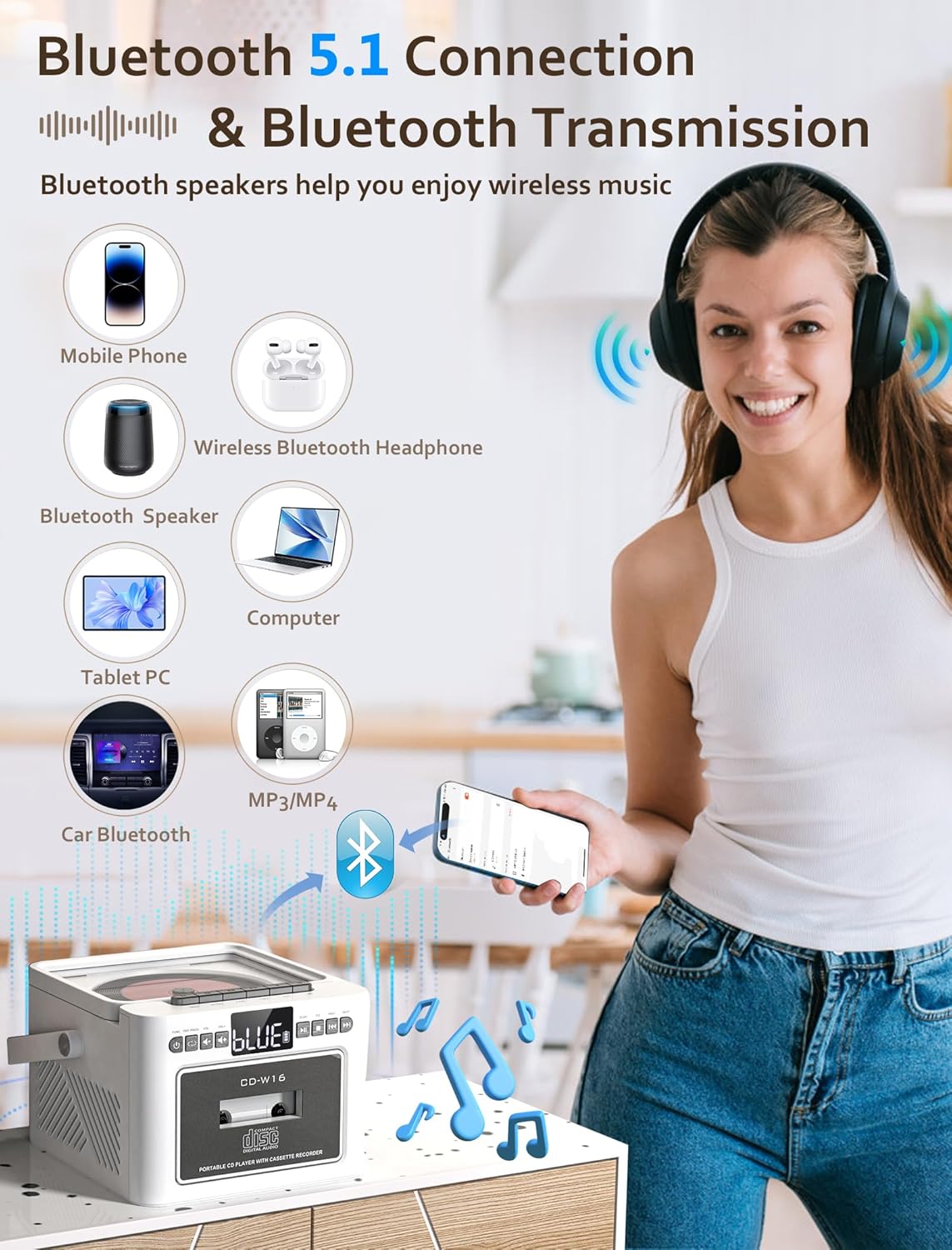
Image 7.3: The Jazmm CD Cassette Player Combo illustrating its Bluetooth 5.1 capabilities for both connecting to mobile devices and transmitting to Bluetooth speakers or headphones.
- דרוק די FUNC button repeatedly until "BT" (Bluetooth) mode is selected. The display will show "BLUE" and flash, indicating it's in pairing mode.
- On your external device (smartphone, tablet, etc.), enable Bluetooth and search for "CD-W16" (or similar).
- Select "CD-W16" to pair. Once connected, the "BLUE" indicator will stop flashing.
- You can now play audio from your device through the boombox speakers.
- בלועטאָאָטה טראַנסמיסיע: To transmit audio from the boombox (e.g., CD playback) to external Bluetooth headphones or speakers, ensure the external device is in pairing mode. The boombox will automatically search and connect.
7.5 USB / TF Card / AUX-IN Playback
- USB/TF קאַרטל: Insert a USB flash drive into the USB port or a TF (Micro SD) card into the TF card slot. Press the FUNC button to select "USB" or "TF" mode. Playback will begin automatically.
- AUX-IN: Connect an external audio device (e.g., MP3 player) to the AUX-IN port using a 3.5mm audio cable (not included). Press the FUNC button to select "AUX" mode. Control playback from your external device.
7.6 ניצן די רימאָוט קאָנטראָל

Image 7.4: The Jazmm CD Cassette Player Combo shown with its included remote control, allowing for convenient operation from a distance.
The remote control allows you to operate most functions from a distance. Ensure there are no obstructions between the remote and the boombox. Insert batteries (not included) into the remote control before use.
8. וישאַלט
- רייניקונג: ניצט אַ ווייכע, טרוקענע שטאָף צו רייניקן די אויסערלעכע זייט פון דעם אַפּאַראַט. ניצט נישט קיין שרײַבנדיקע רייניגער אָדער סאָלווענטן.
- סי-די לינז זאָרג: אויב עס פּאַסירן פּראָבלעמען מיטן ווידערשפּילן סי-די, ניצט אַ קאמערציעל בנימצא סי-די לינז רייניגער דיסק.
- קאַסעטע קאָפּ רייניקונג: Periodically clean the cassette player's heads with a cotton swab lightly dampened with isopropyl alcohol to ensure optimal sound quality.
- סטאָרידזש: ווען נישט אין באַנוץ פֿאַר לענגערע פּעריאָדן, האַלט די מיטל אין אַ קיל, טרוקן אָרט.
- באַטערי זאָרגן: To prolong battery life, avoid fully discharging the battery frequently. Recharge the battery regularly, even if the device is not in active use.
9. טראָובלעשאָאָטינג
| פּראָבלעם | מעגלעך סיבה | לייזונג |
|---|---|---|
| קיין מאַכט | Power adapter not connected; Battery discharged. | Ensure power adapter is securely connected and plugged into a working outlet. Charge the battery. |
| קיין געזונט | קול צו נידעריג; אומרעכטע מאָדע אויסגעקליבן; קאָפּהערער פֿאַרבונדן. | Increase volume. Select the correct playback mode (CD, BT, FM, etc.). Disconnect headphones if sound is desired from speakers. |
| סי-די שפּילט נישט / שפּרינגט איבער | CD dirty or scratched; CD inserted incorrectly; CD format not supported. | Clean the CD with a soft cloth. Reinsert the CD label side up. Ensure the CD is a supported format (CD, CD-R, CD-RW, MP3, WMA). |
| Cassette tape not playing | Tape inserted incorrectly; Tape tangled or damaged. | Reinsert the tape correctly. Check the tape for damage. |
| נעבעך עפעם ראַדיאָ אָפּטראָג | אַנטענע נישט אויסגעשטרעקט; שוואַך סיגנאַל. | Fully extend the FM antenna. Reposition the unit for better reception. |
| בלועטאָאָטה פּערינג ניט אַנדערש | Device not in pairing mode; Boombox too far from device. | Ensure both devices are in pairing mode. Move devices closer. Restart Bluetooth on both devices. |
10. ספּעסאַפאַקיישאַנז
| שטריך | דעטאַל |
|---|---|
| מאָדעל | CD-W16 |
| סאָרט | דזשאַזמם |
| פּראָדוקט דימענשאַנז (L x W x H) | 7.5 X 6.2 X 4.3 אינטשעס |
| קאַנעקטיוויטי טעכנאָלאָגיע | הילפס-פארבינדונג, בלועטוט, יו-עס-בי |
| רעדנער טיפּ | Stereo (Dual 10W HiFi Speakers) |
| מאַכט מקור | באַטעריע געטריבן (איינגעבויטע 5000mAh ריטשאַרדזשאַבאַל באַטעריע) |
| עפעם ראַדיאָ פרעקווענסי | 87.5-108 מהז |
| בלועטאָאָטה ווערסיע | 5.1 |
| שטיצט מידיאַ | CD, CD-R, CD-RW, MP3, WMA, Cassette Tape, USB, TF Card |
11. וואָראַנטי און שטיצן
Jazmm offers a lifetime warranty on this portable CD player boombox. For any inquiries, technical assistance, or warranty claims, please contact our customer service team. We provide 24/7 world-class customer service to ensure your satisfaction.
Please refer to your purchase documentation or the Jazmm official webוועבזייטל פֿאַר ספּעציפֿישע קאָנטאַקט דעטאַלן.


