1. הקדמה
Thank you for choosing the ErGear EGESD8 Electric Standing Desk. This manual provides essential information for the safe and efficient assembly, operation, and maintenance of your new desk. Please read these instructions carefully before use and retain them for future reference. This electric standing desk is designed to offer ergonomic flexibility, allowing you to easily switch between sitting and standing positions, promoting a healthier work environment.

The ErGear Electric Standing Desk, showcasing its sleek design and spacious desktop in a contemporary workspace.
2. זיכערקייַט אינסטרוקציעס
כדי צו זיכער מאַכן זיכערע אָפּעראַציע און פאַרמייַדן שאָדן, ביטע אָבסערווירן די פאלגענדע:
- זיכער מאַכן אַז אַלע פֿאַרבינדונגען זענען זיכער איידער איר באַניצט דעם טיש.
- האַלט קינדער און חיות אַוועק פון דעם טיש בעת אָפּעראַציע.
- Do not place hands or other body parts near moving parts to avoid injury.
- Do not overload the desk. The maximum weight capacity is 80 קג.
- פֿאַרמײַדן צו שטעלן פֿליסיקייטן גלייך אויף דער קאָנטראָל פּאַנעל אָדער לעבן עלעקטרישע קאָמפּאָנענטן.
- If the desk makes unusual noises or movements, discontinue use and consult the troubleshooting section or contact support.
- ניצט נאָר דעם צוגעשטעלטן מאַכט אַדאַפּטער און קייבלען.

This image highlights the robust construction of the ErGear Electric Standing Desk, capable of supporting up to 80 kg, ensuring stability even under significant load.
3. פּעקל אינהאַלט
ביטע קאָנטראָלירט אַז אַלע קאָמפּאָנענטן זענען פאַראַן און נישט געשעדיגט:
- Desktop Panels (assembled)
- טיש פיס (2)
- פֿוס־פּאַדס (2)
- זייַט בראַקאַץ (2)
- קראָססבאַר
- טראַנסמיסיע רוט
- קאָנטראָל פּאַנעל
- מאַכט אַדאַפּטער און קאַבלע
- Cable Grommets (2)
- Headphone Hooks (2)
- פֿאַרזאַמלונג האַרדווער (שרויף, אַלען שליסל)
- באַניצער מאַנואַל
4. אַסעמבלי אינסטרוקציעס
Follow these steps to assemble your ErGear Electric Standing Desk. It is recommended to have two people for assembly.
Official assembly video for the ErGear Electric Standing Desk, demonstrating step-by-step installation.
שריט 1: אַסעמבאַל די ראַם
- Attach the side brackets to the desk legs using the provided screws and Allen wrench.
- Secure the foot pads to the bottom of each leg.
- Connect the two leg assemblies with the crossbar, ensuring all screws are tightened.
Step 2: Fix the Transmission Rod
- Insert the transmission rod into the designated openings on both desk legs.
- Ensure the rod is properly seated and secured with the retaining clips or screws.
Step 3: Assemble the Desktop Panel
- Lay the desktop panels face down on a soft, clean surface.
- Align the panels and secure them together using the provided connectors and screws.
Step 4: Attach the Frame to the Desktop
- Carefully place the assembled desk frame onto the underside of the desktop.
- Align the pre-drilled holes and secure the frame to the desktop using the appropriate screws.
- באַפעסטיקט דעם קאָנטראָל פּאַנעל צו דער אונטערשטער זייט פון דעם דעסקטאַפּ אין אַ באַקוועמען אָרט מיט די צוגעשטעלטע שרויפן.
- Install the headphone hooks to the underside of the desktop as desired.
שריט 5: קאָננעקט די קאַבלעס
- Connect the motor cables from the legs to the control box.
- Connect the control panel cable to the control box.
- Connect the power adapter to the control box and then to a power outlet.
Step 6: Fix the Cable Grommets
- Insert the cable grommets into the pre-cut holes on the desktop to manage cables.
5. אַפּערייטינג ינסטרוקטיאָנס
Your ErGear Electric Standing Desk features an intuitive control panel for easy height adjustment.
Short video showcasing key features of the ErGear Electric Standing Desk, including height adjustment and stability.
קאָנטראָל פּאַנעל איבערview

The desk's intelligent control panel features an LED display showing current height in centimeters, along with up/down arrows and four memory preset buttons for quick adjustments.
- Up/Down Arrows (▲ / ▼): Press and hold to adjust the desk height manually.
- געפירט ווייַז: Shows the current height of the desk in centimeters.
- Memory Presets (1, 2, 3, 4): Store and recall preferred height settings.
אַדזשאַסטינג הייך
דער טיש קען ווערן צוגעפאסט צווישן 72 סענטימעטער און 118 סענטימעטער.
- מאַנואַל אַדדזשוסטמענט: Press and hold the up (▲) or down (▼) arrow button until the desk reaches your desired height.
- Using Memory Presets: Press the corresponding memory button (1, 2, 3, or 4) to automatically move the desk to the saved height.
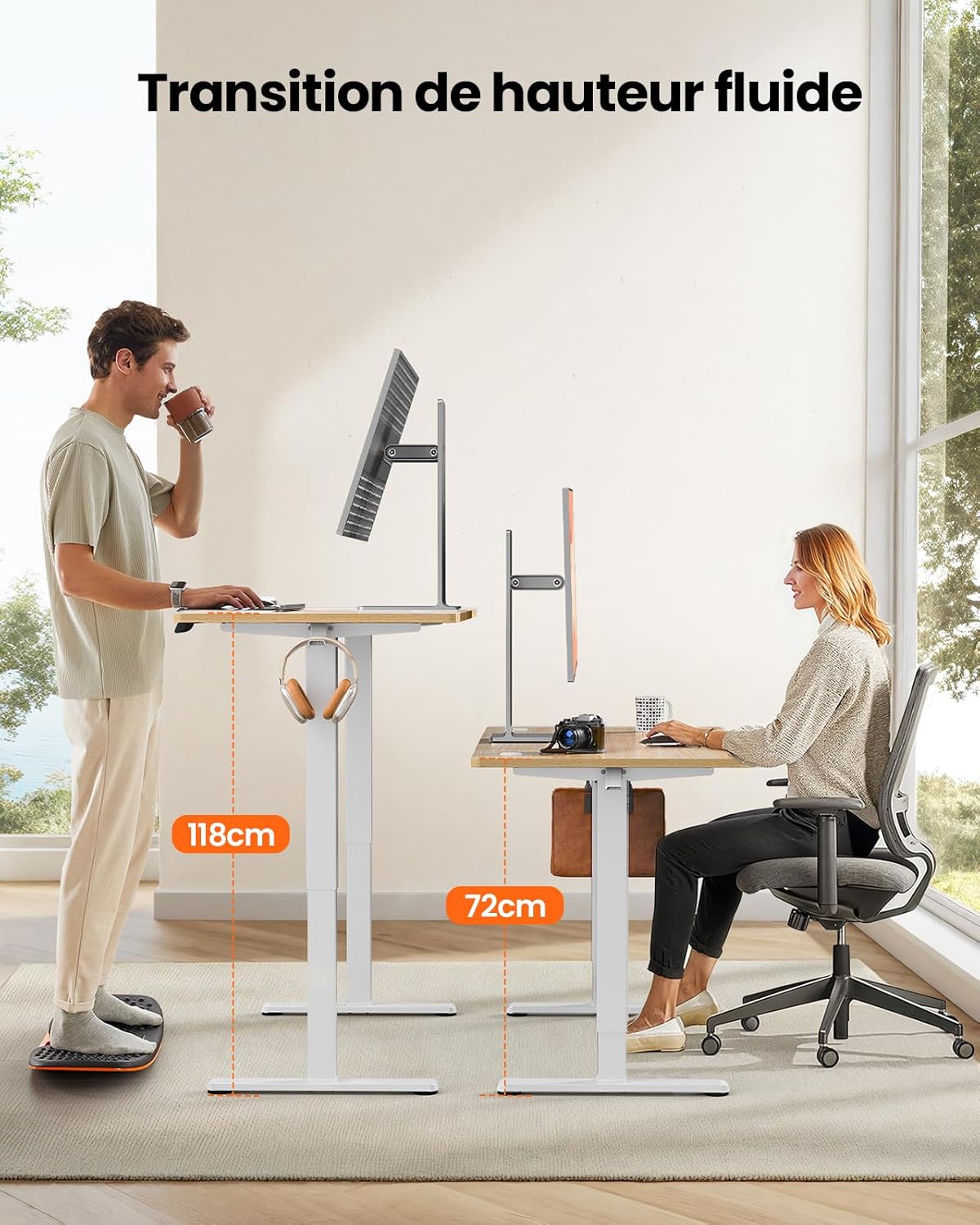
This image demonstrates the adjustable height range of the ErGear Electric Standing Desk, showing a user sitting at 72cm and standing at 118cm, emphasizing ergonomic flexibility.
שטעלן זכּרון פּרעסעטס
- שטעל דעם טיש צו אייער געוואונטשענע הייך מיט די ארויף/אראפ פײַלן.
- Press the 'M' button (if available, or a 'Set' button) followed by the desired memory button (1, 2, 3, or 4). The display will typically flash or beep to confirm the setting is saved.
שטיל אָפּעראַציע
The desk operates with a quiet motor, producing a noise level of ≤ 55 dB, ensuring a peaceful work environment.

Illustrates the ultra-quiet operation of the ErGear Electric Standing Desk, with a noise level of 55dB, ensuring a peaceful and undisturbed work environment.
6. וישאַלט
רעגולערע אויפהאלטונג העלפט פארלענגערן דאס לעבן פון אייער טיש:
- רייניקונג: Wipe the desk surface and legs with a soft, damp שטאָף. פֿאַרמײַדט שאַרפֿע כעמיקאַלן אָדער אַברייסיוו רייניגער.
- קאַבלע מאַנאַגעמענט: Periodically check that all cables are neatly organized and not pinched or tangled. Utilize the integrated cable grommets and hooks.
- Screw Tightness: Occasionally check and tighten any loose screws on the frame or desktop connections.
- דורכקוק: Inspect the desk for any signs of wear or damage. If any issues are found, contact customer support.

דעטאַל view of the desk's integrated cable grommets and convenient hooks, designed to help maintain a tidy and organized workspace by managing cables and accessories.
7. טראָובלעשאָאָטינג
אויב איר טרעפט פראבלעמען מיט אייער טיש, ביטע זעט די פאלגנדע אלגעמיינע פראבלעמען און לייזונגען:
| פּראָבלעם | מעגלעך סיבה | לייזונג |
|---|---|---|
| דער טיש רירט זיך נישט. | שטראָם קאַבל אָפּגעטיילט, מאָטאָר קאַבל לויז, איבערלאַסטונג. | קאָנטראָלירט אַלע מאַכט און מאָטאָר קאַנעקשאַנז. רעדוצירט וואָג אויף דעם טיש. |
| דער טיש באוועגט זיך נישט גלייך. | אומגלייכע לאסט, לויזע שרויפן, פארשטאפונג. | פארטיילן וואָג גלייך. קאָנטראָלירן און אָנציִען אַלע פֿאַרזאַמלונג שרויפֿן. זיכער מאַכן אַז עס זענען נישטאָ קיין שטערונגען. |
| דער טיש שטעלט זיך אפ בעתן אדזשאַסטירן. | Overload protection activated, obstruction. | Remove some weight. Check for obstructions. Wait a few minutes before trying again. |
| קאָנטראָל פּאַנעל רעאַגירט נישט. | Control panel cable loose, power issue. | Check control panel cable connection. Verify power supply. |
If the problem persists after trying these solutions, please contact ErGear customer support.
8. ספּעסאַפאַקיישאַנז
| שטריך | דעטאַל |
|---|---|
| סאָרט | ErGear |
| מאָדעל נומער | EGESD8 |
| קאָליר | Beige and Natural |
| דעסקטאָפּ גרייס (L x B) | 120 סענטימעטער רענטגענ 60 סענטימעטער |
| הייך אַדדזשוסטמענט ראַנגע | 72 ס״מ - 118 ס״מ |
| מאַטעריאַל | Wood (Desktop), Metal (Base) |
| וואָג קאַפּאַסיטי | 80 קג |
| מאָטאָר ראַש לעוועל | ≤ 55 דב |
| ספּעציעלע פֿעיִקייטן | Ergonomic, Electric, 4 Memory Presets, Cable Grommets, Headphone Hooks |
| פּראָדוקט וואָג | 19.05 קג |

A clear diagram illustrating the overall dimensions of the ErGear Electric Standing Desk, including its 120cm x 60cm desktop and adjustable height range of 72cm to 118cm.
9. וואָראַנטי און שטיצן
ErGear products are designed for durability and performance. This product comes with a standard manufacturer's warranty. For specific warranty details, please refer to the warranty card included in your package or visit the official ErGear webפּלאַץ.
If you have any questions, require technical assistance, or need to report a missing or damaged part, please contact ErGear customer support through the retailer where you purchased the product or via the contact information provided on the official ErGear webפּלאַץ.
Please have your model number (EGESD8) and purchase information ready when contacting support.


