הקדמה
This manual provides comprehensive instructions for the assembly, operation, maintenance, and troubleshooting of your FLEXISPOT 79 x 32 Inch Large Standing Desk. Please read this manual thoroughly before use to ensure proper function and safety. Keep this manual for future reference.

Image: The FLEXISPOT standing desk in an office setting, showcasing its large surface area with multiple monitors and accessories.
זיכערקייַט אינפֿאָרמאַציע
Always follow assembly instructions carefully. Do not exceed the maximum weight recommendation of 132 pounds to ensure stability and safety. Ensure all connections are secure before operating the desk. Keep children and pets away from the desk during operation.
פּעקל אינהאַלט
Verify that all components are present before beginning assembly. Your FLEXISPOT standing desk package typically includes:
- Desktop (79 x 32 inches, may be a splice board design)
- Desk Frame (legs, crossbar, motor)
- קאָנטראָל פּאַנעל
- מאַכט אַדאַפּטער און קאַבלע
- גלעזל האָלדער
- כעדפאָון קרוק
- פֿאַרזאַמלונג האַרדווער (שרויף, מכשירים)
- ינסטראַקשאַנז מאַנואַל
Note: Due to the size and weight, your desk may arrive in multiple packages that could ship and arrive separately.

Image: Illustration showing two separate boxes for the desktop and desk frame, indicating that components may arrive in multiple shipments.
סעטאַפּ און אַסעמבלי
Assembly of the FLEXISPOT standing desk is designed to be straightforward. A power drill may be needed for some steps (not included). Follow the detailed instructions provided in the included assembly guide. Ensure all screws are tightened securely, but do not overtighten.
פֿאַרזאַמלונג עצות:
- לייג אויס אַלע טיילן און ייַזנוואַרג איידער איר אָנהייבן.
- Ensure the desktop halves (if applicable) are correctly aligned before securing.
- When installing the transmission rod, ensure it slides smoothly into the motor. Tolerances can be tight.
- It is recommended to have a second person assist when flipping the desk over after assembly.
אַפּערייטינג ינסטראַקשאַנז
Your FLEXISPOT standing desk features an electric height adjustment system with a multifunctional controller.
הייך אַדזשאַסטמאַנט:
- The desk height can be adjusted smoothly and quietly from 28.9 inches to 46.5 inches.
- ניצן די UP און אַראָפּ קנעפלעך אויף די קאנטראל פאנעל צו מאנועל צופאסן דעם טיש צו אייער געוואונטשענע הייך.
זכּרון פּרעסעץ:
The control panel includes 4 programmable memory presets, allowing you to save and recall your preferred sitting and standing heights with a single touch.
- שטעל דעם טיש צו אייער געוואונטשענע הייך מיט די ארויף/אראפ קנעפלעך.
- דרוק די M button (or similar memory set button) followed by one of the numbered preset buttons (1, 2, 3, or 4) to save the current height.
- צו צוריקרופן א געראַטעוועטע הייך, דריק פשוט דעם קאָרעספּאָנדירנדיקן נומערירטן פּרעסעט קנעפּל.
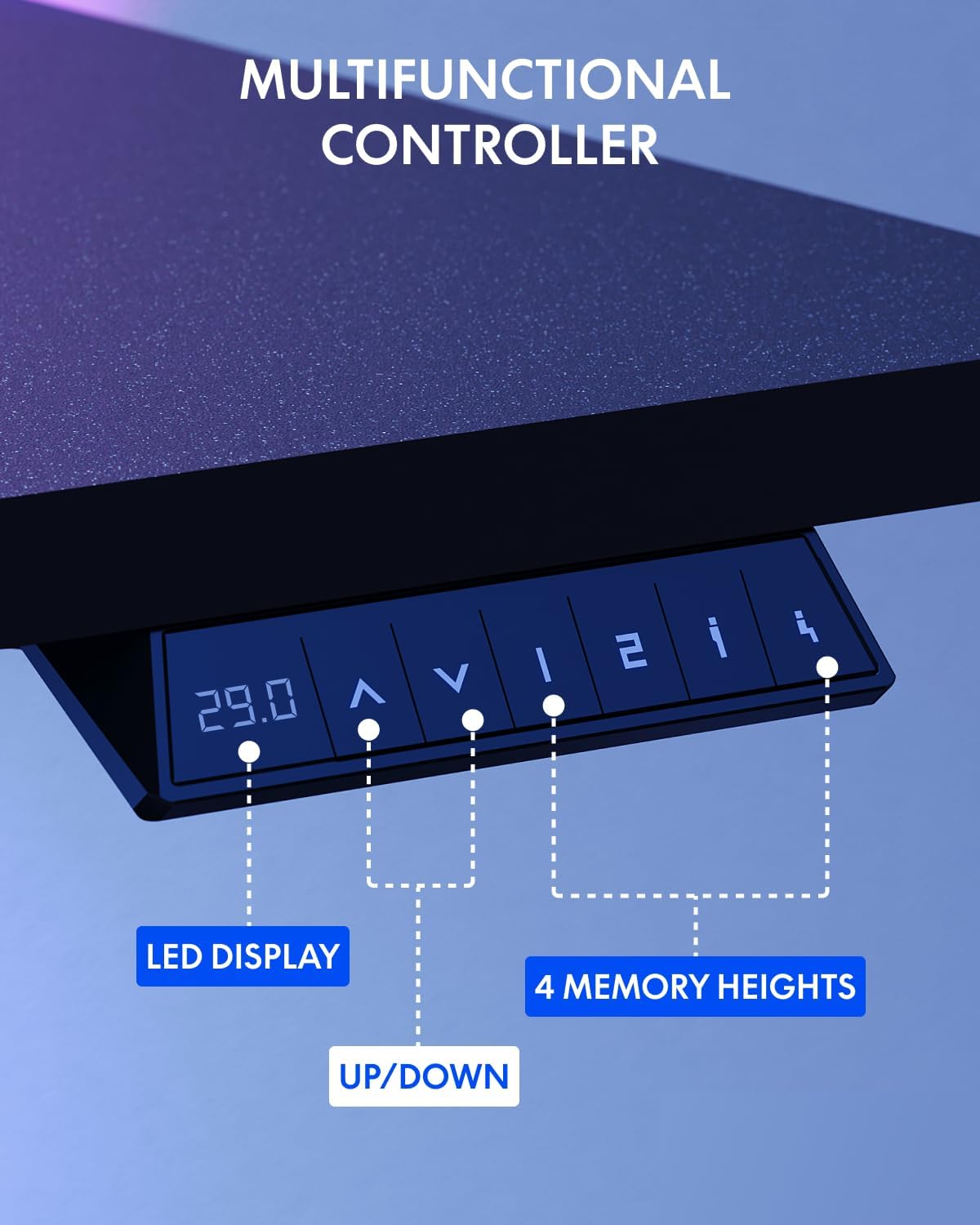
Image: The multifunctional control panel with an LED display and buttons for height adjustment and four memory presets.
אַקסעסערי באַניץ:
- The included cup holder can be attached to the side of the desk for convenient beverage access.
- The headphone hook provides a dedicated storage spot for your headphones, keeping your workspace tidy.

Image: Details of the integrated cup holder and headphone hook accessories.
וישאַלט
רעגולערע אויפהאלטונג גאראנטירט די לאנגעוויטי און אפטימאלע פאָרשטעלונג פון אייער שטייענדיקן טיש.
- רייניקונג: ווישט דעם דעסקטאַפּ און ראַם מיט אַ ווייכן, דamp שטאָף. פֿאַרמײַדט שרײַבנדיקע רייניקונגס־מיטלען אָדער שאַרפֿע כעמיקאַלן.
- טשעק קאַנעקשאַנז: קאָנטראָלירט פּעריִאָדיש אַלע שרויפן און באָלטן צו זיכער מאַכן אַז זיי בלייבן פעסט. פֿעסטשטײַערט ווידער אויב נייטיק.
- קאַבלע פאַרוואַלטונג: Organize cables to prevent snagging during height adjustments.
טראָובלעשאָאָטינג
If you encounter issues with your FLEXISPOT standing desk, refer to the following common solutions:
| פּראָבלעם | מעגלעך סיבה | לייזונג |
|---|---|---|
| טיש רירט זיך נישט | Power cable disconnected, motor error | Check power connections. Unplug and replug the desk. If an error code is displayed, consult customer support. |
| אַניוואַן הייך אַדזשאַסטמאַנט | Obstruction, uneven load | Ensure no obstructions are present. Distribute weight evenly on the desktop. Perform a reset if available (refer to specific controller instructions). |
| טיש וואַקלט זיך | Loose connections, uneven floor | Tighten all assembly screws. Ensure the desk is on a level surface. Adjust foot pads if necessary. |
For persistent issues or error codes not listed, please contact FLEXISPOT customer support.
ספּעסאַפאַקיישאַנז
Key specifications for the FLEXISPOT 79 x 32 Inch Large Standing Desk:
- סאָרט: FLEXISPOT
- מאָדעל: 79 x 32 Inch Large Standing Desk
- פּראָדוקט דימענשאַנז: 32"ד x 79"ברייט x 29"ה (אין מינימום הייך)
- קאָליר: שוואַרצע ראַם + שוואַרצע שפּיץ
- סטייל: מאָדערן
- באַזע מאַטעריאַל: אַללוי סטיל
- שפּיץ מאַטעריאַל טיפּ: ענדזשאַנירד האָלץ
- ענדיקן טיפּ: פּודער קאָוטאַד
- הייך קייט: 28.9" ביז 46.5"
- מאַקסימום וואָג רעקאָממענדאַטיאָן: 132 פונט
- ספּעציעלע פֿעיִקייטן: 79" x 32" Large Tabletop, Splice Board, Cup Holder, Headphone Hook, Electric Height Adjustment, 4 Memory Presets
- פֿאַרזאַמלונג: פארלאנגט
- UPC: 810072869357

Image: Visual representation of the desk's dimensions and adjustable height range.
וואָראַנטי און שטיצן
FLEXISPOT provides the following warranty for your standing desk:
- Frame and Mechanical Parts: 5-יאָר לימיטעד וואָראַנטי
- עלעקטראָניקס: 2-יאָר לימיטעד וואָראַנטי
For warranty claims, technical assistance, or any questions regarding your product, please contact FLEXISPOT customer support. You can find contact information on the official FLEXISPOT webזייטל אדער דורך אייער קויפן פּלאַטפאָרמע.
Visit the official FLEXISPOT Store for more information and products: פלעקסיספּאָט קראָם


