1. וויכטיק סאַפעטי אינפֿאָרמאַציע
ביטע ליינט אלע זיכערהייט אינסטרוקציעס קערפול איידער איר שטעלט עס צונויף און ניצט עס. אויב איר פאלגט נישט די אינסטרוקציעס קען דאס פירן צו שאָדן אדער שאָדן צום פּראָדוקט.
- שטענדיק פאָלגן די פֿאַרזאַמלונג אינסטרוקציעס פּינקטלעך.
- נישט איבערשטייגן די מאקסימום לאוד קאפאציטעט פון 100 קג.
- Keep the desk away from heat sources and liquids.
- Ensure the desk is properly anchored or placed on a stable surface to prevent tipping.
- Exercise caution when adjusting the desk height to avoid pinching or trapping objects.
This section provides critical guidelines for safe operation and handling of your ErGear Electric Height Adjustable Desk.
2. פּראָדוקט איבערview
The ErGear Electric Height Adjustable Desk is designed for ergonomic comfort and versatility in your workspace. It features a robust metal frame, a powerful brushless motor, and programmable memory presets for height adjustment.

Figure 2.1: The ErGear Electric Height Adjustable Desk in a typical office setup, showcasing its spacious white desktop and sturdy frame supporting multiple devices.
שליסל פֿעיִקייטן:
- 100 kg Load Capacity: Supports multiple monitors, laptops, and heavy equipment.
- אַוואַנסירטע ברושלעס מאָטאָר: Certified for reliable performance and smooth height transitions, tested for 100,000 lift cycles.
- ריינפאָרסט ראַם: Features thicker 2.36" legs, wider feet, and larger top plates for 30% more stability.
- הייך אַדזשאַסטמאַנט: Range from 72 cm to 118 cm with four programmable memory presets.
- שטיל אָפּעראַציע: Maximum noise level of 50 dB during height adjustment.
- קאַבלע פאַרוואַלטונג: Two cable grommets and an under-desk power strip holder for an organized workspace.
- אַקסעסערי כוקס: Two hooks for headphones or bags.
3. אַסעמבלי אינסטרוקציעס
Assembly of the ErGear Electric Height Adjustable Desk is straightforward. It is recommended to have a second person assist with certain steps due to the weight of the components.
3.1. אַנפּאַקקינג און קאָמפּאָנענט טשעק
Carefully unpack all components and lay them out on a clean, soft surface to prevent scratches. Verify that all parts listed in the packing list are present. If any parts are missing or damaged, contact customer support.
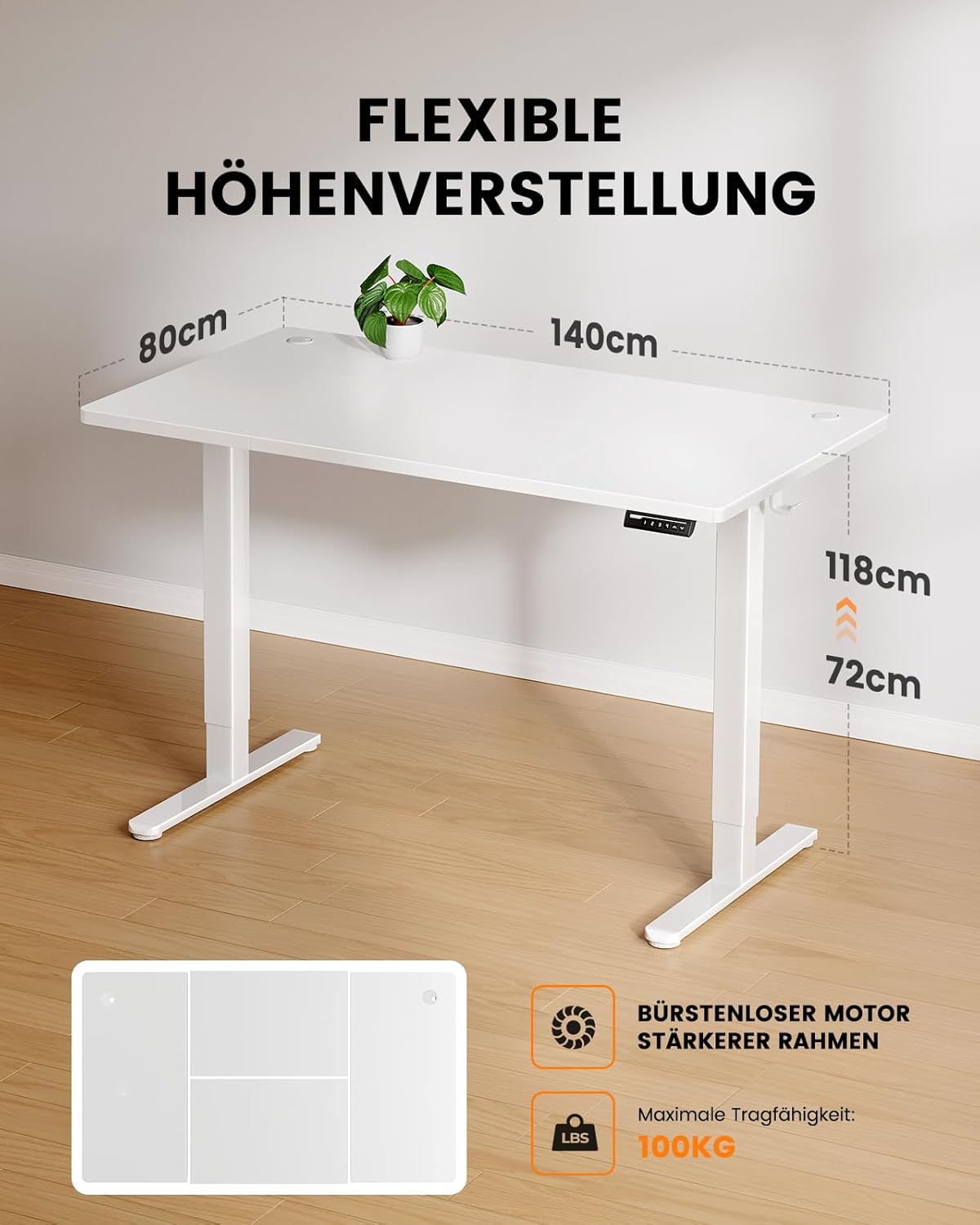
Figure 3.1: Illustration of the desk's flexible height adjustment range (72cm to 118cm) and its maximum load capacity of 100kg, highlighting the brushless motor and strong frame.
3.2. ראַם אַסעמבלי
- Attach the lifting columns to the foot supports using the provided screws. Ensure they are securely fastened.
- Connect the crossbar to the lifting columns. This provides structural integrity.
- Install the control box onto the designated area of the frame.

Figure 3.2: A visual comparison demonstrating the thicker leg design of the ErGear desk (6cm) versus standard thinner legs (4.5cm), illustrating the enhanced stability provided by the robust frame.
3.3. דעסקטאָפּ ינסטאַלירונג
- Carefully place the desktop onto the assembled frame, aligning the pre-drilled holes.
- Secure the desktop to the frame using the appropriate screws. Use a screwdriver or electric drill (low torque setting) for best results.
3.4. Cable Management and Accessories
- Install the power strip holder under the desk.
- Attach the accessory hooks to the sides of the desk as desired.
- Route all cables through the cable grommets and into the power strip holder for a tidy setup.

פיגורע 3.3: דעטאַילעד view of the desk's integrated cable management features, including dual cable grommets, an under-desk power strip holder, and convenient accessory hooks for headphones or bags.
4. אַפּערייטינג ינסטרוקטיאָנס
Your ErGear Electric Height Adjustable Desk is designed for easy and intuitive operation.
4.1. ערשטע אויפשטעל און ערשטע באנוץ
- Plug the desk into a standard power outlet.
- The control panel display will light up.
- דרוק די Up or אַראָפּ arrows to move the desk to your desired height.

Figure 4.1: The desk's control panel, featuring four programmable memory buttons (1-4) for quick height recall, along with standard up and down adjustment arrows.
4.2. Programming Memory Presets
The desk allows you to save up to four preferred height settings.
- שטעל צו דעם טיש צו אייער געוואונטשענע הייך מיטן הילף פון די Up or אַראָפּ עראָוז.
- דרוק די "מ" button (or similar memory button, if present, otherwise assume direct number press). The display might flash.
- Immediately press one of the number buttons (1, 2, 3 אָדער 4) to save the current height to that preset. The display will confirm the save.
- צו צוריקרופן א געראַטעוועטע הייך, דריק פשוט דעם קאָרעספּאָנדירנדיקן נומער קנעפּל.

Figure 4.2: A user demonstrating the ergonomic benefits of the ErGear desk, easily transitioning between sitting and standing positions within the 72cm to 118cm height range.
5. וישאַלט און קער
Proper maintenance ensures the longevity and optimal performance of your ErGear desk.
- רייניקונג: ווישט דעם דעסקטאַפּ און ראַם מיט אַ ווייכן, דamp שטאָף. פֿאַרמײַדט שרײַבנדיקע רייניקונגס־מיטלען אָדער שאַרפֿע כעמיקאַלן.
- דורכקוק: קאָנטראָלירט פּעריִאָדיש אַלע שרויפֿן און פֿאַרבינדונגען צו זיכער מאַכן אַז זיי זענען פֿעסט. פֿעסטשטײַערט ווידער אויב נייטיק.
- מאָטאָר קער: The brushless motor is designed for durability and requires no special maintenance. Avoid obstructing the motor's movement.
- קאַבלע פאַרוואַלטונג: Regularly check cables for wear or damage and ensure they are neatly routed to prevent tripping hazards or damage.
6. טראָובלעשאָאָטינג
If you encounter any issues with your ErGear Electric Height Adjustable Desk, refer to the following common troubleshooting steps:
| פּראָבלעם | מעגלעך סיבה | לייזונג |
|---|---|---|
| דער טיש רירט זיך נישט. | נישט איינגעשטאכן; מאַכט אויסtage; motor overload. | Check power connection; verify power supply; reduce load on desk. |
| דער טיש באוועגט זיך נישט גלייך אדער מאכט אומגעווענליכע גערוישן. | Loose connections; obstruction; uneven weight distribution. | Check and tighten all screws; remove any obstructions; redistribute weight evenly. |
| זכּרון פּרעסעטס אַרבעטן נישט. | Incorrect programming; power cycle needed. | Re-program the memory presets (refer to Section 4.2); unplug the desk for 30 seconds and plug back in. |
| טעות קאָד אויף דיספּליי. | ספּעציפישע סיסטעם טעות. | זעט דעם ספּעציפֿישן טעות קאָד אין דעם גאַנצן מאַנואַל (אויב פֿאַראַן) אָדער קאָנטאַקטירט קונה שטיצע. |
אויב די פראבלעם בלייבט נאך פרובירן די לייזונגען, ביטע קאנטאקטירט ErGear קאסטומער שטיצע פאר ווייטערדיגע הילף.
7. ספּעסאַפאַקיישאַנז
- מאָדעל: B0D9MFMBBQ
- סאָרט: ErGear
- דעסקטאָפּ דימענסיעס: 140 סענטימעטער (לענג) רענטגענ 80 סענטימעטער (ברייט)
- הייך אַדזשאַסטמאַנט קייט: 72 ס״מ - 118 ס״מ
- מאַסע קאַפּאַציטעט: 100 קג
- מאָטאָר טיפּ: Advanced Brushless Motor
- ראַש מדרגה: ≤ 50 דב
- מאַטעריאַל: Metal (Frame), Wood (Desktop)
- פּראָדוקט וואָג: בעערעך 29.6 קג
- קאָליר: ווייַס
8. וואָראַנטי און שטיצן
ErGear products are built with quality and durability in mind. For specific warranty details, please refer to the warranty card included with your product or visit the official ErGear webפּלאַץ.
קונה שטיצן:
If you have any questions, require technical assistance, or need to report an issue, please contact ErGear customer support through the following channels:
- אָנליין שטיצן: Visit the ErGear official webפּלאַץ (ErGear קראָם אויף עמעזאָן) for FAQs and contact information.
- בליצפּאָסט: זעט אייער פּראָדוקט פּאַקאַדזשינג אָדער וואָראַנטי קאַרטל פֿאַר די קונה סערוויס בליצפּאָסט אַדרעס.
Please have your product model number (B0D9MFMBBQ) and purchase date ready when contacting support.


