1. הקדמה
This manual provides detailed instructions for the installation, operation, and maintenance of your BOTSLAB G980H 4K Dual Dash Cam and G300H 2.5K Front Dash Cam. Please read this manual thoroughly before using the device to ensure proper functionality and safety. Keep this manual for future reference.
2. פּעקל אינהאַלט
ביטע באַשטעטיקן אַז אַלע זאכן וואָס זענען ליסטעד אונטן זענען אַרייַנגערעכנט אין דיין פּעקל:
- BOTSLAB G980H 4K Dual Dash Cam Unit
- BOTSLAB G300H 2.5K Front Dash Cam Unit
- Hardwire Kit (Included as per product specifications)
- מאַכט קאַבלע
- Rear Camera Cable (for G980H)
- מאַונטינג בראַקאַץ
- באַניצער מאַנואַל (דעם דאָקומענט)
3. פּראָדוקט איבערview
The BOTSLAB G980H and G300H dash cams are designed to provide high-quality video recording for vehicle safety and security. The G980H offers true 4K resolution for the front camera and 1080P for the rear, while the G300H provides 2.5K front recording. Both models incorporate advanced features for an enhanced driving experience.
שליסל פֿעיִקייטן:
- True 4K Front Recording (G980H): Utilizes a Sony IMX 415 sensor for superior clarity.
- 2.5K Front Recording (G300H): Provides enhanced clarity at 30 frames per second.
- אַוואַנסירטע דרייווער-הילף סיסטעמען (ADAS): Powered by a 1.5TOPS AI NPU chip, offering real-time alerts for pedestrian collisions, vehicle movement ahead, lane departure, and headway monitoring.
- געבויט-אין GPS: Records journey details including speed and location, viewable on Google Maps via your phone.
- 24/7 Parking Mode: Provides theft and vandalism protection when the vehicle is off (requires dedicated hardwire kit, ASIN: B0D3QK86TQ).
- ג-סענסאָר: אויטאָמאַטיש פארשפארט ווידעא פוtage during collisions or sudden movements to prevent overwriting.
- נאַכט זעאונג: Enhanced clarity in low-light conditions.
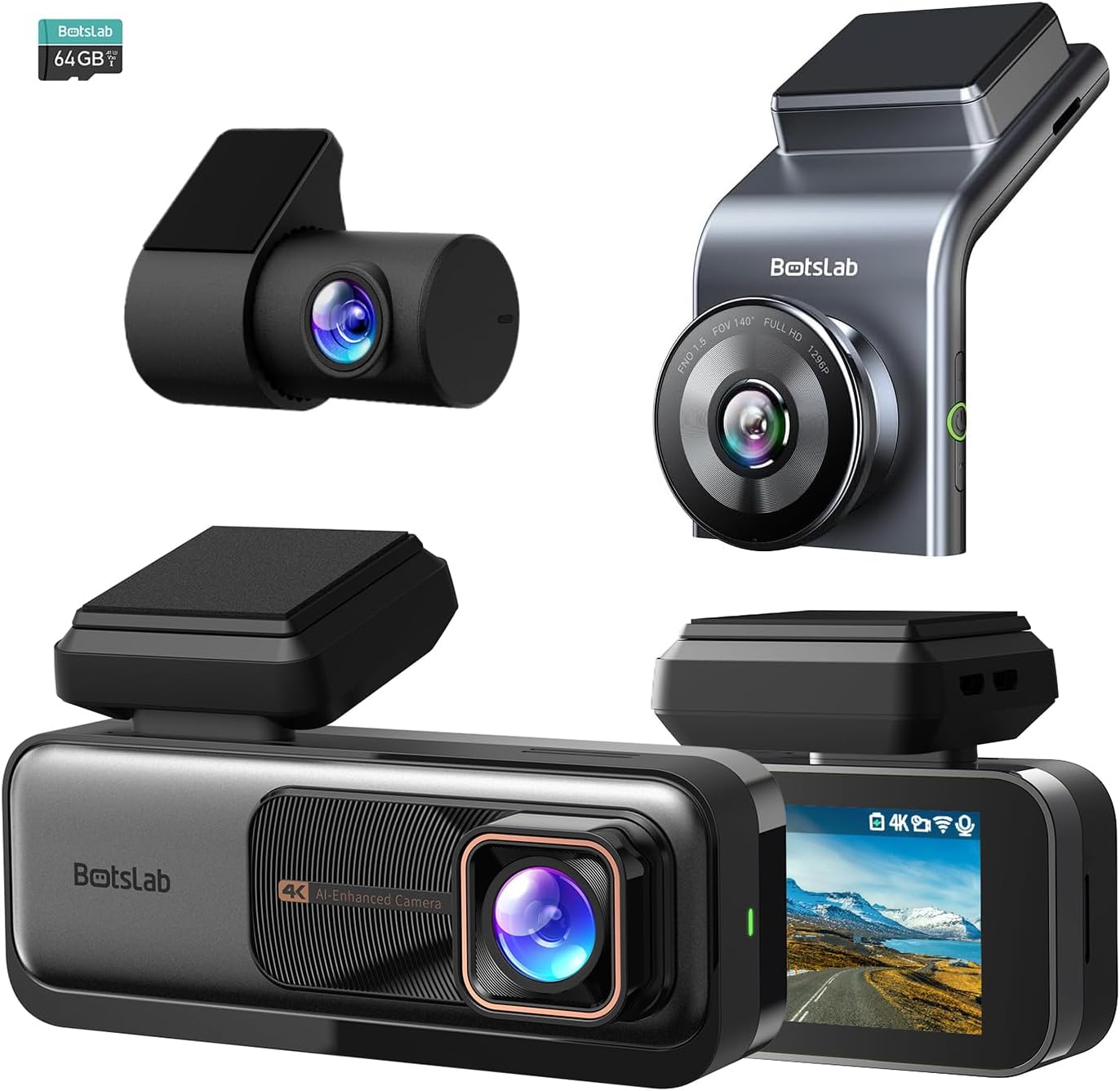
פיגורע 3.1: איבערview of the BOTSLAB G980H and G300H dash cam units.

Figure 3.2: Illustration of the Sony IMX 415 sensor and the 6-layer lens with F1.5 aperture for enhanced clarity.
4. סעטאַפּ און ייַנמאָנטירונג
Proper installation is crucial for optimal performance of your dash cam. Follow these steps carefully:
4.1 פּריפּערינג פֿאַר ינסטאַלירונג
- קלייַבן אַ אָרט: אויסקלייבן אַ פּלאַץ אויף אייער ווינטשילד וואָס שטערט נישט אייער view, טיפּיש הינטערן הינטןview שפּיגל.
- רייניקן די ווינטשילד: Ensure the mounting area is clean and dry for secure adhesion.
- אַרייַנלייגן SD קאָרט: Insert a compatible microSD card (not included, unless specified) into the dash cam's card slot. Ensure the card is formatted before first use (refer to Section 6.1).
4.2 מאָנטירן די דאַש קאַם
- Attach the mounting bracket to the dash cam unit.
- Remove the protective film from the adhesive pad on the bracket.
- Firmly press the dash cam with the bracket onto the chosen windshield location for at least 30 seconds.
- For the G980H, install the rear camera on the rear windshield, ensuring a clear view.
4.3 מאַכט קאַנעקשאַן
- Connect the power cable to the dash cam's power input port.
- Route the power cable along the edge of the windshield and dashboard to the vehicle's 12V power outlet (cigarette lighter socket) or fuse box.
- For 24/7 Parking Mode functionality, connect the included hardwire kit to your vehicle's fuse box according to the hardwire kit's specific instructions. This allows the dash cam to receive continuous power even when the vehicle is off.
- Connect the rear camera cable to the G980H main unit and route it to the rear camera.

Figure 4.1: Recommended installation position for a wide, unobstructed view (170°).
5. אַפּערייטינג ינסטרוקטיאָנס
5.1 יקערדיק אָפּעראַציע
- מאַכט אויף / אַוועק: The dash cam will automatically power on and begin recording when the vehicle's ignition is turned on. It will power off automatically when the ignition is turned off (unless hardwired for parking mode).
- רעקאָרדינג: Loop recording is enabled by default. Older files will be overwritten by new ones when the memory card is full.
- נויטפאַל רעקאָרדינג (G-סענסאָר): In the event of a collision or sudden braking, the built-in G-Sensor will automatically detect the event and lock the current video segment, preventing it from being overwritten.
5.2 אַוואַנסירטע דרייווער-הילף סיסטעמען (ADAS)
The dash cam features an AI NPU chip that provides real-time ADAS alerts to enhance driving safety:
- ווארענונג וועגן פוסגייער קאליזיע: Alerts you to potential pedestrian collisions.
- Vehicle Movement Ahead: מעלדט אייך ווען די פאָרמיטל פֿאַר אייך הייבט אָן צו רירן.
- ווארענונג פון ליין אָפּפאָר: Alerts you if you unintentionally drift out of your lane.
- Headway Monitoring: העלפט האַלטן אַ זיכערע דיסטאַנץ פֿון דעם פֿאָרמיטל.
- Driver Fatigue Alerts: Provides alerts every 2 hours to remind you to take a break.

Figure 5.1: Visual representation of ADAS alerts and the AI NPU chip.

פיגורע 5.2: עקסample of a timely alert for front vehicle departure.

פיגורע 5.3: עקסample of pedestrian recognition with voice reminders.
5.3 Built-in GPS Functionality
The integrated GPS module records your driving data, including speed and location. This data can be viewed on Google Maps via a connected smartphone application, ensuring your travel data remains private and secure.

Figure 5.4: Visualization of GPS route recording and data display.
5.4 פּאַרקינג מאָדע
When connected with the dedicated hardwire kit (ASIN: B0D3QK86TQ), the dash cam can continue to monitor your vehicle even when it is turned off. This mode provides protection against theft and vandalism by recording events while parked.
5.5 Night Vision and Clarity
Both dash cam models are equipped with advanced sensors and optics (like the Sony IMX 415 in G980H) to ensure clear video capture even in low-light conditions or at night, without relying on streetlights.

פיגורע 5.5: עקסample of clear video capture in dark road conditions.

Figure 5.6: Comparison showing enhanced clarity with the G300H's 2.5K resolution.
6. וישאַלט
6.1 סד קאָרט פאַרוואַלטונג
- פֿאָרמאַטירונג: It is recommended to format the microSD card regularly (e.g., once a month) to prevent data corruption and ensure optimal recording performance. This can usually be done through the dash cam's settings menu.
- קאַרטל פאַרבייַט: MicroSD cards have a limited lifespan. If you experience frequent recording errors or corrupted files, consider replacing the card.
6.2 רייניקונג די מיטל
- Use a soft, dry cloth to clean the dash cam's lens and body.
- Do not use chemical cleaners or solvents, as they may damage the device.
7. טראָובלעשאָאָטינג
אויב איר טרעפט פּראָבלעמען מיט אייער דאַש קאַם, זעט די פאלגענדע געוויינטלעכע פּראָבלעמען און לייזונגען:
| פּראָבלעם | מעגלעך סיבה / לייזונג |
|---|---|
| די דאַש קאַם גייט נישט אָן. |
|
| רעקאָרדירונג שטעלט זיך אָפּ אָדער fileס זענען פארדארבן. |
|
| די דזשי-פי-עס סיגנאַל איז שוואַך אָדער נישט געפֿונען. |
|
| ADAS alerts are not functioning. |
|
8. ספּעסאַפאַקיישאַנז
| שטריך | באַשרייַבונג |
|---|---|
| מאָדעל נאָמען | G980H (Dual), G300H (Front) |
| סאָרט | באָטלאַב |
| ווידעא קאַפּטורע רעסאָלוטיאָן | 4K (G980H Front), 1080P (G980H Rear), 2.5K (G300H Front) |
| ספּעציעלע פֿעיִקייטן | Built-In GPS, ADAS, G-Sensor, 24/7 Parking Mode (with hardwire kit) |
| קאַנעקטיוויטי טעכנאָלאָגיע | USB, Wireless (Wi-Fi for app connectivity) |
| קאָליר | שוואַרץ |
| אָריענטירונג | Front and Inside (G980H), Front (G300H) |
| אַרייַנגערעכנט קאַמפּאָונאַנץ | האַרדווירע קיט |
| פאַבריקאַנט | באָטלאַב |
9. וואָראַנטי און שטיצן
For warranty information and technical support, please contact BOTSLAB customer service directly. Details can typically be found on the official BOTSLAB website or through the contact information provided with your purchase documentation.


