1. הקדמה
Thank you for choosing the Bobtot B38 5.1 Channel Home Theater System. This system is designed to provide an immersive audio experience for your entertainment needs. Featuring a 4-inch subwoofer with a built-in receiver and five wired satellite speakers, it delivers clear highs, rich mid-range, and deep bass. Its compact design makes it suitable for small to medium-sized rooms, allowing for flexible placement to optimize sound quality.
This manual provides detailed instructions for setting up, operating, and maintaining your home theater system. Please read it thoroughly before use to ensure proper functionality and to maximize your audio experience.

Image: The Bobtot B38 5.1 Channel Home Theater System, showcasing the central subwoofer unit and five wired satellite speakers.
2. וואָס איז אין דער קעסטל
Upon unpacking your Bobtot B38 Home Theater System, please ensure all the following items are present:
- 1 x Subwoofer with Built-in Receiver
- 1 x Center Speaker
- 2 x Front Speakers
- 2 x Rear Speakers
- 1 x Full Function Remote Control
- 1 x שנעל אָנהייב גייד (באַניצער מאַנואַל)
- 3 x RCA Video Audio Cables
- 1 x 3.5mm to 2-Male RCA Audio Stereo Cable
- קסנומקס רענטגענ קאָאַקסיאַל קאַבלע
- 1 x FM Antenna Cable
- 1 x Optical Stereo Cable
- 1 x TV ARC Cable (HDMI)

Image: All components included in the Bobtot B38 package, laid out on a table.
3. פּראָדוקט איבערview
The Bobtot B38 system comprises a central subwoofer unit and five satellite speakers, designed for a 5.1 channel surround sound experience. The subwoofer houses the main amplifier and various input/output ports.
3.1 Subwoofer and Satellite Speakers
The main unit features a 4-inch subwoofer for powerful bass and a built-in receiver. The five wired satellite speakers (center, two front, two rear) work in conjunction to create an immersive soundstage.

בילד: דעטאַלירט view of the 4-inch subwoofer, illustrating its internal structure.
The compact size of the satellite speakers allows for versatile placement in your room.

Image: A satellite speaker and the subwoofer, with their dimensions indicated.
3.2 דערציען פּאַנעל קאַנעקשאַנז
The rear panel of the subwoofer features various input and output ports for connecting to your audio sources and the satellite speakers.

Image: The rear panel of the subwoofer, detailing the ARC Input, Optical Input, Coaxial Input, AUX Audio Input (RCA), FM Antenna, DVD Audio Input, and speaker Audio Output ports.
- ARC אַרייַנשרייַב: For connecting to TVs with HDMI ARC support.
- אָפּטיש אַרייַנשרייַב: פֿאַר דיגיטאַלער אַודיאָ פֿאַרבינדונג פֿון קאָמפּאַטיבלע דעוויסעס.
- קאָאַקסיאַל אַרייַנשרייַב: פֿאַר דיגיטאַלער אַודיאָ פֿאַרבינדונג פֿון קאָמפּאַטיבלע דעוויסעס.
- AUX Audio Input (RCA): For analog audio connection from various devices.
- FM אַנטענע: פֿאַר FM ראַדיאָ אָפּנאַם.
- DVD Audio Input: Specific RCA inputs for DVD players.
- אַודיאָ רעזולטאַט: RCA jacks for connecting the five wired satellite speakers.
- מאַכט מקור: AC 120V 60Hz 0.5A.
- מאַכט סוויטש: To turn the unit ON/OFF.
3.3 פראָנט פּאַנעל קאָנטראָלס
The front panel of the subwoofer includes essential controls and indicators.

Image: The front panel of the subwoofer with buttons for ST.BY, INPUT, 5.1/2.1, AUTO/M, and ON/OFF Timer.
- ST.BY: Standby button. Press this before selecting the mode every time you turn on the unit.
- איינגאבע: Cycles through available input sources (BT/ARC/OPT/COA/DV/AUX/FM/USB).
- 5.1/2.1: Toggles between 5.1 channel surround sound and 2.1 channel stereo mode (only front speakers play).
- AUTO/M: Auto/Manual tuning for FM radio.
- ON/OFF Timer: For setting sleep timer.
- באַנד קנעפּל: אַדדזשוסץ די בעל באַנד.
- USB/SD קאַרטל סלאָץ: For direct media playback.
3.4 רימאָוט קאָנטראָל
The included full-function remote control allows for convenient operation of your home theater system from a distance.

Image: The remote control for the Bobtot B38 system, showing buttons for power, input selection, 5.1/2.1 channel mode, individual speaker volume control, and other settings.
- מאַכט אויף / אַוועק: טורנס די סיסטעם אויף אָדער אַוועק.
- Input Mode Select: Buttons for BT, ARC, OPT, COA, AUX, USB, FM, DVD.
- 5.1/2.1 Channel Select: Toggles between surround sound and stereo.
- באַנד קאָנטראָל: אַדזשאַסץ די קוילעלדיק סיסטעם באַנד.
- Individual Speaker Volume: The remote control allows independent volume adjustment for each speaker and the subwoofer. Refer to the remote control diagram in Section 3.4 for specific buttons.
- שטום: מוטעס די אַודיאָ רעזולטאַט.
- EQ: עקוואַלייזער סעטטינגס.
- TUNE+/-: For FM radio tuning.
- טש +/-: For changing FM radio channels.
- נומעריק קיפּאַד: For direct input or channel selection.
4. סעטאַפּ
Follow these steps to set up your Bobtot B38 Home Theater System.
4.1 רעדנער קאַנעקשאַן
- אָרט: Position your subwoofer and satellite speakers for optimal performance. Ensure the center speaker is placed centrally, front speakers to the left and right of your viewing area, and rear speakers behind you.
- פֿאַרבינדן סאַטעליט רעדנערס: Connect the five small wired speakers to the "AUDIO OUTPUT" slots on the rear of the subwoofer. Ensure each speaker is connected to its corresponding output (FL, FR, CEN, SL, SR).
- מאַכט אויף: Turn on the subwoofer using the power switch on the rear panel.
- Select 5.1 Mode: דרוק די ST.BY button on the front panel or remote. Then, press the 5.1/2.1 button to switch to 5.1 channel mode.

Image: A visual guide demonstrating the four steps of setting up the 5.1 surround sound system, including speaker placement, wired connections, device connections, and sound testing.
Video: A detailed guide on setting up the Bobtot B38 5.1 Home Theater System, covering speaker connections and initial power-on.
4.2 פֿאַרבינדן זיך צו עקסטערנע דעוויסעס
The Bobtot B38 system supports various connection methods for different audio sources. Ensure your external device has the appropriate output port to match the subwoofer's input.
4.2.1 HDMI ARC Connection (for TVs)
- Verify TV ARC Output: Check if your TV has an HDMI port labeled "ARC" or "HDMI ARC".
- קאָננעקט קאַבלע: Use the provided HDMI ARC cable to connect the TV's ARC port to the "ARC INPUT" port on the subwoofer.
- אויסקלייַבן אַרייַנשרייַב: דרוק די אַרייַנשרייַב button on the subwoofer or remote until "ARC" is displayed on the LED screen.
- טעלעוויזיע אַודיאָ סעטטינגס: On your TV, navigate to the audio settings and select "HDMI ARC" or "Receiver (HDMI)" as the sound output. Some TVs may automatically detect this. If not, manually select it.
- וויכטיק באַמערקונג: The B38 ARC output only supports LPCM 2.0 audio format. Ensure your TV's digital audio output format is set to LPCM 2.0 if you encounter issues.
Video: Demonstrates how to connect the Bobtot B38 to a TV using an HDMI ARC cable and adjust TV audio settings.
4.2.2 Optical Connection (for TVs/Devices)
- Verify Optical Output: Check if your TV or audio device has an optical audio output port.
- קאָננעקט קאַבלע: Remove the transparent cap from the optical cable. Connect one end to your device's optical output and the other end to the "OPTICAL INPUT" port on the subwoofer.
- אויסקלייַבן אַרייַנשרייַב: דרוק די אַרייַנשרייַב button on the subwoofer or remote until "OPT" is displayed on the LED screen.
- Device Audio Settings: On your TV or audio device, navigate to the audio settings and select "PCM" (Pulse-code modulation) as the digital audio output format. Do not select "Automatic" or "Bitstream".
4.2.3 Coaxial Connection (for TVs/Devices)
- Verify Coaxial Output: Check if your TV or audio device has a coaxial audio output port.
- קאָננעקט קאַבלע: Use the provided coaxial cable to connect your device's coaxial output to the "COAXIAL INPUT" port on the subwoofer.
- אויסקלייַבן אַרייַנשרייַב: דרוק די אַרייַנשרייַב button on the subwoofer or remote until "COA" is displayed on the LED screen.
- Device Audio Settings: On your TV or audio device, navigate to the audio settings and select "PCM" as the digital audio output format. Do not select "Automatic" or "Bitstream".
4.2.4 AUX Input (RCA to RCA Connection)
For devices with RCA stereo audio outputs (e.g., older DVD players, some TVs).
- קאָננעקט קאַבלע: Use the provided RCA audio cables (red and white) to connect your device's audio output to the "AUX AUDIO INPUT" (L/R) ports on the subwoofer. Match colors (red to red, white to white).
- אויסקלייַבן אַרייַנשרייַב: דרוק די אַרייַנשרייַב button on the subwoofer or remote until "AUX" is displayed on the LED screen.
4.2.5 AUX Input (RCA to 3.5mm Aux Connection)
For devices with a 3.5mm auxiliary output (e.g., smartphones, laptops, some projectors).
- קאָננעקט קאַבלע: Use the provided 3.5mm to 2-Male RCA audio stereo cable. Connect the RCA ends to the "AUX AUDIO INPUT" (L/R) ports on the subwoofer and the 3.5mm end to your device's auxiliary output.
- אויסקלייַבן אַרייַנשרייַב: דרוק די אַרייַנשרייַב button on the subwoofer or remote until "AUX" is displayed on the LED screen.
4.2.6 DVD Input (3-piece RCA to RCA Connection)
For some older DVD players with multi-channel RCA outputs.
- פאַרבינדן קאַבלעס: Use three RCA to RCA cables. Connect the corresponding outputs from your DVD player (Front L/R, Center/Subwoofer, Rear L/R) to the "DVD AUDIO INPUT" ports on the subwoofer. Match colors.
- אויסקלייַבן אַרייַנשרייַב: דרוק די אַרייַנשרייַב button on the subwoofer or remote until "DVD" is displayed on the LED screen.
4.3 בלועטאָאָטה קאַנעקשאַן
Connect your smartphone, tablet, or other Bluetooth-enabled devices wirelessly.
- אויסקלייַבן בלועטאָאָטה מאָדע: דרוק די אַרייַנשרייַב button on the subwoofer or remote until "BT" is displayed on the LED screen. The system will enter pairing mode.
- אַקטיווירן בלועטוט אויף מיטל: אויף אייער סמאַרטפאָון אָדער טאַבלעט, גייט צו בלועטוט סעטטינגס און אַקטיווירט בלועטוט.
- פּאָר דיווייס: זוכן פֿאַר "Bobtot B38" in the list of available devices and tap to connect.
- Password (if required): אויב געבעטן פֿאַר אַ פּאַראָל, אַרייַן "0000" (פיר נולן).
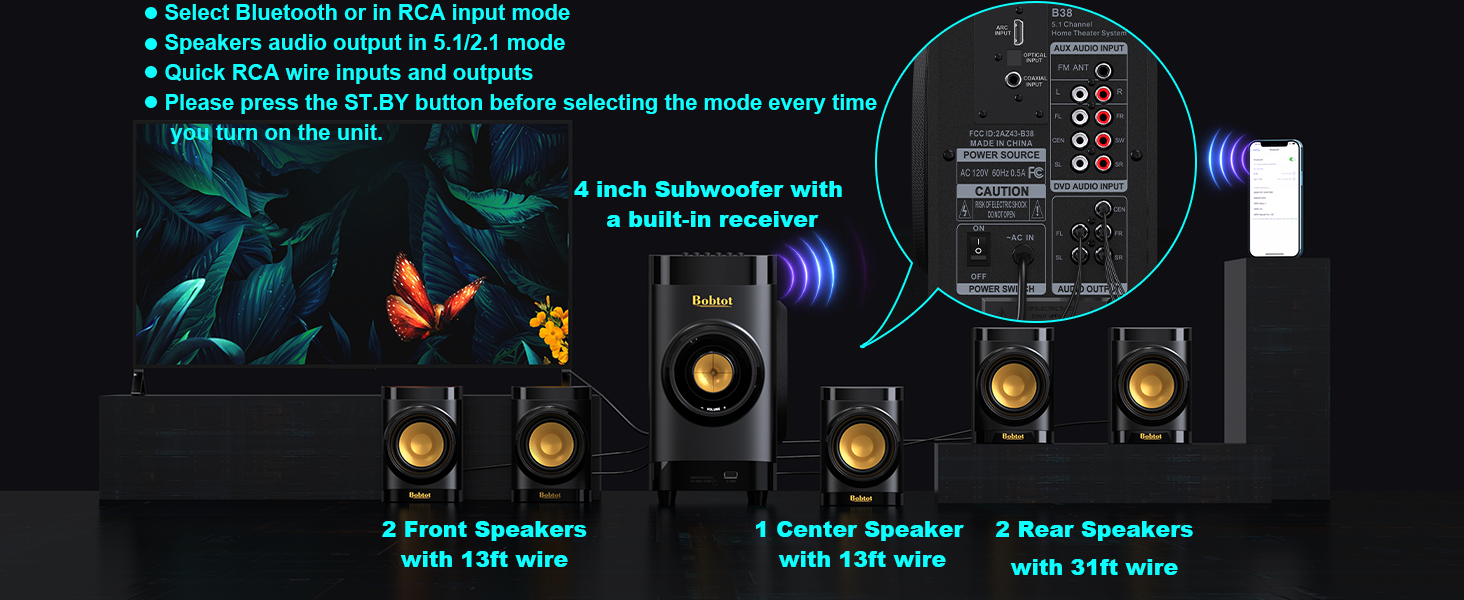
Image: A smartphone displaying Bluetooth settings, showing "Bobtot B38" as an available device for connection.
4.4 USB/SD קאַרטל ווידערשפּיל
For direct music playback without an external device.
- אריינלייגן מעדיע: Insert a USB disk or SD card (with music files) into the corresponding slot on the front panel of the subwoofer.
- אויסקלייַבן אַרייַנשרייַב: דרוק די אַרייַנשרייַב button on the subwoofer or remote until "USB" or "SD" is displayed on the LED screen.
- פּלייבאַק: The system will automatically begin playing music from the inserted media.
5. אַפּערייטינג ינסטרוקטיאָנס
Once your system is set up, use the remote control or front panel buttons to manage playback and settings.
- באַנד אַדזשאַסטמאַנט: ניצן די וואָל +/- buttons on the remote or the volume knob on the subwoofer to adjust the master volume.
- Individual Speaker Volume: The remote control allows independent volume adjustment for each of the five satellite speakers and the subwoofer. Refer to the remote control diagram in Section 3.4 for specific buttons.
- שטום: דרוק די שטום button on the remote to temporarily silence the audio. Press again to unmute.
- EQ סעטטינגס: ניצן די EQ button on the remote to cycle through different equalizer presets.
- עפעם ראַדיאָ: In FM mode, use טונע +/- for manual tuning or AUTO/M for automatic station search. Use טש +/- to navigate saved channels.
- שלאָפן טימער: ניצן די שלאפן +/- buttons on the remote to set a sleep timer.
6. רעדנער פּלייסמאַנט
Proper speaker placement is crucial for achieving the best surround sound experience. Consider the following guidelines:
- סובוואָאָפער: Place the subwoofer on the floor, ideally in a corner or near a wall, to enhance bass response. Experiment with placement to find the best sound for your room.
- צענטער רעדנער: Position the center speaker directly above or below your TV/projector screen, facing the listening area. This speaker handles dialogue.
- Front Left & Right Speakers: Place these speakers to the left and right of your TV, at roughly ear level when seated. They should be equidistant from your main listening position.
- Rear Left & Right Speakers: Place these speakers behind your main listening position, slightly to the sides or directly behind, also at ear level. These provide the surround effects.

Image: An illustration of a living room with the Bobtot B38 5.1 system correctly positioned for optimal surround sound.
The satellite speakers are mountable, allowing for wall installation to save space and optimize sound dispersion.
Video: Shows a person installing a satellite speaker on a wall using a screwdriver, demonstrating the mountable feature.
7. ספּעסאַפאַקיישאַנז
| סאָרט | Bobtot |
| מאָדעל נאָמען | B38 |
| רעדנער טיפּ | אַרומרינגלען סאָונד |
| אַרומרינגלען סאָונד קאַנאַל קאַנפיגיעריישאַן | 5.1 |
| רעדנער מאַקסימום רעזולטאַט מאַכט | 200 וואטס |
| סובוואָאָפער דיאַמעטער | 4 אינטשעס |
| Speaker Size (Satellite) | 2.75 אינטשעס |
| קאַנעקטיוויטי טעכנאָלאָגיע | Auxiliary, Bluetooth, Coaxial, Optical, ARC |
| בלועטאָאָטה ווערסיע | 5.0 |
| בלועטאָאָטה קייט | 33 פֿיס |
| קאַמפּאַטאַבאַל דעוויסעס | Desktop, Gaming Console, Projector, Smartphone, Television |
| פּראָדוקט דימענשאַנז | 17"ד רענטגענ 13"וו רענטגענ 14"ה |
| פּונקט וואָג | 14.34 פונט (6.52 קילאָגראַמס) |
| מאַטעריאַל | Acrylonitrile Butadiene Styrene (ABS), Wood |
| אַרייַנשרייַב וואָלtage | 120 וואלטס |
| סיגנאַל-צו-נויז ראַטיאָ | 70 דב |
| אָפטקייַט ענטפער | 20 KHz |
| דרינענדיק / דרויסנדיק באַניץ | דרינענדיק |
8. טראָובלעשאָאָטינג
If you encounter any issues with your Bobtot B38 Home Theater System, please refer to the following common troubleshooting steps:
- קיין קול:
- Ensure all speakers are correctly connected to the subwoofer's audio output ports.
- Verify the power is ON for both the subwoofer and your audio source (TV, DVD player, etc.).
- Check that the correct input mode is selected on the subwoofer (e.g., ARC, OPT, COA, AUX, BT, USB/SD).
- Adjust the master volume and individual speaker volumes.
- For digital inputs (ARC, Optical, Coaxial), ensure your TV/device audio output is set to "PCM" and not "Automatic" or "Bitstream".
- If using ARC, ensure your TV's HDMI ARC output is selected and the B38 supports LPCM 2.0.
- בלועטאָאָטה פּערינג ישוז:
- Ensure the subwoofer is in "BT" input mode.
- Make sure Bluetooth is enabled on your device and it's within range (33 feet).
- Forget "Bobtot B38" from your device's Bluetooth list and try pairing again.
- אויב אַ פּאַראָל איז פארלאנגט, אַרייַן "0000".
- פאַרקרימט סאָונד:
- Reduce the volume on both the system and your audio source.
- קאָנטראָלירט אַלע קאַבל פֿאַרבינדונגען פֿאַר לויזקייט אָדער שעדיקן.
- Ensure the audio source is not sending an over-ampליפיעד סיגנאַל.
- רימאָוט קאָנטראָל נישט ארבעטן:
- קאָנטראָלירט און פאַרבייט די באַטעריעס אין דער ווײַטקאָנטראָל.
- Ensure there are no obstructions between the remote and the subwoofer's sensor.
- Point the remote directly at the subwoofer.
אויב די טריט לייזן נישט דעם פראבלעם, ביטע קאנטאקטירט קאסטומער סופארט.
9. וישאַלט
To ensure the longevity and optimal performance of your Bobtot B38 Home Theater System, follow these maintenance guidelines:
- רייניקונג: Use a soft, dry cloth to clean the surfaces of the subwoofer and speakers. Do not use liquid cleaners or abrasive materials, as they may damage the finish.
- ווענטילאַטיאָן: זאָרגט פֿאַר גענוג ווענטילאַציע אַרום דעם סאַבוווּפער צו פֿאַרמייַדן איבערהיצונג. בלאָקירט נישט קיין ווענטילאַציע עפענונגען.
- אָרט: פֿאַרמײַדט צו שטעלן די סיסטעם אין דירעקטער זון, לעבן היץ־קוואַלן, צי אין געביטן מיט הויכער פֿײַכטקייט צי שטויב.
- קאַבלעס: Periodically check all cables for any signs of wear or damage. Replace damaged cables immediately to prevent performance issues or safety hazards.
- מאַכט אַוועק: When not in use for extended periods, it is recommended to turn off the system and unplug it from the power outlet.
10. וואָראַנטי און שטיצן
The Bobtot B38 Home Theater System comes with a לימיטעד וואָראַנטיביטע זעט די וואָראַנטי קאַרטל וואָס איז אַרייַנגערעכנט אין אייער פּאַקעט פֿאַר ספּעציפֿישע תּנאים און באַדינגונגען.
For technical support, troubleshooting assistance, or warranty claims, please contact Bobtot customer service through the following channels:
- אַמאַזאָן שטיצן: באַזוכן די פּראָדוקט בלאַט אויף Amazon.com and look for customer support options.
- פאַבריקאַנט Webפּלאַץ: Refer to the official Bobtot webזייטל פֿאַר קאָנטאַקט אינפֿאָרמאַציע און שטיצע רעסורסן.
- טעלעפאָן שטיצן: Check your Quick Start Guide for any provided phone numbers for direct support.
Please have your product model number (B38) and purchase details ready when contacting support.


