1. הקדמה
The Parsonver Smartwatch Z139 is designed to enhance your daily life with a variety of intelligent functions. This manual provides detailed instructions for setting up, operating, and maintaining your smartwatch to ensure optimal performance and user experience.
Key features include Bluetooth calling, comprehensive health monitoring (heart rate, blood oxygen, sleep), over 100 sports modes, and smart notifications.
2. אָנהייבן: אויפֿשטעלן
2.1 פּעקל אינהאַלט
- Parsonver Smartwatch Z139
- טשאַרדזשינג קאַבלע
- באַניצער מאַנואַל
2.2 אויפלאָדן די סמאַרטוואַטש
פארן ערשטן באַנוץ, זאָלט איר גאָר אויפלאָדן אייער סמאַרטוואַטש. פֿאַרבינדט דעם מאַגנעטישן אויפלאָדן קאַבל צו די אויפלאָדן קאָנטאַקטן אויף דער הינטערשטער זייגער און שטעקט דעם USB עק אין אַ מאַכט אַדאַפּטער (נישט אַרייַנגערעכנט) אָדער אַ קאָמפּיוטער'ס USB פּאָרט.
2.3 אַפּ אינסטאַלאַציע און פּערינג
To unlock the full potential of your Parsonver Smartwatch, download the companion app on your smartphone. The app is compatible with iOS 9.0/Android 6.0 or above.
- Scan the QR code in the manual or search for "Parsonver" in your phone's app store (Google Play Store for Android, Apple App Store for iOS).
- ינסטאַלירן און עפֿענען די אַפּ.
- Follow the on-screen instructions in the app to create an account and pair your smartwatch via Bluetooth. Ensure Bluetooth is enabled on your smartphone.
- During pairing, grant necessary permissions for notifications, location, and health data synchronization.

Image: The Parsonver Smartwatch Z139, showcasing its main display with time, date, and step count.
3. אַפּערייטינג ינסטרוקטיאָנס
3.1 בלועטוט רופן און קלוגע נאטיפיקאציעס
Once connected via Bluetooth, you can manage calls directly from your smartwatch.
- ענטפֿערן/מאַכן רופֿן: Use the watch's interface to answer incoming calls or dial numbers. The watch features high-quality speakers and a high-definition microphone for clear communication.
- נאָטיפיקאַטיאָנס: Receive alerts for SMS, WhatsApp, Facebook, emails, and other app notifications directly on your watch. The watch will vibrate to inform you of new messages.
- שטימע אַססיסטאַנט: Utilize the integrated voice assistant for hands-free control and information access.
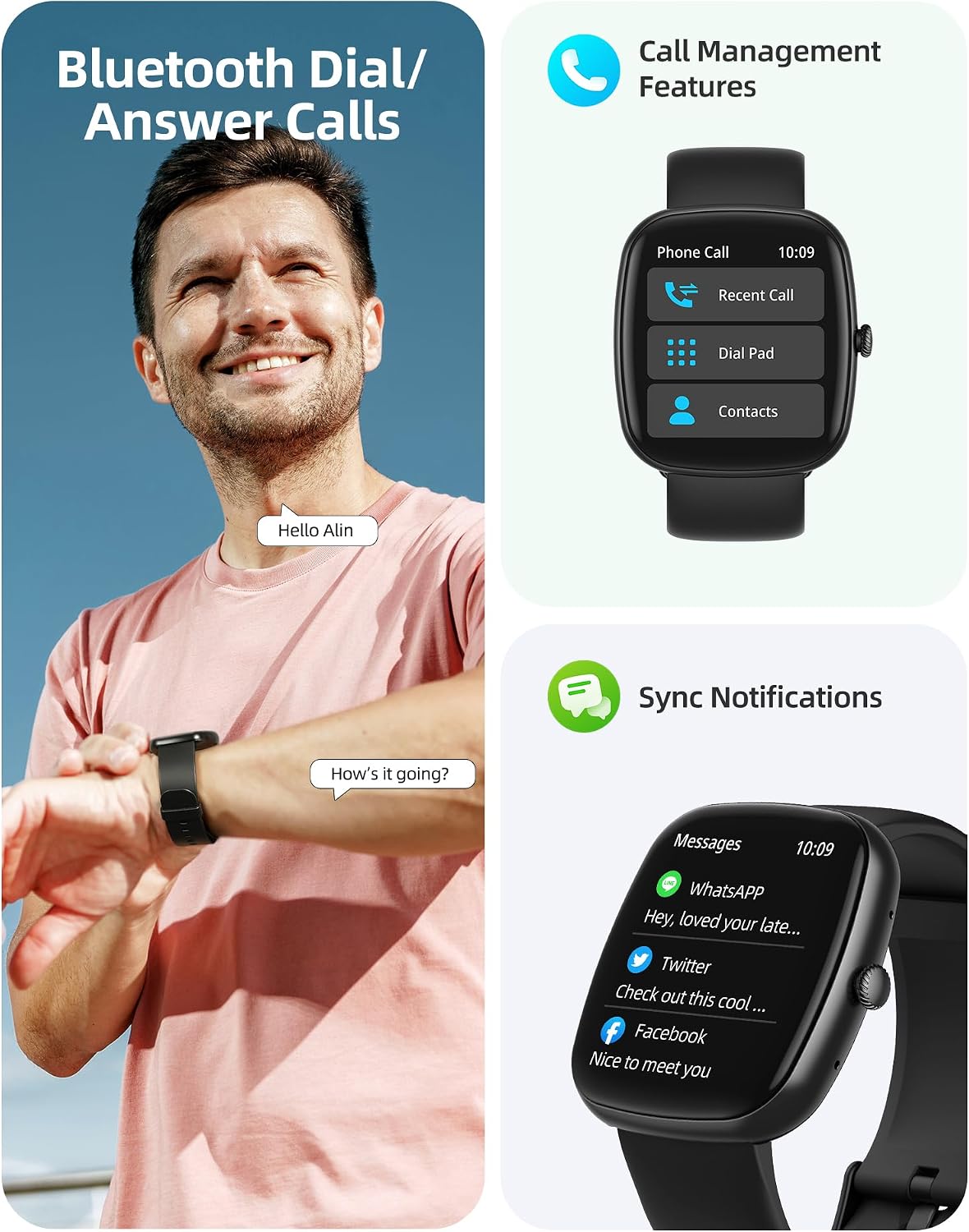
Image: A user interacting with the smartwatch for Bluetooth calls, demonstrating the call management interface.
3.2 געזונט מאָניטאָרינג
The smartwatch features advanced sensors for continuous health tracking.
- האַרץ קורס מאָניטאָרינג: Measures and records your heart rate throughout the day. The app displays trends and alerts for abnormal readings.
- מאָניטאָרינג פון בלוט זויערשטאָף (SpO2): טראַקט אייערע בלוט זויערשטאָף זעטיקונג לעוועלס.
- שלאָף מאָניטאָרינג: Analyzes your sleep patterns, including deep sleep, light sleep, and awake times, to help optimize your sleep habits.
- דרוק מאָניטאָרינג: גיט איינבליקן אין אייערע סטרעס לעוועלס.
- פרויען געזונט טראַקינג: Records menstrual cycles and ovulation periods.

Image: Visual representation of the smartwatch's health monitoring capabilities, including heart rate, blood oxygen, and pressure readings.
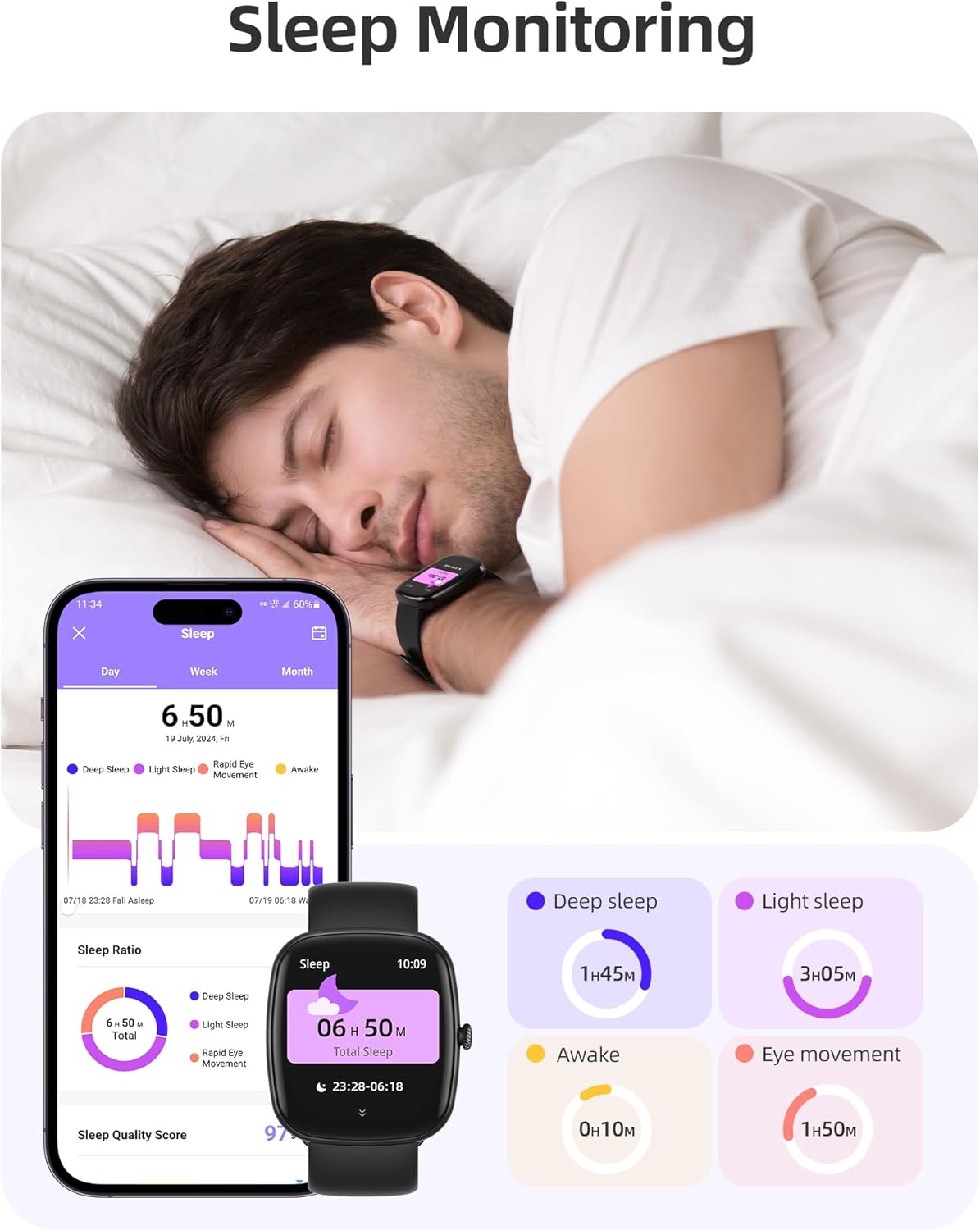
Image: The smartwatch monitoring sleep, with a detailed breakdown of sleep stages displayed on the companion app.
3.3 ספּאָרט מאָדעס און טעטיקייט טראַקינג
The activity tracker supports over 100 sports modes to monitor your workouts effectively.
- בנימצא מאָדעס: Includes yoga, running, jumping, cycling, badminton, football, rowing, and many more.
- דאַטן טראַקינג: Records steps, distance, calories burned, and real-time heart rate during exercise.
- טעגלעכער גרייטקייט סקאָר: Provides a summary of your daily activity and recovery.

Image: The smartwatch tracking a user's activity during a run, displaying key metrics like calories, steps, heart rate, and distance.
3.4 App Experience and BMI Tracking
The companion app offers additional features for health management.
- Weight and BMI Tracking: Manually input your weight in the app to track changes and automatically calculate your Body Mass Index (BMI). View daily, weekly, monthly, and yearly weight trends.
- טרענירונג קורסן: Access integrated training courses from beginner to advanced levels.
- Relaxation Features: Includes white noise, meditation exercises, and relaxation training.

Image: The companion app displaying weight and BMI tracking features, helping users monitor their body composition.
3.5 קוסטאָמיזאַבלע וואַך פנימער
Personalize your smartwatch with over 200 different watch face designs available through the app.

Image: A selection of customizable watch faces, demonstrating the variety of styles and information layouts available.
3.6 אַנדערע פּראַקטישע פֿונקציעס
די סמאַרטוואַטטש כולל עטלעכע אנדערע נוציקע פֿעיִקייטן:
- וועטער פאָרעקאַסט: View 7-day weather forecasts.
- מוזיק קאָנטראָל: Control music playback directly from your wrist.
- אַפּאַראַט קאָנטראָל: קאָנטראָליר די קאַמעראַ פון דיין סמאַרטפאָון אויף אַ ווײַטן אופֿן.
- וועקער זייגער: שטעלן קייפל אַלאַרמס.
- סטאָפּוואַטש און טייַמער: פּינקטלעכע צייט פֿאַר פֿאַרשידענע אַקטיוויטעטן.
- זיציק דערמאָנונג: פרעגט אייך צו רירן זיך נאך פעריאדן פון אומאקטיוויטעט.
- ברידינג עקסערסייזיז: Guided exercises to reduce stress.
- געפֿינען טעלעפֿאָן: Locate your paired smartphone with a tap on your watch.
- ברייטנאַס אַדזשאַסטמאַנט: Continuously adjustable screen brightness for optimal visibility in any lighting condition.

בילד: אן איבערview of the various practical functions available on the Parsonver Smartwatch Z139.
4. וישאַלט
Proper care ensures the longevity and performance of your smartwatch.
- רייניקונג: רייניקט רעגולער די זייגער און רימען מיט א ווייכן, טרוקענעם שטאָף. פֿאַרמייַדט שטרענגע כעמיקאַלן.
- וואַסער קעגנשטעל: The smartwatch has an IP68 water resistance rating, meaning it can withstand hand washing, rain, and splashes. Do not use it for swimming, diving, or in saunas.
- טשאַרדזשינג: Use only the provided charging cable. Avoid exposing charging contacts to moisture.
- סטאָרידזש: האַלט די זייגער אין אַ קיל, טרוקן אָרט ווען נישט אין באַנוץ.
5. טראָובלעשאָאָטינג
If you encounter issues with your smartwatch, try the following steps:
- זייגער טוט זיך נישט אן: מאַכן זיכער אַז די וואַך איז גאָר באפוילן.
- קען נישט צוזאמענשטעלן מיטן טעלעפאן:
- זיכער מאַכן אַז בלועטוט איז ענייבאַלד אויף דיין טעלעפאָן און די זייגער.
- זייט זיכער אז די זייגער איז אין דער דערגרייכונג פון אייער טעלעפאָן.
- ריסטאַרט ביידע די זייגער און דיין טעלעפאָן.
- Try unpairing and re-pairing through the app.
- מעלדונגען נישט באקומען:
- Check app permissions on your phone to ensure notifications are allowed for the Parsonver app.
- Verify that notifications are enabled within the Parsonver app settings.
- זיכער מאַכן אַז די זייגער איז ריכטיק פארבונדן דורך בלועטוט.
- נישט פּינקטלעכע געזונט דאַטן:
- זייט זיכער אז די זייגער טראָגט גוט אויף אייער האַנטגעלענק, נישט צו ענג אדער צו לויז.
- רייניקט דעם סענסאר אויף דער הינטערשטער זייגער.
- פֿאַרמײַדן איבערגעטריבענע באַוועגונג בעת מעסטונגען.
- עקראַן רעאַגירט נישט: Try restarting the watch. If the issue persists, contact customer support.
6. ספּעסאַפאַקיישאַנז
| שטריך | באַשרייַבונג |
|---|---|
| סאָרט | פּאַרסאָנווער |
| מאָדעל נומער | ז139 |
| פאַרשטעלן גרייס | 1.83 אינטשעס |
| אַפּערייטינג סיסטעם קאַמפּאַטאַבילאַטי | iOS 9.0/Android 6.0 אדער העכער סמאַרטפאָונז |
| קאַנעקטיוויטי טעכנאָלאָגיע | בלועטאָאָטה |
| ספּעציעלע פֿעיִקייטן | Bluetooth Calls, 100+ Sports Modes, Heart Rate Monitoring, SpO2 Monitoring, Sleep Monitoring, IP68 Water Resistance, Music Control, Camera Control, Weather, Alarm, Timer, Stopwatch, Sedentary Reminder, Breathing Exercises, Find Phone, Brightness Adjustment, Women's Health Tracking |
| באַטאַרייע זאַץ | ליטהיום-פּאָלימער |
| באַטאַרייע קאַפּאַציטעט | 230 מאַה |
| וואַסער קעגנשטעל שאַץ | IP68 (Not for swimming/diving/sauna) |
| זכּרון סטאָרידזש קאַפּאַסיטי | 512 מב |
| גפּס | דורך סמאַרטפאָנע |
7. וואָראַנטי און שטיצן
For warranty information and customer support, please refer to the documentation included with your purchase or visit the official Parsonver website. Typically, products are covered by a manufacturer's warranty against defects in materials and workmanship for a specified period from the date of purchase. Please retain your proof of purchase.
If you experience any issues not covered in this manual, or require further assistance, please contact Parsonver customer service.


