1. וויכטיק סאַפעטי אינפֿאָרמאַציע
- לייענען אַלע ינסטראַקשאַנז איידער איר נוצן די מיטל.
- האַלטן די מיטל אַוועק פון וואַסער און נעץ.
- דו זאלסט נישט ויסשטעלן צו עקסטרעם טעמפּעראַטורעס אָדער דירעקט זונשייַן.
- Use only the provided power adapter and charging cables.
- פּרוּווט נישט צו צענעמען אָדער פאַרריכטן דעם אַפּאַראַט אַליין. קאָנטאַקט קוואַליפֿיצירטע סערוויס פּערסאָנעל.
- פאַרזיכערן געהעריק ווענאַליישאַן צו פאַרמייַדן אָוווערכיטינג.
2. פּעקל אינהאַלט
באַשטעטיקן אַז אַלע זאכן זענען פאַראַן אין פּעקל:
- Ikarao Break X2 Karaoke Machine
- 2 ווירעלעסס מייקראָופאָונז
- טשאַרדזשינג קאַבלע
- רימען
- באַניצער מאַנואַל
3. פּראָדוקט איבערview
The Ikarao Break X2 is an all-in-one portable karaoke system designed for an immersive entertainment experience. It features a 10.1-inch touch screen, a powerful 600W Bluetooth speaker, and two self-charging wireless microphones.
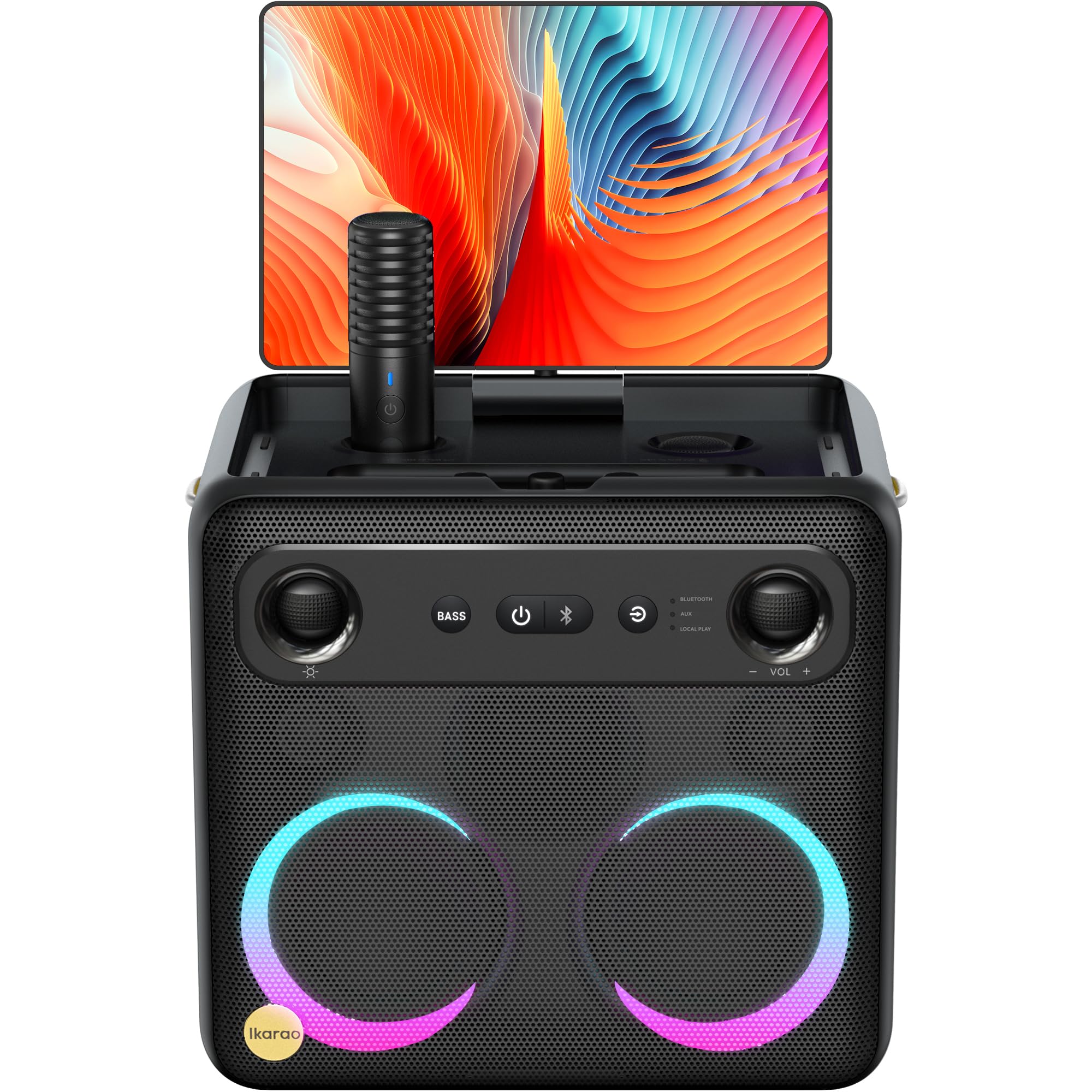
Image: Ikarao Break X2 Karaoke Machine. This image shows the main unit with its integrated 10.1-inch touch screen, the speaker grille, and the two wireless microphones stored in their charging slots.
שליסל פֿעיִקייטן:
- Integrated 10.1-inch Touch Screen: 2K HD resolution for clear lyric display. The screen can rotate 180 degrees for optimal viewינג אַנגלעס.
- 600W Bluetooth Speaker: Delivers powerful and clear audio for an engaging karaoke experience.
- Two Self-Charging Wireless Microphones: Conveniently store and charge microphones within the unit. No manual pairing required.
- איינגעבויטע קאָנעקטיוויטי: Access YouTube and Spotify via Wi-Fi for an unlimited song library.
- קייפל פּלייַבאַקק מאָדעס: Supports HDMI, USB, AUX IN, AUX OUT, TF, SD, and wired microphone connections.
- פּאָרטאַטיוו פּלאַן: Compact and equipped with a strap for easy transport, offering up to 8 hours of battery life.
4. סעטאַפּ
4.1 ערשט טשאַרדזשינג
- Connect the provided charging cable to the charging port on the Ikarao Break X2.
- Plug the other end into a suitable power outlet.
- לאָזט דעם אַפּאַראַט זיך גאָר אויפלאָדן איידער איר ניצט עס צום ערשטן מאָל. דער אויפלאָדן-אינדיקאַטאָר וועט ווײַזן דעם באַטאַריע-סטאַטוס.
4.2 פּאַוערינג אויף / אַוועק
- To power on, press and hold the Power button located on the control panel until the screen illuminates.
- To power off, press and hold the Power button until the shutdown options appear on the screen, then select 'Power Off'.
4.3 ווי-פי קאַנעקשאַן
- Once powered on, navigate to the 'Settings' menu on the touch screen.
- אויסקלייבן 'Wi-Fi' און עס אנצינדן.
- קלייַבט אייער געוואונטשענע Wi-Fi נעץ פֿון דער רשימה און גיט אריין דעם פּאַראָל אויב געבעטן.
- Once connected, you can access online features like YouTube and Spotify.
4.4 מיקראָפאָן באַניץ
- The two wireless microphones are pre-paired with the unit. Simply remove them from their charging slots to activate.
- To charge, place the microphones back into their designated slots on the main unit.
5. אַפּערייטינג ינסטרוקטיאָנס
5.1 ניצן די ריר סקרין
- The 10.1-inch touch screen functions like a tablet. Tap to select, swipe to scroll.
- The screen can be rotated 180 degrees to adjust the viewing angle. Gently pivot the screen to the desired position.
5.2 Karaoke Mode (YouTube/Spotify)
- זיכער מאַכן אַז די דעווייס איז פארבונדן צו Wi-Fi.
- From the home screen, tap on the YouTube or Spotify application icon.
- זוכן פֿאַר your desired karaoke songs or playlists.
- Adjust the main volume using the controls on the unit or the on-screen interface.
- Adjust microphone volume and echo effects using the dedicated controls.
5.3 בלועטוט רעדנער מאָדע
- Activate Bluetooth on your external device (e.g., smartphone, tablet).
- On the Ikarao Break X2, navigate to the Bluetooth settings or select the Bluetooth input mode.
- זוכן פֿאַר 'Ikarao Break X2' on your external device and pair.
- Once connected, you can play audio from your external device through the Ikarao Break X2 speaker.
5.4 עקסטערנע דעווייס קאָנעקטיוויטי
- הדמי: Connect to a TV or external display for a larger viewינג דערפאַרונג.
- USB/TF/SD: Insert USB drives or memory cards to play local audio or video files.
- AUX IN: פֿאַרבינדט עקסטערנע אַודיאָ קוועלער מיט אַ 3.5 מם אַודיאָ קאַבל.
- AUX OUT: Connect to external speakers or sound systems.
- ווייערד מיקראָפאָן: An additional port is available for a wired microphone if desired.
6. וישאַלט
6.1 רייניקונג
- Wipe the screen and exterior surfaces with a soft, dry, lint-free cloth.
- ניצט נישט קיין שרײַבענדיקע רייניגער, סאָלווענטן אדער אַעראָסאָל ספּרײַ.
- פֿאַר שווערע פֿלעקן, לײַכט דריקןampוואשט דעם שטאָף מיט וואַסער, און ווישט גלייך טרוקן.
6.2 סטאָרידזש
- האַלט דעם אַפּאַראַט אין אַ קיל, טרוקן אָרט אַוועק פון דירעקט זונשייַן און עקסטרעמע טעמפּעראַטורן.
- Ensure microphones are securely placed in their charging slots when not in use.
6.3 באַטערי קער
- כדי צו פארלענגערן די לעבן פון די באַטעריע, זאָל מען נישט אָפט אויסלאָדן די באַטעריע גאָר.
- If storing for an extended period, charge the battery to approximately 50% every few months.
7. טראָובלעשאָאָטינג
7.1 No Sound from Speaker
- Check the main volume level on the unit and any connected external devices.
- Ensure the correct input source is selected (e.g., Bluetooth, AUX, YouTube).
- Verify that cables are securely connected if using wired inputs.
7.2 Microphones Not Working
- Ensure microphones are fully charged. Place them in their slots for a few minutes.
- Check microphone volume levels on the unit.
- Confirm that the microphones are removed from their charging slots to activate.
7.3 Wi-Fi פֿאַרבינדונג פּראָבלעמען
- Restart the Ikarao Break X2 and your Wi-Fi router.
- זייט זיכער אז איר זענט אין דער דערגרייכונג פון אייער Wi-Fi נעץ.
- טשעק נאך א מאל דאס Wi-Fi פאסווארט.
7.4 Screen Not Responding
- Try restarting the device by holding the Power button.
- If the screen is frozen, a hard reset might be necessary (refer to specific instructions if available, or hold power button for 10-15 seconds).
8. ספּעסאַפאַקיישאַנז
| שטריך | באַשרייַבונג |
|---|---|
| סאָרט | יקאַראַאָ |
| מאָדעל נאָמען | ברעכן X2 |
| פּראָדוקט דימענשאַנז | 21 X 27 X 29 סענטימעטער |
| וואָג | 6 קילאָגראַמס |
| באַטערי טיפּ | ליטיום יאָן (1 פארלאנגט, אַרייַנגערעכנט) |
| מאַכט מקור | באַטאַרייע פּאַוערד |
| קאָמפּאַטיבלע פּעריפעראַלס | HDMI, Guitar, USB, AUX IN, AUX OUT, TF, SD, Wired Microphone |
| ספּעציעלע פֿעיִקייטן | Integrated YouTube and Spotify connection |
| קאַנעקטיוויטי טעכנאָלאָגיע | Aux, Bluetooth, HDMI, USB, Wi-Fi |
| מעדיע טיפּ | וסב, בלועטאָאָטה |
| רעקאָממענדעד ניצט | TV connection, Indoor, Outdoor, Parties, Commercial, Home use |
9. וואָראַנטי און שטיצן
The Ikarao Break X2 Karaoke Machine comes with a standard manufacturer's warranty. Please refer to the warranty card included in your package for specific terms and conditions.
For technical support, troubleshooting assistance, or warranty claims, please contact Ikarao customer service through their official webזייטל אדער די קאָנטאַקט אינפֿאָרמאַציע וואָס איז צוגעשטעלט אין אייער קויפן דאָקומענטאַציע.
ביטע באַהאַלטן אייער קויפן-באַווייַז פֿאַר גאַראַנטיע צוועקן.


