הקדמה
Thank you for choosing the Tronsmart T7 Lite Portable Bluetooth Speaker. This manual provides essential information for setting up, operating, and maintaining your speaker to ensure optimal performance and longevity. Please read it thoroughly before use.
וואָס איז אין די קעסטל
- 1 X T7 Lite פּאָרטאַטיוו דרויסנדיק רעדנער
- 1 X Type-C טשאַרדזשינג קאַבלע
- 1 x באַניצער מאַנואַל
- 1 X Lanyard
- וואָראַנטי קאַרד
פּראָדוקט איבערview
Familiarize yourself with the Tronsmart T7 Lite speaker's components and controls.
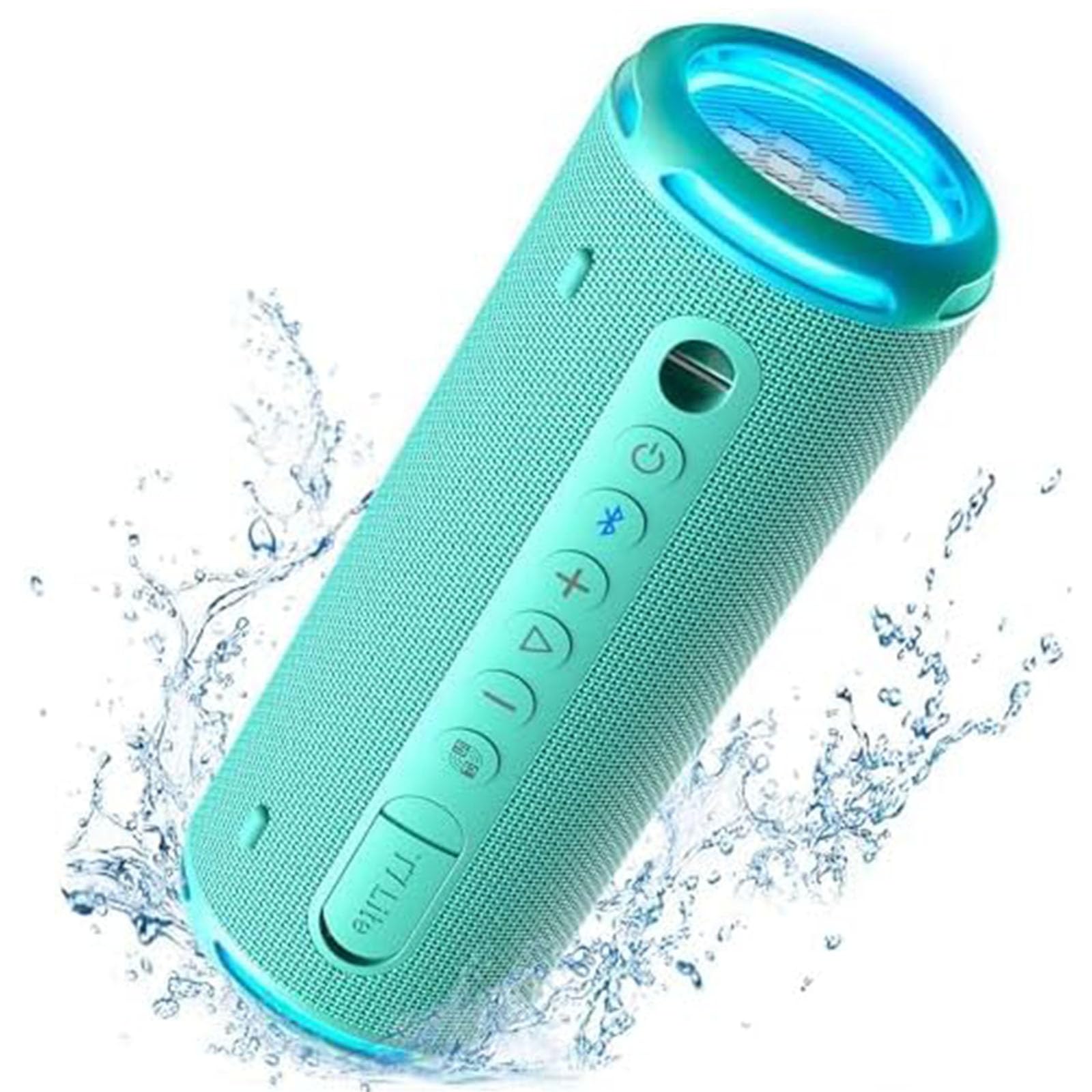
Control Buttons & Ports
- מאַכט קנעפּל: דריקן און האַלטן צו מאַכט אויף / אַוועק.
- בלועטאָאָטה קנעפּל: דריקן צו אַרייַן בלועטאָאָטה פּערינג מאָדע.
- באַנד אַרויף (+): פאַרגרעסערן באַנד.
- באַנד אַראָפּ (-): פאַרמינערן באַנד.
- שפּיל / פּויזע קנעפּל: שפּיל אָדער פּויזע אַודיאָ.
- עק קנעפּל: Cycle through equalizer modes.
- טיפּ C טשאַרדזשינג פּאָרט: פֿאַר טשאַרדזשינג די רעדנער.
- AUX-אין פּאָרט: פֿאַר דראָטיקער אַודיאָ פֿאַרבינדונג.
- טף קאַרד שפּעלטל: פֿאַר שפּילן מוזיק גלייך פֿון אַ TF קאַרטל.
סעטאַפּ
1. טשאַרדזשינג די ספּיקער
Before first use, fully charge the speaker using the provided Type-C charging cable and a compatible USB power adapter (not included). The LED indicator will show charging status.
2. מאַכט אויף / אויסגעלאשן
Press and hold the Power button for 2 seconds to turn the speaker on or off. A sound prompt will indicate the power status.
3. בלועטאָאָטה פּערינג
- Turn on the speaker. The Bluetooth indicator will flash blue, indicating it's ready for pairing.
- אַקטיווירן בלועטוט אויף אייער מיטל (סמאַרטפאָון, טאַבלעט, אאז"וו).
- Select "Tronsmart T7 Lite" from the list of available Bluetooth devices.
- Once connected, the Bluetooth indicator will remain solid blue, and you will hear a confirmation sound.
The speaker features Bluetooth 5.3, offering a stable wireless connection up to 49 feet (15 meters).

אַפּערייטינג די רעדנער
יקערדיק קאָנטראָלס
- שפּיל / פּויזע: קורץ דריקן די שפּיל / פּויזע קנעפּל.
- באַנד אַרויף: דריק קורץ דעם '+' קנעפל.
- באַנד אַראָפּ: דריק קורץ דעם '-' קנעפל.
- ווייַטער שפּור: לאַנג דריקן די '+' קנעפּל.
- פֿריִערדיקע שפּור: לאַנג דריקן דעם '-' קנעפּל.
- ענטפֿערן / סוף רופן: קורץ דריקן די שפּיל / פּויזע קנעפּל.
- אָפּוואַרפן רופן: לאנג דריקן די שפּיל / פּויזע קנעפּל.
EQ and App Control
Customize your audio experience using the Tronsmart app. The app allows you to adjust the equalizer settings and control the light show. Download the Tronsmart app from your device's app store.

Rainbow Light Show
The speaker features a dynamic rainbow light show that moves to the beat of your music. Press the EQ button to cycle through different light modes or turn the lights off. You can also control the light show via the Tronsmart app.

טרו ווירעלעסס סטערעאָ (טווס) פּערינג
For an immersive stereo sound experience, you can pair two Tronsmart T7 Lite speakers together.
- זיכער מאַכן אַז ביידע רעדנערס זענען אנגעצונדן און נישט פארבונדן צו קיין אַנדער בלוטוט מיטל.
- אויף איין רעדנער (דאָס וועט זיין דער הויפּט רעדנער), דריק און האַלט דעם בלועטוט קנעפּל פֿאַר 3 סעקונדעס ביז איר הערט אַ פּראָמפּט.
- The two speakers will automatically connect to each other. Once connected, the primary speaker's Bluetooth indicator will flash blue, and the secondary speaker's indicator will be solid blue.
- פֿאַרבינדט אייער דעווייס צום הויפּט רעדנער דורך בלועטוט.

שליסל פֿעיִקייטן
- Enhanced Bass & Versatility: The T7 Lite features a cutout design that reduces obstructions to sound transmission, boosting bass output. It delivers powerful audio with a maximum volume of 90dB.
- 24 שעה שפּיל צייט: Equipped with a built-in 4000mAh battery, the speaker can continuously play high-quality audio for up to 24 hours at 50% volume. Playtime may vary based on light display, audio content, and volume levels.
- IPX7 Waterproof & Durable Fabric: This wireless Bluetooth speaker is resistant to rain, splashes, and can be submerged in 3.3 feet of water for up to 30 minutes. Its durable fabric material and sturdy rubber cover provide protection for outdoor use.
- וויבראַנט קאָליר אָפּציעס: The T7 Lite is available in various colors, allowing you to choose one that matches your style.


ספּעסאַפאַקיישאַנז
| סאָרט | טראָנסמאַרט |
| מאָדעל נאָמען | T7 Lite |
| רעדנער טיפּ | דרויסנדיק |
| ספּעציעלע פֿעיִקייטן | LED Light, Lightweight, Portable, Stereo Pairing, Waterproof |
| קאַנעקטיוויטי טעכנאָלאָגיע | בלועטאָאָטה 5.3 |
| ווירעלעסס ראַנגע | 49 פֿיס (15 מעטער) |
| מאַקסימום רעזולטאַט מאַכט | 24 וואטס |
| פּלייַטימע | אַרויף צו 24 שעה (ביי 50% באַנד) |
| וואָטערפּרוף רייטינג | IPX7 |
| קאָנטראָל מעטאָד | אַפּ, קנעפּלעך |
| פּראָדוקט דימענשאַנז | 2.83"ד x 2.83"ברייט x 7.68"ה (7.2 ס״מ x 7.2 ס״מ x 19.5 ס״מ) |
| פּונקט וואָג | 1.04 פונט (0.47 קג) |
| באַטערי | 1 ליטהיום יאָן באַטאַרייע (אַרייַנגערעכנט) |
וישאַלט
- רייניקונג: ווישן די רעדנער מיט אַ ווייך, דamp שטאָף. דו זאלסט נישט נוצן האַרב קעמיקאַלז אָדער אַברייסיוו קלינערז.
- סטאָרידזש: האַלט דעם רעדנער אין אַ קיל, טרוקן אָרט אַוועק פון דירעקט זונשייַן און עקסטרעמע טעמפּעראַטורן.
- באַטערי זאָרגן: To prolong battery life, charge the speaker fully at least once every three months if not in regular use.
- וואַסער ויסשטעלן: While IPX7 rated, ensure the charging port cover is securely closed before exposing the speaker to water. After exposure, dry the speaker thoroughly before charging.
טראָובלעשאָאָטינג
- רעדנער גייט נישט אן:
- זיכער מאַכן אַז דער רעדנער איז גאָר אויפגעלאָדן. פֿאַרבינדט עס צו אַ מאַכט מקור און פּרוּווט ווידער.
- קען נישט צוזאמענשטעלן מיט בלוטוט דעווייס:
- Make sure the speaker is in pairing mode (Bluetooth indicator flashing blue). Ensure your device's Bluetooth is enabled and within range. Forget previous pairings on your device and try reconnecting.
- קיין קלאַנג אָדער נידעריקע באַנד:
- Check the volume levels on both the speaker and your connected device. Ensure the speaker is not muted. If using AUX-in, check the cable connection.
- TWS פּאָרינג איז דורכגעפֿאַלן:
- Ensure both speakers are Tronsmart T7 Lite models and are not connected to any other Bluetooth devices. Try resetting both speakers and repeating the TWS pairing steps.
וואָראַנטי און שטיצן
The Tronsmart T7 Lite Portable Bluetooth Speaker comes with a limited warranty. Please refer to the included Warranty Card for detailed terms and conditions. For technical support, product inquiries, or warranty claims, please visit the official Tronsmart webזייטל אדער קאנטאקט זייער קאסטומער סערוויס גלייך.
Official Tronsmart Store: Tronsmart Store on Amazon


