1. הקדמה
Thank you for choosing the Aigo Q2503 Mini-Tower PC Case. This manual provides detailed instructions for the proper installation, operation, and maintenance of your new computer chassis. Please read this guide thoroughly before beginning assembly to ensure optimal performance and longevity of your system components.
2. פּראָדוקט איבערview
The Aigo Q2503 is a compact Mini-Tower PC case designed for M-ATX and ITX motherboards. It offers a streamlined design with essential features for building a functional and efficient computer system. Its robust construction provides a secure environment for your components.
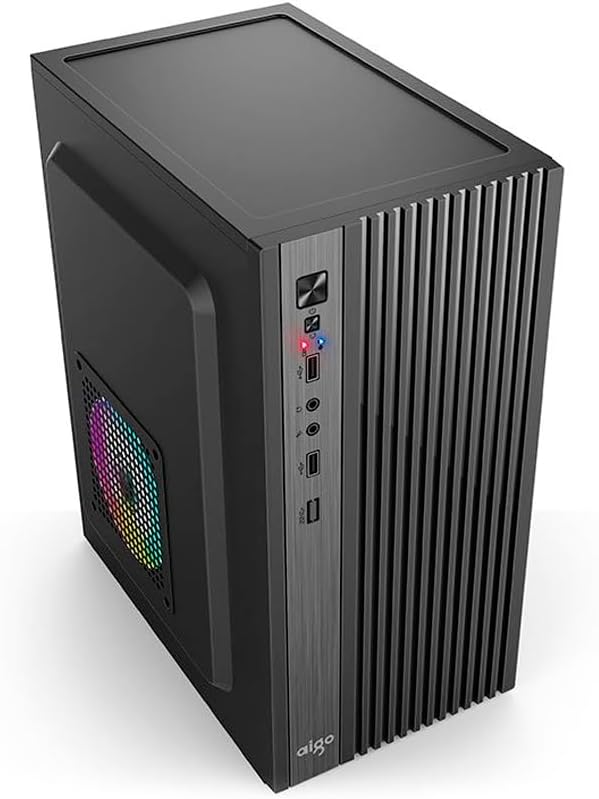
פיגור 2.1: פראָנט-זייט view of the Aigo Q2503 Mini-Tower PC Case, showcasing its compact design and front panel I/O ports.
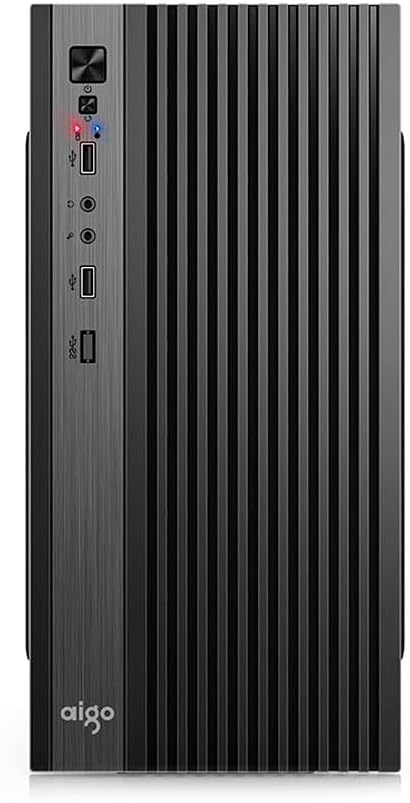
פיגורע 2.2: פראָנט view of the Aigo Q2503 Mini-Tower PC Case, highlighting the vertical ventilation slats and front panel controls.
3. סעטאַפּ און ייַנמאָנטירונג
Follow these steps for proper component installation within the Aigo Q2503 case.
3.1 צוגרייטן דעם פאַל
- אויספּאַקן דעם קעסטל און אַראָפּנעמען אַלע פּאַקאַדזשינג מאַטעריאַלן.
- Carefully remove the side panels by unscrewing the thumbscrews at the rear of the case and sliding the panels backward.
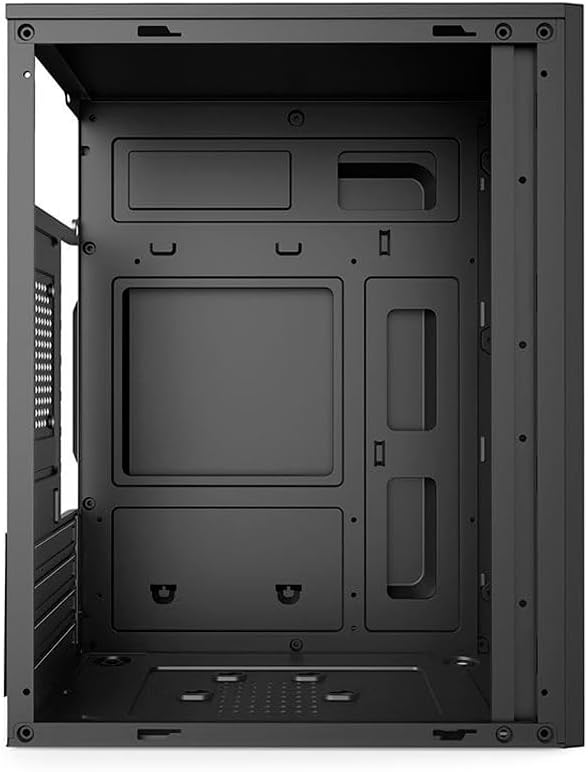
פיגורע 3.1: אינערלעכער view of the Aigo Q2503 PC Case, showing the motherboard tray and drive mounting points.
3.2 מאָטהערבאָאַרד ינסטאַללאַטיאָן
- אינסטאלירט דעם I/O שילד וואָס ווערט צוגעשטעלט מיט אייער מוטערבאָרד אין דער הינטערשטער עפענונג פון דעם קעיס.
- Align your M-ATX or ITX motherboard with the standoffs inside the case. Ensure all standoffs match the motherboard's mounting holes.
- באַזײַטיקט דאָס מאַדערבאָרד מיט די פּאַסיקע שרויפֿן.
3.3 דרייוו אינסטאַלאַציע
- SSD (1x): Locate the dedicated SSD mounting point (typically on the motherboard tray or behind it). Secure the SSD using screws.
- HDD (1x): Locate the HDD bay. Slide the HDD into the bay and secure it with screws.
3.4 Expansion Card Installation (VGA)
- אַראָפּנעמען די נייטיקע יקספּאַנשאַן סלאָט דעקל פון די הינטערשטע טייל פון די קעסטל.
- Insert your graphics card (VGA) or other expansion cards into the PCIe slots on your motherboard.
- Secure the expansion cards with screws. Note the maximum VGA length supported is 150 mm.
3.5 אינסטאַלאַציע פון CPU קילער
Install your CPU cooler according to its manufacturer's instructions. Ensure the cooler's height does not exceed the maximum supported height of 250 mm for this case.
3.6 אינסטאַלאַציע פון מאַכט צושטעל
The Aigo Q2503 supports ATX power supplies. Mount your ATX power supply in the designated area, typically at the top or bottom rear of the case, and secure it with screws.
3.7 פאָכער ינסטאַללאַטיאָן
The case supports the following fan configurations (fans are not included):
- הינטן: 1 x 80 mm fan
- זייט: 1 x 120 mm fan
Install fans in the specified locations to optimize airflow.
3.8 פראָנט פּאַנעל קאַנעקשאַנז
Connect the front panel cables (Power SW, Reset SW, HDD LED, Power LED, USB 2.0, Audio/Mic) to the corresponding headers on your motherboard. Refer to your motherboard manual for exact pin layouts.
4. Operating Your PC Case
Once all components are installed and connected, replace the side panels and secure them. Connect your monitor, keyboard, mouse, and power cable to your system. Press the power button on the front panel to start your computer.
די פראָנט פּאַנעל גיט באַקוועמען צוטריט צו:
- מאַכט קנעפּל
- באַשטעטיק קנעפּל
- 2 רענטגענ וסב 2.0 פּאָרץ
- Audio Out (Headphone) Jack
- מיקראָפאָן אין דזשאַק
5. וישאַלט
רעגולערע אויפהאלטונג העלפט זיכער מאכן אפטימאלע פאָרשטעלונג און פארלענגערט די לעבנס-צייט פון אייערע פּיסי קאָמפּאָנענטן.
5.1 רייניקונג
- עקסטעריע: ניצן אַ ווייך, דamp טוך צו אפווישן די אויסערליכע ייבערפלאַכן. פֿאַרמייַדן שרײַבנדיקע רייניקונגסמיטלען.
- ינלענדיש: Periodically open the case and use compressed air to remove dust buildup from components, fans, and filters. Ensure the system is powered off and unplugged before cleaning the interior.
5.2 אַירפלאָוו
Ensure that the case's ventilation openings are not obstructed to maintain proper airflow and prevent overheating.
6. טראָובלעשאָאָטינג
If you encounter issues with your PC build, consider the following general troubleshooting steps:
- קיין מאַכט: Double-check all power connections, including the power supply to the wall, the power supply to the motherboard, and the front panel power switch cable to the motherboard.
- איבערהייצונג: Verify that all case fans and CPU cooler fans are spinning correctly. Ensure proper airflow within the case and that ventilation openings are clear.
- פראָנט פּאַנעל פּאָרץ אַרבעטן נישט: Confirm that the USB and Audio/Mic cables from the front panel are correctly connected to the motherboard headers.
- קאָמפּאָנענט פּאַסיק פּראָבלעמען: Ensure that all components, especially the graphics card and CPU cooler, are within the specified maximum dimensions for the case.
7. ספּעסאַפאַקיישאַנז
Below are the detailed specifications for the Aigo Q2503 Mini-Tower PC Case:
| שטריך | באַשרייַבונג |
|---|---|
| סאָרט | אַיגאָ |
| מאָדעל | Q2503-BK |
| טיפּ פון קאַסטן | מיני-טורעם |
| מאָטהערבאָאַרד סופּפּאָרט | מ-אַטקס / יטקס |
| מאַטעריאַלס | 0.4mm SPCC (Steel Alloy) |
| פאָר בייס | 1 x SSD, 1 x HDD |
| יקספּאַנשאַן סלאָץ | 4 |
| פראָנט איך / אָ פּאָרץ | 2 x USB 2.0, Audio/Mic |
| מאַקס VGA לענג | 150 מם |
| מאַקסימום קפּו קולער הייך | 250 מם |
| מאַכט צושטעלן שטיצן | אַטקס |
| Supported Fans (not included) | Rear: 1 x 80 mm, Side: 1 x 120 mm |
| דימענסיעס (L X W X H) | 265 X 165 X 340 מם |
| קאָליר | שוואַרץ |
8. וואָראַנטי אינפֿאָרמאַציע
The Aigo Q2503 Mini-Tower PC Case comes with a manufacturer's warranty of 12 חדשים from the date of purchase. This warranty covers defects in materials and workmanship under normal use. Please retain your proof of purchase for warranty claims. The warranty does not cover damage caused by improper installation, misuse, accidents, modifications, or unauthorized repairs.
9. שטיצן
For technical assistance, troubleshooting, or warranty inquiries, please contact your retailer or the official Aigo support channels. Refer to the Aigo official webזייטל פֿאַר די מערסט אַרויף-צו-דאַטע קאָנטאַקט אינפֿאָרמאַציע און שטיצע רעסורסן.
Before contacting support, please have your product model (Q2503-BK) and proof of purchase readily available.