1. הקדמה
Thank you for choosing the PRIXTON Multisport DV800 Action Camera. This manual provides essential information for setting up, operating, and maintaining your device. Please read it thoroughly before use to ensure optimal performance and longevity of your camera.
2. פּעקל אינהאַלט
באַשטעטיקט אַז אַלע זאכן וואָס זענען אויסגערעכנט אונטן זענען אַרייַנגערעכנט אין אייער פּעקל:
- PRIXTON Multisport DV800 Action Camera
- וואָטערפּרוף קאַסע
- קריקאָנלאָדלעך באַטערי
- וסב קאַבלע
- וועלאָסיפּעד בארג
- קליפ
- מאַונטינג אַדאַפּטער
- Three Helmet Mounts
- Strap/Bandage
- 3M Adhesives
- באַניצער מאַנואַל

Image: The PRIXTON DV800 Action Camera and its various accessories, including mounts, cables, and the waterproof case.
3. פּראָדוקט איבערview
The PRIXTON DV800 features a compact design with dual screens for versatile shooting and monitoring. It is designed for capturing high-quality video and photos in various environments.
שליסל פֿעיִקייטן:
- צוויי סקרינז: Front screen for selfies and a rear screen for camera control.
- 5K Video Resolution: Up to 5K at 30 frames per second (FPS).
- 24 MP Photo Resolution: הויך-קוואַליטעט סטיל בילדער.
- 6-AXIS EIS Optical Stabilizer: For smooth and stable footage.
- וואָטערפּרוף: Up to 30 meters with the included waterproof case.
- קאַנעקטיוויטי: Built-in Wi-Fi for mobile app control and content transfer.
- סטאָרידזש: Supports MicroSD cards up to 128 GB.

Image: The PRIXTON DV800 Action Camera, showcasing its dual-screen capability and the waterproof housing, alongside several mounting accessories.
4. סעטאַפּ
4.1. באַטאַרייע ייַנמאָנטירונג
- געפֿינען די באַטאַרייע אָפּטייל אויף די אַפּאַראַט.
- עפענען די אָפּטייל דעקן.
- אַרײַנשטעלן די ריטשאַרדזשאַבאַל באַטאַרייע, זיכער מאַכנדיק די ריכטיקע פּאָלאַריטעט.
- פאַרמאַכן די באַטאַרייע אָפּטייל דעקן סיקיורלי.
4.2. מיקראָSD קאַרטל אַריינשטעלן
A MicroSD card (up to 128 GB, not included) is required to store recordings and photos.
- געפינט דעם MicroSD קאַרטל שפּעלטל אויף דער זייט פון דער קאַמעראַ.
- Gently insert the MicroSD card with the contacts facing the correct direction until it clicks into place.
- צו אַרויסנעמען, דריק די קאַרטל אַרײַן ביז זי שפּרינגט אַרויס.
4.3. אנשטעלן דעם וואַסערפּרוף קעסטל
For underwater use or protection against impacts, place the camera inside the waterproof case.
- עפֿנט דעם לאַטש אויף דעם וואַסערפּרוף קעסטל.
- לייגט פֿאָרזיכטיק די קאַמעראַ אַרײַן אין דעם קעסטל, און מאַכט זיכער אַז זי פּאַסט גוט.
- Close the latch firmly to seal the case. Ensure no debris is caught in the seal.
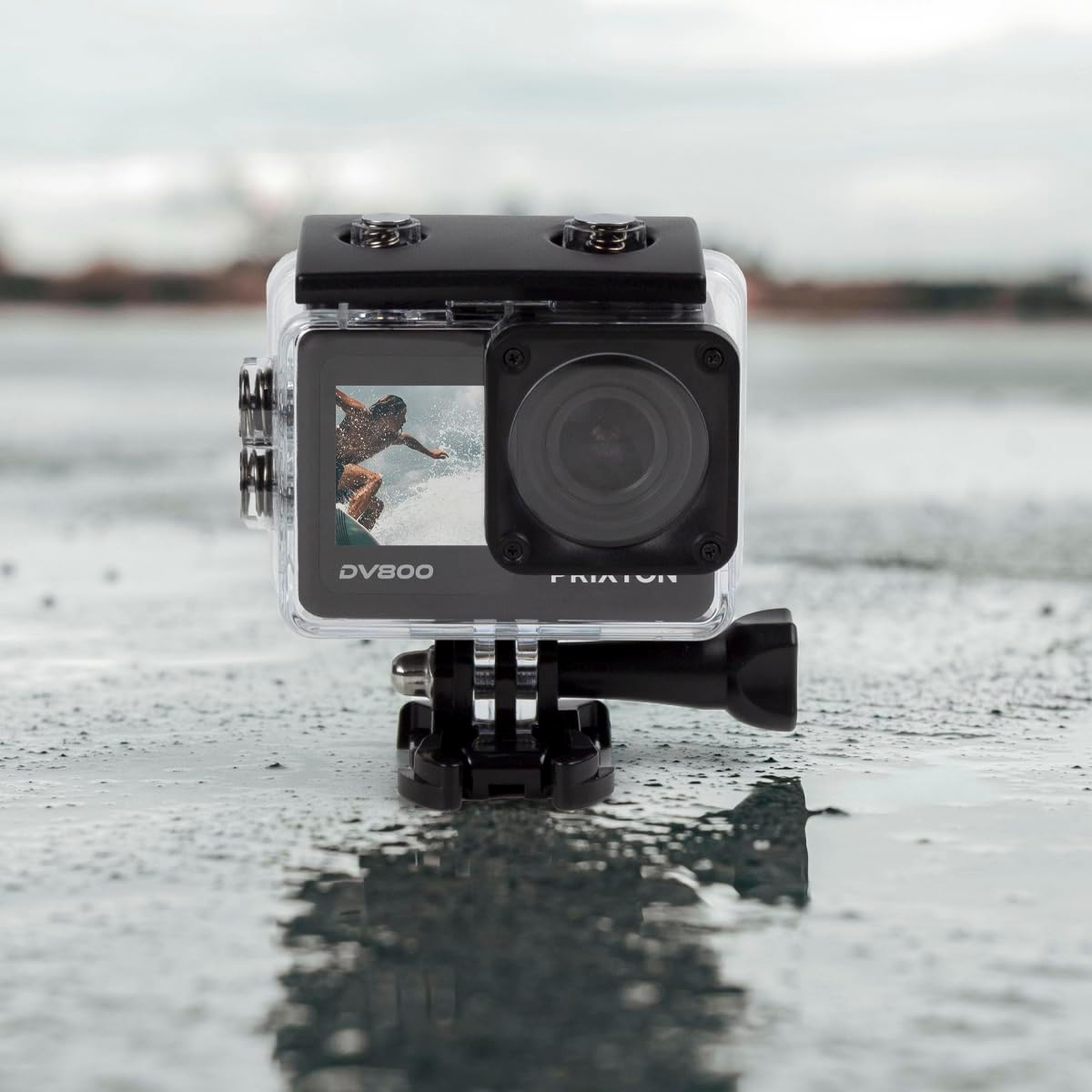
Image: The PRIXTON DV800 Action Camera securely housed within its waterproof casing, ready for use in aquatic environments.
5. אַפּערייטינג ינסטרוקטיאָנס
5.1. מאַכט אויף / אויסגעלאשן
- צו מאַכט אויף: דריק און האלט דעם פּאַוער/מאָדע קנעפּל פֿאַר אַ פּאָר סעקונדעס ביז דער עקראַן באַלויכטנט זיך.
- צו מאַכט אַוועק: דריק און האלט דעם פּאַוער/מאָדע קנעפּל ווידער ביז דער עקראַן שליסט זיך אויס.
5.2. מאָדע סעלעקציע
דריק דעם מאַכט/מאָדוס קנעפּל עטלעכע מאָל צו גיין דורך פֿאַרשידענע מאָדעס: ווידעאָ, פאָטאָ, ווידערשפּיל, און סעטטינגס.
5.3. ווידעא רעקאָרדינג
- Switch to Video Mode.
- Press the Shutter/OK button to start recording. A red indicator light will flash.
- דריק נאכאמאל דעם שאטער/אקעי קנעפל צו אפשטעלן די רעקארדירונג. די אינדיקאטאר ליכט וועט אויפהערן צו בלינקען.
5.4. גענומען פאָטאָס
- טוישט צו פאָטאָ מאָדע.
- ראַמען דיין שאָס ניצנדיק דעם עקראַן.
- דריק דעם שאטער/OK קנעפל צו נעמען א בילד.
5.5. Wi-Fi Connectivity and Mobile App
The camera can connect to your mobile device via Wi-Fi using the "XDV PRO" application.
- Download and install the "XDV PRO" app on your smartphone or tablet.
- On the camera, navigate to the settings menu and enable Wi-Fi.
- אויף אייער מאָבילער מיטל, פֿאַרבינדט זיך צום קאַמעראַ'ס Wi-Fi נעץ (SSID און פּאַראָל וועלן ווערן געוויזן אויף דער קאַמעראַ פאַרשטעלן).
- Open the "XDV PRO" app to control the camera, view לעבן פאָאָtage, און איבערפירן files.

Image: A close-up of the PRIXTON DV800 Action Camera's rear screen, showing its 5K Ultra HD capability and Wi-Fi connectivity.
5.6. Using as a Webקאַם
פֿאַרבינדט די קאַמעראַ צו אַ קאָמפּיוטער דורך USB צו נוצן עס ווי אַ webקאַם.
- פאַרבינדן די אַפּאַראַט צו דיין קאָמפּיוטער מיט די צוגעשטעלט וסב קאַבלע.
- Select the 'PC Camera' or 'Webcam' option on the camera's screen if prompted.
- אייער קאָמפּיוטער זאָל דערקענען די קאַמעראַ ווי אַ webcam, which can then be selected in video conferencing applications.
6. וישאַלט
6.1. רייניקונג
- Use a soft, lint-free cloth to clean the camera lens and screens.
- For the waterproof case, rinse with fresh water after saltwater use and allow it to air dry.
- ויסמיידן ניצן האַרב קעמיקאַלז אָדער אַברייסיוו מאַטעריאַלס.
6.2. באַטערי קער
- באַשולדיקן די באַטאַרייע גאָר איידער ערשטער נוצן.
- דו זאלסט נישט ויסשטעלן די באַטאַרייע צו עקסטרעם טעמפּעראַטורעס.
- אויב איר לייגט די קאַמעראַ אַוועק פֿאַר אַ לענגערע צייט, נעמט אַרויס די באַטאַרייע.
6.3. סטאָרידזש
האַלט די קאַמעראַ אין אַ קיל, טרוקן אָרט אַוועק פון דירעקט זונשייַן און שטויב ווען נישט אין באַנוץ.
7. טראָובלעשאָאָטינג
- די אַפּאַראַט טוט נישט קער אויף: זיכער מאַכן אַז די באַטאַרייע איז אויפגעלאָדן און ריכטיק אַרײַנגעשטעלט.
- רעקאָרדינג פּראָבלעמען: Check if the MicroSD card is inserted correctly and has sufficient free space. Format the card if necessary (this will erase all data).
- Wi-Fi פֿאַרבינדונג פּראָבלעמען: Ensure Wi-Fi is enabled on the camera and your mobile device. Restart both devices if issues persist.
- שלעכטע בילד/ווידעא קוואַליטעט: רייניקט די לינז. זאָרגט פֿאַר גענוג ליכט. קאָנטראָלירט די רעזאָלוציע סעטטינגס.
8. ספּעסאַפאַקיישאַנז
| מאָדעל נאָמען | DV800 |
| סאָרט | PRIXTON |
| ווידעא קאַפּטורע רעסאָלוטיאָן | 5K |
| פאָטאָ סענסאָר טעכנאָלאָגיע | אנדערע |
| פלאַש זכּרון טיפּ | MicroSD (up to 128GB) |
| ווידעא קאַפּטורע פֿאָרמאַט | MOV |
| שטיצט אַודיאָ פֿאָרמאַט | mp4 |
| קאַנעקטיוויטי טעכנאָלאָגיע | ווי-פי |
| קאָליר | שוואַרץ |
| קאַמקאָרדער טיפּ | קאַמף קאַמעראַ |
| באַטערי לעבן | בעערעך 90 מינוט |
9. וואָראַנטי און שטיצן
The PRIXTON Multisport DV800 Action Camera comes with a standard manufacturer's warranty. For detailed warranty information, technical support, or service inquiries, please refer to the warranty card included in your package or visit the official PRIXTON webזייטל. האַלט אייער קויף קוויטל ווי אַ באַווייַז פון קויפן פֿאַר וואָראַנטי קליימז.


