1. הקדמה
Welcome to the Fastrack Magnus FX3 Smart Watch user manual. This guide provides essential information for setting up, operating, and maintaining your new smartwatch. Please read this manual thoroughly to ensure proper use and to fully utilize all available features.

בילד: פראָנט view of the Fastrack Magnus FX3 Smart Watch, showcasing its display and metal strap.
2. וואָס איז אין דער קעסטל
באַשטעטיקן אַז אַלע זאכן זענען פאַראַן אין דיין פּראָדוקט פּאַקאַדזשינג:
- Fastrack Magnus FX3 Smart Watch
- מאַגנעטיק טשאַרדזשינג קאַבלע
- שנעל אָנהייב גייד
- וואָראַנטי קאַרד
3. סעטאַפּ
3.1 ערשט טשאַרדזשינג
Before first use, fully charge your smartwatch. Connect the magnetic charging cable to the charging points on the back of the watch and to a USB power source. A full charge takes approximately 2 hours.
3.2 פארבינדן מיט אייער סמאַרטפאָון
- Download the 'Fastrack Smart World' app from your smartphone's app store (available for Android and iOS).
- מאַכן זיכער אַז בלועטאָאָטה איז ענייבאַלד אויף דיין סמאַרטפאָנע.
- Open the Fastrack Smart World app and follow the on-screen instructions to create an account or log in.
- Select 'Add Device' and choose your Fastrack Magnus FX3 from the list of nearby devices.
- באַשטעטיקן די פּאָרינג בעטן אויף ביידע דיין זייגער און סמאַרטפאָון.
4. אַפּערייטינג ינסטרוקטיאָנס
4.1 אַרויסווייַזונג און נאַוויגאַציע
The Fastrack Magnus FX3 features a 1.46-inch TFT display with a 360x360 pixel resolution. Navigate the interface using touch gestures and the functional crown.
- סוויפּ אַרויף: Access quick settings.
- שלעפּ אַראָפּ: View נאָוטאַפאַקיישאַנז.
- שלעפּן לינקס / רעכט: Scroll through widgets and main menu options.
- פונקציאָנעלע קרוין: Rotate to scroll through menus or press to return to the home screen.

Image: Close-up of the Fastrack Magnus FX3 Smart Watch highlighting its premium metal construction and functional crown.
4.2 Bluetooth Calling (SingleSync BT Calling)
The SingleSync BT Calling feature allows you to make and receive calls directly from your watch when connected to your smartphone.
- Ensure your watch is paired and connected to your smartphone via Bluetooth.
- Access the phone function on your watch.
- You can dial numbers, access recent calls, or select contacts (synced from your phone).

Image: The Fastrack Magnus FX3 Smart Watch screen showing an incoming call, demonstrating its seamless connectivity for Bluetooth calling.
4.3 געזונט מאָניטאָרינג
The Fastrack Magnus FX3 provides comprehensive health tracking features:
- האַרץ קורס מאָניטאָרינג: Continuous 24/7 heart rate tracking.
- SpO2 מאָניטאָרינג: מעסט אייערע בלוט זויערשטאָף לעוועלס.
- דרוק מאָניטאָרינג: טראַק דיין סטרעס לעוועלס איבערן טאָג.
- שלאָף טראַקינג: Analyze your sleep patterns, including Deep, Light, and REM sleep.
- Hydration Alerts: Set reminders to drink water.
Access these features through the watch's menu or the Fastrack Smart World app for detailed insights.

Image: The Fastrack Magnus FX3 Smart Watch displaying detailed sleep monitoring data, including deep and light sleep durations.
4.4 ספּאָרט מאָדעס
The watch supports over 60 sports modes to track various physical activities. Select your desired sport from the watch menu to begin tracking metrics such as steps, distance, calories burned, and heart rate during your workout.
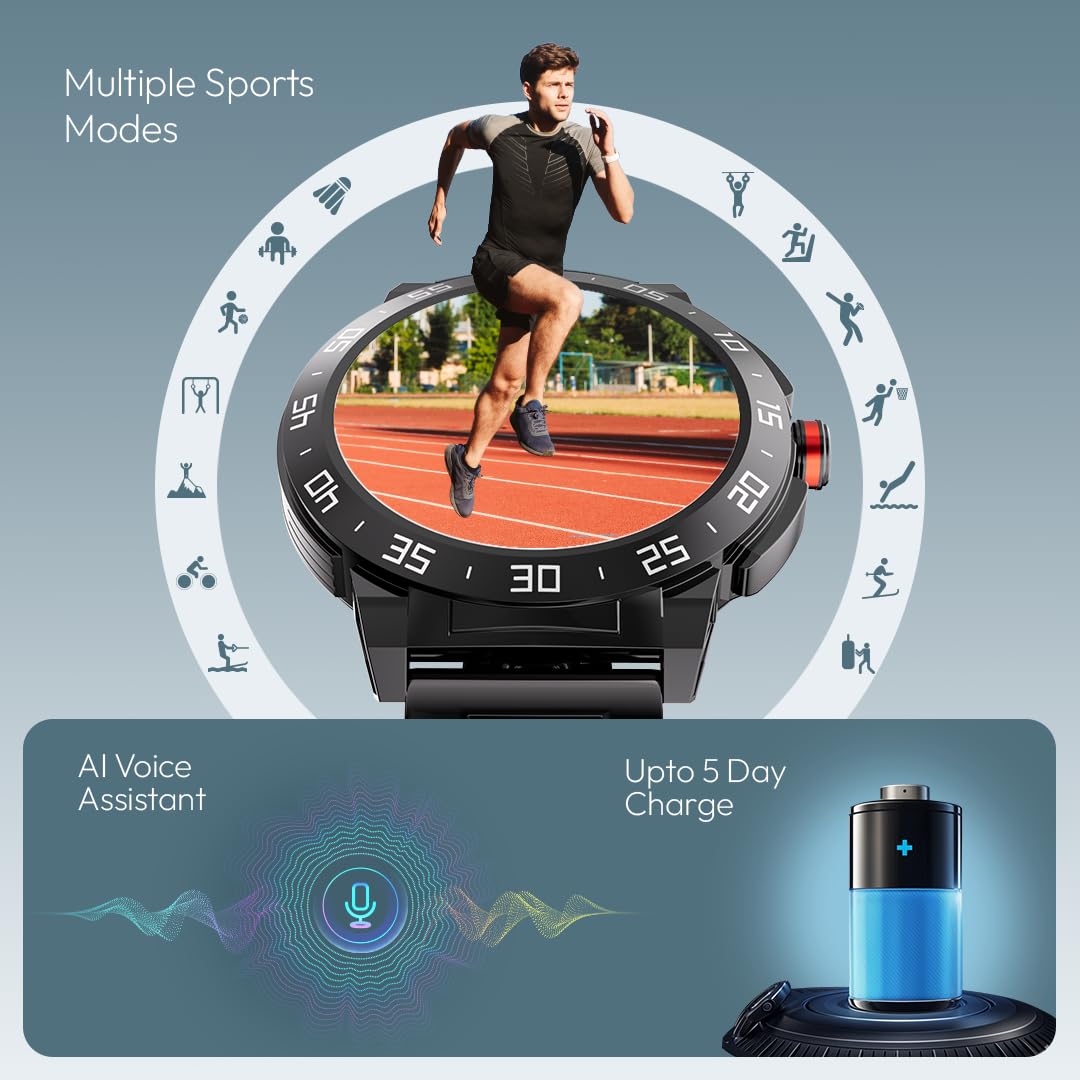
Image: The Fastrack Magnus FX3 Smart Watch interface displaying various sports mode icons, indicating its multi-sport tracking capabilities.
4.5 קלוגע נאָטיפיקאַציעס
Receive notifications for calls, messages, and app alerts directly on your watch. Customize which app notifications you receive through the Fastrack Smart World app.

Image: The Fastrack Magnus FX3 Smart Watch displaying icons for various smart notifications, including calls, messages, and social media alerts.
4.6 נאָך פֿעיִקייטן
- AI Voice Assistant: ניצט שטימע קאמאנדעס פאר פארשידענע פונקציעס.
- מוזיק קאָנטראָל: קאָנטראָל מוזיק פּלייבאַק אויף דיין סמאַרטפאָנע.
- אַפּאַראַט קאָנטראָל: Remotely trigger your smartphone's camera.
- 100+ Watchfaces: Personalize your watch with a wide selection of watchfaces.
- In-Built Game: Enjoy a simple game directly on your watch.
5. טשאַרדזשינג און באַטאַרייע
The Fastrack Magnus FX3 is equipped with a 460mAh battery, providing up to 5 days of typical use and 3 days with Bluetooth calling enabled. Use the provided magnetic charging cable to charge the device. Charging time is approximately 2 hours.
Video: Official Fastrack Magnus FX3 Smart Watch preview, demonstrating its design and various features in action, including battery life and charging.
6. קער און וישאַלט
- וואַסער קעגנשטעל: The watch has an IP68 rating, making it resistant to dust and water. It can withstand immersion in water up to 1.5 meters for 30 minutes. Avoid hot water, steam, or prolonged submersion.
- רייניקונג: ווישט אָפּ די זייגער און רימען רעגולער מיט אַ ווייכן, טרוקענעם שטאָף. פֿאַר שווערן שמוץ, ניצט אַ לייכט טרוקענעם שטאָף.amp שטאָף און מילד זייף, דערנאָך שווענקען און טרוקן גוט.
- סטאָרידזש: האַלט די זייגער אין אַ קיל, טרוקן אָרט אַוועק פון דירעקט זונשייַן און עקסטרעמע טעמפּעראַטורן.
- ויסמיידן קעמיקאַלז: שטעלט נישט אויס די זייגער צו שטרענגע כעמיקאלן, סאָלווענטן אדער דיטערדזשענטן, ווייל די קענען שעדיקן די ענדיקונג און די סילינגז.
7. טראָובלעשאָאָטינג
| אַרויסגעבן | מעגלעך לייזונג |
|---|---|
| וואַך נישט אויסגעדרייט אויף | זיכער מאַכן אַז די זייגער איז גאָר אויפגעלאָדן. דריק און האַלט די מאַכט קנעפּל פֿאַר עטלעכע סעקונדעס. |
| ניט געקענט צו פאַרבינדן מיט טעלעפאָן | Check if Bluetooth is enabled on your phone. Restart both the watch and phone. Ensure the Fastrack Smart World app is updated. |
| אומגענויע געזונטהייט דאַטן | זייט זיכער אז די זייגער טראָגט זיך גוט אויף אייער האַנטגעלענק, נישט צו ענג אדער צו לויז. רייניקט דעם סענסאָר אויף דער הינטערשטער זייגער. |
| נאָוטאַפאַקיישאַנז ניט באקומען | Check app notification settings on your phone and within the Fastrack Smart World app. Ensure the watch is connected via Bluetooth. |
8. ספּעסאַפאַקיישאַנז
| שטריך | דעטאַל |
|---|---|
| מאָדעל נאָמען | Magnus FX3 |
| מאָדעל נומער | 38143KM02 |
| ווייַז גרייס | 1.46 אינטשעס |
| ווייַז טיפּ | טפט לקד |
| האַכלאָטע | 360 X 360 בילדצעלן |
| באַטאַרייע קאַפּאַציטעט | 460 מאַה ליטהיום פּאָלימער |
| באַטעריע לעבן (דורכשניטלעך) | Up to 5 Days (3 Days with BT Calling) |
| טשאַרדזשינג צייט | בעערעך. 2-3 שעה |
| וואַסער קעגנשטעל | IP68 |
| קאַנעקטיוויטי | בלועטאָאָטה |
| מאַטעריאַל | Metal Alloy Case |
| פּונקט וואָג | 46 ג |
| קאַמפּאַטאַבאַל דעוויסעס | סמאַרטפאָון (אַנדרויד, יאָס) |
9. וואָראַנטי און שטיצן
Your Fastrack Magnus FX3 Smart Watch comes with a manufacturer's warranty. Please refer to the included Warranty Card for details on coverage and terms. For technical support, service, or warranty claims, please contact Fastrack customer care:
- קונה קעיר נומער: 1800-266-0123
- בליצפּאָסט: customercare@titan.co.in
Keep your purchase receipt and warranty card for future reference.


