הקדמה
This user manual provides detailed instructions for setting up, operating, and maintaining your Ninkear N15 Plus Laptop. Please read this manual thoroughly before using your device to ensure optimal performance and longevity. The Ninkear N15 Plus is a high-performance laptop featuring an Intel N100 processor, a 15.6-inch FHD IPS screen, 16GB DDR4 RAM, and a 1TB SSD, designed for efficient productivity and entertainment.
וואָס איז אין די קעסטל
ביים עפענען דעם פעקל, זיכער מאכן אז אלע פאלגנדע זאכן זענען אריינגערעכנט:
- Ninkear N15 PLUS Laptop
- טשאַרדזשער
- ינסטרוקטיאָן מאַנואַל (דעם דאָקומענט)

Image: The Ninkear N15 Plus Laptop, showcasing its sleek design and the included charger.
סעטאַפּ גייד
1. ערשטע אויפלאדונג און איינשאַלטן
- Connect the provided charger to the Type-C charging port on the laptop and plug it into a power outlet. Ensure the charging indicator light illuminates.
- Allow the laptop to charge for at least 30 minutes before initial use, or until the battery is sufficiently charged.
- Press the power button located on the keyboard to turn on the laptop. The Ninkear logo will appear, followed by the Windows 11 setup screen.
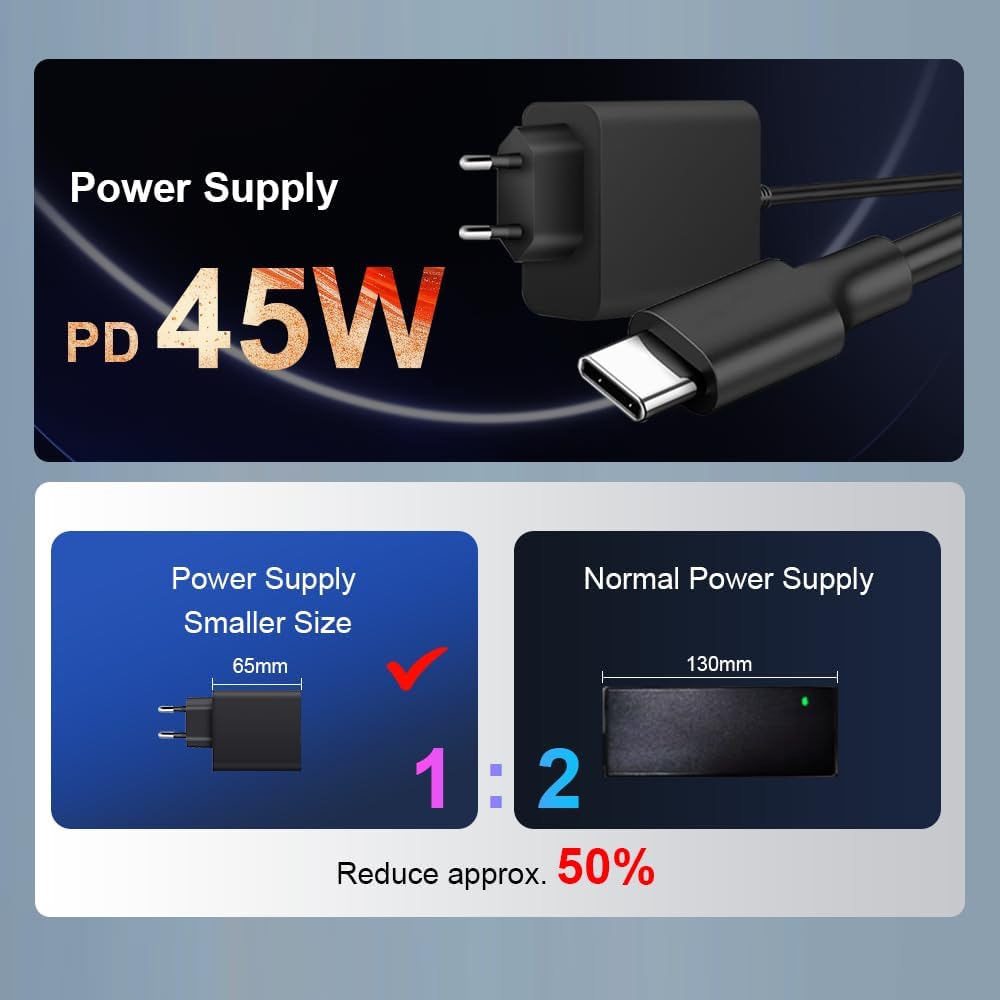
בילד: א נאָענטע בילד view of the N15 Plus laptop connected to its Type-C power supply, highlighting the compact charger design.
2. ווינדאָוס 11 סעטאַפּ
Follow the on-screen prompts to complete the Windows 11 setup process. This typically includes:
- אויסקלייבן אייער ראיאן און קלאַוויאַטור אויסלייג.
- קאַנעקטינג צו אַ Wi-Fi נעץ.
- זיך אריינלאָגירן מיט אדער שאַפֿן אַ מייקראָסאָפֿט חשבון.
- אויפשטעלן א PIN אדער פּאַראָל.
- קאָנפיגורירן פּריוואַטקייט סעטטינגס.
Once setup is complete, your laptop is ready for use.
אפערירן דיין לאַפּטאָפּ
קלאַוויאַטור און טאָוטשפּאַד
The N15 Plus features an ergonomic full-size keyboard with a numeric keypad for comfortable typing. The integrated touchpad supports multi-touch gestures for intuitive navigation.
- באַקלייט קלאַוויאַטור: כדי צו אנצינדן אדער אויסלעשן די קלאַוויאַטור הינטערגרונט, דריק די Fn + F5 shortcut key. Three levels of backlight brightness can be adjusted as needed.

בילד: אן איבערview of the Ninkear N15 Plus laptop, highlighting its 15.6-inch IPS screen, Intel N100 processor, 16GB DDR4 RAM, 1TB SSD, 89WH battery, Wi-Fi 6, Bluetooth 5.2, Windows 11, and diamond pattern texture.
ופשליסן פינגערפּרינט
For enhanced security and quick access, the N15 Plus is equipped with a fingerprint sensor. Set up your fingerprint through Windows Hello in the system settings.
- Fingerprint unlocking takes approximately 0.5 seconds.
ווייַז
The laptop features a 15.6-inch Full HD (1920x1080) IPS screen, providing wide viewing angles, accurate color reproduction, and consistent image quality. This display is designed to protect eyesight during extended use.
קאַנעקטיוויטי
The N15 Plus supports modern wireless standards and offers versatile ports:
- Wi-Fi 6: For fast and reliable wireless internet connection.
- בלועטאָאָטה 5.2: For connecting wireless peripherals such as headphones, mice, and keyboards.
- וסב 3.0 פּאָרץ: צוויי פּאָרטן פֿאַר הויך-גיכקייט דאַטן אַריבערפירן.
- הדמי פּאָרט: פֿאַר פֿאַרבינדן צו עקסטערנע דיספּלייז אָדער פּראָיעקטאָרן.
- טיפ-C פּאָרטן: Two Type-C interfaces. The left Type-C port supports PD charging and data transmission. The right Type-C interface supports reverse power supply, allowing you to charge other electronic devices like mobile phones.
- אַודיאָ דזשאַק: פֿאַר כעדפאָונז אָדער עקסטערנע רעדנערס.
- טף קאַרד שפּעלטל: פֿאַר אויסברייטערן סטאָרידזש אָדער טראַנספערירן דאַטן פֿון זכּרון קאַרדס.

בילד: דעטאַלירט view of the N15 Plus laptop's side ports, including Audio, TF Card slot, USB 3.0, and Type-C ports with their functionalities (PD charging, data transmission, reverse charging).
פאָרשטעלונג און סטאָרידזש
The N15 Plus is powered by an Intel N100 processor with 4 cores and 4 threads, offering a maximum frequency of 3.4 GHz. This configuration ensures smooth operation for productivity software and supports 4K video decoding and multi-display setups.
- באַראַן: 16 גיגאבייט DDR4 ראַם פֿאַר עפֿעקטיוו מאַלטיטאַסקינג.
- סטאָרידזש: 1TB PCIe SSD provides ample and fast storage for your files, אַפּלאַקיישאַנז און מידיאַ.

Image: A graph illustrating the performance of the Intel N100 processor compared to other Intel Jasper Lake series CPUs, showing its multi-core and single-core capabilities.

Image: Visual representation of the laptop's 16GB DDR4 RAM and 1TB M.2 SSD, emphasizing fast reading and writing speeds for smooth operation and ample סטאָרידזש.
באַטערי לעבן
The N15 Plus is equipped with a built-in 11600mAh (89WH) high-capacity lithium-ion battery, offering extended usage times.
- Up to 13 hours of working use on a full charge.
- ביז 72 שעה פון סטענדביי צייט.

Image: A graphic illustrating the impressive 11600mAh battery life of the N15 Plus, showing approximately 13 hours of working time and 72 hours of standby time.

Image: A visual demonstration of the Type-C reverse charging feature, showing the laptop charging a mobile phone.
וישאַלט
רייניקונג
- ניצט אַ ווייכן, לינט-פֿרייע שטאָף צו רייניקן דעם עקראַן און דעם אויסערן.
- פֿאַר שווערע פֿלעקן, אַ ביסל דampווישט דעם שטאָף מיט וואַסער אָדער אַ רייניקונג לייזונג פֿאַרן עקראַן. פֿאַרמייַדט שאַרפע כעמיקאַלן.
- רייניקט רעגולער די קלאַוויאַטור און טאָוטשפּאַד צו פאַרמייַדן שטויב און שמוץ אָנזאַמלונג.
ווייכווארג דערהייַנטיקונגען
- Keep your Windows 11 operating system updated to ensure optimal performance, security, and compatibility.
- Check for driver updates periodically from the Ninkear support website (if applicable) or through Windows Update.
סטאָרידזש מאַנאַגעמענט
- רעגולער אויסמעקן נישט-נייטיקע זאכן files and applications to free up storage space on your 1TB SSD.
- באַטראַכטן ניצן וואָלקן סטאָרידזש אָדער פונדרויסנדיק דרייווז פֿאַר גרויסע files to maintain optimal system speed.
טראָובלעשאָאָטינג
This section addresses common issues you might encounter with your Ninkear N15 Plus Laptop.
לאַפּטאָפּ גייט נישט אָן
- זייט זיכער אז דער טשאַרדזשער איז זיכער פארבונדן סיי צום לאַפּטאַפּ און סיי צו אַ ארבעטנדיקן עלעקטרישן ווענטיל.
- באַשטעטיקן אַז די עלעקטרישע ווענטיל אַרבעט דורך אַרײַנשטעקן אַן אַנדער דעוויס.
- לאָזט דעם לאַפּטאָפּ זיך אָפּלאָדן פֿאַר מינדעסטנס 30 מינוט איידער איר פּרוּווט עס ווידער אָנצוצינדן.
- If the issue persists, try a different compatible Type-C charger if available.
Screen Remains Blank or Flickers
- ריסטאַרט די לאַפּטאַפּ.
- Ensure the display brightness is not set to minimum. Use the function keys (e.g., Fn + F2/F3 or similar, check keyboard icons) to adjust brightness.
- If connected to an external monitor, try disconnecting it or pressing Fn + פ10 (or similar, check keyboard icons) to cycle display modes.
Wi-Fi קאָנעקטיוויטי פּראָבלעמען
- זייט זיכער אז Wi-Fi איז ענייבאַלד אין די Windows סעטטינגס.
- ריסטאַרט דיין Wi-Fi ראַוטער און דעם לאַפּטאַפּ.
- Forget the network and reconnect, re-entering the password.
- Update your Wi-Fi drivers through Windows Update or the Ninkear support webפּלאַץ.
פּאַמעלעך פאָרשטעלונג
- שליסט אומנייטיקע אַפּליקאַציעס וואָס לויפן אין הינטערגרונט.
- Check Task Manager (Ctrl+Shift+Esc) for processes consuming high CPU, RAM, or disk usage.
- Ensure your Windows 11 is up to date.
- Run a disk cleanup and defragmentation (for HDD, though SSDs don't need defragging, Windows handles TRIM automatically).
- סקענען פֿאַר מאַלוואַרע אָדער ווירוסן.
ספּעסאַפאַקיישאַנז
| שטריך | דעטאַל |
|---|---|
| סאָרט | נינקעאַר |
| מאָדעל נאָמען | N15 PLUS |
| פאַרשטעלן גרייס | 15.6 אינטשעס |
| פאַרשטעלן האַכלאָטע | 1920 x 1080 פּיקסעלס (FHD IPS) |
| פּראַסעסער | Intel Processor N100 (4 Cores, 4 Threads, up to 3.4 GHz) |
| באַראַן | 16GB DDR4 |
| שווער דרייוו | 1TB SSD (PCIe) |
| גראַפיקס קאָופּראַסעסער | אינטעל UHD גראַפיקס (אינטעגרירט) |
| אָפּערייטינג סיסטעם | Windows 11 |
| ווירעלעסס טיפּ | Wi-Fi 6 (802.11ax), בלועטוט 5.2 |
| וסב פּאָרץ | 2 x USB 3.0, 2 x Type-C (one with PD charging/data, one with reverse power supply) |
| אנדערע פּאָרץ | HDMI, Audio Jack, TF Card Slot |
| באַטערי | 11600mAh (89WH Lithium Ion) |
| פּונקט וואָג | 4.4 פונט |
| פּראָדוקט דימענשאַנז | 14 X 9 X 0.25 אינטשעס |
| ספּעציעלע פֿעיִקייטן | באַקלייט קלאַוויאַטור, פינגערפּרינט לייענער, נומערישער קלאַוויאַטור |
וואָראַנטי און שטיצן
Your Ninkear N15 Plus Laptop comes with a manufacturer's warranty. For detailed warranty information, please refer to the warranty card included in your product packaging or visit the official Ninkear webפּלאַץ.
For technical support, troubleshooting assistance beyond this manual, or service inquiries, please contact Ninkear customer support through their official channels. Keep your purchase receipt and product serial number handy when contacting support.


