1. וויכטיק סאַפעטי אינסטרוקציעס
ביטע ליינט דעם מאַנואַל קערפֿול איידער איר ניצט דעם אַפּאַראַט און האַלט עס פֿאַר צוקונפֿטיקע רעפֿערענץ. נישט נאָכפֿאָלגן די אינסטרוקציעס קען רעזולטירן אין עלעקטרישן קלאַפּ, פֿײַער אָדער ערנסטע שאָדן.
- Always connect the dehumidifier to a grounded power outlet.
- דו זאלסט נישט אַרבעטן די אַפּאַראַט מיט אַ דאַמידזשד מאַכט שנור אָדער צאַפּן.
- Keep the appliance away from water and other liquids. Do not immerse it.
- זיכערט זיך אז עס זאל זיין געהעריגע ווענטילאציע ארום דעם איינהייט. בלאקירט נישט קיין לופט אריינגאנגען אדער ארויסגאנגען.
- נעמט ארויס דעם לופט-טרוקענער איידער איר רייניגט אדער פירט אויס קיין שום אויפהאלטונג.
- דער אַפּפּליאַנסע איז נישט בדעה פֿאַר נוצן דורך מענטשן (אַרייַנגערעכנט קינדער) מיט רידוסט גשמיות, סענסערי אָדער גייַסטיק קייפּאַבילאַטיז, אָדער פעלן פון דערפאַרונג און וויסן, סייַדן זיי האָבן באקומען השגחה אָדער לימעד וועגן די נוצן פון דעם אַפּפּליאַנסע דורך אַ מענטש פאַראַנטוואָרטלעך פֿאַר זייער זיכערקייַט.
- Do not use the appliance in areas where flammable gases or vapors are present.
- Operate the unit within the specified temperature range of 5-32 °C.
2. פּראָדוקט איבערview
The SENCOR SDH 3028WH is a portable smart dehumidifier designed to efficiently remove excess moisture from your indoor environment. It features Wi-Fi connectivity for app control, multiple operating modes, and a large water tank capacity.
שליסל פֿעיִקייטן:
- Dehumidification Capacity: 30 liters per day (at 30 °C, 80% Relative Humidity).
- Water Tank Capacity: 6 liters.
- Control: Wi-Fi enabled with Sencor HOME app (iOS and Android).
- Dehumidification Settings: Adjustable from 35% to 85% Relative Humidity, or Continuous operation.
- Operating Modes: Dehumidification, Fan, Laundry Drying.
- Fan Speeds: High and Low.
- Display: Precise humidity indication.
- Timer: 0-24 hours.
- Safety Features: Full tank indicator, Child safety lock, Automatic defrost function, Automatic restart function.
- Convenience: Removable and washable filter, Integrated handles and wheels for easy portability, 1-meter drain hose for continuous drainage.
- Quiet Operation: Noise level 43/41 dB.
- Suitable Room Size: 30 to 89 m².
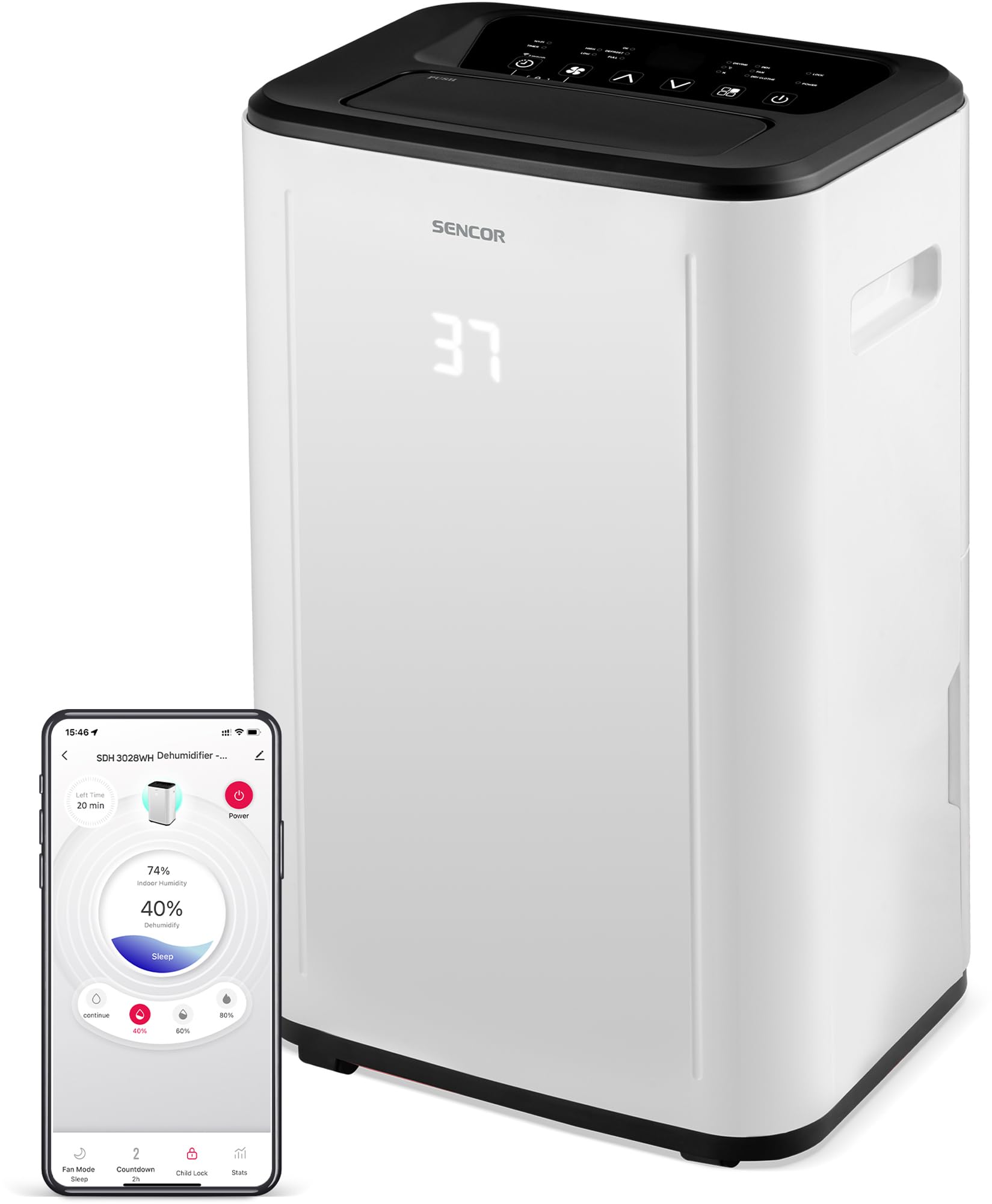
פיגורע 1: פראָנט view of the SENCOR SDH 3028WH Portable Dehumidifier.
3. פּעקל אינהאַלט
ביים אויספּאַקן, ביטע זיכער מאַכן אַז אַלע זאכן זענען פאַראַן און אין גוטן צושטאַנד:
- SENCOR SDH 3028WH Portable Dehumidifier
- ינסטראַקשאַנז מאַנואַל
- Drain Hose (1 meter)

Figure 2: Packaging of the SENCOR SDH 3028WH, illustrating key features.
4. סעטאַפּ
4.1 פּלייסמאַנט
Place the dehumidifier on a firm, level surface in the area where dehumidification is desired. Ensure there is at least 20 cm (8 inches) of clear space around the air inlets and outlets for optimal airflow.
4.2 מאַכט קאַנעקשאַן
Plug the power cord into a suitable grounded electrical outlet (220-240V, 50Hz). The unit will enter standby mode.
4.3 Wi-Fi Setup (Sencor HOME App)
- Download the Sencor HOME app from the App Store (iOS) or Google Play Store (Android).
- שאַפֿן אַ חשבון אָדער קלאָץ אין.
- Follow the in-app instructions to add your SDH 3028WH dehumidifier. This typically involves putting the dehumidifier into pairing mode (refer to the app or device display for specific instructions) and connecting it to your home Wi-Fi network.
- Once connected, you can control the dehumidifier remotely and monitor its status via the app.
5. אַפּערייטינג ינסטרוקטיאָנס
5.1 קאָנטראָל פּאַנעל
The control panel on top of the unit allows you to manage all functions. The digital display shows the current humidity level or timer settings.
5.2 מאַכט אויף / אַוועק
דרוק די מאַכט קנעפּל צו קער די אַפּאַראַט אויף אָדער אַוועק.
5.3 איינשטעלן די געוואונטשענע הומידיטי
- דרוק די הומידיטי קנעפּל.
- ניצן די אַרויף / אַראָפּ arrows to adjust the desired humidity level between 35% and 85% RH in 5% increments.
- די איינהייט וועט ארבעטן ביז דער איינגעשטעלטער הומידיטי לעוועל ווערט דערגרייכט, און דערנאך וועט זי זיך אן און אויס טאן כדי עס צו האלטן.
- To enable continuous dehumidification, select the 'Continuous' setting (usually indicated by 'CO' or similar on the display).
5.4 אַפּערייטינג מאָדעס
דרוק די מאָדע קנעפּל צו דורכגיין די פאַראַן מאָדעס:
- דעהומידיפיקאַטיאָן מאָדע: Standard operation to remove moisture.
- פאָכער מאָדע: Circulates air without dehumidifying.
- וועש דרייינג מאָדע: Optimized for drying clothes faster by continuously running the fan and dehumidifier.
5.5 פאַן ספּיד
דרוק די פאַן ספּיד button to switch between High and Low fan speeds.
5.6 טייַמער פֿונקציע
- דרוק די טיימער קנעפּל.
- ניצן די אַרויף / אַראָפּ arrows to set the desired operating duration from 0 to 24 hours.
- The unit will automatically turn off or on after the set time.
5.7 קינד לאַק
צו אַקטיוויזירן דעם קינדער־שלאָס, דריק און האַלט די קנעפּל קינד לאַק button (or a combination of buttons as indicated on the control panel) for a few seconds. This prevents accidental changes to settings. Repeat the action to deactivate.
6. וישאַלט
רעגולערע אויפהאלטונג גאראנטירט אפטימאלע פאָרשטעלונג און פארלענגערט די לעבנסדויער פון אייער לופט-טרוקענער.
6.1 עמפּטיינג די וואַסער טאַנק
- When the water tank is full, the unit will stop operating, and the 'Full Tank' indicator will illuminate.
- Carefully pull out the water tank from the back or side of the unit.
- ליידיקן דאָס געזאַמלטע וואַסער.
- Reinsert the empty tank firmly into its position. The unit will resume operation.
6.2 קעסיידערדיק דריינאַדזש
For continuous operation without needing to empty the tank, you can use the included drain hose.
- געפינט דעם קאנטינעווערלעכן אפפלוס אויף דער הינטערשטער זייט פונעם לופט-טרוקענער.
- Remove the rubber stopper (if present).
- Connect one end of the 1-meter drain hose to the outlet.
- Direct the other end of the hose to a suitable drain or larger container, ensuring it is lower than the dehumidifier's drain outlet for gravity flow.
6.3 רייניקונג די לופט פילטער
- עס איז רעקאָמענדירט צו רייניקן דעם לופט פילטער יעדע צוויי וואָכן אָדער אָפטער לויטן באַניץ.
- קער אַוועק און אָפּשטעקן די דעהומידיפיער.
- Locate and remove the air filter (usually at the back or side).
- וואַשט דעם פילטער מיט לאַקע וואַסער און אַ מילדן וואַשפּולווער. שווענקט גוט אויס.
- לאָזט דעם פילטער גאָר טרוקן ווערן אין דער לופט איידער איר לייגט עס צוריק אַרײַן אין דעם אַפּאַראַט. ניצט נישט קיין טריקענער אָדער דירעקטע היץ.
6.4 רייניקונג פון די אויסערליכע זייט
ווישן די יקסטיריער פון די אַפּאַראַט מיט אַ ווייך, דamp שטאָף. ניצט נישט קיין שאַרפע כעמיקאַלן, אַברייסיוו רייניגער, אדער סאָלווענטן.
7. טראָובלעשאָאָטינג
איידער איר קאָנטאַקטירט קונה שטיצע, ביטע באַציט זיך צו די פאלגענדע געוויינטלעכע פּראָבלעמען און לייזונגען:
| פּראָבלעם | מעגלעך סיבה | לייזונג |
|---|---|---|
| אַפּאַראַט טוט נישט קער אויף. | קיין מאַכט צושטעלן. עלעקטרישע שנור נישט ריכטיג פארבונדן. | קאָנטראָלירט צי די אַפּאַראַט איז אַרייַנגעשטעקט אין אַ אַרבעטנדיקן ווענטיל. ענשור אַז די מאַכט שנור איז סיקיורלי פארבונדן. |
| די לופט-טרוקענער זאמלט נישט וואסער. | לופט פילטער איז קלאָגד. Room temperature is too low (below 5°C). הומידיטי באַשטעטיקן איז צו הויך. וואַסער טאַנק איז נישט ריכטיק אַרײַנגעשטעלט. | ריין די לופט פילטער. Ensure room temperature is within 5-32°C. נידעריגער די געוואונטשענע הומידיטי אײַנשטעלונג. Reinsert the water tank correctly. |
| די איינהייט איז גערוישפול אדער ווייברירט צו שטארק. | Unit is on an uneven surface. לופט פילטער איז קלאָגד. | שטעלן די אַפּאַראַט אויף אַ פלאַך, סטאַביל ייבערפלאַך. ריין די לופט פילטער. |
| דער "פולער טאנק" אינדיקאטאר איז אן, אבער דער טאנק איז נישט פול. | Water tank is not properly seated. Float switch is stuck. | אַרויסנעמען און צוריקשטעלן דעם וואַסער טאַנק פעסט. Check the float switch inside the tank for obstructions. |
| Wi-Fi פֿאַרבינדונג פּראָבלעמען. | אומרעכט Wi-Fi פּאַראָל. Dehumidifier too far from router. ראַוטער פּראָבלעמען. | באַשטעטיקן Wi-Fi פּאַראָל. Move dehumidifier closer to the router. Restart your Wi-Fi router. Re-attempt pairing process. |
8. ספּעסאַפאַקיישאַנז
| שטריך | דעטאַל |
|---|---|
| סאָרט | SENCOR |
| מאָדעל נומער | SDH 3028WH |
| דעהומידיפיקאַטיאָן קאַפּאַציטעט | 30 Liters/day (at 30 °C, 80% RH) |
| וואַסער טאַנק קאַפּאַציטעט | 6 ליטער |
| מאַכט קאַנסאַמשאַן | 420 וואטס |
| אַפּערייטינג טעמפּעראַטור ראַנגע | 5-32 °C |
| רעקאַמענדיד רום גרייס | 30-89 מ² |
| ראַש מדרגה | 43/41 דב |
| דימענסיעס (L X W X H) | 26 X 33.5 X 53 סענטימעטער |
| וואָג | 15.3 קג |
| מאַטעריאַל | פּלאַסטיק |
| ספּעציעלע פֿעיִקייטן | Digital display, Automatic defrost, Timer, Portable, Wi-Fi control, Child lock, Auto restart |
| דריינאַדזש קישקע לענג | 1 מעטער |
9. וואָראַנטי און שטיצן
SENCOR products are manufactured to the highest quality standards. For warranty information, please refer to the warranty card included with your product or visit the official SENCOR website. For technical support or service inquiries, please contact SENCOR customer service through their official channels.
פֿאַראַן רעזערוו טיילן: 5 יאָר.


