1. הקדמה
The M5Stack ATOM Lite is a compact and versatile ESP32 IoT development board designed for embedded smart home devices and smart toy creation. Measuring only 24x24mm, it offers extensive GPIOs for customization. Powered by the ESP32-PICO chip, it integrates Wi-Fi technology and includes 4MB SPI flash memory for seamless connectivity and sufficient storage. The board features an Infra-Red LED, RGB LED, built-in buttons, and a HY2.0 interface, providing diverse interaction and connectivity options. Its 6 GPIOs allow easy connection to external sensors and actuators, expanding project capabilities. The on-board Type-C USB interface facilitates fast program upload and execution, streamlining the development process.

פיגורע 1: פראָנט view of the M5Stack ATOM Lite development kit.
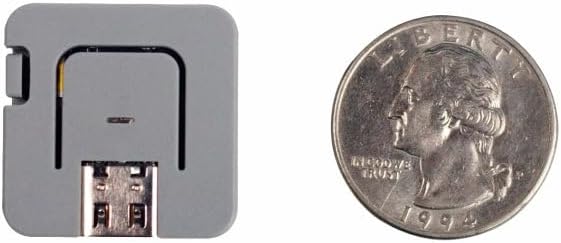
Figure 2: Size comparison of the ATOM Lite with a US quarter, illustrating its compact design.
2. פּעקל אינהאַלט
The M5Stack ATOM Lite package includes the following items:
- 1 x ATOM Lite ESP32 IoT Development Kit

Figure 3: The M5Stack ATOM Lite development kit as packaged for retail.
3. ייַזנוואַרג איבערview
The ATOM Lite features several integrated components and interfaces for diverse applications.

Figure 4: Diagram illustrating the key components and interfaces of the ATOM Lite, including the IR-LED, RGB LED, internal button (G39), Reset button, external pins, USB-C port, and HY2.0-4P connector.
שליסל קאַמפּאָונאַנץ:
- ESP32-PICO Microcontroller: Integrates Wi-Fi and Bluetooth capabilities.
- וסב- C פּאָרט: For power supply and data communication (programming).
- HY2.0-4P קאַנעקטער: A 4-pin connector for external modules and sensors.
- GPIO פּינס: Six general-purpose input/output pins for connecting peripherals.
- RGB LED (G27): A programmable full-color LED.
- Infra-Red (IR) LED: פֿאַר אינפֿראַרויט קאָמוניקאַציע.
- Built-in Button (G39): A user-programmable button.
- באַשטעטיק קנעפּל: To restart the device.
- M2 Screw Hole: For mounting purposes.
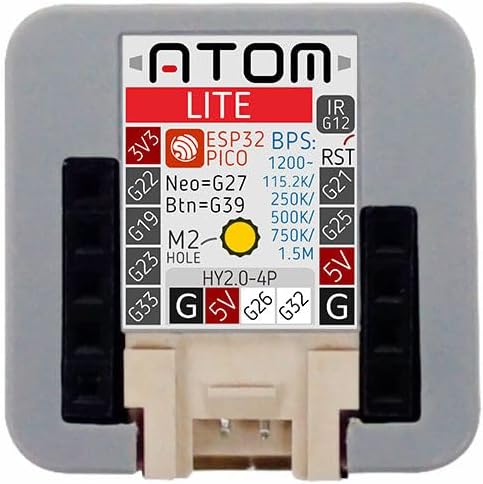
פיגורע 5: שפּיץ view of the ATOM Lite, detailing the pinout for the HY2.0-4P connector and external GPIOs, including voltage (3V3, 5V) and ground (G) connections.
4. אָנהייבן (סעטאַפּ)
To begin using your M5Stack ATOM Lite, follow these steps:
4.1. Powering On and Initial Connection
- Connect the ATOM Lite to your computer using a USB-C cable. The device will power on automatically.
- Upon connection, the RGB LED may illuminate, indicating power.
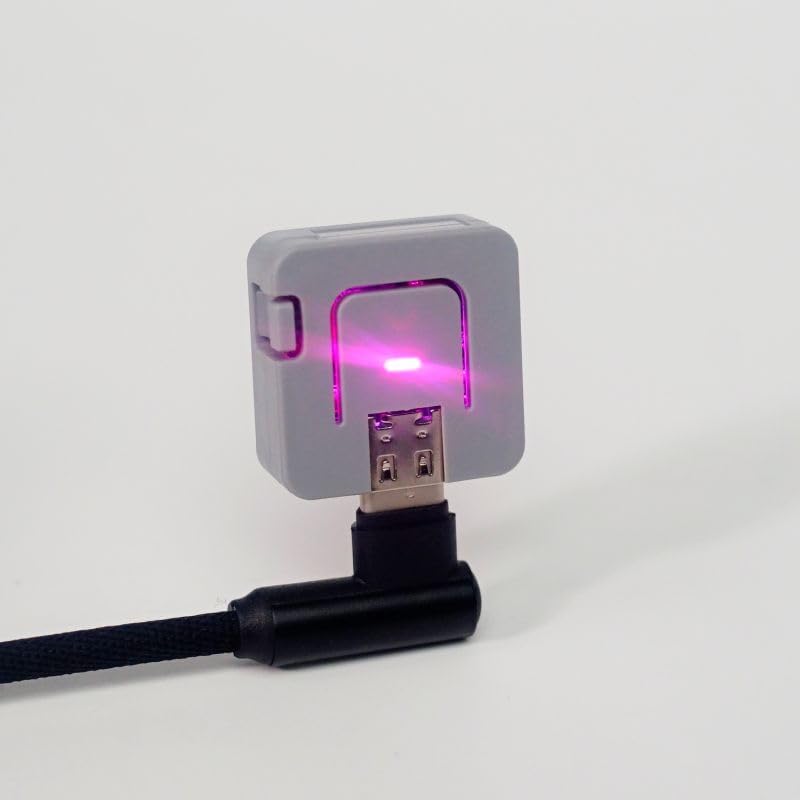
Figure 6: The ATOM Lite connected to a power source via a USB-C cable, with its RGB LED active.
4.2. דרייווער ינסטאַלירונג
The ATOM Lite uses a standard USB-to-Serial chip (typically CP2104 or CH9102F). Most modern operating systems will automatically install the necessary drivers. If the device is not recognized, you may need to manually install drivers:
- For Windows/macOS/Linux, search for 'CP2104 driver' or 'CH9102F driver' online and download from the official Silicon Labs or WCH webפּלאַץ.
4.3. אַנטוויקלונג סוויווע סעטאַפּ
The ATOM Lite supports various development platforms:
- Arduino IDE: Install the ESP32 board package in the Arduino IDE. Refer to the official ESP32 Arduino documentation for detailed instructions.
- מיקראָפּיטהאָן: Flash MicroPython firmware onto the device. Tools like `esptool.py` can be used for this.
- UI-FLOW: M5Stack's block-based programming platform. Download the UI-FLOW desktop IDE or use the web ווערסיע.
- ESPHome: For Home Assistant integration, visit esphome.io for pre-built projects and flashing instructions.
5. יקערדיק אָפּעראַציע
5.1. Using the Built-in Button
The ATOM Lite includes a programmable button (GPIO39). This button can be used for various user inputs, such as triggering events, changing modes, or confirming actions within your programmed application.
5.2. Controlling the RGB LED
The integrated RGB LED (connected to GPIO27) is a versatile indicator. It can be programmed to display different colors and patterns to convey status, alerts, or other visual feedback.
5.3. Infra-Red (IR) Communication
The IR LED allows the ATOM Lite to send infrared signals, enabling control of IR-compatible devices such as televisions, air conditioners, or other consumer electronics. Programming libraries are available for encoding and decoding IR protocols.
6. קאַנעקטינג פּעריפעראַלס
6.1. HY2.0-4P Interface
The HY2.0-4P connector provides a convenient interface for connecting M5Stack's Grove-compatible modules and other peripherals. This connector typically includes power (5V), ground, and two data lines (e.g., I2C, UART, or digital I/O).
6.2. External GPIOs
The ATOM Lite exposes additional GPIO pins (G19, G22, G23, G26, G32, G33) for direct connection to custom circuits, sensors, and actuators. Refer to the pinout diagram (Figure 5) for specific pin assignments and capabilities.
7. וישאַלט און קער
- האַלט דעם אַפּאַראַט טרוקן און אַוועק פון נעץ.
- ויסמיידן יקספּאָוזינג די מיטל צו עקסטרעם טעמפּעראַטורעס.
- Handle with care to prevent physical damage to the board and connectors.
- Clean the device with a soft, dry cloth if necessary. Do not use liquid cleaners.
8. טראָובלעשאָאָטינג
- אפאראט נישט דערקענט דורך קאמפיוטער: Ensure USB-C cable is functional. Install appropriate USB-to-Serial drivers (CP2104/CH9102F) if not automatically detected.
- Program upload failure: Verify correct board and port selection in your IDE. Ensure drivers are installed. Try pressing the Reset button before uploading.
- Wi-Fi קאָנעקטיוויטי פּראָבלעמען: Check Wi-Fi credentials in your code. Ensure the device is within range of the Wi-Fi network.
- אומגעריכטע אויפפירונג: Review your code for logical errors. Ensure all external connections are correct and secure.
9. ספּעסאַפאַקיישאַנז
| שטריך | באַשרייַבונג |
|---|
| מאָדעל נאָמען | ATOM Lite |
| נומער מאָדעל נומער | C008 |
| פּראַסעסער | ESP32-PICO |
| פלאַש זכּרון | 4 MB SPI Flash |
| ווירעלעסס טיפּ | 802.11bgn (Wi-Fi) |
| באַראַן | SRAM |
| אָפּערייטינג סיסטעם | FreeRTOS (default, supports others) |
| קאַנעקטיוויטי טעכנאָלאָגיע | וסב טיפּ-C |
| פּונקט וואָג | 0.423 אונסעס |
| פּראָדוקט דימענשאַנז (LxWxH) | 0.94 X 0.94 X 0.94 אינטשעס |
| קאָליר | גרוי |
| אַרייַנגערעכנט קאַמפּאָונאַנץ | 1 x ATOM Lite ESP32 IoT Development Kit |

פיגורע 7: דנאָ view of the ATOM Lite, showing regulatory markings including the FCC ID.
10. וואָראַנטי אינפֿאָרמאַציע
פֿאַר דעטאַלירטע וואָראַנטי אינפֿאָרמאַציע, ביטע זען די באַאַמטער M5Stack website or contact their customer support directly. Warranty terms and conditions may vary based on region and point of purchase.
11. שטיצן און רעסאָורסעס
For further assistance, technical documentation, and community support, please visit the official M5Stack website. You can find tutorials, examples, and forums to help with your development projects.
- אפיציעלע M5Stack Webפּלאַץ: https://m5stack.com/
- M5Stack Documentation: Refer to the product-specific documentation available on the M5Stack webפּלאַץ.


