1. הקדמה
This manual provides comprehensive instructions for the installation, operation, and maintenance of your Juno 2-Inch Flat Trim Canless Wafer LED Downlight. This innovative lighting solution is designed for quick and easy installation in various ceiling spaces, eliminating the need for traditional recessed housings. It features an all-in-one design with switchable white color temperature and adjustable lumen output, offering versatile lighting for accent, task, or general illumination.

Figure 1: Juno 2-Inch Flat Trim Canless Wafer LED Downlight with its remote driver box.
2. זיכערקייַט אינפֿאָרמאַציע
Please read all instructions carefully before installation and retain this manual for future reference. Failure to follow these instructions may result in electric shock, fire, or other hazards.
- שטענדיק אויסלעשן די עלעקטריע ביים קרייז ברעיקער איידער איר הייבט אן די אינסטאַלאַציע אדער דורכפירן קיין וישאַלט.
- All electrical connections must be in accordance with local and National Electrical Code (NEC) standards. If you are unfamiliar with proper electrical wiring connections, consult a qualified electrician.
- דו זאלסט נישט מאָדיפיצירן אָדער טוישן די פּראָדוקט אין קיין וועג.
- ענשור די צושטעלן וואָלtage איז קאָמפּאַטיבל מיט דער פֿיקסטשור (120 וואָלט).
- This product is suitable for wet locations and is IC Rated for direct contact with insulation.
- Do not install damaged products. Inspect the product upon receipt.
3. פּעקל אינהאַלט
באַשטעטיקן אַז אַלע קאָמפּאָנענטן זענען פאַראַן און נישט געשעדיגט איידער איר גייט ווייטער מיט דער אינסטאַלאַציע:
- LED Lens (Integrated with Downlight Fixture)
- Mounting Hardware (Spring clips, remote driver box)
Note: The downlight fixture and remote driver box are typically pre-assembled or connected.
4. פֿעיִקייטן
The Juno 2-Inch Flat Trim Canless Wafer LED Downlight offers advanced features for optimal lighting performance and ease of use:
- Canless Design: No housing required, allowing installation directly into ceiling drywall.
- Switchable White Color Temperature (SWW5): Easily select from five color temperature options:
- 2700K ווייך ווייַס
- 3000K וואַרעם ווייַס
- 3500K נייטראַל ווייַס
- 4000K קיל ווייַס
- 5000K טאָגליכט
- Adjustable Lumen Output (ALO25): Choose from three brightness levels (Low, Medium, High) to suit your needs.
- דימאַבלע: Compatible with most standard TRIAC dimmers, dimming down to 10 percent.
- ענערגיע עפעקטיוו: Long-life LEDs and a high-efficiency driver ensure superior illumination and extended service life.
- IC רייטאַד: Approved for direct contact with insulation, simplifying installation in insulated ceilings.
- Wet Location Certified: Suitable for use in bathrooms, showers, and outdoor covered areas.

Figure 2: Switches on the remote driver box allow selection of color temperature and lumen output.

Figure 3: Visual guide to the different color temperatures available.
5. סעטאַפּ און ייַנמאָנטירונג
The canless design simplifies installation. Follow these steps for a secure and proper setup:
- קער אַוועק מאַכט: איידער איר הייבט אן, זיכערט זיך אז די עלעקטרע צום אינסטאַלאַציע געגנט איז אויסגעלאָשן ביים קרייַז ברעיקער.
- צוגרייטן די עפענונג: Cut a 2-inch diameter hole in the ceiling drywall at the desired location. Ensure there are no obstructions (joists, pipes, wires) within the ceiling space.
- פאַרבינדן וויירינג:
- Open the remote driver box.
- Connect the building's supply wires (hot, neutral, ground) to the corresponding wires in the driver box using appropriate wire connectors.
- ענשור אַז אַלע קאַנעקשאַנז זענען זיכער און רעכט ינסאַלייטיד.
- Close the driver box cover.
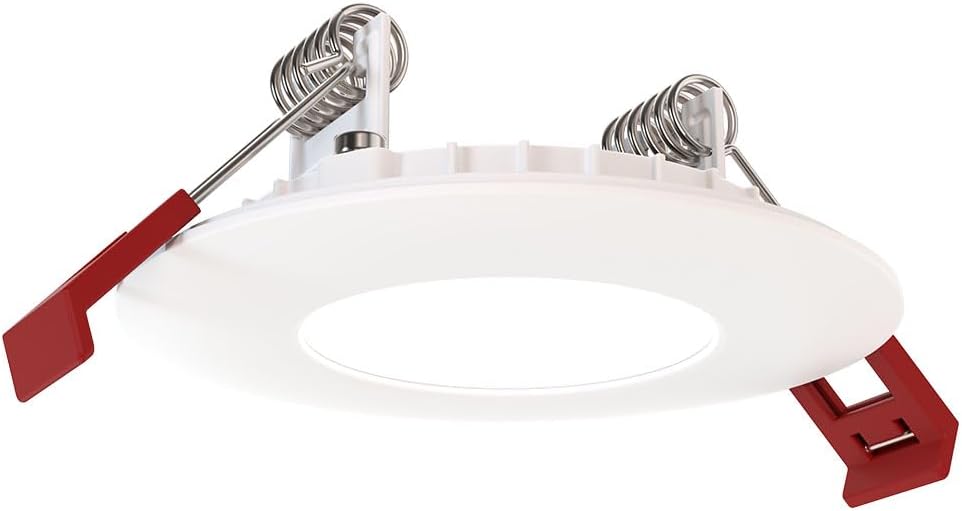
Figure 4: The remote driver box houses the electrical connections and adjustment switches.
- Select Settings (Pre-Installation): Before inserting the downlight into the ceiling, use the switches on the remote driver box to select your desired color temperature (2700K-5000K) and lumen output (Low, Medium, High). These settings can be adjusted later if needed, but it's easier before final installation.
- Insert Driver Box: Place the remote driver box into the ceiling opening. Its slim design allows it to fit into tight spaces.
- Install Downlight:
- Gently push the spring-loaded clips on the sides of the downlight upwards.
- Insert the downlight into the ceiling opening.
- Once the downlight is fully inserted, release the clips. The clips will spring back down and firmly secure the fixture against the ceiling.

Figure 5: Dimensions of the downlight and driver box for installation planning.
- ומקערן מאַכט: Turn the power back on at the circuit breaker. Test the downlight's functionality.
6. אַפּערייטינג ינסטרוקטיאָנס
Your Juno LED Downlight is designed for simple operation once installed.
- מאַכט אויף / אַוועק: קאנטראלירט דאס ליכט מיט א סטאנדארטן וואנט-שוויטש פארבונדן צום קרייז.
- דימינג: If connected to a compatible TRIAC dimmer switch, adjust the brightness by manipulating the dimmer control. The light can be dimmed down to 10% of its maximum output.
- Adjusting Color Temperature and Lumen Output:
The color temperature and lumen output are set via switches located on the remote driver box (refer to Figure 2). To change these settings after installation, you will need to access the driver box, which may require temporarily removing the fixture from the ceiling or accessing the box through an attic/access panel if it was placed there. It is recommended to set these preferences during installation.
- קאָליר טעמפּעראַטור סוויטש: Select from 2700K, 3000K, 3500K, 4000K, or 5000K.
- Lumen Output Switch: Choose Low, Medium, or High brightness.
7. וישאַלט
The Juno LED Downlight requires minimal maintenance due to its durable design and long-life LEDs.
- רייניקונג: זיכער מאַכן אַז די מאַכט איז אויסגעלאָשן איידער איר רייניקט. ווישט די פֿיקסטשור מיט אַ ווייכן, טרוקענעם, אָדער לייכט נאַסן קישן.amp שטאָף. ניצט נישט קיין שרײַבנדיקע רייניגער אָדער סאָלווענטן, ווײַל זיי קענען שאַטן די ענדיקונג אָדער עלעקטרישע קאָמפּאָנענטן.
- געפירט לייפספּאַן: The integrated LEDs are designed for extended operation and do not require replacement under normal use.
8. טראָובלעשאָאָטינג
If you encounter issues with your downlight, refer to the following common problems and solutions:
| פּראָבלעם | מעגלעך סיבה | לייזונג |
|---|---|---|
| ליכט טוט נישט קער אויף. | קיין מאַכט צו די ייַנאָרדענונג. פרייַ וויירינג קשר. Faulty switch or circuit breaker. | קאָנטראָלירט דעם קרייז ברעיקער און וואַנט סוויטש. Turn off power, check all wire connections in the driver box. Test switch or breaker; replace if necessary. |
| ליכט פליקערט אדער פארשווארצט נישט ריכטיק. | נישט-קאמפאטיבלע דימער סוויטש. פרייַ וויירינג. אָווערלאָאַדעד קרייַז. | Ensure dimmer is TRIAC compatible and designed for LED lighting. אויסלעשן די מאַכט, קאָנטראָלירן אַלע דראָט קאַנעקשאַנז. Reduce load on the circuit or consult an electrician. |
| אומרעכטע קאָליר טעמפּעראַטור אָדער העלקייט. | Switches on driver box set incorrectly. | Access the remote driver box and adjust the color temperature and lumen output switches to desired settings. |
אויב די פראבלעם בלייבט נאך פרובירן די לייזונגען, קאנטאקטירט קאסטומער סופארט.
9. ספּעסאַפאַקיישאַנז
| אַטריביוט | דעטאַל |
|---|---|
| סאָרט | דזשונאָ |
| מאָדעל נאָמען | WF2 RD ALO25 SWW5 90CRI 120 MW M6 (Round LED) |
| גרייס | 2-Inch Flat Trim |
| קאָליר | מאַט ווייַס |
| מאַטעריאַל | אַלומינום, פּאָליקאַרבאָנאַטע |
| ליכט מקור טיפּ | געפירט |
| Voltage | 120 וואלטס |
| וואָסtage | 9.2 וואטס |
| ספּעציעלע פֿעיִקייטן | Adjustable Color Temperature (2700K-5000K), Dimmable (Triac), Energy Efficient, Waterproof |
| ייַנמאָנטירונג טיפּ | פלאַש מאָונט (אָן קאַן) |
| דרינענדיק / דרויסנדיק באַניץ | Indoor, Outdoor (Wet Location Certified) |
| פּראָדוקט דימענשאַנז | 3.2"ל x 3.2"בר x 1.3"ה (פֿיקסטשור) |
| פּונקט וואָג | 13.2 אונסעס |
| סערטיפיקאַטיאָנס | CSA certified, Title 24, Energy Star, IC Rated |
10. וואָראַנטי און שטיצן
וואָראַנטי: This product comes with a Limited Warranty. Please refer to the product packaging or the manufacturer's official website for specific terms and conditions of the warranty.
קונה שטיצן: For technical assistance, troubleshooting beyond this manual, or warranty claims, please contact Juno customer support. Contact information can typically be found on the product packaging or the official Juno webפּלאַץ.
אָנליין רעסורסן: For additional information, product updates, or FAQs, visit the official Juno webפּלאַץ: www.acuitybrands.com/brands/juno


