1. הקדמה
This manual provides essential instructions for the safe and efficient installation, operation, and maintenance of your Battery Tender eCharge 48 AMP Level 2 Electric Vehicle (EV) Charger. Please read this manual thoroughly before using the product and retain it for future reference. The Battery Tender eCharge 48 is designed to provide convenient and reliable charging for most electric vehicles utilizing a J1772 plug.
2. זיכערקייַט אינפֿאָרמאַציע
וויכטיק זיכערהייט אינסטרוקציעס:
- עלעקטריקאַל זיכערקייַט: Installation must be performed by a qualified electrician in accordance with all local and national electrical codes. Ensure the power supply is disconnected before any installation or maintenance.
- גראָונדינג: The charger must be properly grounded to reduce the risk of electric shock.
- ינווייראַנמענאַל טנאָים: This charger is designed for both indoor and outdoor use. However, avoid installing it in areas prone to extreme temperatures, direct sunlight for prolonged periods, or excessive moisture beyond its IP66 rating.
- קאַבלע האַנדלינג: Always handle the charging cable and connector with care. Do not use if the cable or connector is damaged. Avoid kinking, crushing, or driving over the cable.
- קינדער און פּעץ: Keep children and pets away from the charging station during operation.
- Emergency Stop: Familiarize yourself with the location of your circuit breaker for the charging station in case of an emergency.
3. פּעקל אינהאַלט
באַשטעטיקן אַז אַלע זאכן זענען פאַראַן אין פּעקל:
- Battery Tender eCharge 48 EV Charger Unit
- מאָונטינג קלאַמער און ייַזנוואַרג
- Charge Plug Holder
- 2 RFID קאַרדס
4. פּראָדוקט איבערview און פֿעיִקייטן
The Battery Tender eCharge 48 is a robust Level 2 EV charging station designed for efficient and secure electric vehicle charging.

Figure 4.1: Battery Tender eCharge 48 AMP EV Charger unit.
שליסל פֿעיִקייטן:
- Adjustable Charging Output: Easily select charging output amperage to optimize charging rates, providing up to 42.25 miles of charge per hour at 11kW rated power.
- הויך קענטיק LCD דיספּלעי: The integrated LCD screen provides real-time charging information, including status, output, and error messages.
- ווערסאַטאַל ינסטאַלירונג: Designed for 240V (NEMA 14-50P) connections, supporting both plug-in and hardwired installations for home or commercial use.
- J1772 Compatibility: Compatible with most Electric Vehicles that utilize a J1772 charging plug.
- RFID Secure Access: Includes RFID chip-enabled cards to provide secure charging access, ideal for managing multiple users or public access installations.
- App-Free Operation: Engineered for straightforward use without the need for a mobile application.
5. ינסטאַלירונג
באַמערקונג: For hardwired installations, professional electrical installation is required to ensure compliance with local codes and safety standards.
5.1 מאָנטירן דעם טשאַרדזשער
- אויסקלייַבן אָרט: Choose a suitable indoor or outdoor location near your vehicle's parking spot and a 240V NEMA 14-50 outlet or electrical panel. Ensure the surface is sturdy enough to support the charger's weight.
- מאָונטינג קלאַמער: Use the provided mounting bracket as a template to mark drilling points on the wall. Ensure the bracket is level.
- זיכער בראַקאַץ: Drill pilot holes and secure the mounting bracket to the wall using the supplied hardware. For optimal security, aim to screw into at least one wall stud.
- Attach Charger: Carefully hang the eCharge 48 unit onto the mounted bracket. Ensure it is securely seated.
- זיכערער דנאָ: Use the short screw from the hardware packet to secure the bottom of the charger to the L-bracket, preventing accidental dislodgement.
- Install Plug Holder: Mount the charge plug holder in a convenient location near the charger to keep the J1772 connector tidy and protected when not in use.

Figure 5.1: Mounted charger with cable management.
5.2 עלעקטריקאַל קאַנעקשאַן
- פּלוג-אין ינסטאַלירונג: If using the NEMA 14-50 plug, ensure your outlet is properly installed and rated for 240V/50A. Plug the charger into the outlet.
- האַרדווירעד ינסטאַלירונג: For hardwired connections, consult a qualified electrician. The charger can be configured for a permanent connection to your home's electrical system.
6. אָפּעראַציע
Once installed and powered, the eCharge 48 is ready for use.
6.1 ערשטע אויפשטעל און אויסשטעלונג
Upon initial power-up, the LCD display will illuminate, showing the current status. The display provides information such as charging rate, voltage, amperage, and temperature.
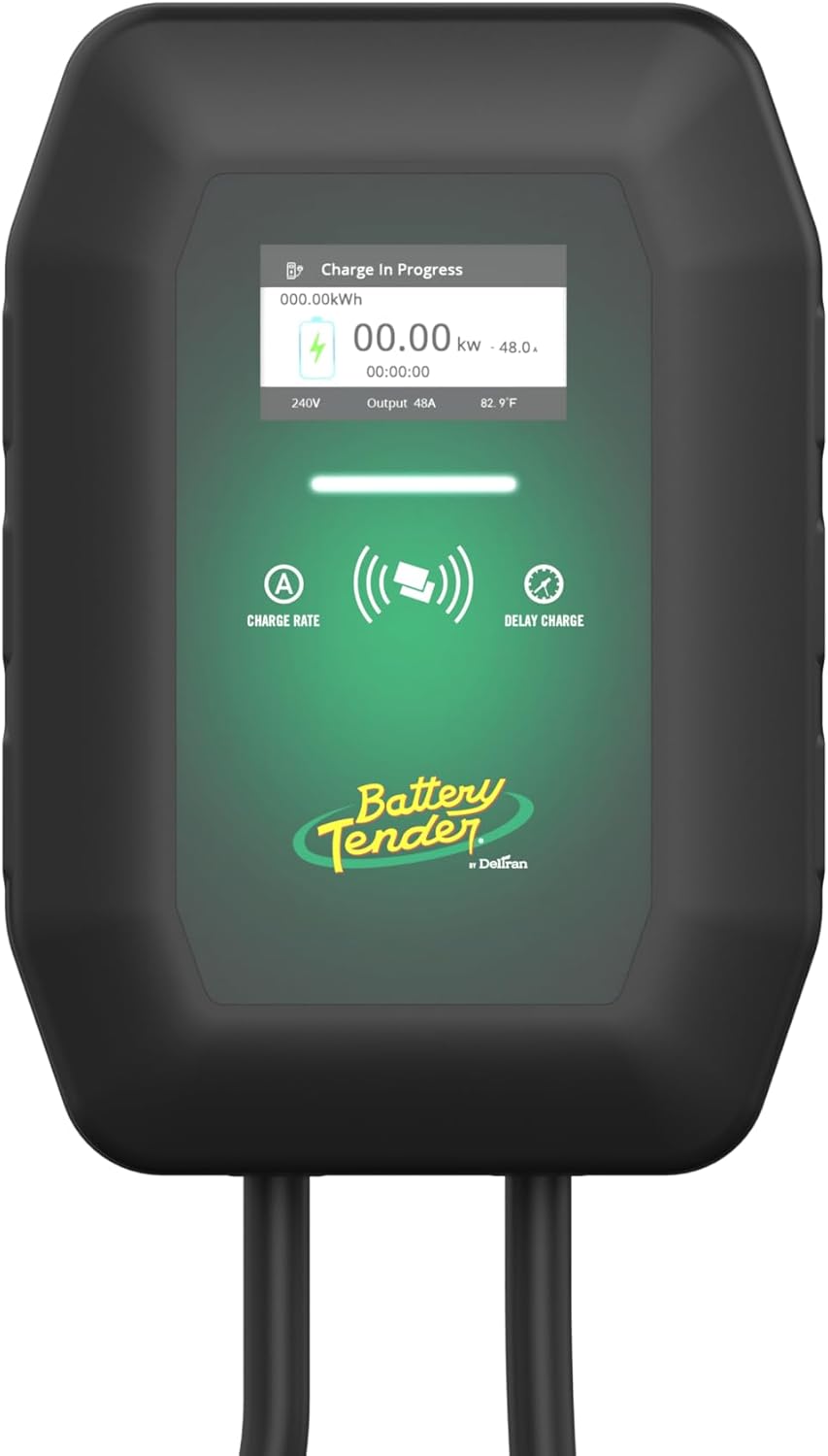
Figure 6.1: Charger LCD display showing charging information.
6.2 אויפלאָדן אייער עלעקטרישן אויטאָ
- פאַרבינדן צו פאָרמיטל: Open your vehicle's charging port and firmly insert the J1772 connector from the eCharge 48. Ensure a secure connection.
- RFID Activation (if enabled): If RFID access is enabled, tap one of the provided RFID cards against the designated sensor area on the charger to initiate the charging session.
- מאָניטאָר טשאַרדזשינג: The LCD display will show "Charge In Progress" and provide real-time charging data. Your vehicle's dashboard or app may also indicate charging status.
- דיסקאַנעקט: Once charging is complete, or if you need to stop charging, safely disconnect the J1772 connector from your vehicle. Return the connector to its holder.

Figure 6.2: Charger connected to an electric vehicle.
6.3 Adjusting Charging Ampעראַגע
The eCharge 48 allows you to select the charging output amperage. Refer to your vehicle's specifications and your electrical system's capacity before adjusting. This setting can typically be adjusted via controls on the charger's interface.
7. וישאַלט
Regular maintenance ensures optimal performance and longevity of your EV charger.
- רייניקונג: ווישט פּעריִאָדיש אָפּ דעם טשאַרדזשער און קאַבל מיט אַ ווייכן, דamp cloth. Do not use harsh chemicals or abrasive cleaners. Ensure the unit is powered off before cleaning.
- קאַבלע דורכקוק: Regularly inspect the charging cable and connector for any signs of wear, cuts, fraying, or damage. If damage is found, discontinue use immediately and contact customer support.
- סטאָרידזש: When not in use, ensure the charging cable is neatly coiled and the J1772 connector is placed in its holder to protect it from dirt and damage.
8. טראָובלעשאָאָטינג
If you encounter issues with your eCharge 48, refer to the following common troubleshooting steps:
| פּראָבלעם | מעגלעך סיבה | לייזונג |
|---|---|---|
| טשאַרדזשער איז נישט פּאַוערינג | No power from outlet/circuit breaker tripped. | Check the circuit breaker. Ensure the charger is securely plugged in or hardwired correctly. |
| טשאַרדזשינג הייבט זיך נישט אָן | Connector not fully inserted; RFID not activated; Vehicle issue. | Ensure the J1772 connector is fully seated. Tap RFID card if required. Check vehicle's charging status. |
| Slow charging rate | Amperage setting too low; Vehicle limitation; Grid limitations. | Adjust charger amperage setting (if applicable). Consult vehicle manual for charging capabilities. |
| טעות אָנזאָג אויף אַרויסווייַזן | Internal fault; Connection issue. | Note the error code. Try power cycling the charger (unplug/turn off breaker, wait 30 seconds, restore power). If the error persists, contact customer support. |
If these steps do not resolve the issue, please contact Battery Tender customer support for further assistance.
9. ספּעסאַפאַקיישאַנז
Technical specifications for the Battery Tender eCharge 48 AMP EV טשאַרדזשער:
| שטריך | דעטאַל |
|---|---|
| סאָרט | באַטערי טענדער |
| מאָדעל | eCharge 48 |
| נומער מאָדעל נומער | 022-3019-DL-WH |
| פאַבריקאַנט | דעלטראן |
| טשאַרדזשינג מדרגה | מדרגה 2 |
| מאַקסימום Ampעראַגע | 48 AMP |
| אַרייַנשרייַב וואָלtage | 240 וואלטס אַק |
| קאַנעקטער טיפּ | J1772 |
| מאַכט פּלוג טיפּ | NEMA 14-50P (or Hardwired) |
| קאַבלע לענג | 25 פֿיס |
| פּראָדוקט דימענשאַנז | 4.59 X 10.15 X 14.48 אינטשעס |
| פּונקט וואָג | 6.37 פונט |
| קאָליר | שוואַרץ |
| ענוויראָנמענטאַל רייטינג | IP66 (וועטער קעגנשטעליק) |
10. וואָראַנטי און שטיצן
וואָראַנטי אינפֿאָרמאַציע:
The Battery Tender eCharge 48 AMP EV Charger comes with a 3-יאָר מאַנופאַקטורער וואָראַנטידי וואָראַנטי דעקט חסרונות אין מאַטעריאַלן און אַרבעט אונטער נאָרמאַל נוצן. ביטע האַלטן דיין קויפן באַווייַז פֿאַר וואָראַנטי קליימז.
קונה שטיצן:
For technical assistance, troubleshooting not covered in this manual, or warranty inquiries, please contact Battery Tender customer support. Refer to the official Battery Tender webזייטל אדער אייער פּראָדוקט פּאַקאַדזשינג פֿאַר די מערסט אַקטועל קאָנטאַקט אינפֿאָרמאַציע.


