1. הקדמה
This manual provides detailed instructions for the installation, operation, and maintenance of your Mars Gaming MC-3TCORE Custom ATX Gaming Case. Please read this manual thoroughly before beginning assembly to ensure proper setup and optimal performance.
2. פּראָדוקט פֿעיִקייטן
- Custom Design with Triple Tempered Glass: Allows for extensive customization and offers a panoramic view of internal components through three removable tempered glass panels with a screwless anchoring system.
- Double Side Chamber Structure: Maximizes internal space for optimized component distribution and cooling. Includes 7 expansion slots, support for graphics cards up to 410mm, and space for 2 x 3.5" HDDs and up to 3 x 2.5" SSDs.
- Optimized Cooling Capacity: Features side and top mesh panels, accommodating up to 10 x 120mm fans, up to 360mm liquid cooling systems on the top panel, and CPU coolers up to 161mm high.
- Compatibility with Reverse Connector Motherboards: Supports back-pluggable ATX motherboards, enhancing airflow, cooling, and cable management.
- Connectivity and Functionality: Front panel includes USB 3.0, USB 2.0, USB-C, microphone, and HD audio connections. Features top and bottom magnetic dust filters and an internal cable management system.
3. פּעקל אינהאַלט
באַשטעטיקן אַז אַלע קאָמפּאָנענטן זענען פאַראַן איידער איר גייט ווייטער מיט דער אינסטאַלאַציע:
- Mars Gaming MC-3TCORE PC Case
- Accessory Box (screws, standoffs, cable ties)
- באַניצער מאַנואַל (דעם דאָקומענט)
Note: Fans and other PC components are sold separately and are not included with the case.
4. Setup and Component Installation
4.1. צוגרייטן דעם פאַל
- אויספּאַקן דעם קעסטל: Carefully remove the MC-3TCORE case from its packaging.
- Remove Tempered Glass Panels: The three tempered glass panels are secured with a screwless anchoring system. Gently lift and remove them to access the interior. Store them safely to prevent damage.
- אַקסעסערי קעסטל: Locate the accessory box inside the case, which contains all necessary screws and mounting hardware.
4.2. מאָטהערבאָאַרד ינסטאַללאַטיאָן
The MC-3TCORE supports ATX motherboards, including those with reverse connectors.
- ינסטאַלירן סטאַנדאָפס: Ensure the correct standoffs are installed for your motherboard's form factor.
- פאזיציע מוטערבאָרד: Carefully place the motherboard onto the standoffs, aligning the screw holes.
- זיכערע מוטערבאָרד: Use the provided screws to secure the motherboard to the case.

בילד: אינערלעך view of the Mars Gaming MC-3TCORE case, highlighting the spacious interior for motherboard and other components.
4.3. Storage Device Installation (HDDs/SSDs)
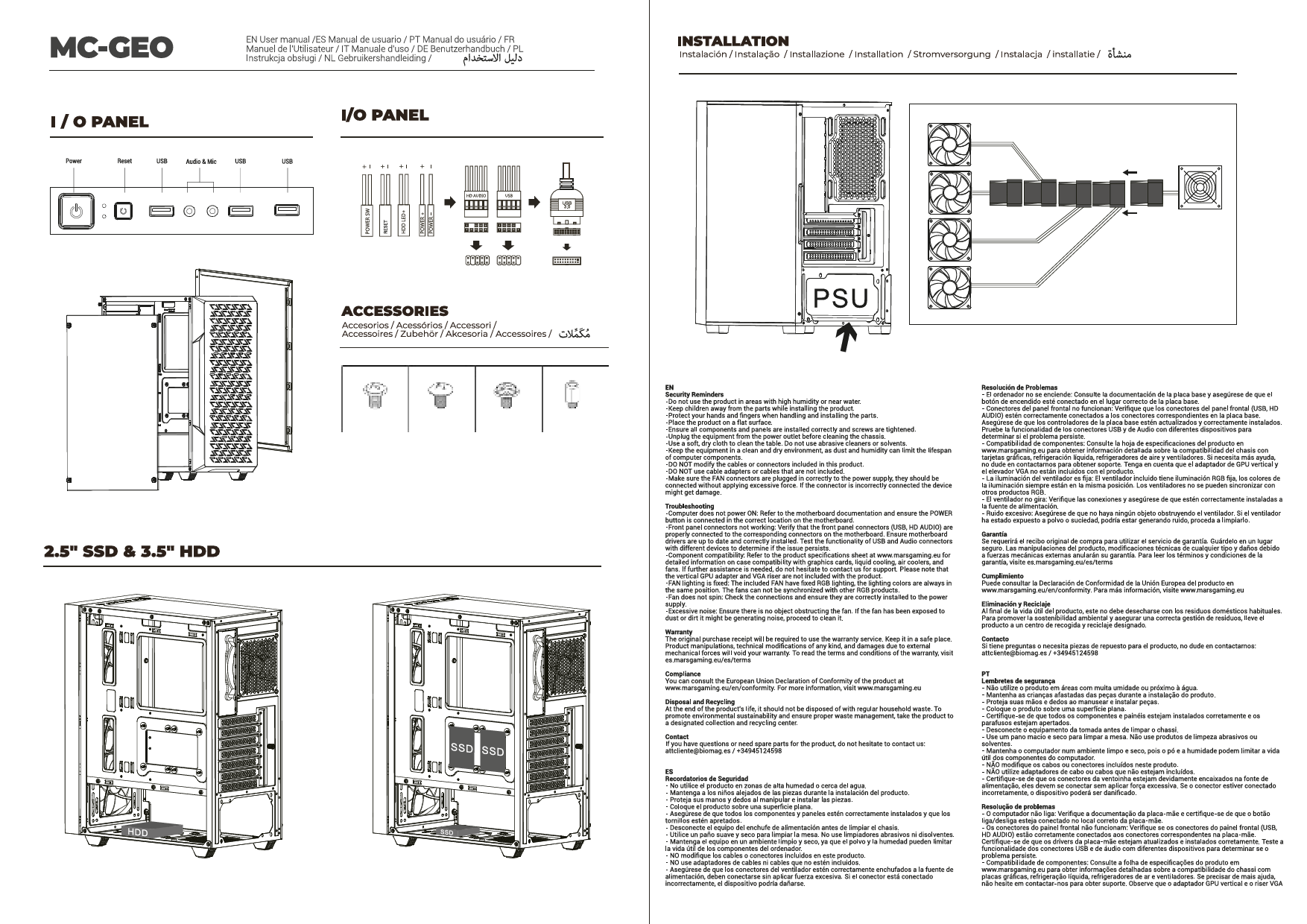
The case supports 2 x 3.5" hard drives and up to 3 x 2.5" SSDs.
- Locate Drive Bays: Identify the dedicated mounting locations for 3.5" HDDs and 2.5" SSDs within the double side chamber.
- Mount Drives: Secure your storage devices using the appropriate screws.

Image: Internal layout diagram indicating dimensions and placement for 2.5" SSDs and 3.5" HDDs.
4.4. גראַפיקס קאַרד ינסטאַללאַטיאָן
דער קעיס שטיצט גראַפיקס קאַרדס ביז 410 מם אין לענג.
- Remove Expansion Slot Covers: אַראָפּנעמען די נייטיקע יקספּאַנשאַן סלאָט דעקל אויף די הינטערשטע טייל פון די קעסטל.
- אַרײַנשטעלן גראַפיקס קאַרטל: Carefully insert the graphics card into the PCIe slot on the motherboard.
- Secure Graphics Card: Fasten the graphics card with screws to the case.
4.5. Cooling System Installation (Fans/Liquid Cooling)
The MC-3TCORE offers extensive cooling options.
- פאָכער ינסטאַלירונג: The case can accommodate up to 10 x 120mm fans. Refer to the diagram for optimal placement (top, side, rear, bottom).
- Liquid Cooling Radiator: Up to 360mm liquid cooling systems can be installed on the top panel. Ensure proper clearance for other components.
- CPU Cooler: Supports CPU coolers up to 161mm in height.

Image: Cooling configuration diagram showing fan and radiator support locations and sizes.

בילד: אינערלעך view שאָוקasing the potential for up to 10 fans for maximum cooling.
4.6. מאַכט סופּפּלי ינסטאַללאַטיאָן
The power supply mounts at the rear of the case.
- Position PSU: Slide the power supply into its designated bay.
- Secure PSU: Fasten the power supply with screws from the rear of the case.
4.7. קאַבלע מאַנאַגעמענט
Utilize the internal cable management system, especially for reverse connector motherboards, to ensure clean routing and optimal airflow.

Image: Detail of the case's rear chamber, illustrating cable management options and compatibility with reverse connector motherboards.
4.8. פראָנט פּאַנעל קאַנעקשאַנז
Connect the front panel cables (USB 3.0, USB 2.0, USB-C, HD Audio, Power, Reset, LED) to the corresponding headers on your motherboard.

Image: Top panel view displaying the integrated USB 3.0, USB 2.0, USB-C, and audio ports.
5. אָפּעראַציע און באַניץ
Once all components are installed and connected, replace the tempered glass panels. Ensure they are securely seated. Power on your system. The case design promotes optimal airflow when properly configured with fans.
6. וישאַלט
- שטויב פילטערס: The MC-3TCORE features magnetic dust filters on the top and bottom panels. Regularly remove and clean these filters to maintain optimal airflow and prevent dust buildup inside the case.
- טעמפּערד גלאז: Clean tempered glass panels with a soft, lint-free cloth and a non-abrasive glass cleaner. Avoid harsh chemicals.
- ינלענדיש רייניקונג: Periodically use compressed air to remove dust from internal components and fan blades. Ensure the system is powered off and unplugged before cleaning.
7. טראָובלעשאָאָטינג
- קיין מאַכט:
- Ensure the power supply is properly connected and switched on.
- Verify all front panel power switch cables are correctly connected to the motherboard.
- Check all internal power connections (24-pin ATX, 8-pin CPU, PCIe power).
- איבערהייצונג:
- Confirm all fans are spinning and correctly oriented for airflow.
- Clean dust filters and internal components.
- Ensure CPU cooler and GPU fans are functioning.
- קאָמפּאָנענט פּאַסיק פּראָבלעמען:
- Refer to the specifications for maximum component dimensions (VGA length, CPU cooler height, radiator size).
- Double-check motherboard standoff alignment.
8. ספּעסאַפאַקיישאַנז
| שטריך | דעטאַל |
|---|---|
| סאָרט | מאַרס גיימינג |
| מאָדעל נאָמען | MC3TCORE |
| טיפּ פון קאַסטן | מיד טאַוער |
| מאַטעריאַל | טעמפּערד גלאז |
| קאָליר | שוואַרץ |
| פּראָדוקט דימענשאַנז | 44 X 28.6 X 40.1 סענטימעטער |
| פּונקט וואָג | 6.3 קג |
| מאָטהערבאָאַרד קאַמפּאַטאַבילאַטי | ATX (including reverse connector), Micro-ATX, Mini-ITX |
| יקספּאַנשאַן סלאָץ | 7 |
| Max VGA Length | 410 מם |
| מאַקסימום קפּו קולער הייך | 161 מם |
| פאָכער סופּפּאָרט | Up to 10 x 120mm |
| פליסיק קאָאָלינג שטיצן | שפּיץ: אַרויף צו 360 מם |
| פאָר בייס | 2 x 3.5" האַרט דרייוו, 3 x 2.5" ססד |
| פראָנט איך / אָ פּאָרץ | 1 x USB 3.0, 2 x USB 2.0, 1 x USB-C, HD אַודיאָ, מיקראָפאָן |
| שטויב פילטערס | Top and Bottom (Magnetic) |
9. וואָראַנטי און שטיצן
Mars Gaming products are designed for durability and performance. For warranty information, please refer to the specific terms and conditions provided at the point of purchase or visit the official Mars Gaming website. For technical support or inquiries, please contact Mars Gaming customer service.
Note: This product does not include batteries.