1. הקדמה
א דאנק פארן קויפןasing the Peakeep Projection Alarm Clock. This device combines a digital alarm clock with a unique projection feature, a colorful nightlight, and a convenient USB charging port. Designed for ease of use and optimal visibility, it offers multiple brightness settings for both the main display and the projection, along with adjustable alarm volume to suit various preferences. Please read this manual carefully to ensure proper setup and operation.
2. זיכערקייַט אינפֿאָרמאַציע
- שטעלט נישט אויס דעם אפאראט צו עקסטרעמע טעמפעראטורן, דירעקטע זונשייַן, אדער הויכע הומידיטי.
- האַלטן די מיטל אַוועק פון וואַסער אָדער אנדערע ליקווידס.
- Use only the provided AC/DC adapter.
- פרובירט נישט צו צענעמען אדער פאררעכטן דעם אפאראט אליין. לאָזט איבער אלע סערוויסעס צו קוואַליפֿיצירטע פּערסאָנעל.
- זיכער מאַכן אַז עס איז דאָ געהעריקע ווענטילאַציע אַרום די זייגער.
- אַוועקוואַרפן באַטעריעס פאַראַנטוואָרטלעך לויט די לאָקאַלע רעגולאַציעס.
3. פּעקל אינהאַלט
- Peakeep Projection Alarm Clock (Model MHP6050)
- AC/DC Power Adapter (60-inch cord)
- באַניצער מאַנואַל
4. פּראָדוקט איבערview

פיגורע 4.1: פראָנט view of the Peakeep Projection Alarm Clock, showing the main display, projection, and USB charging capability.

פיגורע 4.2: דערציען view of the Peakeep Projection Alarm Clock, highlighting the control buttons, USB IN/OUT ports, and focus wheel for the projector.
קאָנטראָל קנעפּלעך און פּאָרטן:
- דיממער: Adjusts the brightness of the main LED display.
- צייט שטעלן: גייט אריין אין צייט-אײַנשטעלונג מאָדע.
- 12/24HR: Toggles between 12-hour and 24-hour time formats.
- באַנד: Adjusts the alarm volume.
- ALARM SET ON/OFF: Sets and activates/deactivates the alarm.
- NIGHTLIGHT ON/OFF: Turns the RGB nightlight on or off.
- PROJECTION DIMMER: Adjusts the brightness of the projected time.
- PROJECTION ON/FLIP/OFF: Controls the projection (on, flip orientation, off).
- FOCUS Wheel: אַדזשאַסטירט די קלאַרקייט פון די פּראַיעקטירטע בילד.
- 5V אין: Power input port for the AC/DC adapter.
- USB OUT: USB charging port for external devices.
- באַטערי אָפּטייל: For 2 AAA backup batteries (not included).
5. סעטאַפּ
5.1 מאַכט קאַנעקשאַן
Connect the provided AC/DC power adapter to the 5V אין port on the back of the clock and plug the adapter into a standard wall outlet. The clock display will illuminate.

Figure 5.1: Power connection and battery backup illustration.
5.2 באַטעריע באַקאַפּ ינסטאַלירונג
For battery backup, open the battery compartment on the back of the clock and insert 2 AAA batteries (not included), observing the correct polarity (+/-). These batteries will preserve your time and alarm settings during a power outage and trigger the alarm if power is lost.
5.3 ערשטע צייט איינשטעלונג
- דריקן און האַלטן די צייט שטעלן קנעפּל. די שעה ציפערן וועלן אָנהייבן צו בלינקען.
- ניצן די באַנד or אַלאַרם שטעלן קנעפּלעך צו סטרויערן די שעה.
- דרוק צייט שטעלן נאכאמאל צו באשטעטיגן די שעה און אריבערגיין צו מינוט איינשטעלונג. די מינוט ציפערן וועלן בלינקען.
- ניצן די באַנד or אַלאַרם שטעלן קנעפּלעך צו סטרויערן די מינוט.
- דרוק צייט שטעלן one more time to save the time and exit time setting mode.
- צו בייטן צווישן 12-שעה און 24-שעה פֿאָרמאַט, דריק די 12/24HR button. In 12-hour format, 'AM' or 'PM' indicators will be displayed.
6. אַפּערייטינג ינסטרוקטיאָנס
6.1 באַשטעטיקן די שרעק
- דריקן און האַלטן די אַלאַרם שטעלן קנעפּל. די אַלאַרם שעה ציפערן וועלן בלינקען.
- ניצן די באַנד or אַלאַרם שטעלן קנעפּלעך צו סטרויערן די שרעק שעה.
- דרוק אַלאַרם שטעלן again to confirm the alarm hour and move to alarm minute setting. The alarm minute digits will flash.
- ניצן די באַנד or אַלאַרם שטעלן קנעפלעך צו סטרויערן די אַלאַרם מינוטן.
- דרוק אַלאַרם שטעלן one more time to save the alarm time.
- To activate or deactivate the alarm, short press the אַלאַרם שטעלן קנעפּל. אן אלארם אייקאן וועט דערשיינען אויפן דיספלעי ווען עס ווערט אקטיווירט.
6.2 אַדזשאַסטירן אַלאַרם באַנד
The alarm volume can be set to 5 levels, ranging from 60dB to 108dB. While the alarm is sounding or in standby mode, press the באַנד button repeatedly to cycle through the 5 volume levels (U01 to U05). Select the desired volume.

פיגור 6.1: אַלאַרם וואָלומען לעוועלס.
6.3 סנוז פונקציע
ווען דער אַלאַרם קלינגט, דריק די גרויסע קנעפּל SNOOZE button on top of the clock to temporarily silence the alarm for 9 minutes. The alarm will sound again after 9 minutes. To turn off the alarm completely, press any other button.
6.4 פּראָיעקציע פֿעיִקייטן
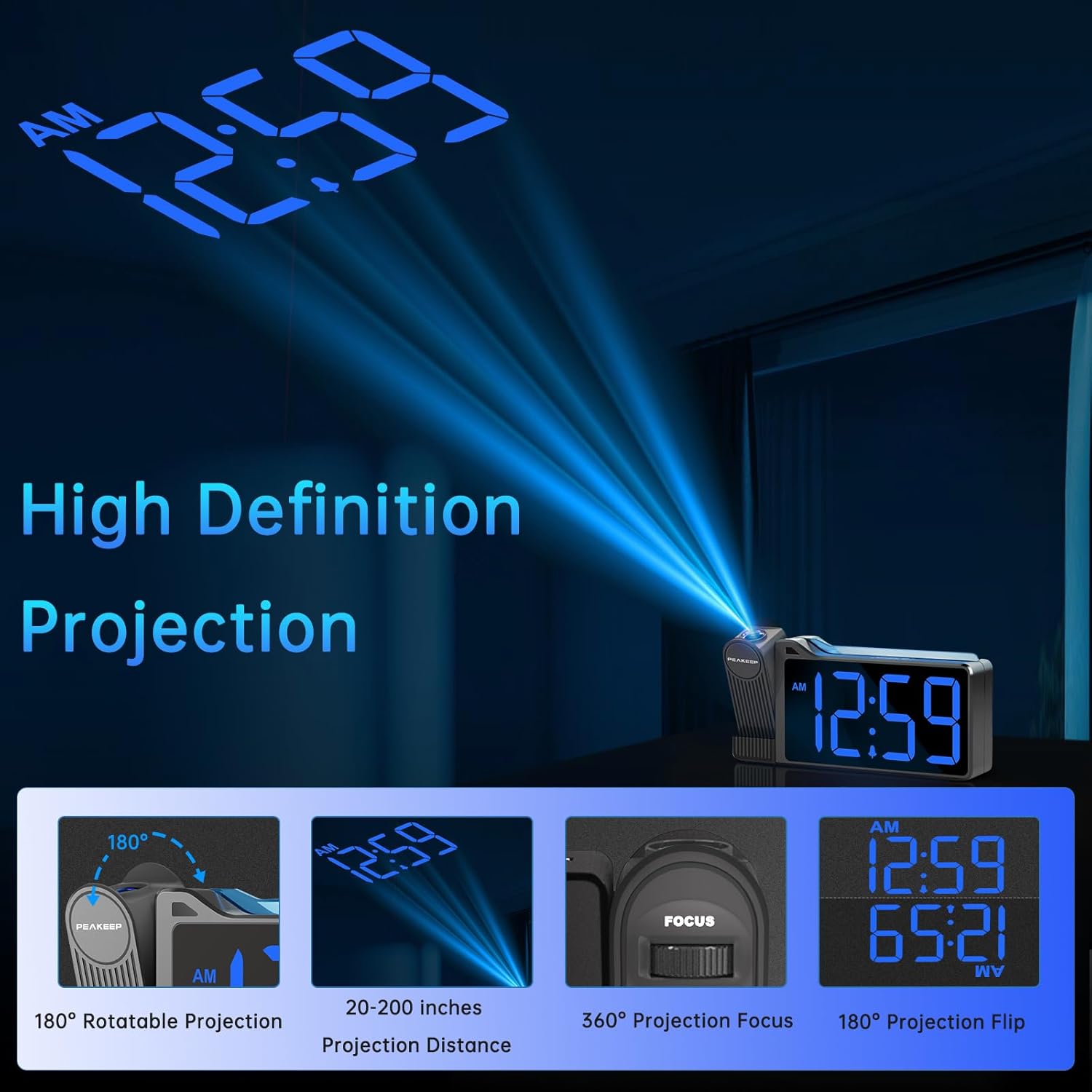
Figure 6.2: High Definition Projection capabilities.
- 180° Rotatable Projection: The projector arm can be rotated 180 degrees to project the time onto a ceiling or wall.
- פּרויעקציע דיסטאַנסע: The optimal projection distance ranges from 20 inches to 200 inches.
- Adjusting Projection Brightness: דרוק די פּראָדזשעקטיאָן דיממער button repeatedly to cycle through 5 brightness levels (L01 to L05) for the projected time.
- Projection ON/FLIP/OFF: דרוק די פּראָדזשעקטיאָן אויף / פליפּ / אַוועק button to turn the projection on, flip its orientation (180 degrees), or turn it off.
- פאָקוס אַדזשאַסטמאַנט: ניצן די פאָקוס wheel on the side of the projector to sharpen the clarity of the projected time.

Figure 6.3: Adjustable Projection Brightness levels.
6.5 פאַרביק נייטליגהט
The clock features an RGB color-changing nightlight on its top surface. Press the NIGHTLIGHT ON/OFF button to turn the nightlight on or off. When on, it will cycle through various colors, providing a soothing ambiance.

Figure 6.4: RGB Color-changing Nightlight.
6.6 אַדזשאַסטירן די ברייטקייט פון דעם עקראַן
The main LED display has 6 levels of adjustable brightness (L1 to L5, plus OFF). Press the דיממער button repeatedly to cycle through these brightness levels to suit your preference and environment.

Figure 6.5: Main display brightness levels.
6.7 וסב טשאַרדזשינג פּאָרט
The clock is equipped with a USB OUT port (5V) on its back, allowing you to charge your smartphone or other USB-powered devices conveniently at your bedside. Simply connect your device's USB charging cable to this port.
7. וישאַלט
- רייניקט די זייגער'ס אויבערפלאך מיט א ווייכן, טרוקענעם טוך. ניצט נישט קיין שרײַבנדיקע רייניגער אדער סאָלווענטן.
- Keep the projection lens clean to ensure clear time projection. Use a soft, lint-free cloth.
- If the clock will not be used for an extended period, remove the backup batteries to prevent leakage.
8. טראָובלעשאָאָטינג
| פּראָבלעם | מעגלעך סיבה | לייזונג |
|---|---|---|
| Clock display is off / Clock not working. | Power adapter not connected or faulty; Power outage. | Ensure the power adapter is securely plugged into the clock and a working outlet. Check power supply. |
| Time/Alarm settings are lost after power disconnection. | No backup batteries installed or batteries are dead. | אינסטאלירט 2 נייע AAA באַטעריעס אין די באַטעריע אָפּטייל. |
| די פּראָיעקטירטע צייט איז פֿאַרשוואָמען אָדער נישט קלאָר. | Focus not adjusted; Incorrect projection distance. | סטרויערן די פאָקוס wheel on the projector. Ensure the clock is within the 20-200 inch projection range. |
| Projected time is not visible. | Projection is off or too dim. | דרוק פּראָדזשעקטיאָן אויף / פליפּ / אַוועק to turn on. Adjust פּראָדזשעקטיאָן דיממער צו פאַרגרעסערן ברייטנאַס. |
| Alarm is not loud enough. | Alarm volume set too low. | דרוק די באַנד button to increase the alarm volume level (U01-U05). |
| USB טשאַרדזשינג איז פּאַמעלעך אָדער אַרבעט נישט. | Device requires higher charging current; Cable issue. | Ensure your device is compatible with 5V USB charging. Try a different USB cable. Note: This port is for charging, not data transfer. |
9. ספּעסאַפאַקיישאַנז
| שטריך | דעטאַל |
|---|---|
| מאָדעל נומער | MHP6050 |
| ווייַז טיפּ | דיגיטאַל געפירט |
| ווייַז קאָליר | בלוי דידזשאַץ |
| פּראָדוקט דימענשאַנז | 6.9"ברייט x 3.5"היך |
| פּונקט וואָג | 8.8 אונסעס |
| מאַכט מקור | Corded Electric (AC/DC Adapter included) |
| באַטאַרייע באַקקופּ | 2 X AAA באַטעריז (ניט אַרייַנגערעכנט) |
| פּרויעקציע ראָוטיישאַן | 180° |
| פּרויעקציע ברייטנאַס | 5 לעוועלס |
| ווייַז ברייטנאַס | 6 levels (including OFF) |
| נאַכט ליכט | RGB Color-changing |
| Alarm Volume Range | 60-108 dB (5 levels) |
| וסב רעזולטאַט | 5V (for charging devices) |
| מאַטעריאַל | פּלאַסטיק |
10. וואָראַנטי און שטיצן
Peakeep products are manufactured with high-quality materials and craftsmanship. For any questions, technical support, or warranty claims, please contact Peakeep customer service through the retailer's platform or the official Peakeep webזייטל. ביטע באַהאַלטן אייער קויפן באַווייַז פֿאַר וואָראַנטי צוועקן.


