1. הקדמה
א דאנק פארן קויפןasing the Edifier R990BT Bluetooth Computer Speakers. These 2.0 active bookshelf speakers are designed to provide high-quality audio for your PC, smartphone, tablet, and other compatible devices. Featuring Bluetooth V5.4 connectivity and dual RCA inputs, the R990BT offers versatile audio options in a classic MDF enclosure. Please read this manual thoroughly to ensure proper setup and optimal performance of your speakers.
2. פּעקל אינהאַלט
ביטע זיכער מאַכן אַז אַלע זאכן זענען פאַראַן אין פּעקל:
- Edifier R990BT Active Bookshelf Speakers (1 Pair)
- רעדנער קאַנעקשאַן קאַבלע
- RCA צו RCA אַודיאָ קאַבל
- 3.5 מם צו RCA אַודיאָ קאַבלע
- מאַכט קאַבלע
- שנעל אָנהייב גייד
3. סעטאַפּ
3.1 רעדנער פּלייסמאַנט
Place the speakers on a stable, flat surface such as a desk or shelf. For optimal stereo imaging, position the speakers equidistant from your listening position, forming an equilateral triangle. Ensure there is adequate space behind the speakers for cable connections and ventilation.

Image: Edifier R990BT speakers positioned on a desk, demonstrating typical placement for computer use.
3.2 פֿאַרבינדן די רעדנערס
- Connect the Passive Speaker: Use the included speaker connection cable to link the active speaker (with controls) to the passive speaker. Ensure the correct polarity (+ to + and - to -) for proper sound reproduction.
- פאַרבינדן צו מאַכט: Plug the power cable into the active speaker's power input and then into a wall outlet.
3.3 פֿאַרבינדן אַודיאָ קוועלער
The R990BT speakers support both wired (RCA) and wireless (Bluetooth) connections.
Wired Connection (RCA)
The speakers feature two sets of RCA input ports (Line In 1 and Line In 2) for connecting two different wired audio devices simultaneously.
- Use the RCA to RCA cable to connect devices with RCA outputs (e.g., CD player, turntable with pre-amp).
- Use the 3.5mm to RCA cable to connect devices with a 3.5mm audio jack (e.g., computer, smartphone, tablet).

Image: Close-up of the rear panel of the active speaker, highlighting the dual RCA input ports (Line In 1 and Line In 2) and the power input.
בלועטאָאָטה קאַנעקשאַן
The R990BT features Bluetooth V5.4 for wireless audio streaming.
- צינד אן די רעדנערס.
- Press the volume/input knob on the rear panel to select the Bluetooth input. The indicator light will flash blue.
- אויף אייער אַודיאָ מיטל (סמאַרטפאָן, טאַבלעט, קאָמפּיוטער), אַקטיווירט בלועטוט און זוכט פֿאַר פֿאַראַן דעוויסעס.
- Select "EDIFIER R990BT" from the list to pair. The indicator light will turn solid blue once connected.

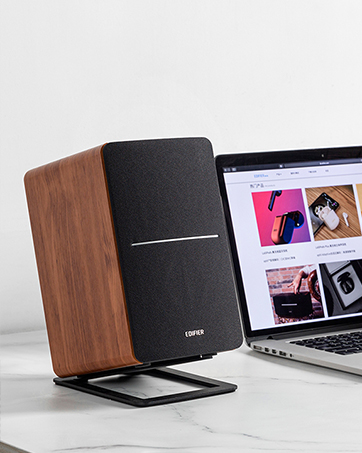
Image: A single Edifier R990BT speaker on a desk next to a laptop, symbolizing the ease of Bluetooth connectivity.
4. אַפּערייטינג ינסטרוקטיאָנס
4.1 מאַכט אויף / אַוועק
The power switch is located on the rear panel of the active speaker. Flip the switch to the 'ON' position to power on the speakers. Flip to 'OFF' to power off.
4.2 באַנד קאָנטראָל
The large knob on the rear panel of the active speaker controls the master volume. Rotate clockwise to increase volume and counter-clockwise to decrease volume.
בילד: דעטאַלירט view of the multi-function control knob on the rear of the speaker, used for volume adjustment and input selection.
4.3 אַרייַנשרייַב סעלעקציע
Press the volume/input knob on the rear panel to cycle through the available audio inputs: Line In 1, Line In 2, and Bluetooth. The indicator light will change color or flash to indicate the selected input mode.
- Line In 1 / Line In 2: Solid green or red indicator (depending on model/firmware).
- בלועטאָאָטה: Flashing blue (pairing mode) or solid blue (connected).
4.4 Using the Edifier ConneX App
For enhanced control and customization, download the Edifier ConneX mobile application. The app allows you to adjust equalization settings and access additional features for your R990BT speakers.
- Download the Edifier ConneX app from your device's app store.
- Ensure your speakers are powered on and connected via Bluetooth to your mobile device.
- Open the app and follow the on-screen instructions to connect to your R990BT speakers.

Image: The official logo for the Edifier ConneX mobile application.
5. וישאַלט
5.1 רייניקונג
צו אויפהאלטן דעם אויסזען און פאָרשטעלונג פון אייערע רעדנערס:
- Wipe the speaker cabinets with a soft, dry cloth.
- Do not use liquid cleaners, aerosols, or abrasive chemicals, as these may damage the finish or internal components.
- Gently brush dust from the speaker grilles using a soft brush or vacuum cleaner with a brush attachment.
5.2 סטאָרידזש
If storing the speakers for an extended period, ensure they are powered off and disconnected from the power source. Store them in a cool, dry place away from direct sunlight and extreme temperatures.
6. טראָובלעשאָאָטינג
If you encounter any issues with your Edifier R990BT speakers, please refer to the following common problems and solutions:
| פּראָבלעם | מעגלעך סיבה | לייזונג |
|---|---|---|
| קיין געזונט |
|
|
| פאַרקרימט געזונט |
|
|
| Bluetooth not connecting/disconnecting |
|
|
| Difficulty switching inputs |
|
|
7. ספּעסאַפאַקיישאַנז
Detailed technical specifications for the Edifier R990BT speakers:
- מאָדעל נאָמען: R990BT
- רעדנער טיפּ: ביכערשעלף
- מאַונטינג טיפּ: Shelf Mount/Tabletop Mount
- מאַטעריאַל: MDF (מיטל-געדיכטקייַט פיבערבאָרד)
- קאַנעקטיוויטי טעכנאָלאָגיע: Bluetooth V5.4, Wired (Dual RCA)
- אַודיאָ רעזולטאַט מאָדע: סטעריאָו (2.0)
- רעדנער מאַקסימום רעזולטאַט מאַכט: 24 וואטס (RMS)
- וואָאָפער דיאַמעטער: 4 אינטשעס
- טוועטער דיאַמעטער: 1 אינטשעס
- אָפטקייַט ענטפער: 18 KHz (Upper limit, typical for compact speakers)
- סיגנאַל-צו-ראַש פאַרהעלטעניש: 85 דב
- קאָנטראָל אופֿן: Touch (via rear knob)
- מאַכט מקור: Corded Electric (100-240V ~ 50/60Hz)
- פּראָדוקט דימענשאַנז: 11.5"D x 7.5"W x 17"H (per speaker, approximate)
- נומער וואָג: 7.94 פונט (פּער רעדנער, אַפּראָקסימאַטיוו)
- קאָליר: שוואַרץ
- קאַמפּאַטאַבאַל דעוויסעס: Devices with Bluetooth technology, devices with RCA or 3.5mm audio output.
8. וואָראַנטי און שטיצן
8.1 וואָראַנטי אינפֿאָרמאַציע
The Edifier R990BT speakers come with a Limited Warranty. Please refer to the warranty card included in your package or visit the official Edifier webזייטל פֿאַר דעטאַלירטע טערמינען און באדינגונגען וועגן דיין פּראָדוקט'ס וואָראַנטי קאַווערידזש.
8.2 קונה שטיצן
For technical assistance, troubleshooting, or general inquiries, please contact Edifier customer support. Contact details can typically be found on the official Edifier webוועבזייטל אדער אין אייער פּראָדוקט'ס שנעל אָנהייב גייד.
אָנליין שטיצן: באַזוכן www.edifier.com פֿאַר אָפֿט געשטעלטע פֿראַגעס, שטיצע רעסורסן, און קאָנטאַקט אינפֿאָרמאַציע.


