1. הקדמה
The typecase Edge Keyboard Case is designed to enhance your iPad Pro 13-inch (M4) 2024 experience by transforming it into a versatile laptop-like device. It features a backlit wireless keyboard, a multi-touch trackpad, and a robust magnetic stand, offering comprehensive protection and improved productivity.
2. קאַמפּאַטאַבילאַטי
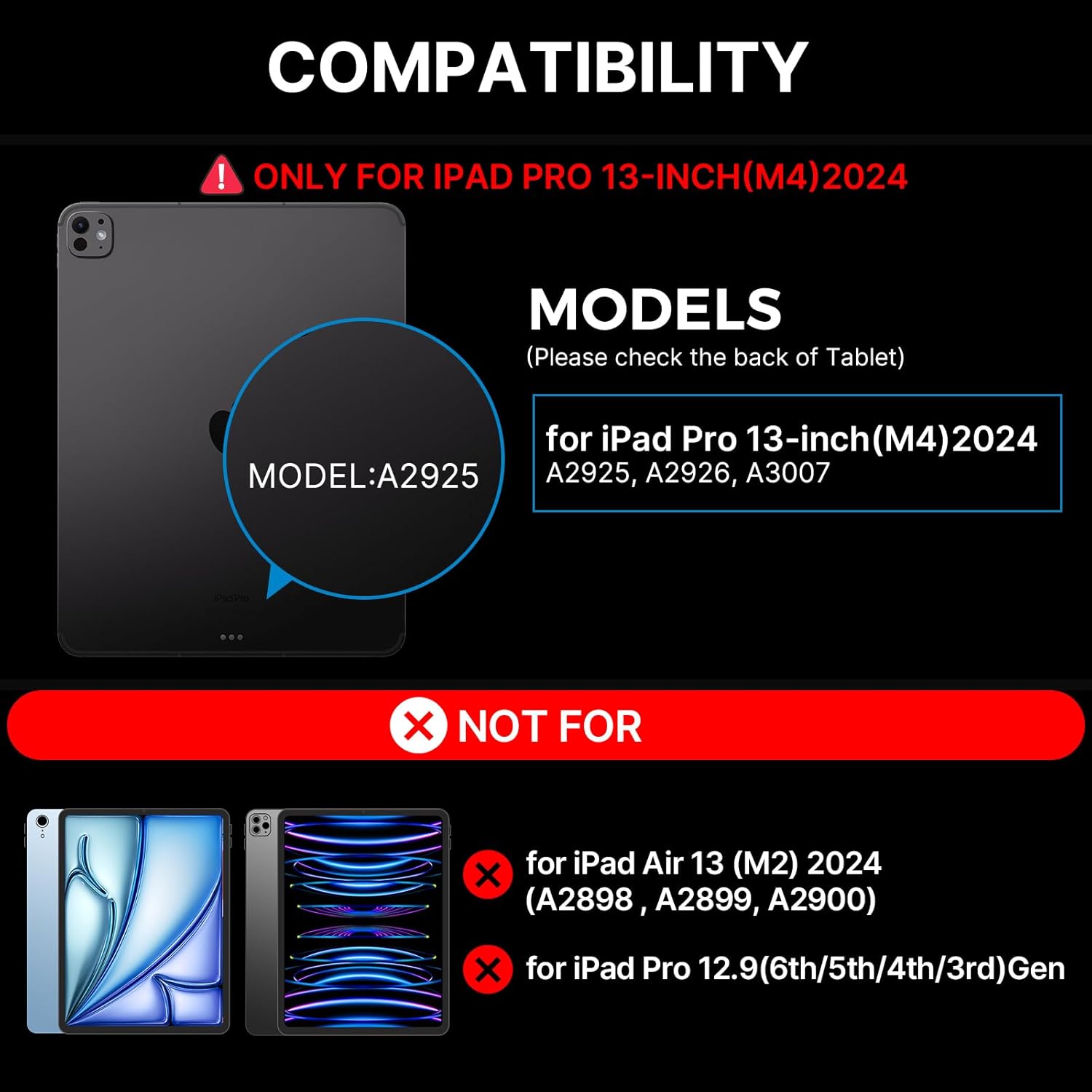
This keyboard case is specifically designed for the iPad Pro 13-inch (M4) 2024 models. Compatible iPad models include: A2925, A2926, A3007.
NOTE: This case is NOT compatible with iPad Air 13-inch (M2) 2024 (A2898, A2899, A2900) or iPad Pro 12.9-inch (6th/5th/4th/3rd Gen).
3. וואָס איז אַרייַנגערעכנט
ווען איר עפנט אייער פעקל, ביטע זיכער מאכן אז אלע פאלגנדע זאכן זענען דא:
- 1 x typecase Edge Magic Keyboard (Only for iPad Pro 13 inch 2024)
- 1 x USB קאַבל (פֿאַר טשאַרדזשינג)
- 1 x באַניצער מאַנואַל

4. סעטאַפּ
4.1 שנעל ינסטאַלירונג
- Place your iPad Pro 13-inch (M4) 2024 onto the magnetic surface of the keyboard case. Ensure proper alignment for a secure fit.
- Adjust the floating cantilever stand to your desired viewing angle. The magnetic grip will hold the iPad firmly in place.
- The keyboard will automatically connect to your iPad via Bluetooth. If not, proceed to Bluetooth Pairing.
4.2 בלועטאָאָטה פּערינג
To pair your typecase Edge Keyboard Case with your iPad:
- זייט זיכער אַז די קלאַוויאַטור איז אויפגעלאָדן.
- Turn on the keyboard using the power switch (usually located on the side or back of the keyboard).
- אויף אייער אייפּאַד, גייט צו סעטטינגס> בלועטאָאָטה.
- Look for "typecase Edge Keyboard" or a similar name in the list of available devices and tap to connect.
- Once connected, the keyboard is ready for use.
5. אַפּערייטינג ינסטרוקטיאָנס
5.1 באַקלייט קאָנטראָל
The keyboard features 11 backlight colors and 3 levels of brightness. You can adjust these settings using the dedicated backlight key on the keyboard.
- Press the backlight brightness key (often depicted with a sun icon) to cycle through high, medium, low brightness, or turn the backlight off.
- Press the backlight mode key (often depicted with a color palette icon) to change between the 11 available backlight colors.
5.2 Multi-Touch Trackpad
The integrated multi-touch trackpad allows for precise navigation and gesture control, similar to a laptop. Common gestures include:
- איין פינגער טאַפּ: Click/Select
- צוויי פינגער קניפּ: פארגרעסער אין / אויס
- צוויי פינגער סקראל: Scroll up/down or left/right
- דריי פינגער סווייפּ אַרויף: עפֿענען אַפּ סוויטשער
- דריי פינגער סווייפּ אַראָפּ: צוריקקומען צו היים פאַרשטעלן
- דריי פינגער סווייפּ לינקס/רעכטס: באַשטימען צווישן עפענען אַפּפּס
5.3 Magnetic Stand and Viewאין אַנגלעס
The floating cantilever design allows for effortless adjustment of your iPad to various viewing angles, providing stability for typing, drawing, or media consumption. The strong magnetic clasp ensures your iPad is securely held and provides a dedicated spot for your Apple Pencil.

5.4 iPadOS Shortcuts
The keyboard includes handy iPadOS shortcuts for quick access to common functions, enhancing your productivity. Refer to the keyboard layout for specific shortcut keys.
5.5 Auto-Sleep/Wake Function
The typecase Edge Keyboard Case features an instant wake and sleep function. Your iPad's screen will automatically turn on when you open the case and turn off when you close it, conserving battery life.
6. וישאַלט
To ensure the longevity and optimal performance of your typecase Edge Keyboard Case, follow these maintenance guidelines:
- רייניקונג: Use a soft, lint-free cloth to wipe down the keyboard and case. For stubborn spots, slightly dampשווענק דעם שטאָף מיט וואַסער. פֿאַרמייַדט שטרענגע כעמיקאַלן אָדער אַברייסיוו מאַטעריאַלן.
- סטאָרידזש: When not in use, keep the case closed to protect the keyboard and iPad screen. Store in a cool, dry place away from direct sunlight and extreme temperatures.
- טשאַרדזשינג: Charge the keyboard using the provided USB-C cable. Avoid overcharging or using damaged cables.
- האַנדלינג: While the case offers robust protection, avoid dropping or subjecting it to excessive force.
7. טראָובלעשאָאָטינג
If you encounter issues with your typecase Edge Keyboard Case, refer to the following common solutions:
- Keyboard not responding/connecting:
- זייט זיכער אַז די קלאַוויאַטור איז אנגעצונדן און גאָר אויפגעלאָדן.
- Check your iPad's Bluetooth settings to confirm the keyboard is paired and connected. Try unpairing and re-pairing the device.
- ריסטאַרט ביידע דיין iPad און די קלאַוויאַטור.
- If the issue persists, a factory reset of the keyboard might be necessary (refer to specific instructions in the included user manual for your model).
- Backlight not staying on or not adjusting:
- זייט זיכער אז די קלאַוויאַטור האט גענוג באַטאַרייע אָפּצאָל.
- Press the backlight brightness key multiple times to cycle through all settings, including off, to ensure it's not just set to the lowest brightness.
- If the backlight functionality is inconsistent, try restarting the keyboard.
- iPad not securely attaching to the case:
- Ensure your iPad model is compatible with this specific case (iPad Pro 13-inch M4 2024).
- Verify that there are no obstructions (like debris or other accessories) between the iPad and the magnetic surface of the case.
For further assistance, please contact typecase customer support.
8. ספּעסאַפאַקיישאַנז
| שטריך | דעטאַל |
|---|---|
| מאָדעל נומער | KB206130P |
| פּעקל דימענשאַנז | 12.36 X 11.57 X 1.46 אינטשעס |
| פּונקט וואָג | 2 פונט |
| פאַבריקאַנט | טיפּקאַס |
| קאַנעקטיוויטי טעכנאָלאָגיע | ווירעלעסס |
| קלאַוויאַטור באַשרייַבונג | מולטי פונקטיאָנאַל |
| ספּעציעלע פֿעיִקייטן | Portable, Lightweight, Backlit, Foldable, Trackpad |
| קאָליר | שוואַרץ |
| נומער פון קיז | 78 |
| קלאַוויאַטור באַקלייטינג קאָליר סופּפּאָרט | RGB (11 פֿאַרבן) |
| באַטעריז | 1 ליטהיום פּאָלימער באַטאַרייע (אַרייַנגערעכנט) |
9. וואָראַנטי און שטיצן
Your typecase Edge Keyboard Case comes with a 1-יאָר פאַבריקאַנט ס וואָראַנטיביטע באַהאַלטן אייער קויפן באַווייַז פֿאַר וואָראַנטי קליימז.
For technical support, warranty inquiries, or any other questions, please contact typecase customer service through the vendor information provided at the point of purchase or visit the official typecase webפּלאַץ.


