1. פּראָדוקט איבערview
The SJOYBRING Wireless Double Din Carplay & Android Auto Car Stereo is a 7-inch full HD capacitive touchscreen unit designed to enhance your in-car entertainment and connectivity. It features wireless Apple CarPlay and Android Auto, Bluetooth, 4-channel RCA output, high power output, subwoofer support, and includes a backup camera.
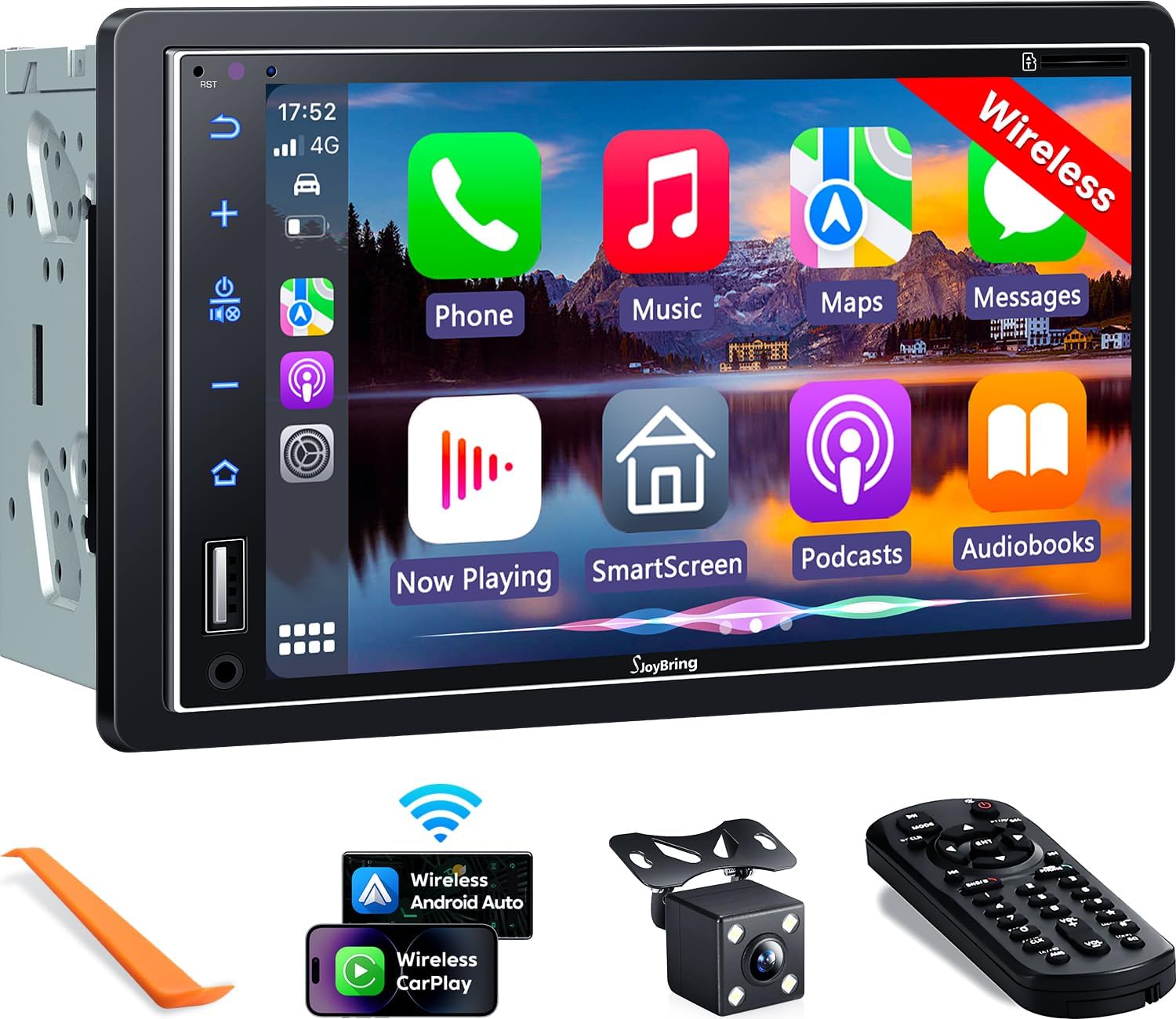
בילד 1.1: פראָנט view of the SJOYBRING car stereo displaying the CarPlay interface.
2. פּעקל אינהאַלט
באַשטעטיקט אַז אַלע זאכן וואָס זענען אויסגערעכנט אונטן זענען אַרייַנגערעכנט אין אייער פּעקל:
- Head Unit (Car Stereo)
- ראַם
- דערציען View אַפּאַראַט
- באַקקופּ אַפּאַראַט קאַבלע
- וויירינג כאַרניס
- ווייַט קאָנטראָל
- באַניצער מאַנואַל (דעם דאָקומענט)
- מאַונטינג בראַקאַץ
- דיסאַססעמבלי טול
- שרויפן (פאַרשידענע גרייסן)

Image 2.1: Visual representation of the SJOYBRING car stereo package contents.
3. סעטאַפּ און ייַנמאָנטירונג
3.1 וויכטיקע אינסטאַלאַציע עצות
- The standard size of this unit is 170mm x 97mm. Ensure your vehicle's dashboard opening matches this size.
- If the stereo size does not fit your dash, an additional suitable dash kit may be required (not included).
- Read this instruction manual thoroughly before beginning installation.
- Some vehicles may require additional accessories for installation, such as a wire harness adapter and a radio antenna adapter specific to your car model (not included).
3.2 וויירינג דיאַגראַמע
Refer to the following diagram for proper wiring connections. Incorrect wiring can damage the unit or your vehicle's electrical system.

Image 3.1: ISO Standard Double DIN wiring and dimension diagram.
3.3 דערציען View קאַמעראַ קאַנעקשאַן
די אַרייַנגערעכנט HD נאַכט זעאונג הינטערשטע view camera provides a 170° ultra-wide viewing angle and is waterproof. Connect the camera as shown in the diagram below. The display will automatically switch to the rear view when the vehicle is in reverse gear.

Image 3.2: One-step wiring connection for the rear camera.
4. אַפּערייטינג ינסטרוקטיאָנס
4.1 וויירלעס עפּל קאַרפּליי און אַנדרויד אויטאָ
Connect your smartphone to the car stereo via Bluetooth and Wi-Fi for wireless Apple CarPlay or Android Auto functionality. This allows access to navigation, music, messages, and other phone features directly on the stereo's screen. Voice control via Siri or Google Assistant is supported for safer operation.
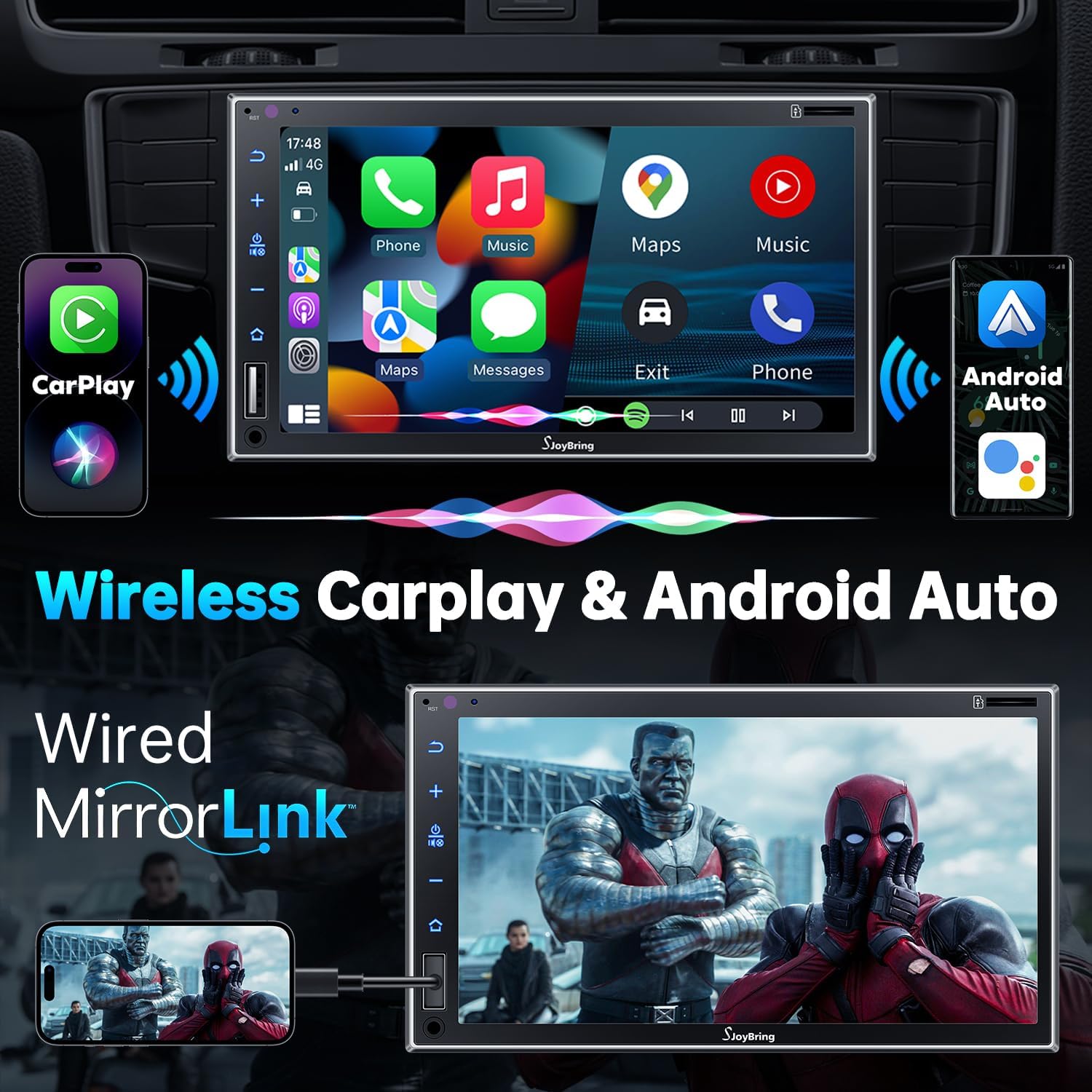
Image 4.1: Wireless Apple CarPlay and Android Auto in operation.
4.2 ווייערד שפּיגל לינק
The unit supports wired mirror link for both iOS and Android phones (no version limit). Use a USB connection to mirror your smartphone's screen, displaying apps like Google Maps, Spotify, or YouTube on the 7-inch HD touchscreen.

Image 4.2: Wired Mirror Link functionality.
4.3 אַודיאָ פֿעיִקייטן
- 4.2-קאַנאַל אַודיאָ אַרויסגאַנג: Features 4 channels of pre-amplifier (RCA) for front right, front left, rear right, and rear left speakers, allowing for precise sound adjustment.
- סובוואָאָפער רעזולטאַט: Includes two high RMS power subwoofer outputs for enhanced bass effects.
- 10-באַנד עק: An integrated 10-band audio equalizer allows customization of the music effect.

Image 4.3: 4.2 Channel Audio Output diagram.

Image 4.4: 10-Band Equalizer interface.
4.4 בלועטוט קאָנעקטיוויטי
Utilizes the latest Bluetooth technology with an independent Bluetooth module and antenna for a strong and stable connection, ensuring clear calls and uninterrupted music playback.

Image 4.5: Latest Bluetooth technology for stable connection.
4.5 שטייער ראָד קאָנטראָל (SWC)
The unit supports steering wheel controls, allowing you to manage audio functions without taking your hands off the wheel. Refer to the wiring diagram for SWC connections and the unit's settings for programming.

Image 4.6: Steering Wheel Control setup interface.
4.6 FM & AM Radio
Access FM radio frequencies from 87.5 to 107.9 MHz and AM radio frequencies from 530 to 1710 KHz. The unit allows for station presets and scanning.

Image 4.7: FM & AM Radio interface.
5. וישאַלט
To ensure the longevity and optimal performance of your SJOYBRING car stereo, follow these maintenance guidelines:
- סקרין רייניקונג: ניצט אַ ווייכע, לינט-פֿרייע שטאָף צו פֿאָרזיכטיק ווישן דעם טאָוטשסקרין. פֿאַר שווערע פֿלעקן, אַ ביסל ווישןampווישט דעם שטאָף מיט וואַסער אָדער אַ פאַרשטעלן-זיכער רייניגער. פֿאַרמייַדט שטרענגע כעמיקאַלן אָדער אַברייסיוו מאַטעריאַלן.
- באַזייַטיקונג פון שטויב: Regularly clean dust from the unit's vents and buttons using a soft brush or compressed air.
- טעמפּעראַטור קאָנטראָל: פֿאַרמײַדן אויסצושטעלן דעם אַפּאַראַט צו עקסטרעמע טעמפּעראַטורן פֿאַר פֿאַרלענגערטע פּעריאָדן.
- וויירינג דורכקוק: קאָנטראָלירט פּעריִאָדיש אַלע וויירינג פֿאַרבינדונגען צו זיכער מאַכן אַז זיי זענען זיכער און פֿרײַ פֿון שאָדן.
6. טראָובלעשאָאָטינג
אויב איר טרעפט פּראָבלעמען מיט אייער SJOYBRING אויטאָ סטערעאָ, זעט די פאלגענדע געוויינטלעכע טראָובלעשווטינג טריט:
- קיין מאַכט: Check all power connections, including the ACC (accessory) and 12V constant power wires. Ensure the vehicle's fuse for the stereo is not blown.
- קיין קול: Verify speaker connections are correct. Check the volume level and ensure the mute function is not activated. Confirm the audio source is properly selected.
- בלועטאָאָטה קאַנעקשאַן ישוז: Ensure Bluetooth is enabled on both the stereo and your smartphone. Delete previous pairings and attempt to re-pair. Move closer to the unit if interference is suspected.
- קאַרפּליי/אַנדרויד אויטאָ פֿאַרבינדט זיך נישט: For wireless connection, ensure both Bluetooth and Wi-Fi are active on your phone and the stereo. For wired mirror link, try a different USB cable or port.
- באַקאַפּ קאַמעראַ ווייַזט נישט: Check the camera's power and video signal connections. Ensure the reverse gear trigger wire is correctly connected to the vehicle's reversing light circuit.
- טאָוטשסקרין רעאַגירט נישט: פרובירט צו ריסטאַרטן דעם אַפּאַראַט. אויב די פּראָבלעם בלייבט, קאָנטאַקטירט קונה שטיצע.
If these steps do not resolve the issue, please contact SJOYBRING customer support for further assistance.
7. ספּעסאַפאַקיישאַנז
| מאָדעל נומער | 7825d65e-cac9-443c-8d2b-17a564819d91 |
| ווייַז | 7 Inch Full HD Capacitive Touchscreen (1024 x 600 resolution) |
| קאַנעקטיוויטי | Wireless Apple CarPlay, Wireless Android Auto, Bluetooth, Wired Mirror Link (USB) |
| אַודיאָ רעזולטאַט מאָדע | סטערעאָ |
| אַרומרינגלען סאָונד קאַנאַל קאַנפיגיעריישאַן | 4 Channel (RCA Pre-amp אַוטפּוץ) |
| סובוואָאָפער רעזולטאַט | 2 High RMS Power Outputs |
| עקוואַליזער | 10-באַנד עק |
| מאַקסימום מאַכט רעזולטאַט | 60W x 4 |
| ארבעטן חלקtage | DC 12V |
| ראַדיאָ פרעקווענסיעס | FM: 87.5~107.9MHz, AM: 530~1710KHz |
| ווידעא קאָדירונג | H.264, H.265/HEVC, MPEG-4 |
| פּונקט וואָג | 2.7 פונט |
| פּעקל דימענשאַנז | 9.25 X 6.3 X 5.94 אינטשעס |
| פאַבריקאַנט | SJOYBRING |
8. וואָראַנטי און שטיצן
8.1 וואָראַנטי אינפֿאָרמאַציע
For specific warranty details regarding your SJOYBRING car stereo, please refer to the warranty card included in your product packaging or contact SJOYBRING customer support directly. Warranty terms typically cover manufacturing defects for a specified period from the date of purchase.
8.2 קונה שטיצן
If you have any questions, require technical assistance, or need to report an issue, please contact SJOYBRING customer support. Contact information can usually be found on the manufacturer's official webוועבזייטל אדער אויף דער פּראָדוקט פּאַקאַדזשינג.
Manufacturer: SJOYBRING
For the most up-to-date support information, visit the official SJOYBRING store on Amazon: SJOYBRING Store