1. הקדמה
א דאנק פארן קויפןasing the RORRY D15 4-in-1 Wireless Charging Station. This device is designed to simplify your charging experience by providing a centralized solution for your iPhone, Apple Watch, and AirPods, along with a detachable portable power bank. Please read this manual carefully before use to ensure proper operation and to maximize the product's lifespan.
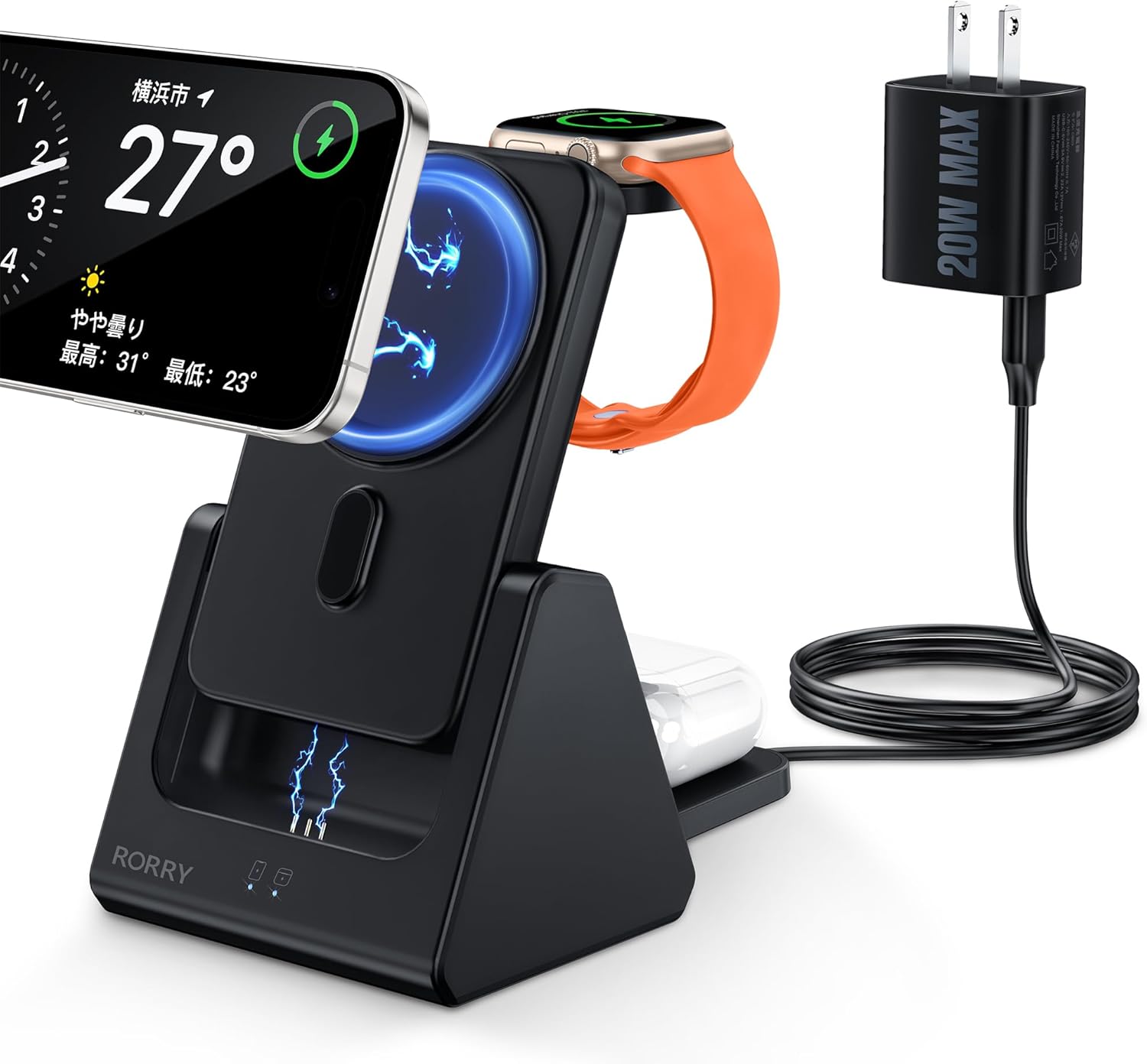
Image: The RORRY D15 charging station in use, simultaneously charging an iPhone, Apple Watch, and AirPods, powered by the included 20W adapter.
2. פּעקל אינהאַלט
Verify that all items are present in your package. If any items are missing or damaged, please contact customer support.
- RORRY D15 4-in-1 Wireless Charging Station
- Detachable 5000mAh Mobile Battery
- 20 וו מאַכט אַדאַפּטער
- וסב טיפּע- C טשאַרדזשינג קאַבלע
- Magnetic Ring (for non-MagSafe compatible devices)
- באַניצער מאַנואַל (דעם דאָקומענט)

Image: An illustration of the RORRY D15 charging station and its complete set of accessories.
3. פּראָדוקט איבערview
The RORRY D15 is a versatile charging solution designed for convenience and efficiency. It features a main charging station with dedicated spots for your iPhone, Apple Watch, and AirPods, plus a removable 5000mAh power bank for portable use. The triangular design ensures stability and a compact footprint on your desk.

בילד: א וויזועלע איבערבליקview of the RORRY D15's key features and charging capabilities.
4. סעטאַפּ
- פאַרבינדן מאַכט: Insert the USB Type-C cable into the charging station's input port and connect the other end to the included 20W power adapter. Plug the power adapter into a wall outlet.
- אָרט: Place the charging station on a flat, stable surface. The triangular design provides stability for your devices.
- Mobile Battery Insertion: Ensure the detachable mobile battery is correctly seated in its designated slot on the charging station.

Image: The stable triangular design of the RORRY D15, ideal for desktop use.
5. אַפּערייטינג ינסטרוקטיאָנס
5.1 אויפלאָדן קייפל דעוויסעס גלײַכצײַטיק
The RORRY D15 allows you to charge your iPhone, Apple Watch, and AirPods concurrently. Simply place each device on its respective charging area.

Image: The charging station actively charging an iPhone, Apple Watch, and AirPods.
5.2 Magnetic Wireless Charging (iPhone)
For MagSafe-compatible iPhones (iPhone 12 series and newer), simply align your device with the magnetic charging pad. The strong magnets will secure it in place, and charging will begin automatically. The charger supports up to 15W fast wireless charging for compatible models.
- באַמערקונג: For iPhone 8 through iPhone 11, a magnetic ring (included) or a MagSafe-compatible case is required for magnetic attachment and charging.
- Ensure your phone case is less than 3mm thick for optimal magnetic connection and charging efficiency.

Image: Magnetic wireless charging in action, with an iPhone securely attached and charging.
5.3 Apple Watch Charging
Place your Apple Watch on the dedicated charging module. The module is designed to hold your watch securely and initiate charging automatically.

Image: Apple Watch charging on the RORRY D15, illustrating compatibility with various models.
5.4 AirPods Charging
Place your AirPods case (with wireless charging capability) on the designated flat charging pad at the base of the station. Charging will begin automatically.

Image: AirPods charging on the base pad of the RORRY D15.
5.5 Detachable Mobile Battery Usage
The 5000mAh mobile battery can be detached from the main station for portable charging. It features a foldable kickstand, allowing you to prop up your phone vertically or horizontally while charging on the go.
- צו אָפּטיילן: Gently pull the mobile battery upwards from its slot in the main station.
- צו פאַרבינדן ווידער: Align the mobile battery with the slot and push it down until it clicks into place.
- Charging the Mobile Battery: The mobile battery charges when docked in the main station. It can also be charged directly via its Type-C port (up to 18W input).

Image: The detachable 5000mAh mobile battery, shown both integrated and separated, charging an iPhone and Apple Watch.

Image: The portable mobile battery attached to an iPhone, demonstrating its compact size and integrated kickstand.

Image: Methods for charging the detachable mobile battery.
6. ספּעסאַפאַקיישאַנז
| מאָדעל | D15 |
| סאָרט | RORRY |
| קאָליר | שוואַרץ |
| מאַטעריאַל | ABS |
| קאַנעקטיוויטי | וסב טיפּ-C |
| אַרייַנשרייַב וואָלtage | 5 Volts (via 20W adapter) |
| Wireless Output (iPhone) | Up to 15W (MagSafe compatible) |
| Wireless Output (Apple Watch) | 2.5 וו |
| Wireless Output (AirPods) | 5W |
| Mobile Battery Capacity | 5000 מאַה |
| Mobile Battery Input/Output | Type-C bidirectional (Max 18W input) |
| פּראָדוקט דימענשאַנז | 7.6 X 9.3 X 13.5 סענטימעטער |
| פּראָדוקט וואָג | 270 ג |
| זיכערקייַט סערטיפיקאַטיאָנס | PSE Certified, Overcharge Protection, Over-discharge Protection, Overheat Protection, Short-circuit Protection |
| קאַמפּאַטאַבאַל דעוויסעס | iPhone 16/16pro/16Pro Max/16Plus/15/15pro/15Pro Max/15 Plus/14/14 Pro/14 Pro Max/14 Plus/13/13 Mini/13 Pro/13 Pro max/12/12 Mini/12 Pro/12 Pro Max; iPhone 8/8 Plus/ X/XS/XS Max/XR/11/11 Pro/iPhone 11 Pro Max/iPhone SE (2nd Gen) (Magnetic ring or MagSafe case required for magnetic attachment on iPhone 8-11); Apple Watch Ultra/9/8/7/SE/6/5/4/3; AirPods 3/2/ Pro/Pro2 |
7. זיכערקייַט אינפֿאָרמאַציע
To ensure safe operation and prolong the life of your RORRY D15 charging station, please observe the following safety guidelines:
- Use only the included 20W power adapter or a compatible 9V/12V power adapter.
- ויסמיידן יקספּאָוזינג די מיטל צו דירעקט זונשייַן אָדער עקסטרעם טעמפּעראַטורעס.
- דו זאלסט נישט דיסאַסעמבאַל, מאָדיפיצירן אָדער פּרווון צו פאַרריכטן די מיטל זיך.
- האַלט דעם אַפּאַראַט אַוועק פון וואַסער, נעץ און ברענענדיקע מאַטעריאַלן.
- זיכער מאַכן אַז עס איז גענוג ווענטילאַציע אַרום דער טשאַרדזשינג סטאַנציע בעת באַנוץ.
- The product is equipped with multiple safety features including overcharge, over-discharge, overheating, and short-circuit protection.

בילד: איבערview of the RORRY D15's safety protection features.
8. וישאַלט
- Clean the charging surfaces regularly with a soft, dry cloth to ensure optimal contact and charging efficiency.
- דו זאלסט נישט נוצן אַברייסיוו קלינערז אָדער סאָלוואַנץ.
- סטאָר די מיטל אין אַ קיל, טרוקן אָרט ווען ניט אין נוצן.
- If the mobile battery is constantly kept in the station, it will always be fully charged. This may shorten the mobile battery's lifespan.
9. טראָובלעשאָאָטינג
- מיטל ניט טשאַרדזשינג:
- Ensure the power adapter is securely plugged into a working outlet and the charging cable is firmly connected to the station.
- Verify that your device is correctly placed on the charging area and aligned with the coils.
- Remove any thick or metallic phone cases (cases thicker than 3mm may interfere with wireless charging).
- Check for any foreign objects between the device and the charging pad.
- ריסטאַרט דיין מיטל און פּרובירן ווידער.
- פּאַמעלעך טשאַרדזשינג:
- Ensure you are using the included 20W power adapter or a compatible fast charging adapter (9V/12V output).
- Confirm your device supports fast wireless charging.
- Avoid using your device extensively while it is charging.
- Device or charger getting hot:
- Some heat generation during wireless charging is normal.
- If the device becomes excessively hot, remove it from the charger immediately.
- Ensure there are no foreign objects on the charging pad.
- פֿאַרמײַדן אָפּלאָדן אין דירעקטער זון אָדער הייסע סביבות.
- Magnetic attachment issues (for iPhone 8-11):
- Ensure a magnetic ring (included) is properly attached to your phone or case, or use a MagSafe-compatible case.
10. וואָראַנטי און שטיצן
The RORRY D15 Wireless Charging Station comes with a 1 יאָר וואָראַנטי פֿון דעם קויפֿדאַטום. די וואָראַנטי דעקט פֿאַבריקאַציע חסרונות און מאַלפאַנגקשאַנז אונטער נאָרמאַל נוצן.
If you encounter any issues or have questions regarding your product, please do not hesitate to contact RORRY customer support. Our team is available to assist you.
For support, please refer to the contact information provided on the product packaging or the official RORRY webפּלאַץ.
Image: RORRY's after-sales service commitment, including warranty details.


