TTEC 2KMM14S

TTEC Rio 2 Stereo USB-C Headset with Microphone User Manual

Model: 2KMM14S

הקדמה

The TTEC Rio 2 Stereo USB-C Headset with Microphone is designed to provide a high-quality audio experience for music and calls. Its comfortable, lightweight design ensures a perfect fit and effective ambient noise isolation, allowing for hands-free communication and entertainment.

שליסל פֿעיִקייטן:

  • Advanced stereo sound output for an immersive audio experience.
  • Integrated microphone for clear phone calls.
  • Smart inline controller for easy management of volume, calls, and music playback.
  • Lightweight and ergonomic design for extended comfort.
  • Universal USB-C connection.

סעטאַפּ

To begin using your TTEC Rio 2 headset, follow these simple steps:

  1. פֿאַרבינדן דעם כעדסעט: Locate the USB-C port on your device (smartphone, tablet, laptop, etc.). Insert the USB-C connector of the TTEC Rio 2 headset firmly into the device's USB-C port.
  2. דיווייס דערקענונג: Your device should automatically recognize the headset. If prompted, select the TTEC Rio 2 as the audio output and input device.
  3. סטרויערן פּאַסיק: Place the earbuds comfortably in your ears. The ergonomic design ensures a snug fit for optimal sound quality and noise isolation.
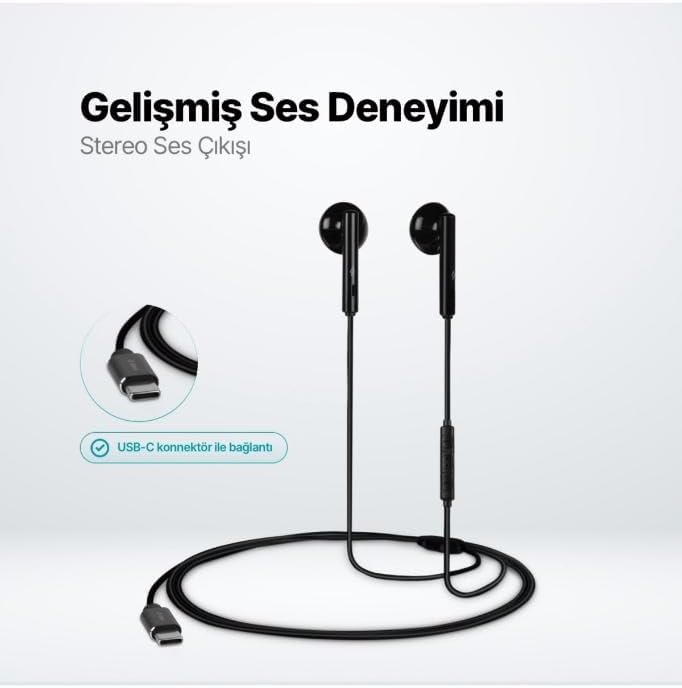
TTEC Rio 2 USB-C Headset showing stereo sound output and USB-C connector.
Image: TTEC Rio 2 USB-C Headset, illustrating its stereo sound output and the USB-C connector for device connection.

אַפּערייטינג ינסטראַקשאַנז

The TTEC Rio 2 headset features an inline smart controller for convenient management of your audio and calls.

Inline Controller Functions:

  • באַנד אַרויף (+): Press to increase audio volume.
  • באַנד אַראָפּ (-): Press to decrease audio volume.
  • Play/Pause/Answer/End Call (Center Button):
    • Single press to play or pause music.
    • Single press to answer an incoming call.
    • Single press to end an active call.
    • לאנג דריקן צו אָפּוואַרפן אַ ינקאַמינג רופן.
  • Next Track (Forward Button): דרוק צו האָפּקען צו דער ווייַטער ליד.
  • Previous Track (Backward Button): Press to go back to the beginning of the current song or to the previous song.
  • געבויט-אין מיקראָפאָן: Located on the inline controller, it captures your voice for calls and voice commands.
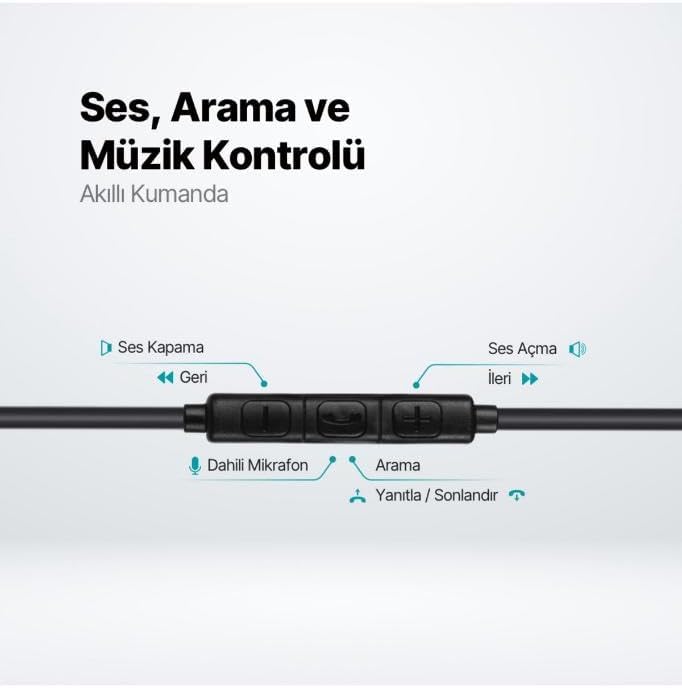
Inline remote control for TTEC Rio 2 headset, detailing volume, track, and call controls.
בילד: דעטאַלירט view of the TTEC Rio 2 headset's inline remote, showing controls for volume, track navigation, and call management, along with the built-in microphone.

וישאַלט

Proper care will extend the life and performance of your TTEC Rio 2 headset.

  • רייניקונג: ווישט אָפּ די אויערן און קאַבל מיט אַ ווייכן, טרוקענעם שטאָף. ניצט נישט קיין שאַרפע כעמיקאַלן אָדער שאַרפע מאַטעריאַלן.
  • סטאָרידזש: When not in use, store the headset in a clean, dry place. Avoid extreme temperatures. The included cable organizer clip can help prevent tangling.
  • ויסמיידן נעץ: שטעלט נישט אויס דעם כעדסעט צו וואַסער אָדער צו פיל פייכטקייט.
  • שעפּן מיט זאָרג: Avoid pulling on the cable or applying excessive force to the connectors.
TTEC Rio 2 USB-C Headset with cable organizer clip, highlighting lightweight and ergonomic design.
Image: TTEC Rio 2 USB-C Headset coiled with its cable organizer clip, demonstrating its compact and lightweight design for easy portability and storage.

טראָובלעשאָאָטינג

If you encounter issues with your TTEC Rio 2 headset, refer to the following common solutions:

פּראָבלעםמעגלעך לייזונג
קיין געזונט פון כעדסעט.
  • זייט זיכער אַז דער USB-C קאַנעקטאָר איז גאָר אַרײַנגעשטעקט אין אײַער דעווײַס.
  • קאָנטראָלירט די וואָלומען סעטטינגס פון אייער דעווייס און זיכערט זיך אַז עס איז נישט שטיל.
  • Verify that the headset is selected as the audio output device in your device's sound settings.
  • פּרובירט דעם כעדסעט מיט אַן אַנדער מיטל צו אויסשליסן אַ מיטל-ספּעציפֿישן פּראָבלעם.
מיקראָפאָן טוט נישט אַרבעטן.
  • זיכער מאַכן אַז דער USB-C קאַנעקטאָר איז גאָר אַרײַנגעשטעקט.
  • Check your device's microphone settings and ensure the headset microphone is selected and not muted.
  • זיכער מאַכן אַז דער מיקראָפאָן איז נישט פֿאַרשטאָפּט.
די געזונט קוואַליטעט איז שלעכט אָדער פאַרקרימט.
  • זייט זיכער אז די אויערקנעפּלעך זענען ריכטיק אײַנגעזעצט אין אייערע אויערן.
  • קאָנטראָלירט די אַודיאָ מקור פֿאַר קוואַליטעט פּראָבלעמען.
  • פּרוּווט צו אַדזשאַסטירן די באַנד אויף דיין מיטל.
Hissing or static noise.
  • This can sometimes occur with certain audio sources or device configurations. Try testing with different devices or audio files.
  • זיכער מאַכן אַז עס זענען נישטאָ קיין שטאַרקע עלעקטראָמאַגנעטישער שטערונגען אין דער נאָענט.

ספּעסאַפאַקיישאַנז

שטריךדעטאַל
סאָרטטטעק
מאָדעל נומער2KMM14S
קאַנעקטיוויטיוסב-C
כעדפאָונז פאָרעם פאַקטאָראין אויער
אויער פּלייסמאַנטאין אויער
מיקראָפאָןגעבויט-אין
פּעקל דימענשאַנז19.8 X 8.5 X 3.1 סענטימעטער
פּונקט וואָג40 גראַמז
ASINB0D3XJ5SP7

וואָראַנטי און שטיצן

For warranty information and customer support, please refer to the documentation included with your purchase or visit the official TTEC webזייטל. האַלט דיין קויפן באַווייַז פֿאַר קיין וואָראַנטי קליימז.

פֿאַרבונדענע דאָקומענטן - 2KMM14S

Preview טטעק עירביט פּראָ2 ANC TWS בלועטוט כעדסעט באַניצער מאַנואַל
באַניצער מאַנואַל פֿאַר די ttec AirBeat Pro2 ANC TWS בלועטוט כעדסעט, דעטאַלירנדיק פֿעיִקייטן, סעטאַפּ, קאָנטראָלס, טראָובלעשווטינג, און ספּעסיפיקאַציעס פֿאַר אַן אימערסיווע אַודיאָ דערפאַרונג.
Preview טטעק סאַונדפלאָו אָפֿן-אויער OWS וויירלעס בלועטוט כעדסעט באַניצער מאַנואַל
א פולשטענדיגע באַניצער מאַנואַל פֿאַר די ttec SoundFlow Open-Ear OWS Wireless Bluetooth כעדסעט, וואָס דעקט אינפֿאָרמאַציע וועגן סעטאַפּ, באַניץ, פֿעיִקייטן, ספּעציפֿיקאַציעס, זיכערקייט און וואָראַנטי.
Preview ttec SoundMax™ Wireless Bluetooth® Headset User Manual
Comprehensive user manual for the ttec SoundMax™ Wireless Bluetooth® Headset, covering setup, operation, troubleshooting, maintenance, and safety guidelines. Learn how to pair, make calls, play music, and care for your device.
Preview טטעק AirBeat Free אמת ווירעלעסס בלועטאָאָטה העאַדסעט באַניצער מאַנואַל
א פולשטענדיגע באַניצער מאַנואַל פֿאַר די ttec AirBeat Free True Wireless Bluetooth כעדסעט, וואָס דעקט פֿעיִקייטן, סעטאַפּ, באַניץ, ספּעציפֿיקאַציעס, זיכערהייט מיטלען און וואָראַנטי אינפֿאָרמאַציע.
Preview טטעק עירביט פּראָ ANC LCD TWS בלועטוט כעדסעט באַניצער מאַנואַל
א פולשטענדיגע באַניצער מאַנואַל פֿאַר די ttec AirBeat Pro ANC LCD TWS בלועטוט כעדסעט, וואָס דעקט סעטאַפּ, פּערינג, קאָנטראָלס, פֿעיִקייטן און וישאַלט פֿאַר אַן אָפּטימאַלער אַודיאָ דערפאַרונג.
Preview טטעק עירביט באַז טרו וויירלעס בלועטוט כעדסעט באַניצער מאַנואַל
א פולשטענדיגע באנוצער מאנואל פארן ttec AirBeat Buzz True Wireless Bluetooth כעדסעט, וואס באדעקט סעטאַפּ, באַניץ, קאָנטראָלס, ספּעציפיקאַציעס און וואָראַנטי אינפֿאָרמאַציע.