1. הקדמה און איבערview
The TTfone TT880 is a mobile phone designed for simplicity and ease of use, particularly for seniors. It features large, well-separated buttons, a clear display, and essential functions for reliable communication. Key features include an SOS emergency button, a loud speaker, and an integrated flashlight.

The TTfone TT880 mobile phone shown alongside its included mains charger, ready for initial setup.
2. סעטאַפּ
2.1. פּעקל אינהאַלט
באַשטעטיקן אַז דיין פּעקל כּולל די פאלגענדע זאכן:
- TTfone TT880 מאָביל טעלעפאָן
- קריקאָנלאָדלעך באַטערי
- וסב טיפּע- C טשאַרדזשינג קאַבלע
- Mains Charger (if included with your specific model)
- באַניצער מאַנואַל
2.2. באַטעריע און סים קאַרטל ינסטאַלירונג
- אַראָפּנעמען די צוריק דעקן: פארזיכטיק רוקט אדער רייסט אראפ די הינטערשטע דעקל פונעם טעלעפאן.
- אַרייַנלייגן סים קאָרט: Locate the SIM card slot. Insert your activated 2G SIM card into the designated slot, ensuring the gold contacts face downwards and the cut corner aligns correctly.
- אַרייַנלייגן באַטערי: Place the rechargeable battery into the battery compartment, aligning the gold contacts on the battery with the contacts in the phone.
- פאַרבייַטן הינטערשטן דעקל: Carefully reattach the back cover until it clicks securely into place.
2.3. טשאַרדזשינג די טעלעפאָן
Before first use, fully charge the phone battery. A full charge typically takes approximately 3 hours.
- Connect the USB Type-C charging cable to the charging port at the bottom of the phone.
- Connect the other end of the USB cable to the included mains charger or a compatible USB power adapter.
- Plug the charger into a wall outlet. The battery indicator on the phone screen will show charging status.
- אַמאָל גאָר באפוילן, דיסקאַנעקט די טשאַרדזשער.

The TTfone TT880 connected via its USB-C port for charging, with the screen indicating battery percentage.
2.4. פּאָווערינג אויף / אויסגעלאשן
- צו מאַכט אויף: דריקן און האַלטן די Green Call button until the screen illuminates.
- צו מאַכט אַוועק: דריקן און האַלטן די Red End Call button until the phone powers down.
3. אפערירן דעם טעלעפאָן
3.1. Keypad and Navigation
The TT880 features a large, easy-to-use keypad with speaking keys for enhanced accessibility.

The TTfone TT880 features a simplified keypad with large, well-separated buttons for easy dialing and navigation.
- Number Keys (0-9, *, #): Used for dialing numbers and entering text.
- Green Call Button: Initiates a call or answers an incoming call.
- Red End Call Button: Ends a call or returns to the idle screen.
- נאַוויגאַציע שליסלען: The central circular button with up/down/left/right arrows is used to navigate menus. The center button within the circle typically acts as a 'Select' or 'OK' button.
- מעניו קנעפּל: Accesses the main menu of the phone.
- טעלעפאָן בוך קנעפּל: Directly accesses your saved contacts.
3.2. מאכן און ריסיווינג קאַללס
- צו מאַכן אַ רוף: אַרייַן די טעלעפאָן נומער ניצנדיק די קלאַוויאַטור און דריקן די Green Call button.
- צו ענטפֿערן אַ רוף: ווען דער טעלעפאָן קלינגט, דריק די Green Call button.
- צו ענדיקן אַ רוף: דרוק די Red End Call button.
3.3. Sending and Receiving SMS Messages
- To Send an SMS: Navigate to the 'Messages' menu, select 'Write Message', enter your text using the keypad, and then select 'Send' to a contact or entered number.
- To Read an SMS: New messages will typically appear as a notification. Navigate to the 'Messages' menu and select 'Inbox' to view באקומען אַרטיקלען.
3.4. SOS Emergency Function
The TT880 features a dedicated SOS button for emergencies. This function allows you to quickly contact pre-defined numbers.

The dedicated SOS button on the back of the TTfone TT880 allows for quick activation of emergency calls and messages to pre-set contacts.
- Setting SOS Numbers: Access the 'SOS Settings' in the phone's menu to add up to five emergency contact numbers. These contacts will receive an SMS and/or a call when the SOS button is pressed.
- אַקטאַווייטינג SOS: אין א נויטפאַל, דריק און האַלט די SOS קנעפּל on the back of the phone for a few seconds. The phone will automatically send an emergency SMS to the pre-set numbers and then begin dialing them in sequence until one is answered.
3.5. פלאַשליגהט
The TT880 includes a convenient built-in flashlight.
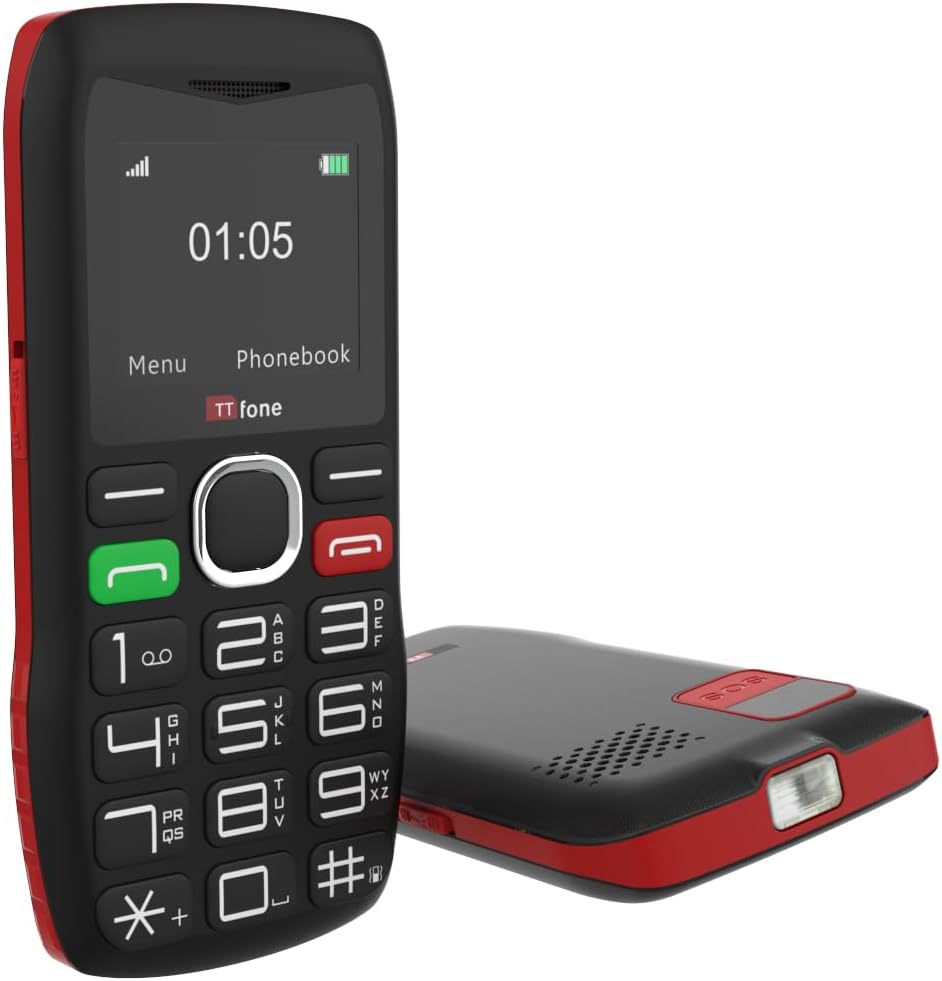
The TTfone TT880 includes a built-in flashlight, activated by a dedicated switch for convenience in low-light conditions.
- צו קער אויף / אַוועק: Locate the dedicated flashlight switch on the side of the phone. Slide the switch to activate or deactivate the flashlight.
3.6. באַנד קאָנטראָל
The phone features an extra loud speaker for clear audio during calls.

The TTfone TT880 is equipped with an extra loud speaker, designed to enhance call clarity and hands-free communication.
- During a call, use the volume up/down buttons (usually on the side of the phone) to adjust the earpiece or loudspeaker volume.
- Ringtone and notification volumes can be adjusted through the 'Settings' menu.
3.7. טעלעפאָנבאָאָק
Store frequently called numbers in the phonebook for quick access.
- צו לייגן צו א קאנטאקט: Go to 'Phonebook' from the main menu, select 'Add New Contact', enter the name and number, then save.
- To Call a Contact: Access the 'Phonebook', select the desired contact, and press the Green Call button.
3.8. בלועטאָאָטה קאַנעקטיוויטי
The TT880 supports Bluetooth for connecting to compatible devices like headsets.
- To Enable Bluetooth: Navigate to 'Settings' > 'Bluetooth' and turn it 'On'.
- To Pair a Device: אויסקלייבן 'זוכן פֿאַר devices' and choose your desired Bluetooth device from the list. Follow on-screen prompts to complete pairing.
4. וישאַלט
4.1. רייניקונג
To maintain the phone's condition, wipe it regularly with a soft, dry cloth. Avoid using harsh chemicals or abrasive cleaners.
4.2. באַטערי קער
- ויסמיידן יקספּאָוזינג די באַטאַרייע צו עקסטרעם טעמפּעראַטורעס.
- נישט דורכשטעכן אדער באשעדיגן די באטעריע.
- If the phone will not be used for an extended period, charge it periodically to prevent deep discharge.
4.3. ענוויראָנמענטאַל פּראַטעקשאַן
The TT880 has an IP54 rating, indicating some resistance to dust and splashing water. However, it is not waterproof. Avoid submerging the phone in water or exposing it to heavy rain.
5. טראָובלעשאָאָטינג
If you encounter issues with your TTfone TT880, refer to the following common problems and solutions:
| פּראָבלעם | מעגלעך לייזונג |
|---|---|
| טעלעפאָן גייט נישט אָן | Ensure the battery is correctly installed and fully charged. Press and hold the Green Call button for several seconds. |
| קען נישט מאַכן אָדער באַקומען רופן | Check if the SIM card is properly inserted and activated. Verify that you have network signal. Ensure the phone is not in airplane mode. |
| Poor call quality or low volume | Adjust the call volume using the side buttons during a call. Ensure the speaker is not obstructed. Move to an area with better network coverage. |
| SOS קנעפּל אַרבעט נישט | Verify that emergency contact numbers are correctly set in the SOS settings. Ensure the phone has network signal. |
| באַטאַרייע דריינז געשווינד | Ensure the phone is fully charged. Reduce screen brightness. Close unused applications. If the issue persists, the battery may need replacement. |
| דער טעלעפאָן איז נישט טשאַרדזשינג | Check if the charging cable and adapter are securely connected and undamaged. Try a different power outlet or USB port. Ensure the charging port on the phone is clean. |
6. ספּעסאַפאַקיישאַנז
Below are the technical specifications for the TTfone TT880 mobile phone:
| שטריך | דעטאַל |
|---|---|
| סאָרט | TTfone |
| מאָדעל | TT880 |
| ווייַז גרייס | 1.8 אינטשעס |
| ווייַז טיפּ | לקד |
| ווייַז האַכלאָטע | 128 X 160 בילדצעלן |
| באַטאַרייע קאַפּאַציטעט | 800 מאַה ליטהיום-יאָן |
| Average Battery Life (Talk Time) | אַרויף צו 6 שעה |
| Average Battery Life (Standby) | Up to 72 hours (3 days) / Up to 5 days (as per product description) |
| טשאַרדזשינג צייט | בעערעך 3 שעה |
| מאָביל טעכנאָלאָגיע | 2G |
| קאַנעקטיוויטי | בלועטאָאָטה, וסב טיפּ-C |
| ספּעציעלע פֿעיִקייטן | Easy to operate, Long battery life, SOS emergency call button, USB Type-C, No camera, Loud speaker, Flashlight |
| באַראַן זכּרון | 32 מב |
| פלאַש זכּרון קאַפּאַציטעט | 32 מב |
| דימענשאַנז (פּאַקאַץ) | 26.2 X 18 X 3.4 סענטימעטער |
| וואָג (פּאַקעט) | 240 ג |
| IP שאַץ | IP54 (שטויב און שפּריץ קעגנשטעליק) |
7. וואָראַנטי און שטיצן
7.1. וואָראַנטי אינפֿאָרמאַציע
The TTfone TT880 is manufactured by TTfone. For specific warranty terms and conditions, please refer to the warranty card included with your product or contact TTfone directly. Keep your proof of purchase for warranty claims.
7.2. קונה שטיצן
If you require further assistance or encounter issues not covered in this manual, please contact TTfone customer support. Contact details can typically be found on the manufacturer's webוועבזייטל אדער אויף דער פּראָדוקט פּאַקאַדזשינג.


