1. הקדמה
This manual provides essential information for the safe and effective operation of your Mastech MS8301A Digital Multimeter. Please read this manual thoroughly before using the device to ensure proper functionality and to prevent potential hazards. Keep this manual for future reference.
2. זיכערקייַט אינפֿאָרמאַציע
Always adhere to the following safety precautions to avoid electric shock or personal injury, and to prevent damage to the multimeter or the equipment under test.
- לייענען אינסטרוקציעס: Understand all instructions and safety information before use.
- רייטאַד וואָלtage: דו זאלסט נישט צולייגן מער ווי די רייטאַד וואָלtage, as marked on the multimeter, between the terminals or between any terminal and ground.
- טעסט ליידז: קאָנטראָלירט די טעסט דראָטן פֿאַר צעבראָכענע איזאָלאַציע אָדער אויסגעשטעלט מעטאַל. פאַרבייטן אויב צעבראָכן.
- Circuit Disconnection: אָפּשטעקן די קרייז מאַכט און אָפּלאָדן אַלע הויך-וואָלוומעtagE קאַפּאַסאַטערז איידער טעסטינג קעגנשטעל, קאַנטיניויישאַן, דייאָודז אָדער קאַפּאַסאַטאַנס.
- פונקציע סעלעקציע: זיכער מאַכן אַז דער פונקציע סוויטש איז אין דער ריכטיקער פּאָזיציע פֿאַר דער מעסטונג וואָס ווערט דורכגעפֿירט.
- לעבעדיקע קרייזן: Do not measure current on a live circuit with the test leads connected in parallel.
- אַפּערייטינג סוויווע: Do not operate the multimeter in explosive gas, vapor, or damp ינווייראַנמאַנץ.
- פערזענלעכע פּראַטעקטיוו עקוויפּמענט: Always wear appropriate personal protective equipment, such as safety glasses, when working with electrical circuits.
- זיכערהייט רייטינג: This device is rated for CAT III 600V. Do not exceed this rating.
3. פּראָדוקט איבערview
3.1 פֿעיִקייטן
The Mastech MS8301A Digital Multimeter offers a range of features for various electrical measurements:
- ווייַז: 2000 קאַונץ
- דאַטן האַלטן: איינפֿרירט די אָנגעגעבענע לייענונג פֿאַר באַקוועמע רעקאָרדינג.
- Battery Tester: For 1.5V and 9V batteries.
- סאָליד פּלאַן: Product Size: 150mm x 74mm x 48mm (5.9" x 2.9" x 1.7")
- לייטווייט: Product Weight: 220g (0.48lb)

Image: Detailed features and specifications of the Mastech MS8301A multimeter, including display count, data hold, battery test function, and physical dimensions.
3.2 קאַמפּאָונאַנץ
The Mastech MS8301A package typically includes the following components:
- Mastech MS8301A Digital Multimeter Unit
- טעסט דראָטן (רויט און שוואַרץ)
- AAA Batteries (2x1.5V)
- Calibration Certificate (if applicable)
- שנעל אָנהייב גייד
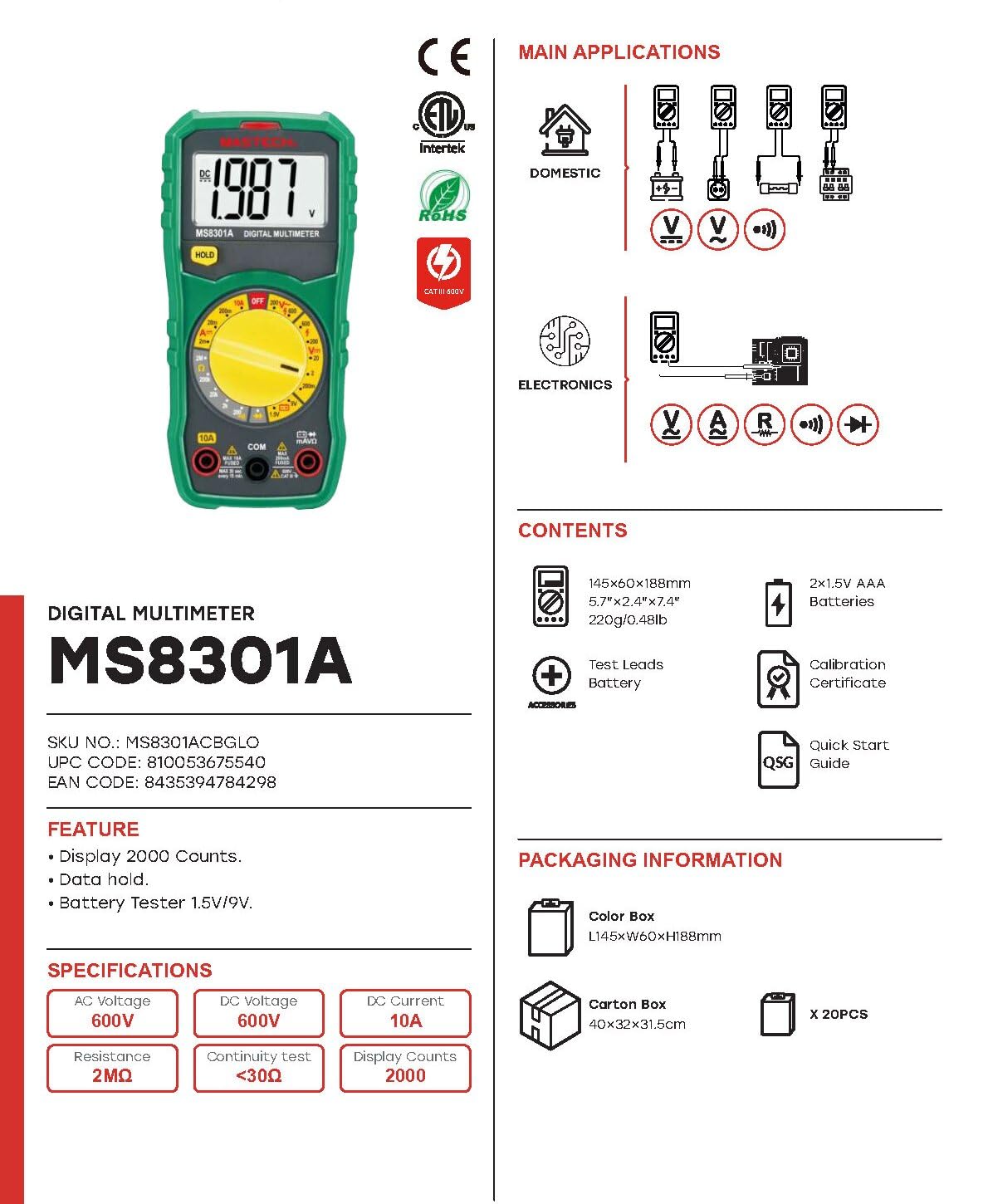
Image: The Mastech MS8301A Digital Multimeter showing its front panel, rotary switch, display, input jacks, and a list of included accessories such as test leads and batteries.
4. סעטאַפּ
4.1 באַטאַרייע ייַנמאָנטירונג
- Ensure the multimeter is turned off and disconnect any test leads.
- געפינט דעם דעקל פון דעם באַטעריע אָפּטייל אויף דער צוריקזייט פון דעם מולטימעטער.
- שרויפט ארויס די שרויף(ן) און נעמט אראפ דעם דעקל.
- אַרײַנשטעלן צוויי 1.5V AAA באַטעריעס, און באַאָבאַכטן די ריכטיקע פּאָלאַריטעט (+ און -) ווי אָנגעוויזן אינעווייניק אין דעם אָפּטייל.
- לייג צוריק דעם דעקל פונעם באַטעריע־אָפּטייל און פֿאַרזיכער עס מיט די שרויף(ן).
4.2 פֿאַרבינדן טעסט דראָטן
פֿאַרבינדט די טעסט דראָטן צו די פּאַסיקע אַרייַנגאַנג דזשאַקס אויף דעם מולטימעטער:
- אַרייַנלייגן די שוואַרץ טעסט פירן אין די COM (געוויינטלעך) דזשעק.
- פֿאַר רובֿ מעסטונגען (וואָל.tage, Resistance, Diode, Continuity, Temperature, Battery Test), insert the רויט טעסט פירן אין די VΩmA דזשאַק.
- For high current measurements (up to 10A), insert the רויט טעסט פירן אין די 10 א דזשאַק.
5. אַפּערייטינג ינסטרוקטיאָנס
Before taking any measurement, ensure the test leads are correctly connected and the rotary switch is set to the desired function.
5.1 מעאַסורינג דק וואָלtagע (V=)
- Set the rotary switch to the desired V= range (e.g., 20V for measuring up to 20V DC).
- Connect the red test lead to the positive (+) side of the circuit and the black test lead to the negative (-) side.
- לייענען דעם חלקtagE ווערט אויף די אַרויסווייַזן.
5.2 מעאַסורינג אַק וואַלtagE (V~)
- Set the rotary switch to the desired V~ range (e.g., 200V for measuring up to 200V AC).
- פֿאַרבינדט די טעסט דראָטן אַריבער די AC וואָלומעןtagE מקור.
- לייענען דעם חלקtagE ווערט אויף די אַרויסווייַזן.
5.3 מעסטן גלייכשטראָם (A=)
- וויכטיק: אָפּשטעקן די מאַכט צום קרייַז איידער איר קאַנעקט דעם מולטימעטער אין סעריע.
- Set the rotary switch to the desired A= range (e.g., 200mA or 10A). Remember to move the red lead to the 10A jack for high current.
- Open the circuit where current is to be measured.
- Connect the multimeter in series with the circuit, ensuring the current flows through the multimeter.
- Apply power to the circuit and read the current value on the display.
5.4 מעסטן קעגנשטעל (Ω)
- וויכטיק: זיכער מאַכן אַז די קרייַז איז דעענערדזשייזד און אַלע קאַפּאַסיטאָרן זענען דיסטשאַרדזשד איידער איר מעסט די קעגנשטעל.
- Set the rotary switch to the desired Ω קייט.
- פֿאַרבינדט די טעסט־לידער אַריבער דעם קאָמפּאָנענט וואָס מע דאַרף מעסטן.
- לייענען די קעגנשטעל ווערט אויף די אַרויסווייַזן.
5.5 דיאָד טעסט (→|)
- וויכטיק: זיכער מאַכן אַז די דיאָד איז אָפּגעטיילט פֿון דער קרייַז.
- שטעלן די דריי - באַשטימען צו די דייאָוד טעסט שטעלע.
- Connect the red test lead to the anode and the black test lead to the cathode of the diode. The display will show the forward voltagאון קאַפּ.
- Reverse the leads. The display should show "OL" (Open Loop) for a good diode.
5.6 Continuity Test ())))
- וויכטיק: זיכער מאַכן אַז די קרייַז איז דע-ענערדזשייזד.
- שטעלן די דריי - באַשטימען צו די קאָנטינויטי טעסט שטעלע.
- Connect the test leads across the component or wire to be tested.
- If the resistance is below approximately 30Ω, the buzzer will sound, indicating continuity. The display will also show the resistance value.
5.7 Battery Test (1.5V/9V)
- שטעלן די דריי - באַשטימען צו די 1.5V or 9V battery test position, corresponding to the battery type.
- Connect the red test lead to the positive (+) terminal of the battery and the black test lead to the negative (-) terminal.
- לייענען די באַטאַרייע וואָלtage אויף די אַרויסווייַזן.
5.8 דאַטאַ האַלטן
Press the "HOLD" button to freeze the current reading on the display. Press it again to release the hold function and resume live readings.
6. ספּעסאַפאַקיישאַנז
| מעזשערמאַנט | קייט | האַכלאָטע |
|---|---|---|
| DC Voltage | 200 וו / 2 וו / 20 וו / 200 וו / 600 וו | 100µV / 1mV / 10mV / 100mV / 1V |
| AC Voltage | 200V / 600V | 100mV / 1V |
| DC Current | 2mA / 20mA / 200mA / 10A | 1µA / 10µA / 100µA / 10mA |
| קעגנשטעל | 200Ω / 2kΩ / 20kΩ / 200kΩ / 2MΩ | 0.1Ω / 1Ω / 10Ω / 100Ω / 1kΩ |
| קאָנטינויטי טעסט | Buzzer sounds at <30Ω | — |
| דייאָוד טעסט | פֿאָרווערטס וולtagאון פאַלן | — |
| באַטערי טעסט | 1.5V / 9V | — |
אַלגעמיינע ספּעסאַפאַקיישאַנז
- ווייַז: 2000 קאַונץ
- מאַכט צושטעלן: 2 רענטגענ 1.5 וו אַאַאַ באַטעריז
- דימענסיעס: 150 מם רענטגענ 74 מם רענטגענ 48 מם (5.9 "רענטגענ 2.9" רענטגענ 1.7")
- וואָג: 220 ג (0.48 לב)
- זיכערהייט רייטינג: קאַץ III 600 וו
- מאַטעריאַל: אַקרילאָניטרילע בוטאַדיענע סטירענע (אַבס)
- קאָליר: בלוי

Image: A table detailing manual ranging specifications for various Mastech digital multimeters, including the MS8301A, showing display counts, safety ratings, and measurement capabilities.
7. וישאַלט
7.1 באַטערי פאַרבייַט
When the battery low indicator appears on the display, replace the batteries immediately to ensure accurate readings. Follow the steps outlined in Section 4.1 for battery installation.
7.2 רייניקונג
ווישן די פאַל מיט אַדamp א שטאָף און א מילדן וואַשפּולווער. ניצט נישט קיין שוואַרצע מאַטעריאַלן אדער סאָלווענטן. מאַכט זיכער אַז דער מולטימעטער איז גאָר טרוקן איידער נוצן.
7.3 סטאָרידזש
If the multimeter is not used for an extended period, remove the batteries to prevent leakage and damage to the device. Store in a cool, dry place away from direct sunlight.
8. טראָובלעשאָאָטינג
| פּראָבלעם | מעגלעך סיבה | לייזונג |
|---|---|---|
| קיין דיספּלעי אָדער טונקעל דיספּלעי | טויטע אדער נידעריגע באַטעריעס; אומרעכטע באַטעריע פּאָלאַריטעט. | טוישן באַטעריעס; קאָנטראָלירן די אָריענטירונג פון די באַטעריעס. |
| "OL" (איבערלאַסט) געוויזן | Measurement exceeds selected range; open circuit. | Select a higher range; check for open circuit in the component or leads. |
| פאַלש רידינגז | Incorrect function selected; poor test lead connection; damaged test leads. | Verify function switch position; ensure secure lead connection; inspect and replace damaged leads. |
| קיין קאנטינעויטעט ביפּ | Open circuit; resistance too high. | Check for breaks in the circuit; ensure resistance is below 30Ω. |
9. וואָראַנטי און שטיצן
Mastech products are designed for reliability and performance. For specific warranty information, please refer to the warranty card included with your product or contact Mastech customer support. Keep your purchase receipt as proof of purchase.
For technical support or service inquiries, please visit the official Mastech webזייטל אדער קאָנטאַקט זייערע אָטערייזד סערוויס צענטערס.


