Mastech MS2101 AC/DC Digital Clamp מעטער באַניצער מאַנואַל
Model: MS2101 | Brand: Mastech
1. וויכטיק סאַפעטי אינפֿאָרמאַציע
Please read and understand all safety information and operating instructions before using this instrument. Improper use may result in electric shock or damage to the meter. Always adhere to local and national safety codes.
- נישט איבערשרייטן די מאקסימום איינגאבע ווערטן ספעציפיצירט פאר יעדער פונקציע.
- Ensure the test leads are properly connected and in good condition before making any measurements.
- ניצט נישט דעם מעטער אויב ער קוקט אויס געשעדיגט אדער אויב די איזאלאציע אויף די טעסט דראטן איז קאמפראמיטירט.
- געניטונג עקסטרעם וואָרענען ווען ארבעטן מיט וואָלtagהעכער 30V AC RMS, 42V שפּיץ, אדער 60V DC. די וואַליומעןtagדאָס איז אַ ריזיקירן פון קלאַפּ.
- שטענדיק אָפּשטעקן די שטראָם פון דער קרייז און אָפּלאָדן אַלע הויך-וואָלוומעtagקאַפּאַסיטאָרס איידער מעסטן קעגנשטעל, קאָנטינעואַטי, דיאָדעס, אָדער קאַפּאַסיטאַנס.
- טוישט די באַטעריעס גלייך ווען דער נידעריק-באַטעריע אינדיקאַטאָר דערשיינט צו ענשור גענויע מעסטונגען.
- This device is rated for CAT III 600V and CAT II 1000V. Adhere to these safety categories.
2. פּראָדוקט איבערview
The Mastech MS2101 is a versatile AC/DC digital clamp meter designed for accurate measurement of current, voltage, resistance, capacitance, frequency, and temperature. It features auto-ranging capabilities and a clear digital display, making it suitable for both domestic and industrial electrical testing.
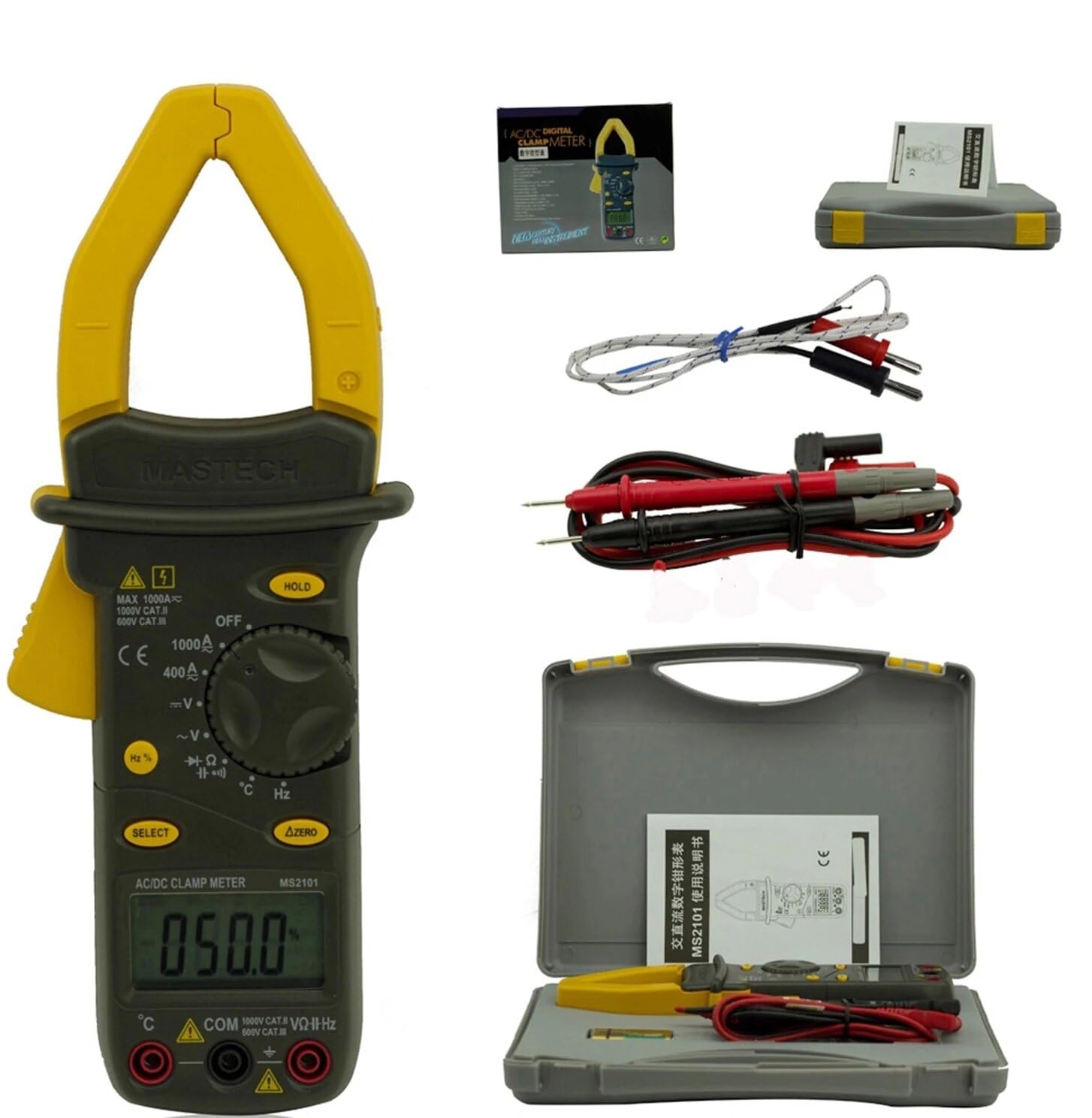
Image: Mastech MS2101 clamp meter with included test leads, temperature probe, and carrying case.
2.1 שליסל פֿעיִקייטן
- ווייַז: 4000 קאַונץ
- Jaw Opening: Φ42mm / 1.7 inches
- אַוטאָ און מאַנואַל ראַנגינג
- אַוטאָ פּאָווער אויסגעלאשן פֿונקציע
- Diode Open Voltage: 2.2 וו
- Continuity Buzzer: Activates at <50±20Ω
- דאַטאַ האָלד פֿונקציע
- Low Battery Display indicator
3. פּעקל אינהאַלט
Upon opening the package, verify that all items listed below are present and in good condition.

Image: Contents of the Mastech MS2101 package, including the meter, test leads, and documentation.
- Mastech MS2101 AC/DC Digital Clamp מעטער
- Test Leads (one pair)
- K-Type Thermocouple (for temperature measurement)
- קעריינג באַג
- קאַלאַבריישאַן סערטיפיקאַט
- שנעל אָנהייב גייד
- Batteries (2 x LR44, included)
4. מיטל אויסלייג און קאָנטראָלס
Familiarize yourself with the various parts and controls of your MS2101 clamp מעטער.

בילד: פראָנט view of the Mastech MS2101, highlighting the display, rotary switch, and function buttons.
- איצטיקע קלamp קין: געניצט פֿאַר ניט-קאָנטאַקט AC/DC קראַנט מעסטונג.
- קין טריגער: Squeeze to open the current clamp קין.
- ראָטאַרי סוויטש: Selects the desired measurement function (OFF, V, A, Ω, Capacitance, Hz, Diode, Continuity, Temperature).
- LCD ווייַז: ווײַזט מעסטונג לייענונגען, איינסן און פונקציע אינדיקאַטאָרן.
- האַלטן קנעפּל: איינפֿרירט די איצטיקע לייענונג אויפן דיספּלעי.
- SELECT קנעפּל: Toggles between AC/DC modes or different functions within a rotary switch position (e.g., Diode/Continuity, AC/DC Voltagאון).
- ΔZERO Button: Used to zero out DC current readings or relative measurements.
- COM אַרייַנשרייַב דזשאַק: געוויינטלעכע (נעגאַטיווע) אַרייַנגאַנג פֿאַר טעסט לידז.
- VΩHz Input Jack: פּאָזיטיווער אַרייַנגאַנג פֿאַר באַנדtagע, קעגנשטעל, פרעקווענץ, קאַפּאַסיטאַנס, דיאָד, און קאָנטינויִטעט מעסטונגען.
- Temperature Input Jack: Specific input for the K-type thermocouple.
5. ערשט סעטאַפּ
5.1 באַטאַרייע ייַנמאָנטירונג
The Mastech MS2101 requires two LR44 batteries for operation. These are typically included in the package.

בילד: צוריק view of the Mastech MS2101, indicating the location of the battery compartment screws.
- זיכער מאַכן אַז דער מעטער איז אויסגעלאָשן.
- געפינט די באַטעריע אָפּטייל אויף דער צוריקזייט פון דעם מעטער.
- ניצט אַ שרויפנציהער צו אַראָפּנעמען די שרויפן וואָס האַלטן די באַטאַרייע דעקל.
- אַראָפּנעמען די באַטאַרייע דעקן קערפאַלי.
- Insert two LR44 batteries, observing the correct polarity (+ and -) as indicated inside the compartment.
- לייג צוריק דעם באַטעריע דעקל און באַפעסטיקט עס מיט די שרויפן.
6. אַפּערייטינג ינסטרוקטיאָנס
6.1 מאַכט אויף / אַוועק
To power on the meter, rotate the rotary switch from the 'OFF' position to any desired measurement function. To power off, rotate the switch back to 'OFF'.
6.2 פונקציע סעלעקציע
Turn the rotary switch to the desired measurement function. For functions with multiple modes (e.g., AC/DC Voltage, Diode/Continuity), press the 'SELECT' button to toggle between them.
6.3 מעסטן AC/DC קראַנט
- Rotate the switch to the 'A' (Current) position.
- Press 'SELECT' to choose between AC or DC current measurement.
- דריקן די קין צינגל צו עפֿענען די קלamp קין.
- אַריינשליסן נאָר איין קאַנדאַקטער פֿון דעם קרייַז אין דער קל.amp קין. זיכער מאַכן אַז דער קין איז גאָר פֿאַרמאַכט.
- לייענען די קראַנט ווערט אויף די לקד אַרויסווייַזן.
- For DC current, use the 'ΔZERO' button to zero the display before measurement if necessary.
6.4 מעאַסורינג אַק/דק וואָלtage
- Rotate the switch to the 'V' (Voltagה) שטעלע.
- Press 'SELECT' to choose between AC or DC voltage מעזשערמאַנט.
- Insert the red test lead into the 'VΩHz' jack and the black test lead into the 'COM' jack.
- פֿאַרבינדט די טעסט פּראָובז פּאַראַלעל צום קרייַז אָדער קאָמפּאָנענט וואָס איר ווילט מעסטן.
- לייענען דעם חלקtagE ווערט אויף די לקד אַרויסווייַזן.
6.5 מעסטן קעגנשטעל
- Rotate the switch to the 'Ω' (Resistance) position.
- Insert the red test lead into the 'VΩHz' jack and the black test lead into the 'COM' jack.
- Ensure the circuit or component is de-energized before connecting the test probes across it.
- לייענט דעם ווערט פון דעם קעגנשטעל אויפן LCD דיספּלעי.
6.6 מעאַסורינג קאַפּאַסיטאַנס
- Rotate the switch to the 'Capacitance' position.
- Insert the red test lead into the 'VΩHz' jack and the black test lead into the 'COM' jack.
- זיכער מאַכן אַז דער קאַפּאַסיטאָר איז גאָר אויסגעלאָדן איידער איר פֿאַרבינדט די טעסט פּראָובז אַריבער אים.
- לייענען די קאַפּאַסאַטאַנס ווערט אויף די לקד אַרויסווייַזן.
6.7 Measuring Frequency/Duty Cycle
- Rotate the switch to the 'Hz' (Frequency) position.
- Insert the red test lead into the 'VΩHz' jack and the black test lead into the 'COM' jack.
- פֿאַרבינדט די טעסט פּראָובז אַריבער די סיגנאַל מקור.
- Read the frequency or duty cycle value on the LCD display. Press 'SELECT' to toggle between frequency and duty cycle.
6.8 דייאָוד טעסט
- Rotate the switch to the Diode/Continuity position. Press 'SELECT' until the diode symbol appears.
- Insert the red test lead into the 'VΩHz' jack and the black test lead into the 'COM' jack.
- פֿאַרבינדט די רויטע פּראָבע צו דער אַנאָדע און די שוואַרצע פּראָבע צו דער קאַטאָדע פֿון דער דיאָד.
- לייענען די פאָרויס voltage drop on the display. Reverse the probes to check for open circuit (OL) in reverse bias.
6.9 קאָנטינויטי טעסט
- Rotate the switch to the Diode/Continuity position. Press 'SELECT' until the continuity buzzer symbol appears.
- Insert the red test lead into the 'VΩHz' jack and the black test lead into the 'COM' jack.
- פֿאַרבינדט די טעסט פּראָובז אַריבער דעם קרייַז אָדער קאָמפּאָנענט.
- אויב דער קעגנשטאנד איז אונטער בערך 50Ω, וועט דער בוזער קלינגען, וואס ווײַזט אויף קאנטינעויטעט.
6.10 טעמפּעראַטור מעזשערמאַנט
- Rotate the switch to the '°C/°F' (Temperature) position.
- Insert the K-type thermocouple into the dedicated temperature input jacks, observing polarity.
- שטעלט די טערמאָקאָפּל שפּיץ אויף אָדער לעבן דעם אָביעקט וועמענס טעמפּעראַטור איר ווילט מעסטן.
- Read the temperature on the LCD display. Press 'SELECT' to toggle between Celsius and Fahrenheit.
6.11 דאַטאַ האַלטן פֿונקציע
Press the 'HOLD' button to freeze the current reading on the display. Press it again to release the hold and resume live measurements.
6.12 Zeroing (ΔZERO) Function
In DC current mode, press the 'ΔZERO' button to zero the display before making a measurement. This compensates for any residual magnetic fields or offsets, ensuring more accurate DC current readings.
6.13 אַוטאָ מאַכט אויסגעלאשן
The meter will automatically power off after approximately 15 minutes of inactivity to conserve battery life. To reactivate, turn the rotary switch to 'OFF' and then back to the desired function.
7. וישאַלט
7.1 רייניקונג
ווישט אויס דעם מעטער'ס קasinג מיט אַדamp א טוך און א מילדן דיטערדזשענט. ניצט נישט קיין שווארצע אדער סאָלווענטן. זיכערט זיך אז דער מעטער איז אינגאנצן טרוקן פארן ניצן.
7.2 באַטערי פאַרבייַט
When the low battery indicator appears on the display, replace the batteries as described in Section 5.1. Always use two new LR44 batteries.
7.3 סטאָרידזש
אויב דער מעטער ווערט נישט גענוצט פאר א לענגערע צייט, נעמט ארויס די באַטעריעס צו פארמיידן ליקאַדזש און שאָדן. האַלט דעם מעטער אין א קיל, טרוקן אָרט, אַוועק פון דירעקט זונשייַן און עקסטרעמע טעמפּעראַטורן.
8. טראָובלעשאָאָטינג
- מעטער גייט נישט אן: קאָנטראָלירט די באַטעריע אינסטאַלאַציע און זיכערט זיך אַז די באַטעריעס זענען נישט אויסגעשעפּט.
- No reading or 'OL' displayed: Ensure test leads are properly connected and making good contact. For current measurements, ensure only one conductor is within the clamp jaw. For resistance/continuity, ensure the circuit is de-energized. 'OL' (Overload) indicates the measured value is beyond the meter's range.
- נישט פּינקטלעכע לייענונגען: Check battery level. Ensure the correct function is selected. For DC current, use the 'ΔZERO' function.
- Buzzer not sounding in continuity mode: The resistance may be too high (above 50Ω), or the circuit is open.
9. טעכניש ספּעסאַפאַקיישאַנז
Detailed specifications for the Mastech MS2101 clamp meter are provided below.

Image: Table detailing the measurement ranges, resolutions, and accuracies of the Mastech MS2101.
| מעזשערמאַנט | קייט | האַכלאָטע | אַקיעראַסי |
|---|---|---|---|
| DC Voltage | 400mV/4V/40V/400V 1000V | 0.1מוו/1מוו/10מוו/0.1וו 1V | ±(0.7%+1) ±(0.8%+3) |
| AC Voltage | 4V/40V/400V 750V | 1mV/10mV/0.1V 1V | ±(0.8%+5) ±(1.0%+10) |
| DC Current | 400 אַ / 1000 אַ | 0.1 אַ / 1 אַ | ±(3.0%+3) |
| AC קראַנט | 400 אַ / 1000 אַ | 0.1 אַ / 1 אַ | ±(3.0%+3) |
| קעגנשטעל | 400Ω/4kΩ/40kΩ/400kΩ/4MΩ 40MΩ | 0.1Ω/1Ω/10Ω/100Ω/1kΩ 10kΩ | ±(1.2%+1) ±(2.0%+3) |
| קאַפּאַסיטאַנס | 4nF/40nF/400nF 4µF/40µF/100µF | 1pF/10pF/0.1nF 1nF/10nF/100nF | ±(4.0%+10) ±(4.0%+10) |
| אָפטקייַט | 40Hz/400Hz/4kHz/40kHz/100kHz | 0.01Hz/0.1Hz/1Hz/10Hz/0.1kHz | ±(2.0%+1) |
| פליכט ציקל | 0.1% ~ 99.9% | 0.10% | ±(2.0%+2) |
| טעמפּעראַטור | -40°C ~ 0°C 1 °C ~ 400 °C 401 °C ~ 750 °C | 1°C 1°C 1°C | ±(1.0%+6) ±(1.0%+3) ±(1.0%+5) |
| ווייַז | 4000 קאַונץ | ||
| קין עפן | 42 מם / 1.7 אינטשעס | ||
| העמשעכדיקייט באַזער | <50±20Ω | ||
| Diode Open Voltage | 2.2V | ||
| מאַכט מקור | 2 x LR44 batteries | ||
| דימענסיעס (L X W X H) | 7.87 X 5.91 X 9.84 אינטשעס | ||
| וואָג | 1 קילאָגראַם (2.2 פונט) | ||
10. וואָראַנטי און שטיצן
The Mastech MS2101 Digital Clamp Meter comes with a 1-year warranty from the date of purchase, covering manufacturing defects. Please retain your proof of purchase for warranty claims.
For technical support, product information, or warranty inquiries, please visit the official Mastech webזייטל אדער קאנטאקט זייער קאסטומער סערוויס:
- Official Mastech Webפּלאַץ: www.mastech-group.com
- שטיצן בלאַט: http://www.mastech-group.com/support.php?n=0


