1. הקדמה
The Mastech MS8250D is a high-performance digital multimeter designed for accurate measurement of AC/DC voltage, AC/DC current, resistance, capacitance, frequency, and temperature. It features a 6600-count display, auto/manual ranging, True RMS, Non-Contact Voltage (NCV) detection, diode and continuity testing, and a USB interface for PC connectivity. This manual provides detailed instructions for safe and effective use of the device.
שליסל פֿעיִקייטן:
- 6600-count digital display
- Automatic and Manual Ranging
- אמת RMS מעזשערמאַנט
- נאַן-קאָנטאַקט חלקtagE (NCV) דיטעקשאַן
- Diode and Continuity Tester (buzzer < 50Ω)
- MAX/MIN value recording
- דאַטאַ האָלד פֿונקציע
- ווייַז באַקלייט
- אַוטאָ מאַכט אויסגעלאשן
- רעלאַטיווע מעסטונג מאָדע
- נידעריק באַטערי ינדיקאַטיאָן
- USB Interface for Windows OS
2. זיכערקייַט אינפֿאָרמאַציע
ווארענונג: To avoid electric shock or personal injury, and to avoid damage to the meter or to the equipment under test, read all safety information carefully before using the meter. This device complies with CE, RoHS, and UL safety standards.
- Always ensure the test leads are in good condition and properly connected.
- דו זאלסט נישט צולייגן מער ווי די רייטאַד וואָלtagE, ווי אנגעצייכנט אויף די מעטער, צווישן די טערמינאַלס אָדער צווישן קיין וואָקזאַל און ערד ערד.
- ניצן וואָרענען ווען ארבעטן מיט וואָלtagהעכער 30V AC RMS, 42V שפּיץ, אדער 60V DC. די וואַליומעןtagדאָס איז אַ ריזיקירן פון קלאַפּ.
- Before measuring current, ensure the circuit is de-energized and the meter is connected in series.
- שטענדיק אָפּשטעקן די טעסט דראָטן פֿון דער קרייַז איידער איר ענדערן פֿונקציעס אָדער ראַנגעס.
- ניצט נישט דעם מעטער אויב ער זעט אויס צעבראכן אדער אויב דער קעסטל איז אפן.
- טוישט די באַטעריע אַזוי שנעל ווי דער נידעריק באַטעריע אינדיקאַטאָר דערשיינט צו ענשור פּינקטלעכע מעסטונגען.
- Adhere to the specified measurement categories (CAT III 1000V / CAT IV 600V) for safe operation.
3. פּראָדוקט איבערview
Familiarize yourself with the components of your Mastech MS8250D Digital Multimeter.

בילד 3.1: פראָנט view of the Mastech MS8250D Digital Multimeter, showing the display, function dial, and input jacks. The display shows "1.987 V", indicating a voltage measurement. The function dial is set to T-RMS. Input jacks are labeled for µA mA, A, VΩHz%, and COM.
הויפּט קאַמפּאָונאַנץ:
- LCD ווייַז: ווײַזט מעסטונג לייענונגען, איינסן און פונקציע אינדיקאַטאָרן.
- פונקציע רעדל: Used to select the desired measurement function (e.g., Voltage, Current, Resistance, Diode, Continuity, Temperature).
- פונקציע קנעפּלעך:
- האלט: איינפֿרירט די איצטיקע אַרויסווײַזונג.
- קייט: Switches between auto and manual ranging.
- REL: אַקטיוויזירט רעלאַטיווע מעסטונג מאָדע.
- מאַקס/מין: רעקאָרדירט מאַקסימום און מינימום ווערטן.
- FUNC: Selects sub-functions within a dial position (e.g., AC/DC, Diode/Continuity).
- T-RMS: (Indicated on dial) True RMS measurement.
- NCV: נאַן-קאָנטאַקט חלקtagE דיטעקשאַן.
- באַקלייט קנעפּל: Activates display backlight.
- אַרייַנשרייַב דזשאַקס:
- COM: Common terminal for all measurements (negative lead).
- VΩHz%: אַרייַנשרייַב פֿאַר וואָלtage, resistance, frequency, capacitance, and diode/continuity measurements (positive lead).
- µA mA: אַרייַנגאַנג פֿאַר מיקראָampערע און מיליampere current measurements (positive lead). Fused for protection.
- A: אַרייַנשרייַב פֿאַר ampere current measurements (positive lead). Fused for protection.
אַרייַנגערעכנט קאַמפּאָונאַנץ:
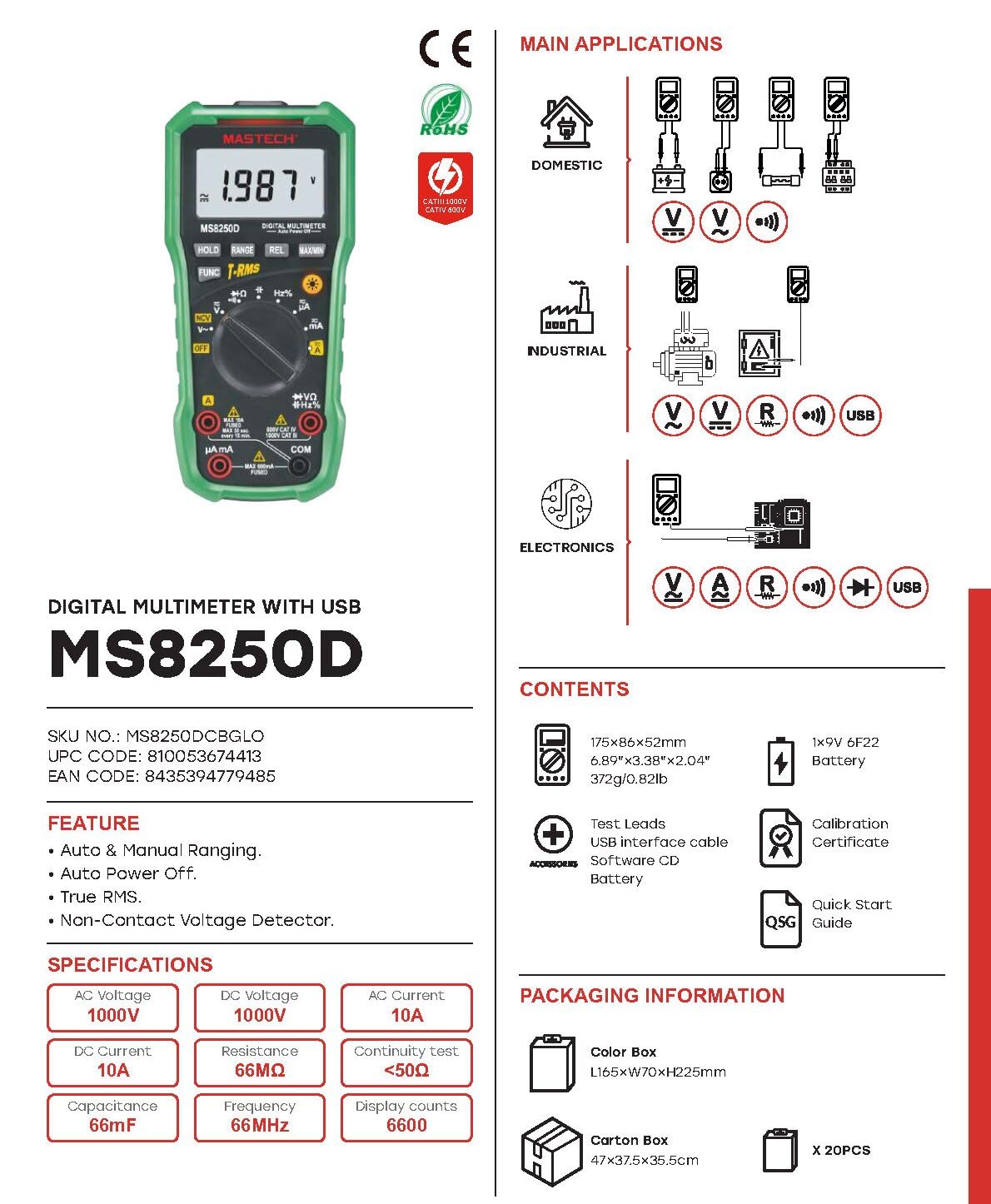
בילד 3.2: Diagram showing the Mastech MS8250D Multimeter and its included accessories. The image also illustrates typical applications in domestic, industrial, and electronics settings.
- Mastech MS8250D Digital Multimeter
- טעסט דראָטן (רויט און שוואַרץ)
- 1x 9V 6F22 Battery (pre-installed or included separately)
- וסב צובינד קאַבלע
- Software CD (for Windows OS)
- קאַלאַבריישאַן סערטיפיקאַט
- שנעל-אָנהייב גייד
4. סעטאַפּ
4.1 באַטאַרייע ייַנמאָנטירונג
The MS8250D requires one 9V 6F22 battery for operation. Two LR44 batteries are also mentioned in specifications, likely for a different internal component or an error in data. For the main power, use the 9V battery.
- זיכער מאַכן אַז דער מולטימעטער איז אויסגעלאָשן.
- געפינט דעם דעקל פונעם באַטעריע־אָפּטייל אויף דער הינטערשטער זייט פונעם מעטער.
- ניצט אַ שרויפן־ציער צו לייזן די שרויף(ן) וואָס פֿעסטשטעלן דעם דעקל.
- אַראָפּנעמען די דעקל.
- Connect the 9V battery to the battery clips, observing correct polarity (+ and -).
- שטעלן די באַטאַרייע אין די אָפּטייל.
- לייג צוריק דעם דעקל פונעם באַטעריע־אָפּטייל און פֿאַרזיכער עס מיט די שרויף(ן).
באַמערקונג: The meter also uses 2 LR44 batteries, which are typically included and pre-installed for specific functions like the backlight or non-contact voltage detection. Refer to the quick-start guide for specific details on these smaller batteries if replacement is needed.
4.2 פֿאַרבינדן טעסט דראָטן
Always connect the black test lead to the COM jack. Connect the red test lead to the appropriate input jack based on the measurement type:
- פֿאַר וואָלtage, Resistance, Capacitance, Frequency, Diode, and Continuity measurements: Connect the red lead to the VΩHz% דזשאַק.
- For Current measurements (µA or mA): Connect the red lead to the µA mA דזשאַק.
- For High Current measurements (A): Connect the red lead to the A דזשאַק.
Ensure the test leads are fully inserted into the jacks.
5. אַפּערייטינג ינסטרוקטיאָנס
5.1 מאַכט אויף / אַוועק
To turn the meter ON, rotate the function dial from the "OFF" position to any desired measurement function. To turn the meter OFF, rotate the function dial back to the "OFF" position.
The meter features an אַוטאָ מאַכט אויסגעלאשן function to conserve battery life. It will automatically power off after a period of inactivity. To disable or re-enable this feature, refer to the quick-start guide or the full user manual provided on the software CD.
5.2 Auto Ranging and Manual Ranging
The MS8250D defaults to אַוטאָ ראַנגינג, which automatically selects the best measurement range. Press the קייט קנעפּל צו באַשטימען צו מאַנואַל ריינדזשינג. In manual ranging, each press of the קייט button cycles through available ranges. To return to auto ranging, press and hold the קייט קנעפּל.
5.3 מעאַסורינג אַק/דק וואָלtagE (V)
- שטעלן די פונקציע רעדל צו די V~ (AC באַנדtage) אָדער V- (DC Voltagה) שטעלע.
- פאַרבינדן די שוואַרץ פּרובירן פירן צו די COM דזשעק און די רויטע טעסט פירט צו די VΩHz% דזשאַק.
- פֿאַרבינדט די טעסט פּראָובס אַריבער דעם קרייַז אָדער קאָמפּאָנענט וואָס דאַרף געמעסטן ווערן.
- לייענען דעם חלקtage value on the display. The meter will automatically detect AC or DC if the dial is set to the combined V position, or you can use the FUNC button to toggle between AC and DC if available on your model.
5.4 Measuring AC/DC Current (A, mA, µA)
ווארענונג: Never connect the meter in parallel to a voltagדי מקור ביים מעסט שטראָם. דאָס קען אויפרייסן די פיוז אָדער באַשעדיגן דעם מעטער.
- קער אַוועק די מאַכט צו די קרייַז.
- שטעלן די פונקציע רעדל צו די A~ (AC קראַנט), A- (גלייכשטראָם), mA~, מא-, µA~, אָדער µA- שטעלע.
- פאַרבינדן די שוואַרץ פּרובירן פירן צו די COM דזשאַק.
- פאַרבינדן די רויט פּרובירן פירן צו די A jack for high current, or µA mA jack for low current.
- Open the circuit where the current is to be measured and connect the meter in series with the load.
- צולייגן מאַכט צו די קרייַז.
- Read the current value on the display. Use the FUNC button to toggle between AC and DC if needed.
5.5 מעסטן קעגנשטעל (Ω)
- שטעלן די פונקציע רעדל צו די Ω שטעלע.
- פאַרבינדן די שוואַרץ פּרובירן פירן צו די COM דזשעק און די רויטע טעסט פירט צו די VΩHz% דזשאַק.
- Ensure the circuit or component under test is de-energized.
- פֿאַרבינדט די טעסט פּראָובז אַריבער דעם קאָמפּאָנענט.
- לייענען די קעגנשטעל ווערט אויף די אַרויסווייַזן.
5.6 דיאָד טעסט און קאָנטינויִטעט טעסט
- שטעלן די פונקציע רעדל צו די דיאָד/קאָנטינויִטעט position (often shared with resistance or capacitance).
- פאַרבינדן די שוואַרץ פּרובירן פירן צו די COM דזשעק און די רויטע טעסט פירט צו די VΩHz% דזשאַק.
- ניצן די FUNC button to select between Diode Test and Continuity Test.
- פֿאַר דיאָד טעסט: פֿאַרבינדט די רויטע פּראָבע צו דער אַנאָדע און די שוואַרצע פּראָבע צו דער קאַטאָדע פֿון דער דיאָד. דער עקראַן וועט ווײַזן דעם פֿאָרווערטס וואָלומען.tage drop (typically 0.5V to 0.8V for silicon diodes). Reversing the probes should show "OL" (Open Loop).
- פֿאַר קאָנטינויִיטעט טעסט: Connect the probes across the circuit or component. If resistance is less than approximately 50Ω, the buzzer will sound, indicating continuity.
5.7 Measuring Capacitance (F)
- שטעלן די פונקציע רעדל צו די קאַפּאַסיטאַנס position (often shared with resistance or diode).
- פאַרבינדן די שוואַרץ פּרובירן פירן צו די COM דזשעק און די רויטע טעסט פירט צו די VΩHz% דזשאַק.
- Ensure the capacitor is fully discharged before testing to avoid damage to the meter.
- פֿאַרבינדט די טעסט פּראָובז אַריבער די קאַפּאַסיטאָר טערמינאַלס.
- לייענען די קאַפּאַסאַטאַנס ווערט אויף די אַרויסווייַזן.
5.8 Measuring Frequency (Hz) and Duty Cycle (%)
- שטעלן די פונקציע רעדל צו די הז% position (often shared with voltagאון).
- פאַרבינדן די שוואַרץ פּרובירן פירן צו די COM דזשעק און די רויטע טעסט פירט צו די VΩHz% דזשאַק.
- פֿאַרבינדט די טעסט פּראָובז אַריבער די סיגנאַל מקור.
- The display will show the frequency. Press the FUNC button to toggle to Duty Cycle measurement if available.
5.9 ניט-קאָנטאַקט VoltagE (NCV) דעטעקשאַן
- שטעלן די פונקציע רעדל צו די NCV שטעלע.
- Hold the meter with the NCV sensor (usually at the top of the meter) near a live AC voltagE מקור.
- דער מעטער וועט ווײַזן דעם בייַזײַן פֿון AC וואָלומעןtage through an audible beep and/or visual indicator (e.g., LED).
5.10 USB Interface (Windows OS)
The MS8250D includes a USB interface for connecting to a computer running Windows OS. This allows for data logging and real-time monitoring of measurements. Install the provided software from the CD and follow the on-screen instructions for driver installation and software usage.
6. וישאַלט
6.1 רייניקונג
ווישט אויס דעם מעטער'ס קעסטל מיט אדווערטייזמענטamp א טוך און א מילדן דיטערדזשענט. ניצט נישט קיין שווארצע אדער סאָלווענטן. זיכערט זיך אז דער מעטער איז אינגאנצן טרוקן פארן ניצן.
6.2 באַטערי פאַרבייַט
When the low battery indicator appears on the display, replace the 9V battery immediately to ensure accurate readings. Follow the steps in Section 4.1 Battery Installation.
6.3 קאָריק פאַרבייַט
If the meter fails to measure current, the fuse may be blown. Fuses are located inside the meter. To replace a fuse:
- זיכער מאַכן אַז דער מעטער איז אויסגעלאָשן און אַלע טעסט דראָטן זענען אָפּגעטיילט.
- Open the battery compartment cover (and potentially the main case, depending on design).
- פֿאָרזיכטיק אַראָפּנעמען די אַלטע פֿיוז.
- Replace with a fuse of the exact same type and rating (e.g., F600mA/250V for mA/µA range, F10A/250V for A range). Refer to the meter's internal markings or the full manual for specific fuse ratings.
- Reassemble the meter, ensuring all screws are tightened.
ווארענונג: Never use a fuse with a different rating or bypass the fuse. This can damage the meter and pose a serious safety hazard.
7. טראָובלעשאָאָטינג
| פּראָבלעם | מעגלעך סיבה | לייזונג |
|---|---|---|
| דער מעטער גייט נישט אן. | טויט באַטאַרייע. | פאַרבייַטן די 9 וו באַטאַרייע. |
| "OL" (איבערלאָד) ווערט געוויזן. | די מעסטונג איז גרעסער ווי די אויסגעקליבענע קייט אדער מעטער'ס מאקסימום קאפאציטעט. | Switch to a higher range (if in manual ranging) or ensure the measurement is within the meter's limits. |
| קיין איצטיקע לייענונג. | Blown fuse; incorrect lead connection; open circuit. | Check and replace fuse if necessary. Ensure leads are connected correctly (in series). Verify circuit continuity. |
| ומפּינקטלעך רידינגז. | Low battery; poor lead contact; external interference. | Replace battery. Ensure leads are firmly connected. Move away from strong electromagnetic fields. |
| Display shows "USB" but no PC connection. | Drivers not installed; incorrect software settings. | Install drivers from the provided CD. Refer to software manual for connection instructions. |
8. ספּעסאַפאַקיישאַנז
The following table details the technical specifications of the Mastech MS8250D Digital Multimeter.

בילד 8.1: Detailed specifications table for the Mastech MS8250D, outlining ranges, resolutions, and accuracies for various measurement functions.
| פֿונקציע | קייט | האַכלאָטע | אַקיעראַסי |
|---|---|---|---|
| DC Voltage | |||
| קסנומקסמוו | קסנומקסמוו | ±(0.8%+3) | |
| 6.6V/66V/660V/1000V | 1mV/10mV/0.1V/1V | ±(0.5%+5) | |
| AC Voltage (אמת RMS) | |||
| קסנומקסמוו | קסנומקסמוו | ±(1.5%+5) | |
| 6.6V/66V | 1mV/10mV | ±(1.2%+5) | |
| 660V/1000V | 0.1V/1V | ±(1.0%+3) | |
| DC Current | |||
| 660 µA/6600µA/66mA/660mA | 0.1µA/1µA/10µA/0.1mA | ±(1.0%+5) | |
| 10 א | 10מאַ | ±(2.0%+5) | |
| AC Current (True RMS) | |||
| 660 µA/6600µA/66mA/660mA | 0.1 µA/1µA/0.01mA/0.1mA | ±(1.5%+5) | |
| 10 א | 10מאַ | ±(3.0%+5) | |
| קעגנשטעל | |||
| 660Ω / 6.6kΩ / 66kΩ / 660kΩ / 6.6MΩ | 0.1Ω / 1Ω / 10Ω / 100Ω / 1kΩ | ±(0.8%+5) | |
| 66MΩ | 10kΩ | ±(1.5%+5) | |
| קאַפּאַסיטאַנס | |||
| 6.6nF/66nF/660nF/6.6µF/66µF | 1pF/10pF/0.1nF/1nF/10nF | ±(4.0%+5) | |
| 600 µF | 1 µF | ±(3.0%+5) | |
| 6.6מף / 66מף | 1µF/10µF | ±(4.0%+5) | |
| אָפטקייַט | |||
| 66Hz/660Hz/6.6kHz/66kHz | 0.01 הז / 0.1 הז / 1 הז / 10 הז | ±(1.5%+5) | |
| 660 כז / 6.6 מהז / 66 מהז | 0.1 כז / 1 כז / 10 כז | ±(1.5%+5) | |
| פליכט ציקל | |||
| 0.1% ~ 99.9% | 0.1% | ±(2.0%+5) | |
אַלגעמיינע ספּעסאַפאַקיישאַנז:
- ווייַז: 6600 קאַונץ
- מאַכט מקור: 1x 9V 6F22 Battery (main power), 2x LR44 batteries (auxiliary, e.g., backlight)
- אַוטאָ מאַכט אַוועק: יא
- אמת RMS: יא
- נאַן-קאָנטאַקט חלקtage (NCV) Detector: יא
- Diode Open Voltage: 3.2V
- קאָנטינויִטעט בוזער: <50Ω
- מאַקס/מין: יא
- דאַטן האַלטן: יא
- נידעריק באַטעריע אַרויסווייַזונג: יא
- ווייַז באַקלייט: יא
- USB צובינד: Yes (Windows OS)
- זיכערהייט רייטינג: CAT III 1000V / CAT IV 600V
- מעאַסורעמענט אַקיעראַסי: 0.4% (general, specific accuracies per function in table)
- אַפּערייטינג וואָלtage (מין): 3.2 וואלטס
- אויבערשטער טעמפּעראַטור ראַנג: 50 דיגריז סעלסיוס
- דימענשאַנז (L x W x H): 20 X 15 X 25 סענטימעטער
- נומער וואָג: 1 קג
- מאַטעריאַל: אַקרילאָניטרילע בוטאַדיענע סטירענע (אַבס)
- קאָליר: בלוי
- פאַבריקאַנט: MASTECH
- לאַנד פון אָריגין: טייוואַן
- סערטיפיקאַטיאָנס: CE, RoHS, UL
9. וואָראַנטי און שטיצן
Mastech products are designed for reliability and durability. For specific warranty information, please refer to the warranty card included with your product or contact Mastech customer support directly. Typically, Mastech offers a limited warranty against defects in materials and workmanship.
For technical support, troubleshooting assistance, or warranty claims, please contact your authorized Mastech dealer or visit the official Mastech webפּלאַץ פֿאַר קאָנטאַקט אינפֿאָרמאַציע.
אי.יו. רעזערוו טיילן פאַראַנען געדויער: 1 יאָר


