הקדמה
The FREEWOLF M96 Wireless Gaming Keyboard is designed for versatile use, offering both Bluetooth and 2.4G wireless connectivity. It features a mechanical feel, RGB LED backlighting, a digital display screen, and durable PBT keycaps. This manual provides detailed instructions to help you set up, operate, and maintain your keyboard for optimal performance.
פּראָדוקט איבערview
The FREEWOLF M96 keyboard combines advanced features with a user-friendly design. Key components include:
- צווייענדיק קאַנעקטיוויטי: Supports Bluetooth (BT1, BT2) and 2.4G wireless modes for seamless switching between multiple devices.
- דיגיטאַל ווייַז פאַרשטעלן: Provides real-time information on battery capacity, connection mode, and charging status.
- מולטימעדיאַ קאָנטראָל קנעפּל: Allows for easy adjustment of volume and backlight settings.
- PBT שליסל קאַפּס: Durable, spherical keycaps designed for comfortable typing and longevity.
- RGB LED Backlight: Customizable lighting effects to enhance your gaming or typing experience.
- לאַנג-בלייַביק באַטערי: Equipped with a 3000 mAh battery for extended use.
- ערגאָנאָמיק פּלאַן: Features adjustable feet for optimal typing comfort.

בילד: איבערview of the FREEWOLF M96 Wireless Keyboard, highlighting its 90% US layout, PBT keycaps, Bluetooth/2.4G connectivity, LED backlight, 3000 mAh battery, multimedia knob, LED screen, and compatibility with Win/Mac/Linux/iOS/Android systems.

בילד: נאָענט-אַרויף view of the PBT color blocking keycaps, emphasizing their durability and longer lifespan.
סעטאַפּ
1. אויפלאָדן די קלאַוויאַטור
Before first use, it is recommended to fully charge the keyboard. Connect the provided USB-C cable to the charging port on the keyboard and the other end to a USB power source (e.g., computer USB port, wall adapter).
- The digital display screen will indicate the charging status.
- א פולע טשאַרדזש נעמט טיפּיש עטלעכע שעה.

בילד: זייט view of the keyboard illustrating the power switch, Type-C charging port, and the 2.4G/BT1/BT2 mode switch. The Type-C port is for charging only and cannot be used for wired connection.
2. פֿאַרבינדן זיך דורך 2.4G ווירעלעס
- Locate the 2.4G wireless receiver (USB dongle), usually stored in a compartment on the keyboard's underside.
- שטעקט אריין דעם 2.4G ריסיווער אין א פאראן USB פארט אויף אייער קאמפיוטער.
- רוקט דעם מאָדע סוויטש אויף דער קלאַוויאַטור צו דער "2.4G" פּאָזיציע.
- The keyboard should automatically connect to your device. The display screen will show the 2.4G connection status.
3. קאַנעקטינג דורך בלועטאָאָטה
The keyboard supports two Bluetooth channels (BT1 and BT2) for connecting to multiple devices.
- Slide the mode switch on the keyboard to either "BT1" or "BT2" position.
- אויף אייער דעווייס (קאמפיוטער, טאַבלעט, סמאַרטפאָון), אַקטיווירט בלועטוט און זוכט פֿאַר נײַע דעווייסעס.
- Select "FREEWOLF M96" (or similar name) from the list of available devices.
- If prompted, enter the pairing code displayed on your device.
- Once connected, the digital display screen will show the active Bluetooth channel (BT1 or BT2).
To switch between connected Bluetooth devices, simply slide the mode switch to the desired BT1 or BT2 channel.
Video: Demonstrates the dual-mode connectivity of the FREEWOLF M96 Wireless Gaming Keyboard, showing how to switch between 2.4G wireless and Bluetooth connections (BT1, BT2) for seamless multi-device operation.
אַפּערייטינג ינסטראַקשאַנז
1. דיגיטאַל ווייַז סקרין
The integrated electronic display provides essential information at a glance:
- באַטאַרייע קאַפּאַציטעט: ווייזט די קראַנט באַטאַרייע פּראָצענטtage.
- קשר מאָדע: Indicates whether the keyboard is in 2.4G, BT1, or BT2 mode.
- טשאַרדזשינג סטאַטוס: Displays an icon when the keyboard is charging.
- נידעריק באַטערי ינדיקאַטאָר: Alerts you when the battery is low.

בילד: דעטאַלירט view of the digital display screen on the FREEWOLF M96 keyboard, showing indicators for power display, connection status (2.4G, BT1, BT2), charging, and low battery.
2. Multimedia Control Knob
The knob located on the top right of the keyboard offers dual functionality:
- Default Function (Volume Control):
- דרייען קלאַקווייז צו פאַרגרעסערן די באַנד.
- דריי קעגן זייגער צו פֿאַרמינערן דעם באַנד.
- דריק דעם קנעפּל צו שטום/אויף-שטום מאַכן די אַודיאָ.
- באַקלייט קאָנטראָל:
- Press and hold the knob for five seconds to switch to backlight control mode.
- In backlight control mode:
- Rotate clockwise to increase backlight brightness.
- Rotate counter-clockwise to decrease backlight brightness.
- Press the knob to switch between different backlight effects/modes.

Image: Illustration of the advanced dial control, detailing its default functions for volume (volume up, volume down, mute) and its backlight control functions (backlight brightness up, backlight brightness down, light effect switching) when pressed and held for 5 seconds.
3. Backlight Control (Function Keys)
In addition to the knob, you can control the backlight using function key combinations:
- FN + N: באַשטימען די באַקלייט מאָדע
- FN + Up Arrow / Down Arrow: סטרויערן די ברייטנאַס פון די באַקלייט
- FN + Left Arrow / Right Arrow: סטרויערן די באַקלייט ספּיד
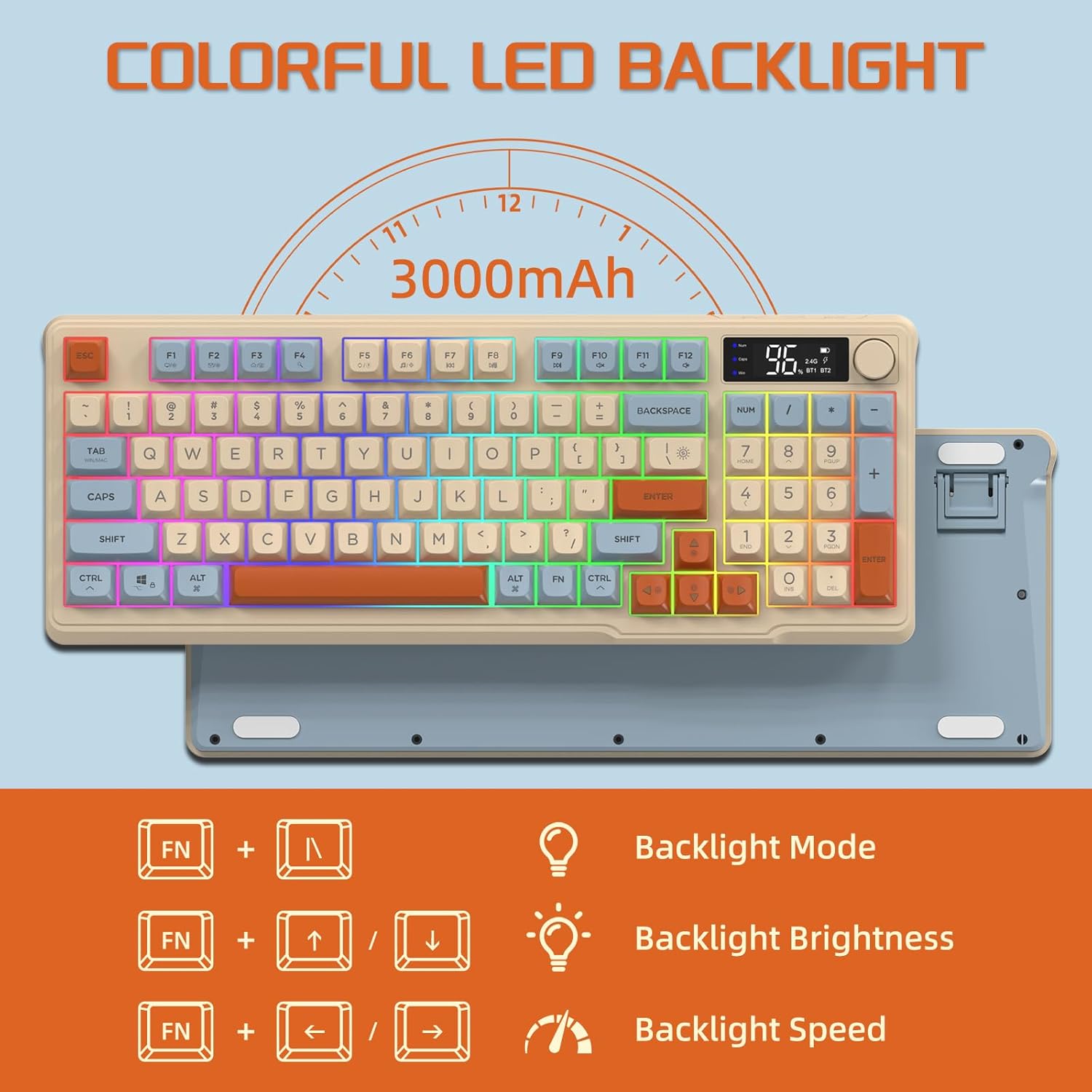
Image: The keyboard displaying the key combinations for controlling the colorful LED backlight, including changing backlight mode, brightness, and speed using the FN key with N, arrow keys.
4. מאַכט שפּאָרן מאָדעס
The keyboard is designed with power-saving features to extend battery life:
- Sleep Mode (3 minutes inactivity): After 3 minutes of inactivity, the keyboard enters sleep mode, and the backlight turns off.
- Deep Sleep Mode (10 minutes inactivity): After 10 minutes in sleep mode, the keyboard enters deep sleep. The first key press will be ignored to wake the keyboard, and the second key press will activate it.
5. קאַמפּאַטאַבילאַטי
The FREEWOLF M96 keyboard is compatible with a wide range of operating systems, including Windows, Mac, and Linux, ensuring broad usability.
וישאַלט
1. רייניקונג
- אויסלעשן די קלאַוויאַטור איידער רייניקונג.
- ניצן אַ ווייך, לינט-פֿרייַ שטאָף אַ ביסל דampאָפּגעוואַשן מיט וואַסער אָדער אַ מילד רייניקונג לייזונג צו ווישן די ייבערפלאַך.
- For cleaning between keycaps, use compressed air or a small brush.
- ויסמיידן ניצן האַרב קעמיקאַלז אָדער אַברייסיוו מאַטעריאַלס.
2. באַטערי קער
- פֿאַרמײַדט אָפֿט פֿולשטענדיק אויסצולאָדן די באַטעריע.
- האַלט די קלאַוויאַטור אין אַ קיל, טרוקן אָרט ווען נישט אין באַנוץ פֿאַר לענגערע פּעריאָדן.
- Use only the provided charging cable or a compatible USB-C cable.
טראָובלעשאָאָטינג
| פּראָבלעם | מעגלעך סיבה | לייזונג |
|---|---|---|
| די קלאַוויאַטור רעאַגירט נישט. | Low battery; incorrect connection mode; receiver not plugged in (2.4G); Bluetooth not paired. | Charge the keyboard; switch to correct mode (2.4G/BT1/BT2); ensure 2.4G receiver is connected; re-pair Bluetooth. |
| באַקלייט אַרבעט נישט. | Backlight turned off; low battery; brightness set to minimum. | Check backlight settings using the knob or FN key combinations; charge the keyboard. |
| Keys not registering or ghosting. | Software conflict; low battery; interference. | Restart your device; charge the keyboard; move closer to the receiver/device; check for driver updates. |
| בלועטוט פֿאַרבינדונג נישט סטאַביל. | אריינמישונג; דיסטאַנץ פֿון אַפּאַראַט; נידעריקע באַטאַרייע. | Reduce interference (other wireless devices); move keyboard closer to device; charge keyboard. |
ספּעסאַפאַקיישאַנז
| שטריך | דעטאַל |
|---|---|
| סאָרט | פרייוואָלף |
| מאָדעל נומער | M96 |
| קאַנעקטיוויטי טעכנאָלאָגיע | בלועטוט, 2.4G וויירלעס |
| קלאַוויאַטור באַשרייַבונג | Mechanical feel with PBT keycaps |
| נומער פון קיז | 94 שליסלען (אמעריקאנער אויסלייג) |
| באַקלייט | RGB געפירט באַקלייט |
| באַטאַרייע קאַפּאַציטעט | 3000 מאַה |
| ספּעציעלע פֿעיִקייטן | Electronic display, multimedia control knob, power saving modes |
| קאַמפּאַטאַבאַל דעוויסעס | PC (Windows, Mac, Linux), iOS, Android |
| קאָליר | Blueberry (Myrtille) |
| פּראָדוקט דימענשאַנז | 385mm (15.16 inch) x 145mm (5.71 inch) x 40mm (1.57 inch) |

Image: Diagram illustrating the product dimensions of the FREEWOLF M96 keyboard: 385mm (15.16 inches) length, 145mm (5.71 inches) width, and 40mm (1.57 inches) height.
וואָראַנטי און שטיצן
This FREEWOLF M96 Wireless Gaming Keyboard comes with a standard manufacturer's warranty. Please refer to the product packaging or the seller's information for specific warranty terms and conditions. For technical support or further assistance, please contact the retailer or manufacturer directly.
For the latest information and support, visit the official FREEWOLF webפּלאַץ אָדער קאָנטאַקט זייער קונה דינסט.


