הקדמה
This manual provides detailed instructions for the setup, operation, and maintenance of your MageGee V560 Wireless Gaming Keyboard and Mouse Combo. Please read this manual thoroughly before use to ensure optimal performance and longevity of your device.

Image: The MageGee V560 Wireless Gaming Keyboard and Mouse Combo, featuring a blue, white, and purple color scheme, with the USB receiver visible.
פּעקל אינהאַלט
ביטע באַשטעטיקן אַז אַלע זאכן זענען פאַראַן אין דעם פּעקל:
- MageGee V560 Wireless Keyboard
- MageGee Wireless Mouse
- 2.4GHz USB Receiver (stored in mouse battery compartment)
- וסב-C טשאַרדזשינג קאַבלע
- באַניצער מאַנואַל

Image: Contents of the MageGee V560 package, including the keyboard, mouse, USB receiver, charging cable, and user manual.
סעטאַפּ אינסטרוקציעס
- געפינט דעם USB ריסיווער: Open the battery cover of the wireless mouse. The 2.4GHz USB receiver is stored inside the compartment next to the mouse battery slot.
- פאַרבינדן די ופנעמער: צאַפּן די וסב ופנעמער אין אַ בנימצא וסב פּאָרט אויף דיין קאָמפּיוטער.
- מאַכט אויף דיווייסאַז: Ensure both the keyboard and mouse are powered on. The devices are plug-and-play and should connect automatically.
- ערשט אָפּצאָל: For optimal performance, it is recommended to fully charge both the keyboard and mouse before first use. Use the provided USB-C charging cable.

Image: Illustration showing the 2-in-1 USB receiver connecting the keyboard and mouse wirelessly to a laptop.
אַפּערייטינג ינסטראַקשאַנז
קלאַוויאַטור פאַנגקשאַנז
- RGB Backlighting Control:
- דרוק פן + ינס צו קער די באַקלייט אויף אָדער אַוועק.
- דרוק פן + פּגופּ or פן + פּגדן to adjust the 3-level backlight brightness.
- דרוק FN + 1 / 2 / 3 / 4 / 5 to switch between different backlight modes. Note: Backlight settings are not saved after power off.
- מולטימעדיאַ קורץ-וועגן: ניצן די FN key in combination with פקסנומקס-פקסנומקס keys for quick access to multimedia functions such as volume control, media playback, and more.
- ערגאָנאָמיק פּלאַן: The keyboard features a stepped layout and foldable brackets at the bottom, allowing you to adjust the typing angle for comfort during extended use.
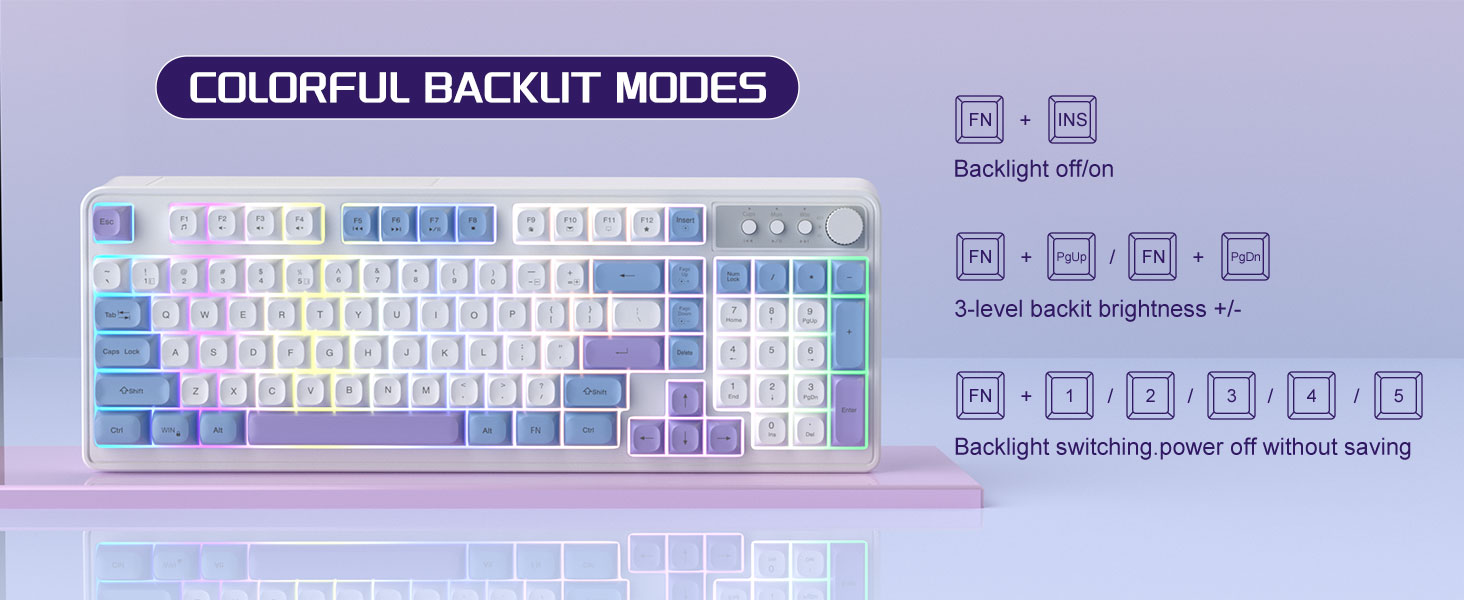
Image: The MageGee V560 keyboard displaying various colorful backlit modes, with instructions for controlling them.

Image: A visual representation of the 16 multimedia shortcuts available on the MageGee V560 keyboard, activated via the FN key.
מויז פאַנגקשאַנז
- דפּי אַדזשאַסטמאַנט: The mouse supports 6 levels of DPI adjustment (600-3200 DPI). Press the DPI button (usually located below the scroll wheel) to cycle through the sensitivity settings. Internal indicator lights will show the current DPI level.
- Breathing Backlight: The mouse features 7 dazzling color breathing backlights. This lighting is automatic and indicates mouse activity.

Image: The MageGee V560 mouse highlighting its DPI settings (1000, 1200, 1600 DPI) and showing the USB-C charging port.
טשאַרדזשינג און באַטאַרייע לעבן
- Both the keyboard and mouse are rechargeable. Use the provided USB-C charging cable to charge them.
- Keyboard Standby Time: אַרויף צו 365 טעג.
- Mouse Standby Time: אַרויף צו 270 טעג.
- אַוטאָ שלאָף פֿונקציע: The devices automatically enter sleep mode after a period of inactivity to conserve battery power and extend battery life.

Image: An illustration demonstrating the intelligent auto-sleep feature of the MageGee V560 combo, which conserves battery life.
קאַמפּאַטאַבילאַטי
The MageGee V560 Wireless Gaming Keyboard and Mouse Combo is compatible with the following operating systems:
- Win2000
- געווינען XP
- געווינען מיר
- וויסטאַ
- Win7
- Win8
- Win10
- אַנדרויד
- לינוקס
- מעק אַס
טראָובלעשאָאָטינג
If you encounter issues with your MageGee V560 combo, please refer to the following common solutions:
- אפאראט קאנעקט זיך נישט:
- זיכער מאַכן אַז דער USB ופנעמער איז זיכער אַרייַנגעשטעקט אין אַ אַרבעטנדיקן USB פּאָרט.
- באַשטעטיקן אַז ביידע די קלאַוויאַטור און מויז זענען אנגעצונדן.
- Check the battery levels of both devices and charge if necessary.
- פּרוּווט פּלאַגינג די וסב ופנעמער אין אַ אַנדערש וסב פּאָרט.
- פֿאַרהאַלטונג אָדער אָפּשטעל:
- Ensure the devices are within the 33 ft (10 meter) operating range of the USB receiver.
- מינימיזירן אריינמישונג פון אנדערע 2.4GHz וויירלעס דעוויסעס (למשל, Wi-Fi ראָוטערס, שנורלאָזע טעלעפאָנען).
- Charge the devices to ensure sufficient power.
- Keys Not Registering / Mouse Not Responding:
- Recharge the keyboard and mouse.
- Ensure the USB receiver is properly connected.
- ריסטאַרט דיין קאָמפּיוטער.
- פראבלעמען מיט באַקלייט:
- זייט זיכער אַז די קלאַוויאַטור איז אויפגעלאָדן.
- ניצן פן + ינס to toggle the backlight.
- אַדזשאַסטירן העלקייט מיט FN + בלאַט אַרויף/בלאַט אַראָפּ.
ספּעסאַפאַקיישאַנז
| סאָרט | MageGee |
| מאָדעל | V560 |
| קאַנעקטיוויטי טעכנאָלאָגיע | ווירעלעסס 2.4GHz |
| ספּעציעלע פֿעיִקייטן | RGB lighting, rechargeable keyboard and mouse, ergonomic design |
| קאַמפּאַטאַבאַל דעוויסעס | Personal Computer (Win2000, Win XP, Win ME, Vista, Win7, Win8, Win10, Android, Linux, Mac OS) |
| פּונקט וואָג | 1.87 פונט |
| פּעקל דימענשאַנז | 16.61 X 9.21 X 1.73 אינטשעס |
| פאַבריקאַנט | MAGEGEE |
וישאַלט
- רייניקונג: Use a soft, dry cloth to clean the keyboard and mouse. For stubborn dirt, a slightly damp מען קען ניצן אַ שטאָף, און זיכער מאַכן אַז קיין פליסיקייט גייט נישט אַרײַן אין דעם אַפּאַראַט.
- סטאָרידזש: האַלט די דעוויסעס אין אַ קיל, טרוקן אָרט אַוועק פון דירעקט זונשייַן און עקסטרעמע טעמפּעראַטורן.
- באַטערי זאָרגן: פֿאַרמײַדט אָפֿט פֿולשטענדיק אויסצולאָדן די באַטעריעס. לאָדט זיי אָפֿט אויף כּדי צו האַלטן די באַטעריע געזונט.
וואָראַנטי און שטיצן
דער פּראָדוקט קומט מיט אַ 1 יאָר וואָראַנטי פון די דאַטע פון קויפן.
For any questions or support needs, please contact MageGee customer service via Amazon email. We aim to respond within 12 hours and provide a satisfactory solution.


