1. הקדמה
This manual provides detailed instructions for the installation, operation, and maintenance of your YEEHUNG 12.3-inch Android 13 Car Multimedia Screen. This device is designed to enhance your driving experience by integrating advanced multimedia features into your Mercedes Benz E Class W212 (2012-2015) with an NTG4.5 OEM host system.
Please read this manual thoroughly before installation and use to ensure proper functionality and to prevent potential issues.
2. קאַמפּאַטאַבילאַטי
This multimedia screen is compatible with the following Mercedes-Benz models:
- Mercedes-Benz E Class W212 (2012-2015)
- Applicable to E180, E200, E220, E250, E260, E300, E320, E350, E63 AMG models.
- Requires NTG4.5 OEM host systems.
- Designed for left-hand drive vehicles.
וויכטיק: To confirm compatibility, please verify your car's NTG system version. Refer to Section 3.1 for guidance on identifying your NTG version.
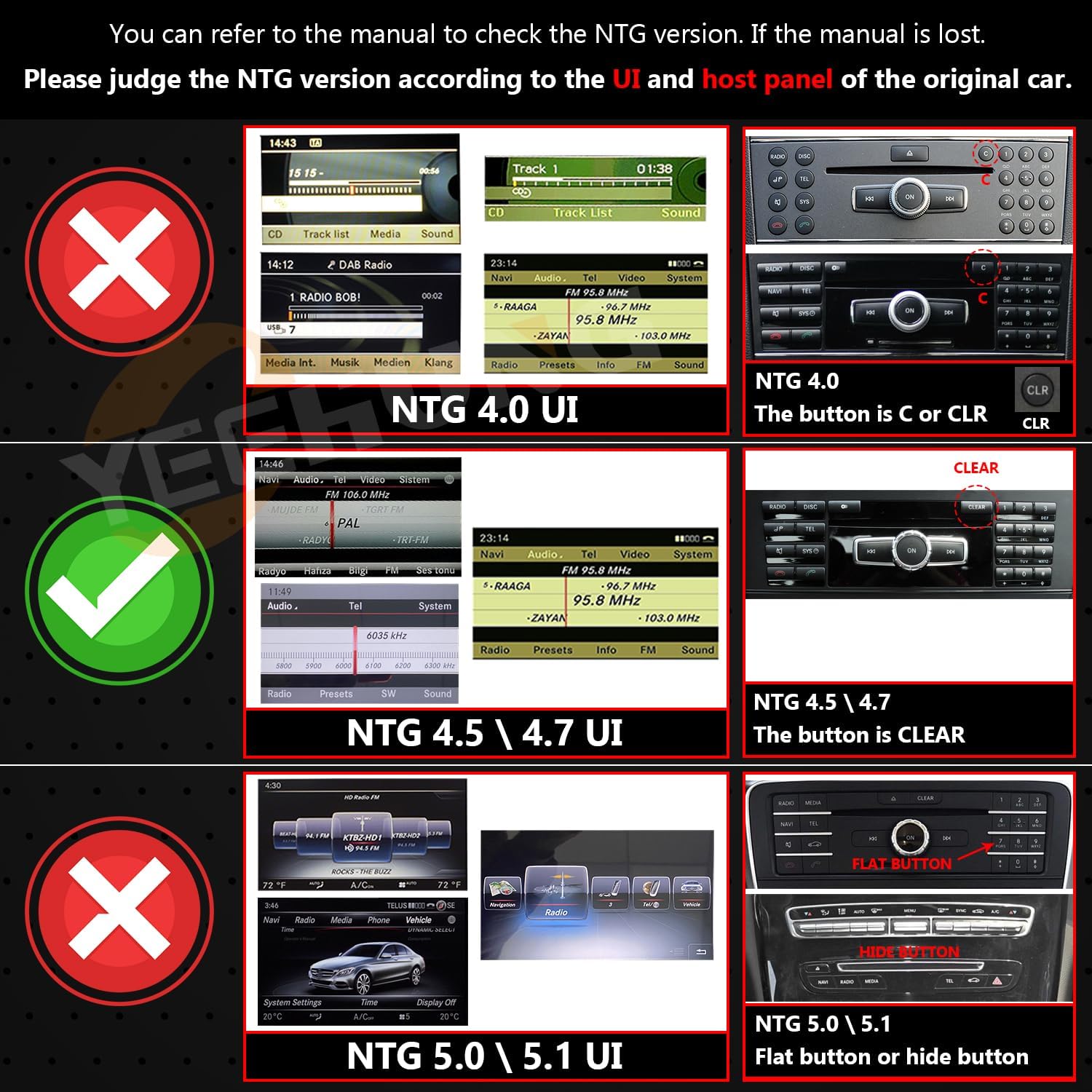
Image: Guide for identifying your car's NTG system version by comparing the user interface and host panel buttons. This image shows examples of NTG 4.0, NTG 4.5/4.7, and NTG 5.0/5.1 interfaces and corresponding buttons (C, CLR, CLEAR, Flat button, Hide button) to help determine compatibility.

Image: Detailed compatibility check for E Class W212 (2013-2015) NTG 4.5. It highlights the original car's interface, the 4-pin LVDS connector (not 10-pin), and the COMAND system knob with a 'CLEAR' button, indicating compatibility for four-door saloon cars.
3. סעטאַפּ און ייַנמאָנטירונג
Careful installation is crucial for optimal performance. It is recommended to consult a professional for installation if you are not familiar with car electronics.
3.1. פּעקל אינהאַלט
באַשטעטיקן אַז אַלע קאָמפּאָנענטן זענען פאַראַן אין דער פּאַקעט:

בילד: אן איבערview of the items included in the package, showing the main screen unit, a base, ISO wiring harness, RCA cable, 4G antenna, GPS antenna, microphone, AMI decoder, installation manual, and user manual.
- 1 x 12.3" Android Multimedia Screen
- 1 x באַזע
- 1 x ISO וויירינג כאַרניס
- 1 קס RCA קאַבלע
- 1 רענטגענ 4 ג אַנטענע
- 1 רענטגענ גפּס אַנטענע
- 1 x מיקראָפאָן
- 1 x AMI Decoder
- 1 רענטגענ ינסטאַללאַטיאָן מאַנואַל
- 1 x באַניצער מאַנואַל (דאָס דאָקומענט)
3.2. Precautionary Notes
- AUX Menu Activation: If your original NTG4.5 system does not have an AUX menu, you must activate it to obtain audio from the Android screen. This can be done by selecting the AMI cable or using the Audio out on the ISO cable to interface with the car's AUX jack, depending on your car's specific interface type.
- ינסטאַלירונג מאַנואַל: Always refer to the dedicated installation manual and videos provided for detailed step-by-step instructions.
- טעסט: After connecting all cables and devices, power on the Android unit and test all functions before reassembling any covers or panels.


Image: Visual guide showing the fiber optic connection, and how to connect the 'Audio out' from the new unit to either the car's AMI port or a standard AUX IN port, which is critical for sound output.
3.3. AUX Automatic Switching Settings (NTG 4.5/4.7)
For NTG4.5 and NTG4.7 systems with an original car AUX function, follow these steps to set up automatic AUX switching:
- In the original car's menu, navigate to the AUDIO section.
- Set the position of the AUDIO icon to '2'.
- Set the position of the AUX icon to '8'.
- In the Android unit's Factory Settings, select 'Automatic' for AUX Switching Modes.
- Ensure 'AUX Activate' is checked under the relevant settings.
- Configure 'CAN Protocol' and 'Car Display' settings according to your vehicle's specifications (e.g., BC_Protocol_type_4.5, NTG4.5_400x240_5.8).

Image: A four-panel image illustrating the steps for setting up automatic AUX switching for NTG 4.5/4.7 systems. It shows menu navigation for AUDIO and AUX positions, and settings within the Android unit's Factory Settings for AUX Switching Modes.


Image: Three separate images showing specific settings within the Android unit's interface: 'AUX Activate' checkbox, 'CAN Protocol' selection (highlighting BC_Protocol_type_4.5), and 'Car Display' options (highlighting NTG4.0/NTG4.5_800).
4. אַפּערייטינג ינסטרוקטיאָנס
Your YEEHUNG multimedia screen offers a range of features designed for convenience and entertainment.
4.1. הויפּט פֿונקציעס
- Wired and Wireless CarPlay: Connect your iPhone for navigation, music, messages, and calls.
- אַנדרויד אַוטאָ: Connect your Android phone for seamless integration of apps and services.
- Wireless Mirror Link: Display your smartphone screen directly on the multimedia unit.

Image: The 12.3-inch multimedia screen displaying the Apple CarPlay interface with various app icons like Car Home, Phone, Music, Messages, Calendar, Settings, Google Maps, WhatsApp, and Telegram.


Image: Three small images demonstrating the CarPlay, Android Auto, and Mirror Link functionalities on the screen, showing typical interfaces for each feature.
4.2. ווייַז פֿעיִקייטן
- 12.3" Blue Anti-Glare HD Screen: Provides a clear, non-reflective display, reducing eye fatigue and improving driving safety.
- רעזאלוציע: 1920x720 HD resolution for a more realistic and detailed visual experience.
- Multi-point Capacitive Touch: Responsive and intuitive touch control.
- IPS טעכנאָלאָגיע: Offers a 178° ultra-wide viewינג ווינקל.
- Automatic Backlight Adjustment: Adapts to ambient light conditions.

Image: A comparison illustrating the benefit of the anti-glare screen, showing a driver struggling with glare in an 'Old Style' screen versus a clear view with the 'New Style' anti-glare screen, emphasizing improved driving safety.

Image: Details the features of the fully laminated HD anti-glare screen, including its 12.3-inch size, 1920x720 resolution, IPS touch screen, 178° ultra-wide viewing angle, high color rendition, 4K video playback, and automatic backlight adjustment.
4.3. System Performance and Connectivity
- פּראַסעסער: 11 nm Qualcomm Snapdragon 662 8-core high-speed processor.
- זכּרון: 8GB RAM and 256GB internal storage for faster reaction speed and ample פּלאַץ.
- בלועטאָאָטה 5.0: Supports music playback and hands-free calling.
- געבויט-אין ווי-פי: Supports 2.4G and 5.0G networks.
- 4G Network Support: Built-in SIM card slot for high-speed internet access (North America TDD-LTE/FDD-LTE/WCDMA).
- Online Voice Control: Available after connecting to the network.

Image: Highlights key technical specifications including Qualcomm Snapdragon 662 processor, 8GB RAM, 256GB ROM, Android 13 operating system, Bluetooth 5.1, 4G network support, and the blue anti-glared 12.3-inch 1920x720 HD screen with IPS technology.

Image: Illustrates the high-speed internet capabilities with a built-in SIM card slot and 2.4G/5G WiFi support, enabling calls, internet browsing, video streaming, online music, and app downloads.
4.4. Integration with Original Car Functions
- Retains original car knob and steering wheel controls.
- Preserves original car radio and ampליפיער פאַנגקשאַנז.
- Supports original rear view camera and reverse trajectory.
- Compatible with factory and aftermarket cameras.
4.5. נאָך פֿעיִקייטן
- שפּאַלטן פאַרשטעלן: Run two applications simultaneously.
- Google פּלייַ סטאָר: Access and download a wide range of applications.
- מולטי-שפּראַך שטיצן: Operates in various languages.
5. וישאַלט
To ensure the longevity and optimal performance of your multimedia screen, follow these general maintenance guidelines:
- רייניקונג: ניצט אַ ווייכע, לינט-פֿרייע שטאָף צו רייניקן דעם עקראַן. פֿאַר שווערע פֿלעקן, ווישט לײַכט.ampווישט דעם שטאָף מיט וואַסער אָדער אַ פאַרשטעלן-זיכער רייניגער. פֿאַרמייַדט שטרענגע כעמיקאַלן אָדער אַברייסיוו מאַטעריאַלן.
- טעמפּעראַטור: Avoid exposing the device to extreme temperatures, both hot and cold, for extended periods.
- גשמיות שעדיקן: Protect the screen from direct impact or sharp objects.
- ווייכווארג דערהייַנטיקונגען: Periodically check for and install software updates to ensure the system runs efficiently and securely.
6. טראָובלעשאָאָטינג
If you encounter issues with your YEEHUNG multimedia screen, refer to the following common troubleshooting steps:
6.1. קיין קלאַנג פֿון אַנדרויד סיסטעם
- Check AUX Activation: Ensure the AUX menu is activated in your original NTG system and that the 'Audio out' from the Android unit is correctly connected to your car's AUX or AMI input. Refer to Section 3.2 and 3.3.
- באַנד לעוועלס: Verify that the volume on both the Android unit and your car's original audio system is turned up.
- קאַבלע קאַנעקשאַנז: Recheck all audio-related cable connections for secure fitment.
6.2. Screen Not Powering On
- מאַכט קאַנעקשאַנז: Ensure all power cables are securely connected to the unit and the vehicle's power source.
- פאָרמיטל צינדונג: Confirm the vehicle's ignition is on.
- פיוס טשעק: Inspect relevant fuses in your vehicle's fuse box.
6.3. CarPlay/Android Auto Not Connecting
- בלועטוט/וויי-פיי: Ensure Bluetooth is enabled on both your phone and the multimedia unit for initial pairing. For wireless connections, ensure Wi-Fi is also active.
- טעלעפאָן סעטטינגס: Check your phone's settings to ensure CarPlay or Android Auto is enabled and allowed to connect to new devices.
- USB קשר: For wired connections, try a different USB cable or port.
אויב די טריט לייזן נישט אייער פראבלעם, ביטע קאנטאקטירט קאסטומער סופארט.
7. ספּעסאַפאַקיישאַנז
| שטריך | באַשרייַבונג |
|---|---|
| פאַרשטעלן גרייס | 12.3 אינטשעס |
| ווייַז האַכלאָטע | 1920x720 |
| אָפּערייטינג סיסטעם | אַנדרויד 13 |
| פּראַסעסער | קוואַלקאָם סנאַפּדראַגאָן 662 (8-קאָר) |
| באַראַן | 8 גיגאבייט |
| אינערלעכער סטאָרידזש | 256 גיגאבייט |
| קאַנעקטיוויטי | Bluetooth 5.0, USB, Wi-Fi (2.4G & 5.0G), 4G (SIM slot) |
| ספּעציעלע פֿעיִקייטן | Touchscreen, Anti-Glare, CarPlay, Android Auto, Mirror Link, Split Screen |
| אַודיאָ רעזולטאַט מאָדע | AUX |
| מאַונטינג טיפּ | דאַשבאָרד בארג |
| פּונקט וואָג | 5.72 פונט |
| פּעקל דימענשאַנז | 16.1 X 8.2 X 7.1 אינטשעס |
8. וואָראַנטי און שטיצן
YEEHUNG is committed to providing quality products and customer satisfaction.
8.1. פּראָדוקט קוואַליטי
All products undergo strict screening to ensure high quality and unique aesthetics.
8.2. קונה שטיצן
If you have any questions or encounter problems, please contact our customer service team. Provide a clear description of your issue to facilitate a quick resolution. We aim to respond to all inquiries within 24 hours.
פֿאַר הילף, ביטע באַזוכט די YEEHUNG Store on Amazon or contact us directly through the platform where you purchased the product.


