1. וויכטיק סאַפעטי אינסטרוקציעס
ביטע ליינט און פארשטייט אלע זיכערהייט אינפארמאציע איידער איר ניצט דעם פראדוקט. נישט נאכפאלגן די אינסטרוקציעס קען רעזולטירן אין עלעקטרישן שאק, פייער, אדער ערנסטע שאדן.
- עלעקטריקאַל זיכערקייַט: Always ensure the charger is disconnected from the power outlet before making or breaking connections to the battery. Do not expose the charger to rain or wet conditions.
- באַטערי זיכערקייַט: Batteries can produce explosive gases. Ensure adequate ventilation when charging. Wear eye protection and protective clothing. Avoid sparks or flames near the battery.
- OBD2 Scanner Safety: Do not attempt to connect or disconnect the scanner while the vehicle's ignition is on or the engine is running. This could damage the vehicle's electronic system or the scanner.
- אַלגעמיינע פּריקאָשאַנז: Keep out of reach of children. Do not operate if the product or cables are damaged. Use only as intended.
2. פּראָדוקט איבערview
2.1 MOTOPOWER MP00205B 12V Battery Charger/Maintainer
The MOTOPOWER MP00205B is an automatic 12-volt battery charger and maintainer designed for lead-acid, flooded, or sealed maintenance-free batteries (AGM and gel cell). It features a compact and durable design, utilizing pulse charging technology to optimize battery performance and extend life. The charger incorporates multiple safety protections, including spark-free technology and automatic shut-off to prevent overcharging.

Figure 1: MOTOPOWER MP00205B 12V Battery Charger Maintainer in use.
2.2 MOTOPOWER MP69040 OBD2 Diagnostic Scanner
The MOTOPOWER MP69040 is an OBD2 diagnostic scanner designed to support all OBDII protocols, including KWP2000, J1850 VPW, ISO9141, J1850 PWM, and CAN. It is compatible with most 1996 US-based, 2003 EU-based, and 2008 Asian-based vehicles, as well as newer OBD2 and CAN vehicles. The scanner features a 2.8-inch TFT color screen and a user-friendly interface for efficient vehicle diagnostics.
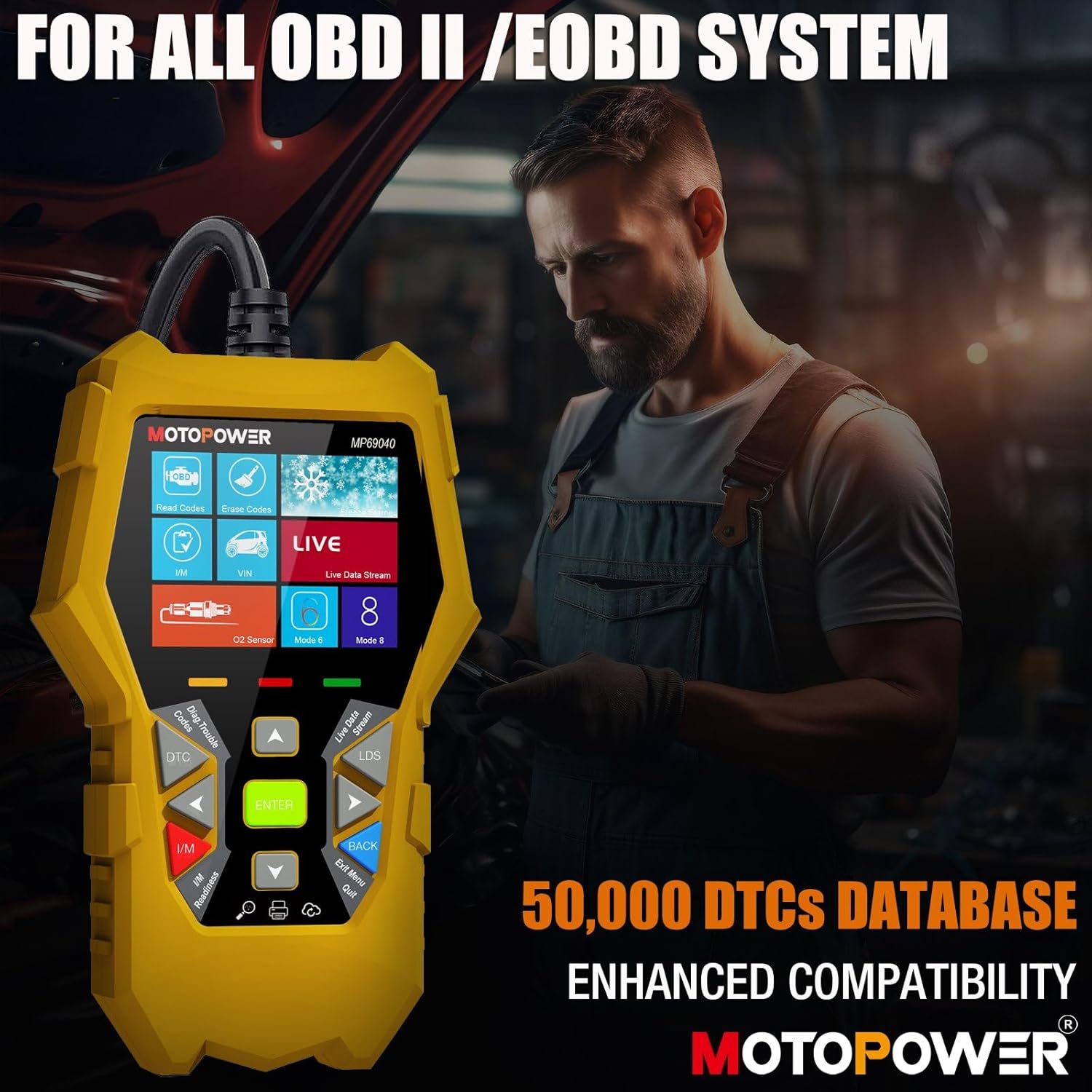
Figure 2: MOTOPOWER MP69040 OBD2 Diagnostic Scanner.
3. פּעקל אינהאַלט
באַשטעטיקן אַז אַלע זאכן זענען פאַראַן אין פּעקל:
- MOTOPOWER MP00205B 12V Battery Charger/Maintainer
- אַלאַגאַטאָר קלamp Harness (50amp)
- Ring Terminal Harness (7.5amp fuse protected)
- MOTOPOWER MP69040 OBD2 Diagnostic Scanner

Figure 3: MP00205B Charger and its accessories.
4. MOTOPOWER MP00205B Charger/Maintainer Setup and Operation
4.1 פֿאַרבינדן דעם טשאַרדזשער
- זיכער מאַכן אַז דער טשאַרדזשער איז אַרויסגעצויגן פֿון דער AC מאַכט ווענטיל.
- קלייַבן די צונעמען קאַנעקטער:
- אַלאַגאַטאָר קלamps: פאַרבינדן די רויט קלamp צו די positive (+) באַטאַרייע וואָקזאַל און די שוואַרץ קלamp צו די נעגאַטיוו (-) באַטאַרייע וואָקזאַל.
- רינג טערמינאַלס: If permanently installing, connect the red ring terminal to the positive (+) battery post and the black ring terminal to the negative (-) battery post.
- Connect the SAE quick-release connector from the chosen harness to the charger's output cable.
- Plug the charger into a standard 120V AC power outlet.
4.2 אויפלאָדן פּראָצעס
The MP00205B operates automatically. Once connected and powered, it will begin its multi-stagE טשאַרדזשינג פּראָצעס:
- Desulfating: If the battery is deeply discharged or sulfated, the charger may enter a desulfation stage to recover the battery.
- טשאַרדזשינג: The charger delivers a steady current to bring the battery to a full charge.
- אַבזאָרפּשאַן: The charger switches to a constant voltage, gradually reducing current as the battery approaches full capacity. This stage includes pulse charging technology to maximize battery performance.
- Charged/Maintain: Once fully charged, the charger automatically switches to maintenance mode, providing a float charge at 13.6V to keep the battery at optimal levels indefinitely without overcharging.
The LED indicators on the charger will show the current charging stage. The device features spark-free technology for enhanced safety during connection and disconnection.

Figure 4: Charger indicating Pulse Boost Technology and charging stages.

Figure 5: Charger displaying automatic operation and safety protections.
5. MOTOPOWER MP69040 OBD2 Scanner Setup and Operation
5.1 פֿאַרבינדן דעם סקאַנער
- Locate the vehicle's 16-pin Data Link Connector (DLC), typically under the dashboard on the driver's side.
- זיכער מאַכן אַז די איגנישאַן פונעם אויטאָ איז אויסגעלאָשן.
- Plug the scanner's OBD2 cable into the vehicle's DLC.
- דרייט די איגנישאַן פונעם אויטאָ צו דער "ON" פּאָזיציע (דער מאָטאָר קען זיין אויסגעלאָשן). דער סקאַנער וועט זיך אויטאָמאַטיש אָנצינדן.
5.2 יקערדיק פאַנגקשאַנז
The MP69040 scanner provides various diagnostic functions through its user-friendly interface:
- לייענען קאָודז: נעמט צוריק דיאַגנאָסטישע פּראָבלעם קאָודן (DTCs) פֿון די קאָמפּיוטער פֿון דעם פֿאָרמיטל.
- מעקן קאָדעס: רייניקט DTCs פון די פאָרמיטל'ס קאָמפּיוטער. באַמערקונג: אויסמעקן קאָודז פיקסט נישט דאָס אונטערלייגנדיקע פּראָבלעם.
- לעבן דאַטן: Displays real-time data streams from the vehicle's sensors, such as Engine RPM, Fuel Pressure, and more.
- I/M גרייטקייט: קאָנטראָלירט דעם סטאַטוס פון עמיסיע-פֿאַרבונדענע מאָניטאָרן צו באַשטימען צי די פאָרמיטל איז גרייט פֿאַר אַן עמיסיע טעסט.
- Vehicle Identification (VIN): Reads the Vehicle Identification Number and other vehicle information.
- DTC ביבליאָטעק: גיט דעפיניציעס פֿאַר אַלגעמיינע און פאַבריקאַנט-ספּעציפֿישע קאָודן.
- דערהייַנטיקן: Supports lifetime free online updates for the latest functions and vehicle compatibility.

Figure 6: MP69040 Scanner user interface.

Figure 7: Key features of the MP69040 Scanner.

Figure 8: Live Data display on the MP69040 Scanner.
6. וישאַלט
- רייניקונג: Wipe the devices with a soft, dry cloth. Do not use abrasive cleaners or solvents.
- סטאָרידזש: Store both the charger and scanner in a cool, dry place away from direct sunlight and extreme temperatures. Ensure cables are neatly coiled to prevent damage.
- קאַבלע דורכקוק: Regularly inspect all cables and connectors for any signs of damage, fraying, or corrosion. Replace if necessary.
7. טראָובלעשאָאָטינג
7.1 MP00205B Charger/Maintainer
- Charger not turning on: Check the AC power connection. Ensure the outlet is functional. Verify the battery connections are secure.
- טשאַרדזשינג אינדיקאַטאָר צינדט זיך נישט אָן: באַשטעטיקן די באַטאַרייע voltage is above 2V. If the battery is severely discharged, it might take a few minutes for the charger to detect it. Ensure proper polarity.
- Charger not maintaining charge: Ensure the charger remains connected to both the AC outlet and the battery. Check for any loose connections.
7.2 MP69040 OBD2 Scanner
- סקאַנער גייט נישט אָן: Ensure the OBD2 cable is securely connected to the vehicle's DLC. Verify the vehicle's ignition is in the ON position.
- קאָמוניקאַציע טעות: Check the vehicle's ignition status. Ensure the OBD2 cable is not damaged. Try connecting to a different vehicle (if available) to rule out a vehicle-specific issue. Verify the vehicle is OBDII compliant.
- פאַרפרוירן פאַרשטעלן: אָפּשטעקן דעם סקאַנער פֿונעם פֿאָרמיטל, וואַרטן אַ פּאָר סעקונדעס, און ווידער פֿאַרבינדן.
8. ספּעסאַפאַקיישאַנז
8.1 MOTOPOWER MP00205B Charger/Maintainer
| באַשרייַבונג | ווערט |
|---|---|
| אַרייַנשרייַב וואָלtage | 120V AC (Standard) |
| רעזולטאַט חלקtage | 12 וואלטס דק |
| רעזולטאַט קראַנט | 1000 מאַ (1 אַ) |
| קאַבלע לענג | Up to 8.5FT (18AWG UL standard) |
| זיכערקייַט פֿעיִקייטן | Spark-free, Overcharge Protection |
| סערטיפיקאַטיאָנס | סע, פקק, אַל |
8.2 MOTOPOWER MP69040 OBD2 Scanner
| באַשרייַבונג | ווערט |
|---|---|
| ווייַז | 2.8-אינטש טפט קאָליר פאַרשטעלן |
| שטיצט פּראָטאָקאָלס | KWP2000, J1850 VPW, ISO9141, J1850 PWM, CAN |
| פאָרמיטל קאָמפּאַטיביליטי | 1996 US-based, 2003 EU-based, 2008 Asian-based and newer OBD2/CAN vehicles (excluding new energy/hybrid) |
| DTC Database | 50,000+ קאָדן |
| שפּראַכן | 10 געבויט-אין שפּראַכן |
9. וואָראַנטי און שטיצן
MOTOPOWER products are designed for reliability and performance. For warranty information, technical support, or service inquiries, please contact MOTOPOWER customer support through their official website or the retailer where the product was purchased. Please have your product model number and purchase date available when contacting support.


