1. הקדמה
Thank you for choosing the ATTACK SHARK X85 Gasket Mechanical Keyboard. This manual provides detailed instructions on how to set up, operate, and maintain your new keyboard. Please read this manual thoroughly before use to ensure optimal performance and longevity of your device.

The ATTACK SHARK X85 Gasket Mechanical Keyboard, featuring a compact 75% layout with a multi-function knob.
2. פּעקל אינהאַלט
ביטע באַשטעטיקן אַז אַלע זאכן וואָס זענען ליסטעד אונטן זענען אַרייַנגערעכנט אין דיין פּעקל:
- ATTACK SHARK X85 Gasket Mechanical Keyboard
- וסב-C צו וסב-א קאַבלע
- 2.4 גהז ווירעלעסס ופנעמער
- Keycap and Switch Puller Tool
- Additional Keycaps (Purple accent keycaps)
- באַניצער מאַנואַל (דעם דאָקומענט)
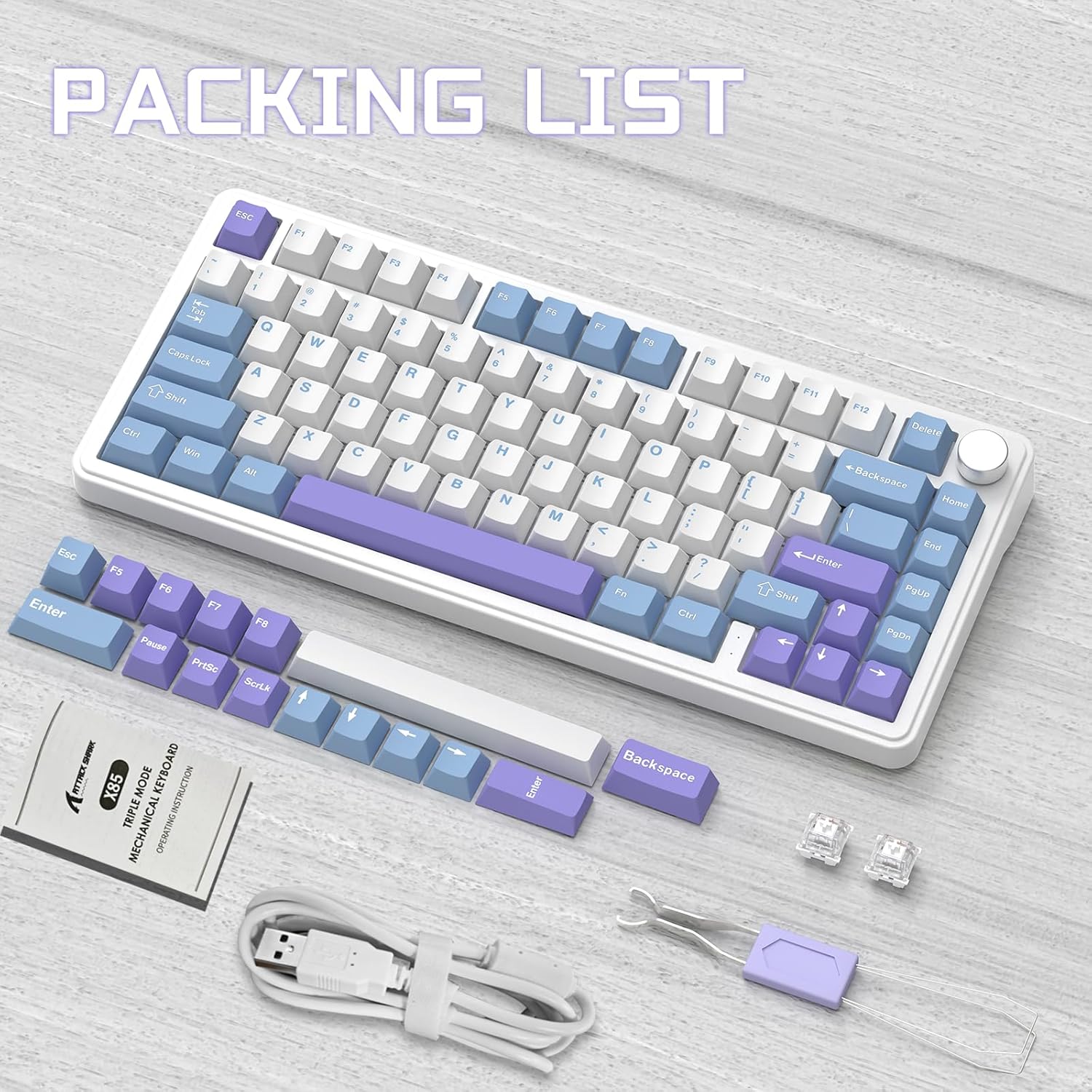
Contents of the ATTACK SHARK X85 keyboard package, including the keyboard, cables, tools, and extra keycaps.
3. פּראָדוקט איבערview
3.1 שליסל פֿעיִקייטן
- 75% קאָמפּאַקט אויסלייג: 81-key design maximizing desk space.
- טריי-מאָד קאַנעקטיוויטי: Supports Bluetooth 5.0, 2.4 GHz wireless, and USB-C wired connections.
- Gasket Mount Design: Five-layer sound and shock-absorbing internal padding (PORON foam, IXPE switch pad, PET sound enhancement pad, bottom silicone pad) for a soft, flexible typing feel.
- הייס-סוואַפּאַבל סוויטשיז: Compatible with most 3-pin mechanical switches for easy customization.
- מולטי-פונקציע קנעפּ: Controls computer volume and keyboard backlight settings.
- PBT שליסל קאַפּס: Durable, wear-resistant keycaps with thick walls.
- RGB באַקלייטונג: 19 RGB modes, 7 monochrome modes, and full-color backlight with adjustable speed and intensity. Customizable via software.
- 5000 מאַה באַטאַרייע: High-capacity battery for extended wireless use with auto-sleep power saving.
- 100% אַנטי-גהאָסטינג: Ensures all key presses are registered accurately during fast typing or gaming.
- ברייט קאַמפּאַטאַבילאַטי: Fully compatible with Windows and Mac operating systems.
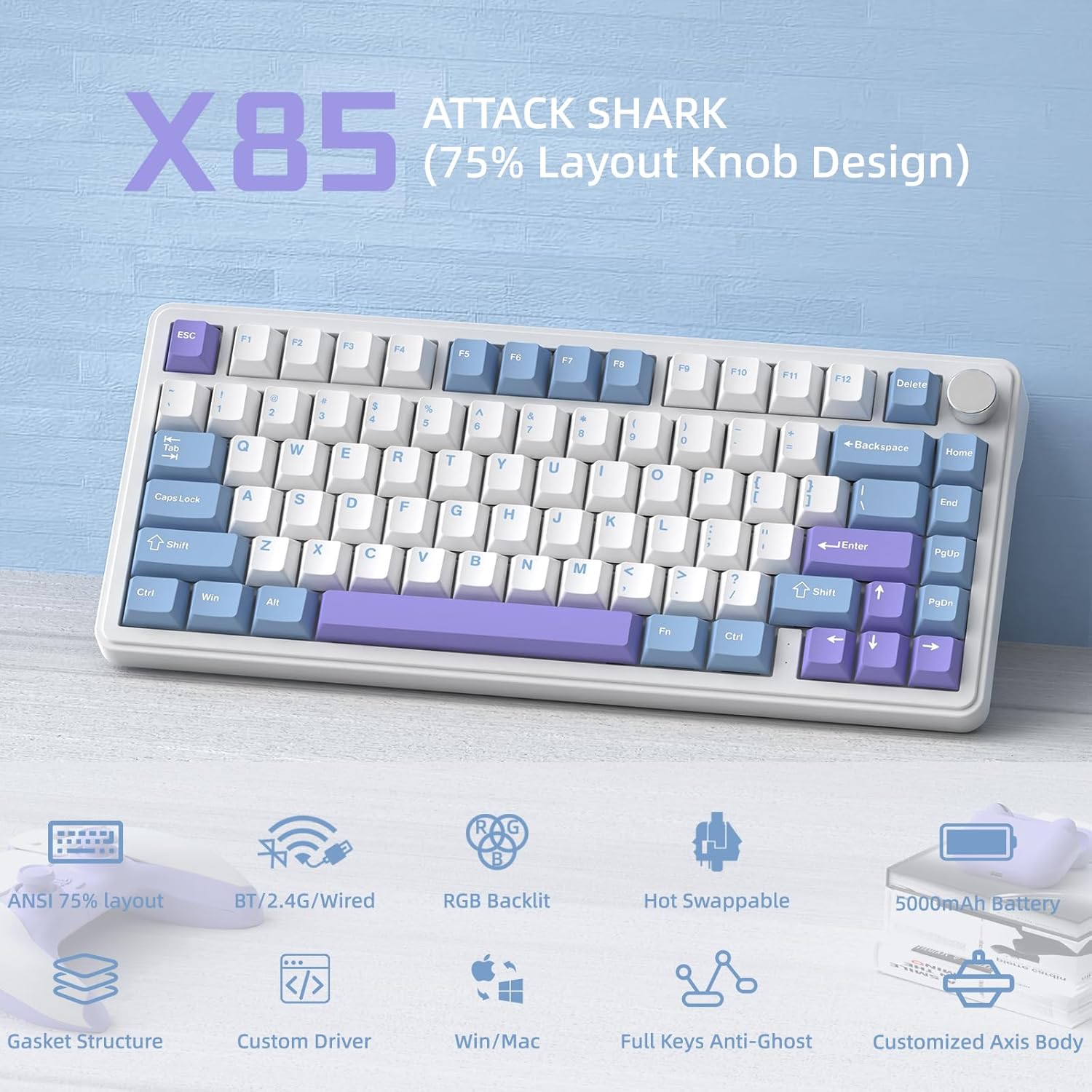
אַן איבערview of the ATTACK SHARK X85's key features, including its 75% layout, tri-mode connectivity, RGB lighting, and hot-swappable design.
3.2 Internal Structure (Gasket Mount)
The X85 features an advanced gasket mount design with multiple layers for enhanced acoustics and typing feel:
- קנופּ
- PBT Keycaps
- אויבערשטן קאָווער
- באַשטימען
- PC Horizontal Slotted Positioning Plate
- PORON Quilted Cotton
- IXPE Switch Pad
- PET Sound Enhancement Pad
- Single Key Slotted PCB
- Switch Seat Silencer Bottom Cotton
- סיליקאָנע פּאַד
- דנאָ קאַסע

Diagram illustrating the five-layer padding and gasket mount structure of the X85 keyboard, showing its various internal components.
4. סעטאַפּ
4.1 טריי-מאָד פֿאַרבינדונג
The ATTACK SHARK X85 keyboard supports three connection modes: Bluetooth, 2.4 GHz wireless, and USB-C wired. The connection mode can be easily switched using the toggle switch on the back of the keyboard.

Visual guide for connecting the ATTACK SHARK X85 keyboard via Bluetooth, 2.4G wireless, and USB-C wired modes.
4.1.1 בלועטאָאָטה קאַנעקשאַן
- Toggle the switch on the back of the keyboard to the "BT" position.
- לאנג דריקן Fn + Q, פן + וו, אָדער Fn + E for more than three seconds until the corresponding key's backlight flashes rapidly. This indicates pairing mode.
- On your device (computer, tablet, or smartphone), enable Bluetooth and search for "ATTACK SHARK X85".
- Select the keyboard to connect. Once connected, the key's backlight will stop flashing and remain solid.
- You can pair up to three Bluetooth devices and switch between them by pressing Fn + Q, פן + וו, אָדער Fn + E.
4.1.2 2.4 GHz דראָטלאָזע פֿאַרבינדונג
- Locate the 2.4 GHz wireless receiver (dongle) in the package.
- Toggle the switch on the back of the keyboard to the "2.4G" position.
- Plug the 2.4 GHz wireless receiver into an available USB port on your computer.
- The keyboard should automatically connect. If not, ensure the receiver is properly inserted and the keyboard is in 2.4G mode.
4.1.3 USB-C ווייערד קאנעקשאן
- Toggle the switch on the back of the keyboard to the "Line" (wired) position.
- פֿאַרבינדט איין עק פֿון דעם צוגעשטעלטן USB-C קאַבל צום קלאַוויאַטור'ס USB-C פּאָרט.
- Connect the other end of the USB-A cable to an available USB port on your computer.
- The keyboard will be recognized as a standard USB keyboard and is ready for use.
4.2 אָפּערייטינג סיסטעם קאָמפּאַטיביליטי
The ATTACK SHARK X85 keyboard is fully compatible with both Windows and Mac operating systems. Use the toggle switch on the back of the keyboard to select between "Win" and "Mac" modes for optimal key mapping.
5. אַפּערייטינג ינסטרוקטיאָנס
5.1 Multi-Function Rotary Knob
The knob on the top right of the keyboard serves multiple functions, controlling both volume and backlight settings.

Instructions for using the multi-function rotary knob to control lighting and sound settings on the X85 keyboard.
- באַשטימען מאָדעס: Press and hold the knob for more than three seconds to switch between Light Mode and Sound Mode.
- ליכט מאָדע:
- Press once to cycle through different backlight modes.
- Turn left to decrease backlight brightness.
- Turn right to increase backlight brightness.
- געזונט מאָדע:
- Press once to play/mute audio.
- Turn left to decrease volume.
- Turn right to increase volume.
5.2 RGB באַקלייטונג קאַסטאַמייזיישאַן
The X85 keyboard offers extensive RGB lighting options. You can adjust settings directly on the keyboard or through the dedicated software.
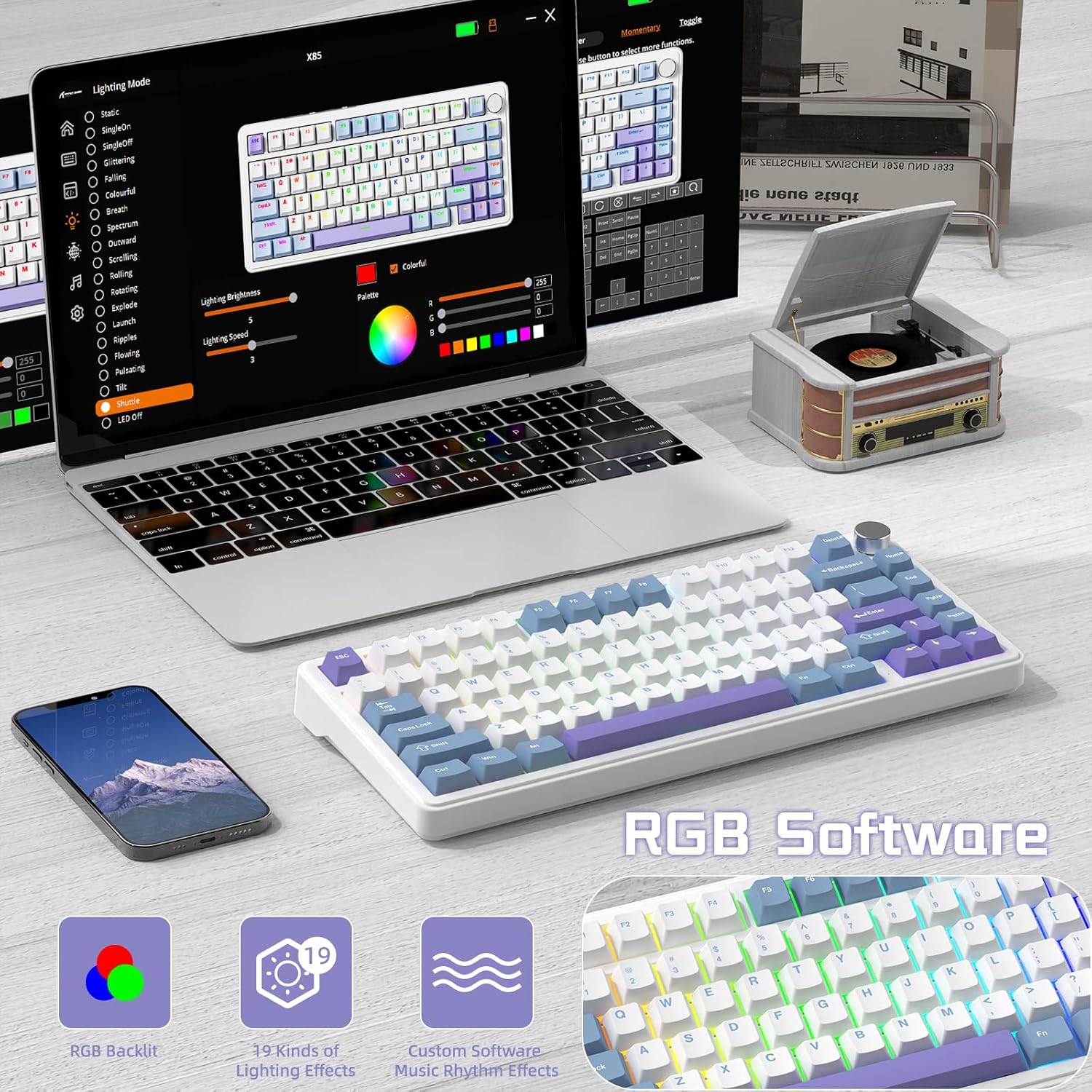
The software interface for customizing RGB lighting and other settings on the ATTACK SHARK X85 keyboard.
- On-Keyboard Controls:
- Use the knob in Light Mode to cycle modes and adjust brightness.
- Refer to the keyboard's quick function keys (usually Fn combinations) for additional lighting effects and speed adjustments.
- ווייכווארג קוסטאָמיזאַטיאָן:
- Download the official ATTACK SHARK software from the manufacturer's webפּלאַץ.
- The software allows for advanced customization of RGB effects, colors, speed, and brightness. It may also offer key remapping and macro creation.
- Note: The software may default to Chinese. Please navigate to settings within the software to change the language to English if needed.
5.3 הייס-סוואַפּאַבל סוויטשיז
The X85 features a hot-swappable PCB, allowing you to easily change mechanical switches without soldering. This enables customization of your typing experience.

Demonstration of the hot-swappable feature of the X85 keyboard, showing how switches can be easily removed and replaced.
- אַראָפּנעמען שליסל-קאַפּ: Use the keycap puller tool to gently remove the desired keycap.
- אַראָפּנעמען סוויטש: Use the switch puller tool to grasp the top and bottom clips of the switch and gently pull it straight up.
- אריינשטעלן נייעם סוויטש: Align the pins of the new 3-pin mechanical switch with the holes on the PCB. Gently push the switch straight down until it clicks into place. Ensure the pins are not bent.
- פאַרבייַטן קלאַוויאַטור: לייג צוריק דעם קלאַוויאַטור אויף דעם נייעם סוויטש סטעם.
The X85 supports 3-pin mechanical switches. Ensure the replacement switches are compatible to avoid damage.
5.4 100% Anti-Ghosting
The keyboard features 100% anti-ghosting, meaning all simultaneous key presses are registered accurately, which is crucial for fast-paced gaming and typing.
6. וישאַלט
6.1 רייניקן דיין קלאַוויאַטור
- אָפּשטעקן די קלאַוויאַטור פֿון אייער קאָמפּיוטער איידער איר רייניקט.
- ניצט אַ קאַן מיט קאַמפּרעסט לופט צו בלאָזן אַוועק שטויב און דעבריס פון צווישן די קלאַוויאַטורן.
- For surface cleaning, gently wipe the keycaps and chassis with a soft, slightly damp, א לינט-פֿרײַער שטאָף. פֿאַרמײַדט איבעריקע פֿײַכטקייט.
- ניצט נישט קיין שטרענגע כעמיקאלן, אברייסיוו רייניגער, אדער סאָלווענטן.
6.2 באַטערי קער
The X85 keyboard is equipped with a 5000mAh high-capacity battery. To maximize battery life and performance:

Battery life estimates for the ATTACK SHARK X85 keyboard: 35 hours with backlight on, 75 hours with backlight off.
- טשאַרדזש די קלאַוויאַטור גאָר איידער ערשטער נוצן.
- When the battery is low, connect the USB-C cable to charge.
- The keyboard features an auto-sleep power saving technology to conserve battery when idle.
- ויסמיידן יקספּאָוזינג די קלאַוויאַטור צו עקסטרעם טעמפּעראַטורעס.
7. טראָובלעשאָאָטינג
| פּראָבלעם | מעגלעך לייזונג |
|---|---|
| קלאַוויאַטור פֿאַרבינדט זיך נישט דורך בלוטוט. |
|
| 2.4 GHz wireless connection is unstable or not working. |
|
| די קנעפלעך רעאגירן נישט אדער טייפן נישט ריכטיג. |
|
| RGB backlighting is not working or behaving unexpectedly. |
|
| Multi-function knob is not responding. |
|
8. ספּעסאַפאַקיישאַנז
| שטריך | דעטאַל |
|---|---|
| סאָרט | באַפאַלן שאַרק |
| מאָדעל | X85 |
| אויסלייג | 75% (81 שליסלען) |
| קאַנעקטיוויטי | Bluetooth 5.0, 2.4 GHz Wireless, USB-C Wired |
| באַטאַרייע קאַפּאַציטעט | 5000 מאַה |
| קייקאַפּ מאַטעריאַל | פּבט (פּאַליבוטילענע טערעפטהאַלאַטע) |
| באַשטימען טיפּ | Hot-swappable (supports 3-pin mechanical switches) |
| באַקלייט | RGB (19 modes, 7 monochrome, full color) |
| אַנטי-גהאָסטינג | 100% אַנטי-גאָוסטינג |
| קאַמפּאַטאַבילאַטי | Windows, Mac |
| פּונקט וואָג | 1.03 קג |
| פּעקל דימענשאַנז | 35.6 X 18.6 X 4.9 סענטימעטער |
9. וואָראַנטי און שטיצן
The ATTACK SHARK X85 Gasket Mechanical Keyboard comes with a standard manufacturer's warranty. Please refer to the warranty card included in your package or visit the official ATTACK SHARK webזייטל פֿאַר דעטאַלירטע וואָראַנטי טערמינען און באדינגונגען.
For technical support, troubleshooting assistance, or any inquiries regarding your product, please contact ATTACK SHARK customer service through their official webפּלאַץ אָדער די קאָנטאַקט אינפֿאָרמאַציע צוגעשטעלט מיט דיין קויפן.


