1. הקדמה
The LTC GM022 is an ultralight 3-mode wireless gaming mouse designed for precision and versatility. It features a high-performance PAW3395 sensor, multiple connectivity options, and a convenient RGB charging dock. This manual provides instructions for setting up, operating, maintaining, and troubleshooting your GM022 mouse.
פּעקל אינהאַלט
- LTC GM022 Gaming Mouse
- רגב טשאַרדזשינג דאָק
- וסב- C קאַבלע
- 2.4G USB Receiver (stored in mouse)

LTC GM022 Wireless Gaming Mouse with RGB Charging Dock and 2.4G USB Receiver.
2. סעטאַפּ און קאַנעקטיוויטי
The LTC GM022 mouse offers three connectivity modes: 2.4GHz wireless, Bluetooth 5.0, and wired USB-C. Select the mode that best suits your needs.

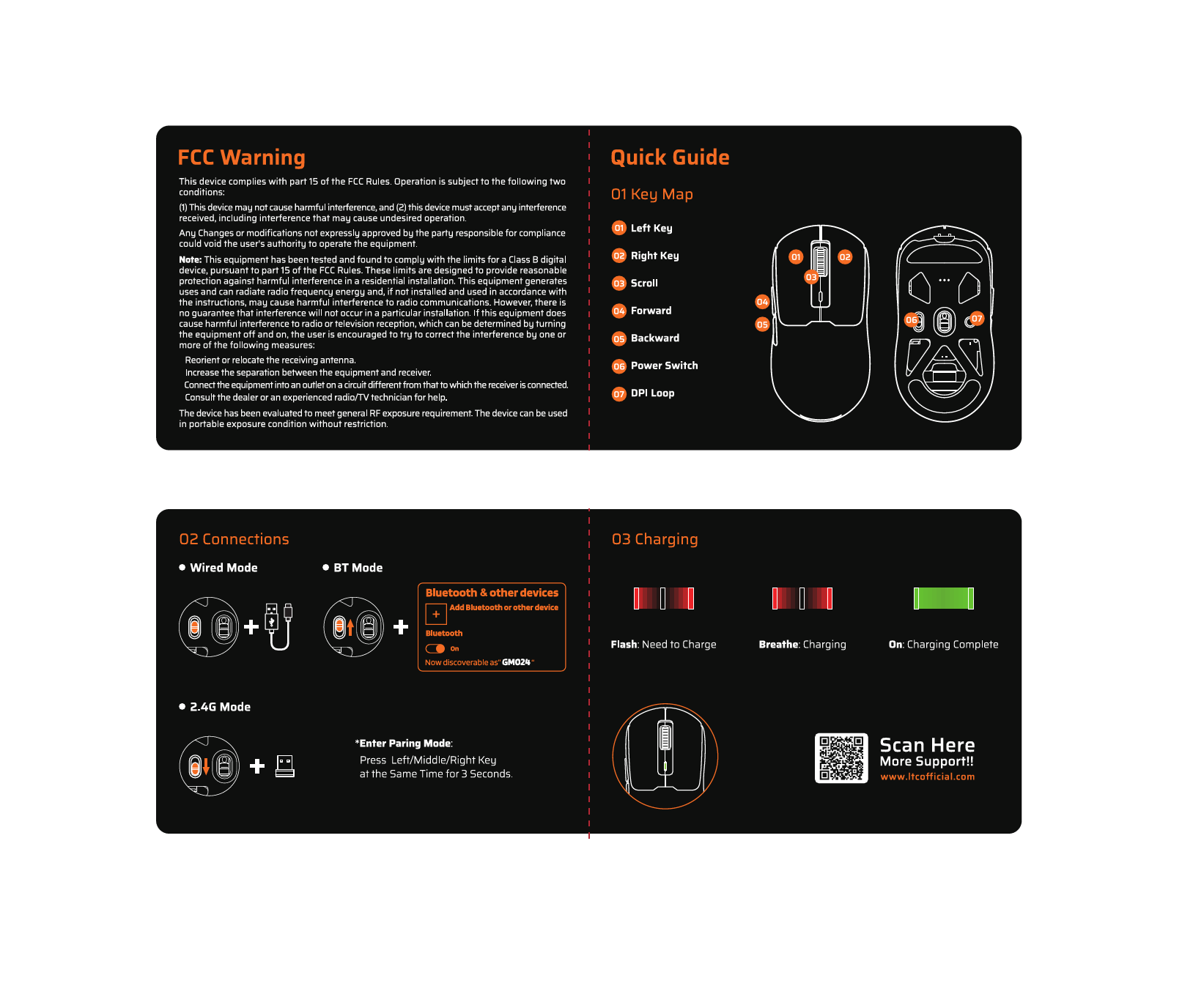
Diagram illustrating the three connectivity modes: 2.4GHz wireless, Bluetooth 5.1, and USB-C wired connection.
2.1. 2.4GHz ווירעלעס מאָדע
- Locate the 2.4G USB receiver stored in the compartment on the underside of the mouse.
- צאַפּן די וסב ופנעמער אין אַ בנימצא וסב פּאָרט אויף דיין קאָמפּיוטער.
- רוקט דעם מאָדע סוויטש אויף דער אונטערשטער טייל פון דער מויז צו דער "2.4G" פּאָזיציע.
- די מויז זאָל זיך אויטאָמאַטיש פֿאַרבינדן צו דיין קאָמפּיוטער.
2.2. בלועטוט 5.0 מאָדע
- רוקט דעם מאָדע סוויטש אויף דער אונטערשטער טייל פון דער מויז צו דער "BT" פּאָזיציע.
- אויף אייער קאָמפּיוטער אָדער מיטל, עפֿנט די בלועטוט סעטטינגס און זוכט פֿאַר נײַע דעוויסעס.
- Select "LTC GM022" from the list of available devices to pair.
2.3. ווייערד יו-עס-בי-סי מאָדע
- Connect the provided USB-C cable to the front port of the mouse.
- פֿאַרבינדט דעם אַנדערן עק פֿונעם USB-C קאַבל צו אַ פֿאַראַן USB פּאָרט אויף אײַער קאָמפּיוטער.
- די מויז וועט פונקציאָנירן אין דראָט מאָדע און וועט זיך אויפלאָדן סיימאַלטייניאַסלי.

Underside of the LTC GM022 mouse with labels for mode switch, dongle storage, PTFE feet, and DPI loop button.
3. אַפּערייטינג ינסטרוקטיאָנס
3.1. קנעפּל פאַנגקשאַנז
The LTC GM022 mouse features 5 programmable buttons:
- לינק קליקט: ערשטיקע אַקציע.
- רעכט גיט: צווייטיקע אַקציע/קאָנטעקסט מעניו.
- מיטל קליק (סקראָל ראָד): Scroll up/down, click for universal scroll or other assigned function.
- פֿאָרווערטס קנעפּל: נאַוויגירט פאָרויס אין web בראַוזערז אָדער file עקספּלאָרערס.
- צוריק קנעפּל: נאַוויגירט צוריק אין web בראַוזערז אָדער file עקספּלאָרערס.

Illustration of the LTC GM022 mouse highlighting its five programmable buttons and their default assignments.
3.2. דפּי אַדזשאַסטמאַנט
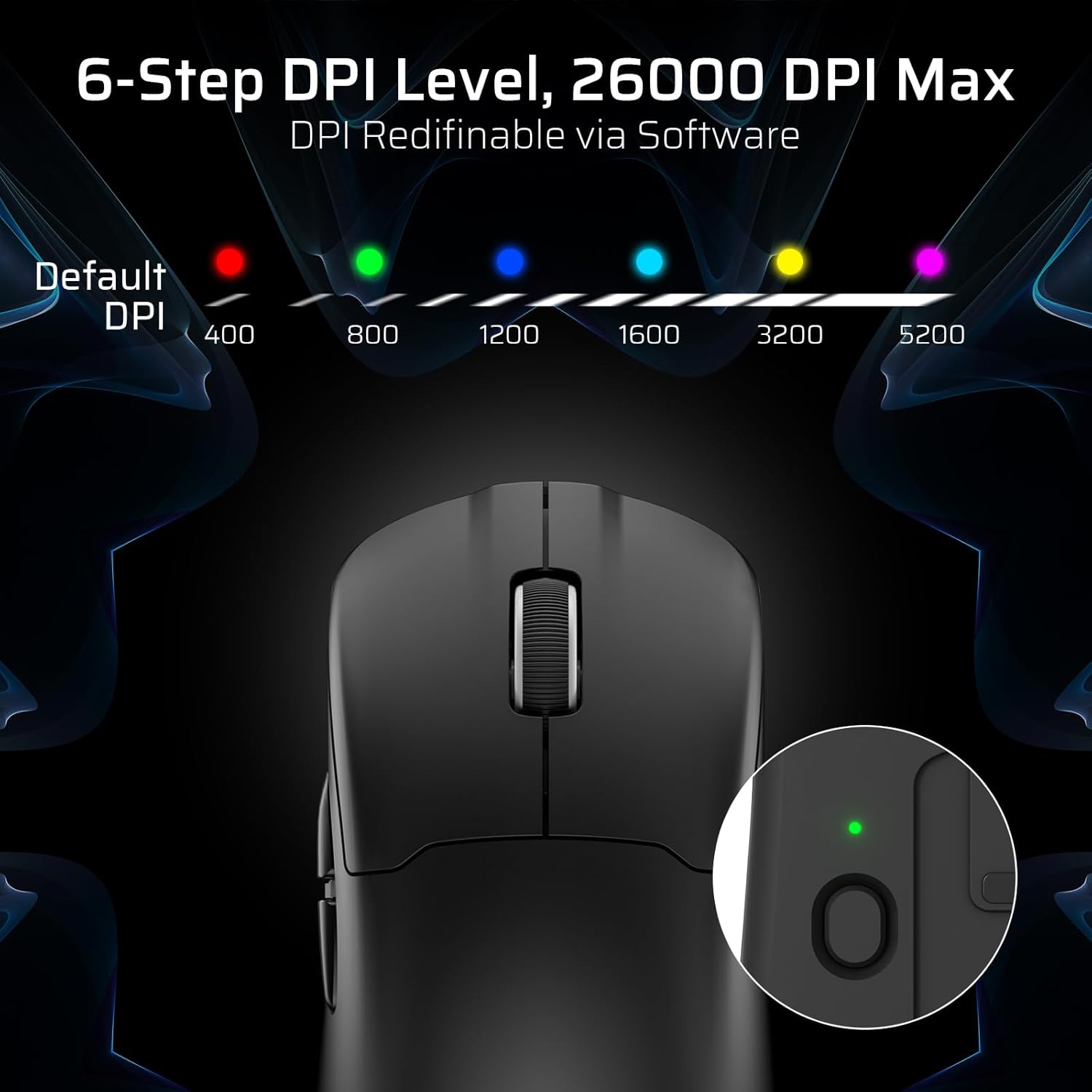
The mouse has a dedicated DPI button on its underside, allowing you to cycle through 6 preset DPI levels. Each level is indicated by a different LED color:
- 400 DPI (רויט)
- 800 DPI (גרין)
- 1200 DPI (בלוי)
- 1600 DPI (ציאַן)
- 3200 DPI (געל)
- 5200 DPI (Magenta)
These DPI levels can be further customized and redefined up to 26000 DPI using the LTC software.

Visual representation of the 6-step DPI levels (400, 800, 1200, 1600, 3200, 5200) and the corresponding LED indicator colors.
3.3. ווייכווארג קאַסטאַמייזיישאַן
Download and install the official LTC software from the manufacturer's website to unlock full customization options. The software allows you to:
- Assign macros to buttons.
- Remap key functions.
- Redefine 6-step DPI levels up to 26000 DPI.
- Adjust polling rate (up to 1000Hz).
- Modify click and scroll speed.
- מאָניטאָרירן די באַטאַרייע סטאַטוס.

Screenshot of the LTC software interface for customizing mouse settings, including key assignments, DPI, polling rate, and battery monitoring.
4. אויפלאָדן די מויז
The LTC GM022 mouse is equipped with a 400mAh battery and can be charged using the included magnetic RGB charging dock or directly via the USB-C cable.
4.1. Using the Magnetic Charging Dock
- פֿאַרבינדט דעם USB-C קאַבל צום טשאַרדזשינג דאָק און דערנאָך צו אַ מאַכט מקור (למשל, קאָמפּיוטער USB פּאָרט, USB וואַנט אַדאַפּטער).
- Place the mouse onto the charging dock. The magnetic connection will secure it in place, and charging will begin automatically.
- The RGB lighting on the dock will indicate charging status.
4.2. Direct USB-C Charging
- פֿאַרבינדט דעם USB-C קאַבל גלייך צום מויז'ס פֿראָנט פּאָרט.
- פאַרבינדן די אנדערע סוף פון די וסב-C קאַבלע צו אַ מאַכט מקור.
- די מויז קען גענוצט ווערן אין דראָט מאָדע בשעת'ן אויפלאָדן.

The LTC GM022 mouse magnetically charging on its RGB illuminated dock, indicating a 400mAh battery.
5. וישאַלט און קער
To ensure the longevity and optimal performance of your LTC GM022 mouse, follow these maintenance guidelines:
- רייניקונג: ניצט אַ ווייכע, טרוקענע שטאָף צו ווישן די מויז ייבערפלאַך. פֿאַר שווערע שמוץ, אַ ביסל ווייכער מאַכןampווישט דעם שטאָף מיט וואַסער אָדער אַ מילדער רייניקונג לייזונג. פֿאַרמייַדט שטרענגע כעמיקאַלן אָדער אַברייסיוו מאַטעריאַלן.
- סענסאָר זאָרגן: האַלט דעם אָפּטישן סענסאָר אויף דער אונטערשטער זייט פון דער מויז ריין און פריי פון שטויב אָדער דעבריס צו האַלטן די טראַקינג אַקיעראַסי.
- PTFE פֿיס: The mouse comes with durable PTFE feet for smooth gliding. If they show significant wear, replacement feet may be available from the manufacturer.
- סטאָרידזש: ווען נישט אין באַנוץ פֿאַר לענגערע פּעריאָדן, האַלט די מויז אין אַ ריינער, טרוקענער סביבה.
Close-up of the mouse's underside, detailing the PTFE feet for smooth gliding and the inclusion of backup feet.
6. טראָובלעשאָאָטינג
If you encounter issues with your LTC GM022 mouse, refer to the following common problems and solutions:
| פּראָבלעם | מעגלעך לייזונג |
|---|---|
| Mouse not responding in 2.4G wireless mode | Ensure the USB receiver is securely plugged in. Check if the mouse mode switch is set to "2.4G". Try a different USB port. Ensure the mouse battery is charged. |
| Mouse not connecting via Bluetooth | Ensure the mouse mode switch is set to "BT". Make sure Bluetooth is enabled on your device. Remove previous pairings and re-pair the mouse. Ensure the mouse battery is charged. |
| מויז לאָדט זיך נישט אויף | Ensure the USB-C cable is properly connected to both the dock/mouse and the power source. Verify the power source is active. Clean the charging contacts on the mouse and dock. |
| נישט פּינקטלעכע טראַקינג אָדער קורסאָר לעג | Clean the optical sensor on the underside of the mouse. Ensure you are using the mouse on a suitable surface (e.g., a mouse pad). Check for interference in wireless modes. Adjust DPI settings. |
| קנעפּלעך נישט ריספּאַנדינג | Ensure the mouse is powered on and connected. If using software, check button assignments. Try restarting your computer. |
If the issue persists after trying these solutions, please contact LTC customer support for further assistance.
7. ספּעסאַפאַקיישאַנז
Key technical specifications for the LTC GM022 Ultralight 3-Mode Wireless Gaming Mouse:
- מאָדעל: GM022
- קאַנעקטיוויטי: 2.4GHz ווירעלעס, בלועטוט 5.0, USB-C מיט ווייערס
- סענסאָר: פּיקסאַרט PAW3395 אָפּטישער סענסאָר
- מאַקסימום דפּי: 26000 DPI (6-step re-definable via software)
- פּאָללינג קורס: 1000 הז
- טראַקינג גיכקייַט: 650 יפּס
- אַקסעלעריישאַן: 50G
- קנעפּלעך: 5 פּראָגראַממאַבלע קנעפּלעך
- באַשטימען לעבן: 80 מיליאָן קליקס
- באַטערי: 400 מאַה ליטהיום פּאָלימער
- וואָג: בעערעך 55 גראַמז (2.01 אונסעס)
- דימענסיעס: 4.7 X 2.44 X 0.04 אינטשעס
- ספּעציעלע פֿעיִקייטן: RGB Charging Dock, Ultralight Design, PTFE Feet

דעטאַילעד view of the PixArt PAW3395 sensor specifications including 26K DPI Max, 1000Hz Polling Rate, 650 IPS Tracking Speed, and 50G Acceleration.

Illustration highlighting the durable switches with an 80 million click lifespan.
8. וואָראַנטי און שטיצן
LTC products are designed and manufactured to the highest quality standards. For information regarding warranty coverage, technical support, or to download the latest software and drivers, please visit the official LTC webפּלאַץ אָדער קאָנטאַקט זייער קונה סערוויס אָפּטיילונג.
האַלט אייער קויף קוויטל ווי אַ באַווייַז פון קויפן פֿאַר וואָראַנטי קליימז.