1. הקדמה
The Mastech MS5908A Circuit Analyzer is a professional-grade instrument designed for comprehensive electrical circuit testing. It provides accurate measurements for AC voltage, impedance, frequency, and performs critical RCD and GFCI tests, ensuring electrical safety and proper circuit functionality. This manual provides detailed instructions for the safe and effective use of your MS5908A.

פיגורע 1: פראָנט view of the Mastech MS5908A Circuit Analyzer, showing the LCD display and control buttons.
2. זיכערקייַט אינפֿאָרמאַציע
WARNING: Always read and understand all safety warnings and instructions before using this instrument. Failure to follow these instructions may result in electric shock, fire, or serious injury.
- זיכער מאַכן אַז די דעווייס איז פּאַסיק פֿאַר די באַנדtage and current levels of the circuit being tested. The MS5908A is designed for 110V US plug systems.
- ניצט נישט דעם אפאראט אויב עס קוקט אויס צעבראכן אדער ארבעט נישט גוט.
- Always wear appropriate personal protective equipment (PPE), such as insulated gloves and safety glasses, when working with electrical circuits.
- Do not operate the device in wet conditions or in explosive atmospheres.
- Verify the correct connection of the device before initiating any test.
- Keep hands and fingers away from live terminals.
- Only qualified personnel should perform electrical testing.
3. וואָס איז אין דער קעסטל
ביים עפענען דעם פעקל, ביטע זיכער מאכן אז אלע זאכן וואס זענען אויסגערעכנט אונטן זענען דא און אין גוטן צושטאנד:
- 1 x Mastech MS5908A Circuit Analyzer
- 2 x LR44 batteries (included)
- 1 x Power Cord / Carry Bag (as indicated in packaging information)
- 1 x קאַלאַבריישאַן סערטיפיקאַט
- 1 x שנעל אָנהייב גייד
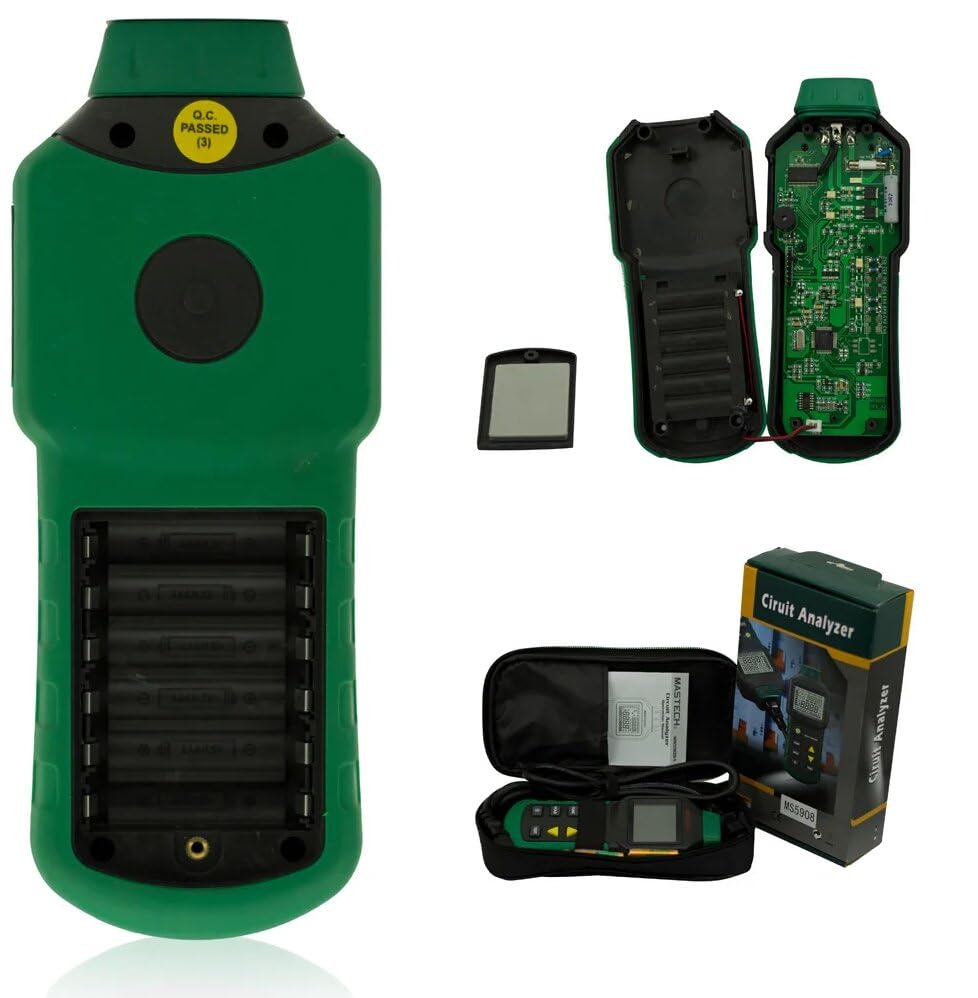
Figure 2: Contents of the Mastech MS5908A package, including the device, battery compartment, and carry case.

Figure 3: Diagram illustrating the packaging and included accessories for the MS5908A.
4. סעטאַפּ
4.1 באַטאַרייע ייַנמאָנטירונג
- Locate the battery compartment on the back of the MS5908A unit.
- עפענען די באַטאַרייע אָפּטייל דעקן.
- Insert the 2 LR44 batteries, ensuring correct polarity (+ and -).
- פאַרמאַכן די באַטאַרייע אָפּטייל דעקן סיקיורלי.
4.2 ערשט מאַכט אויף
Press the power button (usually marked with a circle and vertical line) to turn on the device. The LCD display should illuminate.
5. אַפּערייטינג ינסטרוקטיאָנס
The MS5908A offers various testing functions accessible via its control buttons. Familiarize yourself with the display and button layout.
5.1 אַלגעמיינע אָפּעראַציע
- מאַכט קנעפּל: טוט אָן/אויס דעם אַפּאַראַט.
- FUNC קנעפּל: Cycles through different measurement modes (e.g., Voltage, Frequency, Impedance).
- האַלטן קנעפּל: איינפֿרירט די איצטיקע לייענונג אויף דער אַרויסווייַזונג. דריק ווידער צו באַפֿרײַען.
- באַקלייט קנעפּל: Toggles the display backlight ON/OFF for better visibility in low light conditions.
- TEST קנעפּל: Initiates specific tests like RCD or GFCI.
- פײַל קנעפּלעך (אַרויף/אַראָפּ): Used for navigation or adjusting parameters in certain modes.
5.2 מעאַסורינג אַק וואַלtage (TRMS)
- Plug the MS5908A into the standard US wall socket (110V).
- Ensure the device is in AC Voltage measurement mode (use FUNC button if necessary).
- The display will show the True RMS AC VoltagE לייענען.
5.3 Artificial Load Testing (Wire Drop Measurement)
The MS5908A (US plug version) supports artificial load testing at 12A, 15A, and 20A to measure wire drop.
- Plug the device into the circuit to be tested.
- Select the artificial load test mode using the FUNC button.
- Use the arrow buttons to select the desired load (12A, 15A, or 20A).
- Press the TEST button to initiate the load and measure the voltagאון קאַפּ.
5.4 Measuring Phase Voltage, Neutral Wire, Voltage to Earth, and Frequency
The device can analyze various aspects of the electrical supply:
- Plug the MS5908A into the socket.
- Cycle through the FUNC button to display readings for:
- פאַסע וואָלtage (Live to Neutral)
- Neutral Wire Voltage (Neutral to Earth)
- Voltage to Earth (Live to Earth)
- אָפטקייַט (הז)
5.5 Measuring Phase (Live Wire), Neutral Wire, Earth Wire Conductor Impedance
- Plug the MS5908A into the socket.
- Select the impedance measurement mode using the FUNC button.
- The display will show the impedance values for Live, Neutral, and Earth conductors.
5.6 RCD (Residual Current Device) and GFCI (Ground Fault Circuit Interrupter) Testing
IMPORTANT: RCD/GFCI testing will trip the circuit breaker. Ensure all connected equipment is safely shut down or disconnected before performing this test.
- Plug the MS5908A into the RCD/GFCI protected socket.
- Select the RCD or GFCI test mode using the FUNC button.
- Press the TEST button. The device will simulate a fault condition.
- Observe if the RCD/GFCI trips within the specified time (e.g., 1ms~6.5S for RCD/GFCI Trip Time).
- The device will indicate if the test passed or failed.

Figure 4: The MS5908A Circuit Analyzer in use within a typical electrical testing environment.
6. וישאַלט
- רייניקונג: ווישט אָפּ דאָס אַפּאַראַט מיט אַ טרוקענעם, ווייכן שטאָף. ניצט נישט קיין שרײַבנדיקע רייניגערס אָדער סאָלווענטן.
- סטאָרידזש: האַלט די דעווייס אין אַ קיל, טרוקן אָרט, אַוועק פון דירעקט זונשייַן און עקסטרעמע טעמפּעראַטורן. אויב איר האַלט עס פֿאַר לענגערע פּעריאָדן, נעמט אַרויס די באַטעריעס צו פאַרמייַדן ליקאַדזש.
- באַטערי פאַרבייַט: טוישט די באַטעריעס ווען דער נידעריקע באַטעריע אינדיקאַטאָר דערשיינט אויפן עקראַן.
- קאליבראציע: Regular calibration by qualified service personnel is recommended to ensure continued accuracy.
7. טראָובלעשאָאָטינג
| פּראָבלעם | מעגלעך סיבה | לייזונג |
|---|---|---|
| די מיטל טוט נישט מאַכט אויף. | טויטע אדער נישט ריכטיק אינסטאלירטע באַטעריעס. | קאָנטראָלירט די פּאָלאַריטעט פון די באַטעריע אָדער פאַרבייט די באַטעריעס. |
| ומפּינקטלעך רידינגז. | Poor connection, incorrect mode, or device needs calibration. | Ensure secure connection. Verify correct measurement mode. Consider professional calibration. |
| דער עקראַן איז טונקל אָדער פליקערט. | נידעריק באַטאַרייע. | פאַרבייַטן באַטעריז. |
| RCD/GFCI test does not trip the circuit. | Faulty RCD/GFCI, or incorrect test procedure. | Ensure the circuit is indeed RCD/GFCI protected. Re-read operating instructions for RCD/GFCI test. If issue persists, the RCD/GFCI itself may be faulty and require professional inspection. |
8. ספּעסאַפאַקיישאַנז
The following table details the technical specifications for the Mastech MS5908A Circuit Analyzer:

Figure 5: Detailed specifications for the MS5908A, including ranges, resolutions, and accuracies.
| שטריך | דעטאַל |
|---|---|
| מאָדעל נומער | GL-MS5908A |
| מאַכט מקור | Battery Powered (2 LR44 batteries included) |
| פּראָדוקט דימענשאַנז | 6.3 X 3.54 X 1.97 אינטשעס (160 X 90 X 50 מם) |
| פּונקט וואָג | 1.1 פונט (0.5 קילאָגראַמס) |
| קאָליר | גרין |
| שורה וואָלtage (MS5908A) | 85 ~ 135 וו |
| שפּיץ ליניע וואָלtage (MS5908A) | 120 ~ 190 וו |
| שורה אָפטקייַט | 45 ~ 65 הז |
| Impedance (Live-Neutral & Earth) | 0.00~3.00Ω (Resolution 0.01Ω, Accuracy ±(2.5%+2)) |
| נייטראַל-גראָונד וואָלtage | 0.0~10.0V (Resolution 0.1V, Accuracy ±(2.5%+2)) |
| RCD טריפּ קראַנט | 30mA~37mA (Resolution 0.1mA, Accuracy ±(1.0%+2)) |
| RCD יאַזדע צייט | 1ms~6.5S (Resolution 1mS, Accuracy ±(1.0%+2)) |
| GFCI Trip Current | 6mA~9mA (Resolution 0.1mA, Accuracy ±(1.0%+2)) |
| GFCI יאַזדע צייט | 1ms~6.5S (Resolution 1mS, Accuracy ±(1.0%+2)) |
| Voltage Drop Load Current | 12/15/20א |
| אַוטאָ מאַכט אויסגעלאשן | יא |
| Data Hold | יא |
| נידעריק באַטערי ווייַז | יא |

Figure 6: Comparison of Mastech circuit analyzer models, including MS5908A and MS5908C.
9. וואָראַנטי און שטיצן
Mastech products are designed for reliability and performance. For warranty information, technical support, or service inquiries, please refer to the contact information provided in the Quick Start Guide included with your product or visit the official Mastech webפּלאַץ.
פֿאַר אַלגעמיינע פֿראַגעס, קענט איר אויך באַזוכן די Mastech Store on Amazon.


